Gatsby-source-wordpress-experimental: Comments Missing in Gatsby but not WPGraphql queries
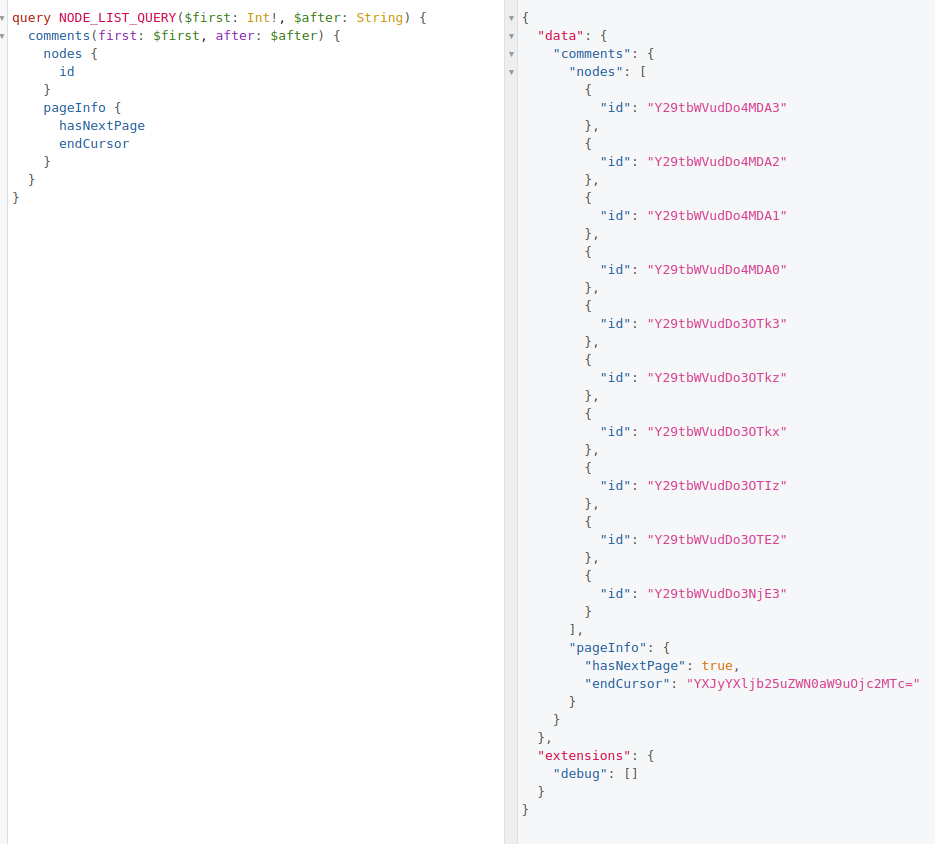
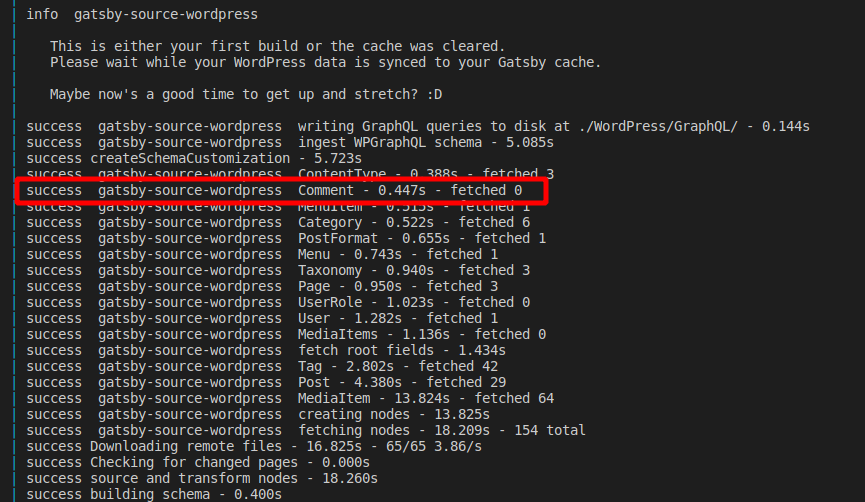
WPGraphql query for comments shows all the comments on the site, but the gatsby plugin import process shows zero comments
Example results from WPGraphql IDE:
Build log from gatsby develop
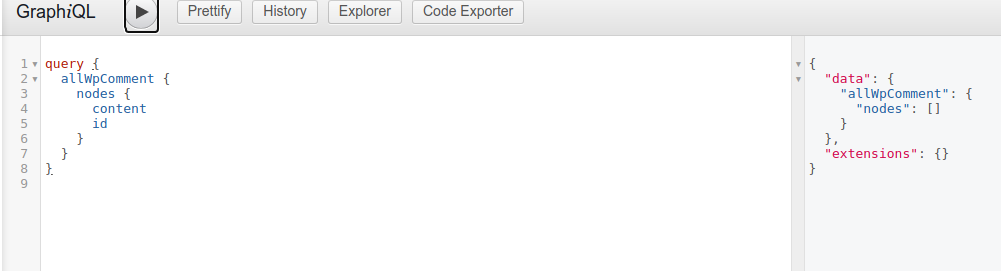
Queries to gatsby for comments then of course fail because Gatsby imported no comments.
Not sure how to troubleshoot this more, but happy to provide more info.
 nullvariable
All 19 comments
Hi @nullvariable , this is likely due to the comments not being public. Follow the steps here to determine if that's the issue https://github.com/gatsbyjs/gatsby-source-wordpress-experimental/blob/master/docs/debugging-and-troubleshooting.md#missing-data-in-gatsby
 TylerBarnes
on 9 Nov 2020
TylerBarnes
on 9 Nov 2020
hey @TylerBarnes the query generated on disk has all the results that I would expect in the GraphQL IDE on the WordPress side of things (and for fun I checked the REST api output as well, and it's working), and comments render fine within the WordPress 2020 theme.
I disabled all the plugins except WPGatsby and WPGraphql, and still seeing fetched 0 for comments
nullvariable
on 9 Nov 2020
@nullvariable did you get a chance to follow the steps in the link I posted? That will help us figure out wether this is a WPGraphQL bug or a source plugin bug. Also a reproduction of the issue would go a long way 👍
Thanks!
TylerBarnes
on 10 Nov 2020
yes, sorry that wasn't clear,
Here's the debug query from WordPress/Graphql/Comment/node-list-query.graphql
query NODE_LIST_QUERY($first: Int!, $after: String) {
  comments(first: $first, after: $after) {
    nodes {
      agent
      approved
      author {
        node {
          id
          __typename
        }
      }
      authorIp
      commentedOn {
        node {
          id
          __typename
        }
      }
      content
      databaseId
      date
      dateGmt
      id
      karma
      wpParent: parent {
        node {
          id
        }
      }
      replies(first: 100) {
        nodes {
          id
        }
      }
      type
      __typename
    }
    pageInfo {
      hasNextPage
      endCursor
    }
  }
}
And here's the result of that query:
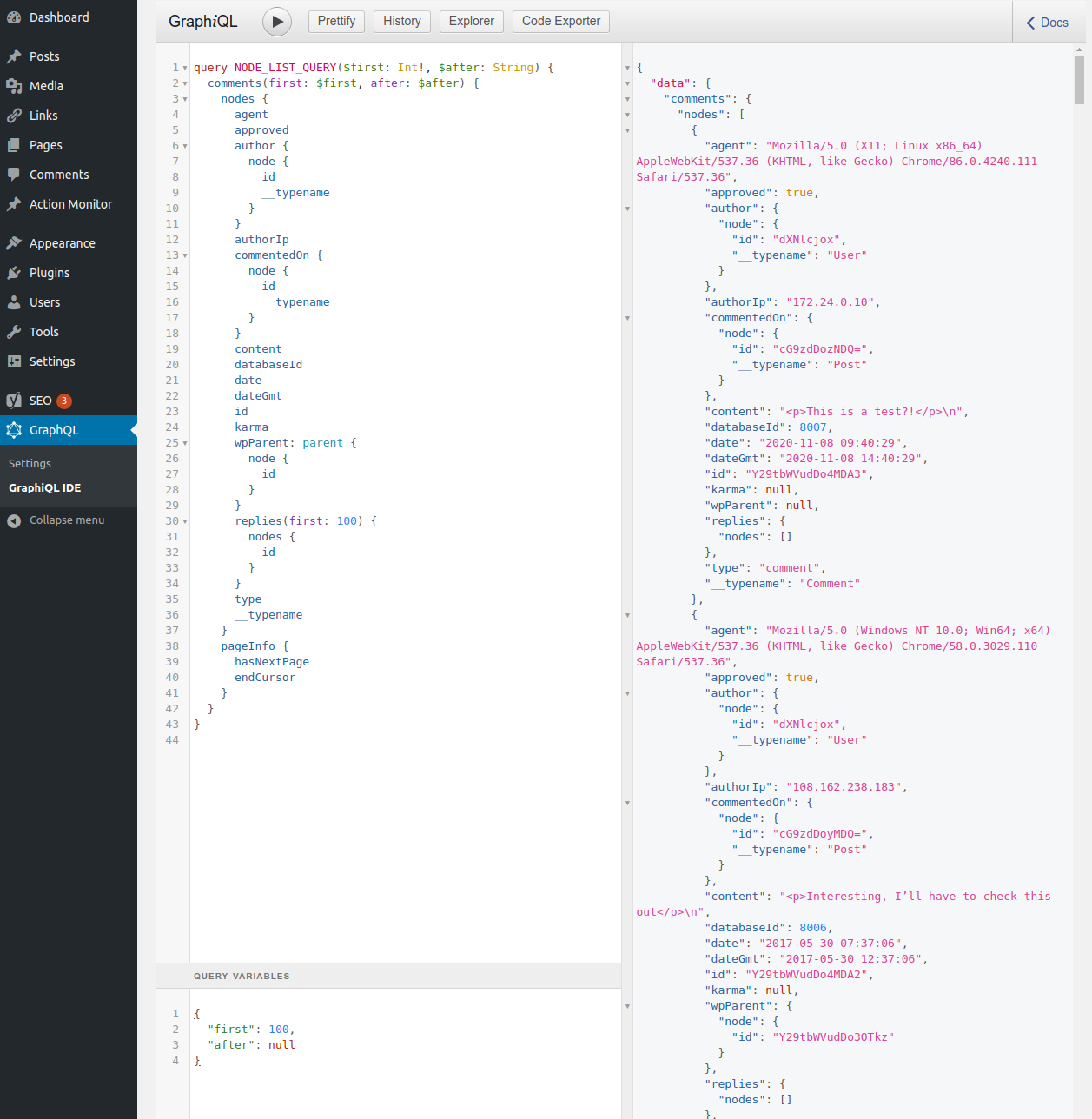
No data is missing at a glance, but allWpComment lists no nodes:
nullvariable
on 10 Nov 2020
Requests via wp-graphiql are as the currently authenticated user, so it's not an effective debugging tool for Gatsby. Can you make that query again using an external GraphQL client like GraphQL Playground or GraphiQL?
TylerBarnes
on 10 Nov 2020
Hi -- sorry for the long bits of code. Using Postman, this works for me:
curl --location --request POST '[wordpress url]/graphql' \
--header 'Content-Type: application/graphql' \
--data-raw 'query NODE_LIST_QUERY {
  posts(first: 10, after: "0") {
    nodes {
      author {
        node {
          id
        }
      }
      authorDatabaseId
      authorId
      categories(first: 100) {
        nodes {
          id
        }
      }
      commentCount
      commentStatus
      comments(first: 100) {
        nodes {
          id
        }
      }
      content
      contentType {
        node {
          id
        }
      }
      databaseId
      date
      dateGmt
      desiredSlug
      enclosure
      excerpt
      featuredImage {
        node {
          __typename
          id
        }
      }
      featuredImageDatabaseId
      featuredImageId
      guid
      id
      isRevision
      lastEditedBy {
        node {
          id
        }
      }
      link
      modified
      modifiedGmt
      pingStatus
      pinged
      postFormats(first: 100) {
        nodes {
          id
        }
      }
      slug
      status
      tags(first: 100) {
        nodes {
          id
        }
      }
      template {
        templateFile
        templateName
        __typename
      }
      terms(first: 100) {
        nodes {
          id
          __typename
        }
      }
      title
      toPing
      uri
      __typename
    }
    pageInfo {
      hasNextPage
      endCursor
    }
  }
}
'
and give me a correct response but this returns an internal server error:
curl --location --request POST '[wordpress url]/graphql' \
--header 'Content-Type: application/graphql' \
--data-raw 'query NODE_LIST_QUERY{
  comments(first: 10, after: "0") {
    nodes {
      agent
      approved
      author {
        node {
          id
          __typename
        }
      }
      authorIp
      commentedOn {
        node {
          id
          __typename
        }
      }
      content
      databaseId
      date
      dateGmt
      id
      karma
      wpParent: parent {
        node {
          id
        }
      }
      replies(first: 100) {
        nodes {
          id
        }
      }
      type
      __typename
    }
    pageInfo {
      hasNextPage
      endCursor
    }
  }
}
'
returns
{
    "errors": [
        {
            "message": "Internal server error",
            "extensions": {
                "category": "internal"
            },
            "locations": [
                {
                    "line": 20,
                    "column": 7
                }
            ],
            "path": [
                "comments",
                "nodes",
                0,
                "databaseId"
            ]
        },
        {
            "message": "Internal server error",
            "extensions": {
                "category": "internal"
            },
            "locations": [
                {
                    "line": 20,
                    "column": 7
                }
            ],
            "path": [
                "comments",
                "nodes",
                1,
                "databaseId"
            ]
        },
        {
            "message": "Internal server error",
            "extensions": {
                "category": "internal"
            },
            "locations": [
                {
                    "line": 20,
                    "column": 7
                }
            ],
            "path": [
                "comments",
                "nodes",
                2,
                "databaseId"
            ]
        },
        {
            "message": "Internal server error",
            "extensions": {
                "category": "internal"
            },
            "locations": [
                {
                    "line": 20,
                    "column": 7
                }
            ],
            "path": [
                "comments",
                "nodes",
                3,
                "databaseId"
            ]
        },
        {
            "message": "Internal server error",
            "extensions": {
                "category": "internal"
            },
            "locations": [
                {
                    "line": 20,
                    "column": 7
                }
            ],
            "path": [
                "comments",
                "nodes",
                4,
                "databaseId"
            ]
        },
        {
            "message": "Internal server error",
            "extensions": {
                "category": "internal"
            },
            "locations": [
                {
                    "line": 20,
                    "column": 7
                }
            ],
            "path": [
                "comments",
                "nodes",
                5,
                "databaseId"
            ]
        },
        {
            "message": "Internal server error",
            "extensions": {
                "category": "internal"
            },
            "locations": [
                {
                    "line": 20,
                    "column": 7
                }
            ],
            "path": [
                "comments",
                "nodes",
                6,
                "databaseId"
            ]
        },
        {
            "message": "Internal server error",
            "extensions": {
                "category": "internal"
            },
            "locations": [
                {
                    "line": 20,
                    "column": 7
                }
            ],
            "path": [
                "comments",
                "nodes",
                7,
                "databaseId"
            ]
        },
        {
            "message": "Internal server error",
            "extensions": {
                "category": "internal"
            },
            "locations": [
                {
                    "line": 20,
                    "column": 7
                }
            ],
            "path": [
                "comments",
                "nodes",
                8,
                "databaseId"
            ]
        },
        {
            "message": "Internal server error",
            "extensions": {
                "category": "internal"
            },
            "locations": [
                {
                    "line": 20,
                    "column": 7
                }
            ],
            "path": [
                "comments",
                "nodes",
                9,
                "databaseId"
            ]
        }
    ],
    "data": {
        "comments": {
            "nodes": [
                null,
                null,
                null,
                null,
                null,
                null,
                null,
                null,
                null,
                null
            ],
            "pageInfo": {
                "hasNextPage": true,
                "endCursor": "YXJyYXljb25uZWN0aW9uOjc="
            }
        }
    }
}
also the GraphiQL on http://localhost:8000/___graphiql also doesn't show the comments (using allWpComment but also the individual post comments don't work). I'm using this starter https://github.com/TylerBarnes/using-gatsby-source-wordpress-experimental ).
 tharsheblows
on 10 Nov 2020
tharsheblows
on 10 Nov 2020
ah, running that query with insomnia produced a trace
https://gist.github.com/nullvariable/54aa9300ad2d45ccff21fac11e4cf687
full output is above, but this is where the trace stops/fails:
{
          "file": "\/app\/web\/wp-content\/plugins\/wp-graphql\/vendor\/webonyx\/graphql-php\/src\/Executor\/ReferenceExecutor.php",
          "line": 662,
          "call": "GraphQL\\Executor\\ReferenceExecutor::completeValue(GraphQLType: Int, instance of ArrayObject(1), instance of GraphQL\\Type\\Definition\\ResolveInfo, array(4), null)"
        },
it's wasn't clear to me exactly what is failing there, so I added some error logging at that line, but all I got pretty consistently there were out of memory errors if I tried to dump any of the vars. Shrinking the query to just first: 1 still returned the error, but only one of them.
What other debugging steps should I take here?
nullvariable
on 10 Nov 2020
Ahh, makes sense why Gatsby doesn't have the comments then. @jasonbahl is on vacation right now (I believe until next week), but this appears to be a WPGraphQL issue which he'll be able to better help with.
TylerBarnes
on 10 Nov 2020
Oh actually! I believe comments(first: 10, after: "0") { should be comments(first: 10, after: null) {. I'm not sure if that would cause the error above, but it'd be good to run that query again to make sure.
TylerBarnes
on 10 Nov 2020
Yeah, there's an error in the response in WPGraphQL: 'Cannot return null for non-nullable field "Comment.databaseId"' in src/Request.php in Request->execute_http()
tharsheblows
on 10 Nov 2020
And trying with null, it's the same error :)
tharsheblows
on 10 Nov 2020
Ok, sounds like a WPGraphQL bug then. cc @smthomas
TylerBarnes
on 10 Nov 2020
However I have used gatsby-source-graphql to get comments and it does work with that, so it might be somewhere else, I'm not sure how the wp-gatsby plugin works. Not sure if that helps!
tharsheblows
on 10 Nov 2020
@tharsheblows it's likely because this plugin is sourcing all fields at once and some combination of fields is causing the WPGQL error.
This reminds me that there's code in the source plugin to flag some errors as "non critical" if errors are returned alongside data. The reason for that originally was that WPGraphQL used to return a lot of errors about trying to access posts when you weren't authenticated. That's since been resolved, so I'll look at removing that non-critical error logic. In that case this error would be thrown immediately. Although 🤔 I guess in this case no data was returned.. So maybe that logic just needs to be updated to filter out null values and not consider those as returned data.
TylerBarnes
on 10 Nov 2020
@tharsheblows I just ran the exact query from Postman on another WordPress site with WPGraphQL and it returned the comments as expected. It seems like there might be something wrong with the data in the WordPress database but without being able to view the site it is hard to tell exactly what the problem could be.
Since it seems to be working with authenticated requests it is possible it is something to do with how WPGraphQL determines if a comment is private. See - https://github.com/wp-graphql/wp-graphql/blob/develop/src/Model/Comment.php#L77
Perhaps you can debug that function to see if comments are being returned as private when they should be returned as public.
 smthomas
on 10 Nov 2020
smthomas
on 10 Nov 2020
@smthomas They're not. And yay, it's been fixed in the develop branch in WPGraphQL this commit : https://github.com/wp-graphql/wp-graphql/pull/1551 – when I switch to the develop branch locally it all works as it should! 😊
tharsheblows
on 10 Nov 2020
Awesome :D that's really great to hear. Thanks for the help @smthomas and @tharsheblows ! It looks like that fix has actually been released in v0.15.0 of WPGQL 🎉 https://github.com/wp-graphql/wp-graphql/releases
TylerBarnes
on 10 Nov 2020
awesome! Just updated to that version, and can confirm this fixes the issue :tada: @TylerBarnes would be happy to make some tweaks to that troubleshooting link to expand on how to work through, and to be clear about needing to test as an unauthenticated user to ensure the results are mirroring what Gatsby will have access to if that makes sense
nullvariable
on 10 Nov 2020
That would be fantastic!
TylerBarnes
on 10 Nov 2020
Related issues
 amantiwari1
·
4Comments
amantiwari1
·
4Comments
 woodwoerk
·
6Comments
woodwoerk
·
6Comments
 PierreMouchan
·
5Comments
PierreMouchan
·
5Comments
 mawnir
·
4Comments
mawnir
·
4Comments
 benknight
·
6Comments
benknight
·
6Comments
Most helpful comment
@smthomas They're not. And yay, it's been fixed in the develop branch in WPGraphQL this commit : https://github.com/wp-graphql/wp-graphql/pull/1551 – when I switch to the develop branch locally it all works as it should! 😊