Gatsby-source-wordpress-experimental: Add helper to check if types and fields exist so that plugins can conditionally run logic based on WPGQL extensions that might not be active sometimes
On the WordPress side, I'm using ACF and I have an options page created with some custom fields.
Everything works properly when these fields exist/have values in them. I can query them with no issues.
But I want to guard against non-existing/empty fields, so I'm trying to extend the GraphQL types.
I've tried many variations, but I can't seem to get this to work. I don't know if it's an issue with my definitions or if the source plugin doesn't allow it (?).
This is what I want to be able to query without worrying about the fields not existing:
wp {
  externalScripts {
    scripts {
      bodyScripts {
        script
      }
      footerScripts {
        script
      }
      headScripts {
        script
      }
    }
  }
}
This works properly when the values are saved.
However, when the values don't exist (e.g. removing the custom fields ), I get the error:
Cannot query field \"externalScripts\" on type \"Wp\".
I'm trying to use createSchemaCustomization and createTypes to add the fields by using the following:
type Wp implements Node @infer {
  externalScripts: WpExternalScripts
}
type WpExternalScripts {
  scripts: WpExternalScripts_Scripts
}
type WpExternalScripts_Scripts {
  bodyScripts: [WpExternalScripts_Scripts_bodyScripts]
  footerScripts: [WpExternalScripts_Scripts_footerScripts]
  headScripts: [WpExternalScripts_Scripts_headScripts]
}
type WpExternalScripts_Scripts_bodyScripts {
  script: String
}
type WpExternalScripts_Scripts_footerScripts {
  script: String
}
type WpExternalScripts_Scripts_headScripts {
  script: String
}
However, this doesn't work. I get the same error message. I tried other variations as well, but I'm a bit lost at this point.
Any idea?
Thank you.
 nunof07
All 15 comments
I kinda got it half-working with this absolute createResolvers monstrosity, _in addition_ to the createTypes above.
function defaultResolver(source, args, context, info) {
  return info.originalResolver
    ? info.originalResolver(source, args, context, info)
    : source;
}

export function createResolvers({ createResolvers }) {
  const resolvers = {
    Wp: {
      externalScripts: {
        type: `WpExternalScripts`,
        resolve(source, args, context, info) {
          return defaultResolver(source, args, context, info);
        },
      },
    },
    WpExternalScripts: {
      scripts: {
        type: `WpExternalScripts_Scripts`,
        resolve(source, args, context, info) {
          return defaultResolver(source, args, context, info);
        },
      },
    },
    WpExternalScripts_Scripts: {
      bodyScripts: {
        type: `[WpExternalScripts_Scripts_bodyScripts]`,
        resolve(source, args, context, info) {
          return defaultResolver(source, args, context, info);
        },
      },
      footerScripts: {
        type: `[WpExternalScripts_Scripts_footerScripts]`,
        resolve(source, args, context, info) {
          return defaultResolver(source, args, context, info);
        },
      },
      headScripts: {
        type: `[WpExternalScripts_Scripts_headScripts]`,
        resolve(source, args, context, info) {
          return defaultResolver(source, args, context, info);
        },
      },
    },
    WpExternalScripts_Scripts_bodyScripts: {
      script: {
        type: `String`,
        resolve(source, args, context, info) {
          return defaultResolver(source, args, context, info);
        },
      },
    },
    WpExternalScripts_Scripts_footerScripts: {
      script: {
        type: `String`,
        resolve(source, args, context, info) {
          return defaultResolver(source, args, context, info);
        },
      },
    },
    WpExternalScripts_Scripts_headScripts: {
      script: {
        type: `String`,
        resolve(source, args, context, info) {
          return defaultResolver(source, args, context, info);
        },
      },
    },
  };

  createResolvers(resolvers);
}
Although this only works for the first 2 levels (scripts is null but exists), so I must be typing something wrong.
But I feel this shouldn't be needed.
nunof07
on 6 Aug 2020
Hi @nunof07 , you shouldn't need to do any schema customization for this plugin as long as the fields exist in WPGraphQL. Do you mean that you want externalScripts to exist in Gatsby wether or not it exists in WPGraphQL?
 TylerBarnes
on 7 Aug 2020
TylerBarnes
on 7 Aug 2020
Hey @TylerBarnes , thanks for the reply.
Yes, ideally I'd like to protect against the custom fields not existing breaking the Gatsby site (might not be added/enabled yet in WP).
With the approach above, I can kind of do it, but seems very hackish. My assumption would be that createTypes should be enough for this type of task, but I'm not sure. It seems like the types declarations are not "merged" (my types get ignored).
Basically I need to add one field to type Wp. The types names that I created above match what I see in GraphiQL when the custom fields exist/have values.
When the custom fields exist in WP, but without any value (user hasn''t saved yet), will they show up in Gatsby at all (but with null, etc)?
nunof07
on 7 Aug 2020
Hi @nunof07 , this is an irregular use case but what you can do is snapshot your schema using this plugin
https://www.gatsbyjs.org/packages/gatsby-plugin-schema-snapshot/
I haven't tested it myself as the intention behind this plugin is to as accurately as possible mirror the WPGraphQL schema (so fields should dissappear when removed from WPGraphQL) but it may work for you.
I think manually writing out types will break things as this plugin uses a lot of custom resolvers for it to work properly.
Can you tell me more about your use-case? This might warrant some kind of helper or API to check if fields exist before making a query but it depends 🤔 there might be other ways to achieve something like that, but there might not be as well depending on the use-case.
TylerBarnes
on 8 Aug 2020
I have a couple of different uses cases that are related to this issue.
In the first use case, I'm building a set of companion WP/Gatsby plugins that I want to be able to install in different sites. On the WP side, the plugin just adds an options page with some custom fields using ACF. The Gatsby plugin queries the data and includes some components to use the data.
My goal here is not breaking the Gatsby site when the options in WP haven't been saved yet or the WP plugin is not installed. I was able to work around this with the createTypes and the createResolvers strategy previously mentioned, although it feels a bit convoluted, but maybe it's due to my lack of understanding.
In the second use case, I'm building a Gatsby plugin to use the data from Yoast SEO to render the meta tags and other information. The issue I'm having is reading one of the general settings from Yoast (not the data from a specific post, but rather one of the general settings) and I actually thought it was the same issue, because the field was not appearing in GraphQL and I hadn't set the value on the WP side, but now I'm not sure because even setting the value on WP doesn't make the field appear in Gatsby (although being able to have an optional field would at least not break the site).
Setting in Yoast SEO:
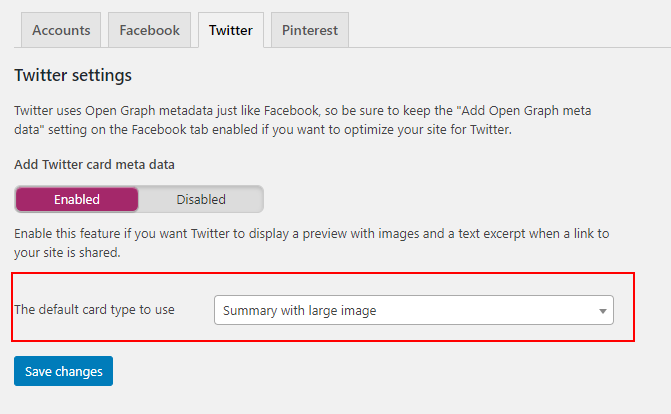
Which appears in WP GraphiQL:
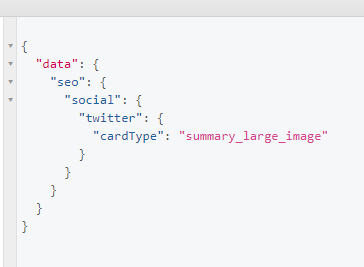
But doesn't appear in Gatsby GraphiQL at all:
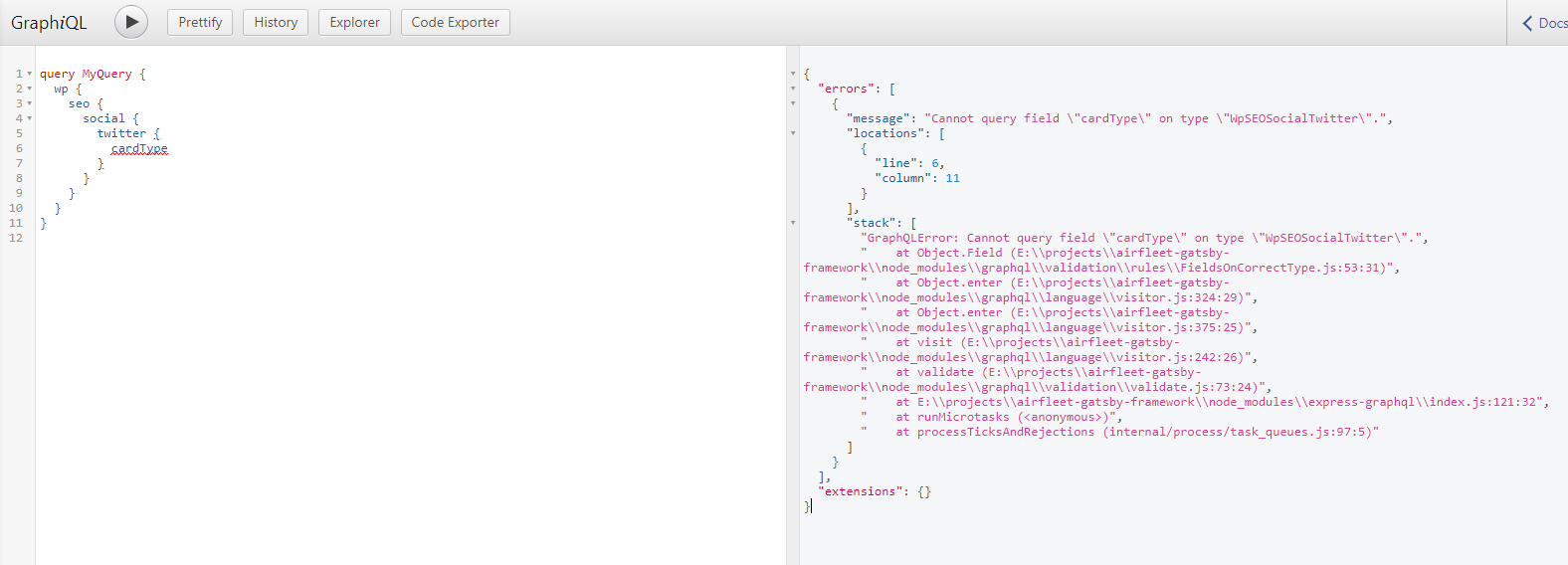
Although, for reference, there is also the username field under twitter, which is another general setting in Yoast, that does appear correctly.
So, I thought this was related, but that's not the case, the field is simply not appearing but having the ability to have optional fields would be very helpful.
In any case, I tried to define the GraphQL types to include the cardType field:
type Wp implements Node {
  seo: WpSEOConfig
}

type WpSEOConfig {
  social: WpSEOSocial
}

type WpSEOSocialTwitter {
  cardType: String
  username: String
}
I even tried to create a resolver, but with no luck yet.
I think I'm missing something. Is this somehow related to type inference or because of the custom resolvers used by gatsby-source-wordpress-experimental?
Thank you for the help. Appreciate it.
nunof07
on 10 Aug 2020
Regarding the second issue, I was able to create a resolver that at least returns an empty value, so it no longer breaks the site.
export function createResolvers(actions: CreateResolversArgs): void {
  const resolvers = {
    WpSEOSocialTwitter: {
      cardType: {
        type: `String`,

        resolve(source: any, args: any, context: any, info: any): any {
          return info.originalResolver
            ? info.originalResolver(source, args, context, info)
            : source?.cardType || "";
        },
      }
    },
  };

  actions.createResolvers(resolvers);
}
But in any case, the actual value should be appearing, because it appears in WP GraphiQL. I will see if I can query the data with a standalone GraphQL IDE outside WP.
nunof07
on 10 Aug 2020
OK, I can query the cardType field successfully outside WordPress using GraphQL Playground.
Using these options:
    {
      resolve: `gatsby-source-wordpress-experimental`,
      options: {
        debug: {
          graphql: {
            writeQueriesToDisk: true,
          },
        },
      },
    },
I can confirm that the field does not appear anywhere in the queries. So for this particular field, I'm not sure where the problem lies, because the field appears correctly in the GraphQL from WP. Is the issue in this source plugin or in WP plugins for GraphQL/Yoast?
nunof07
on 10 Aug 2020
I wonder if this relates to being an enum type?
  register_graphql_enum_type('SEOCardType', [
      'description' => __('Types of cards', 'wp-graphql-yoast-seo'),
      'values' => [
        'summary_large_image' => [
          'value' => 'summary_large_image'
        ],
        'summary' => [
          'value' => 'summary'
        ],
      ],
    ]);
This is currently the only enum type i register as part of the plugin.
 ashhitch
on 12 Aug 2020
ashhitch
on 12 Aug 2020
Makes sense, I don't have issues with the other fields from the SEO plugin. Although I don't know the inner workings of the source plugin, so @TylerBarnes can probably clarify this part.
nunof07
on 12 Aug 2020
That sounds like a bug indeed. @nunof07 can you open an issue separate from this one to track that? I want to try to avoid combining too many problems into 1 issue to keep things focused.
For the problem of only running code if Yoast is active, the best way forward is to use introspection to determine wether the relevant fields or types are registered and then only add your code if they are. I've been thinking on ways to add a helper for this but nothing concrete yet.
I'm also planning on adding filters throughout the plugin so plugins can register custom code to run int various places and that will help here, but again nothing concrete on that yet.
TylerBarnes
on 12 Aug 2020
@TylerBarnes opened a separate issue: https://github.com/gatsbyjs/gatsby-source-wordpress-experimental/issues/121
Thank you for considering helpers so we can have more control over fields and types. It would indeed be helpful. For now I can use the workarounds.
nunof07
on 13 Aug 2020
@nunof07 the way to accomplish this would be to use GraphQL introspection to check if the fields are registered or not and then conditionally run your code and queries based on that. The plan is to add a helper that allows you to check if a field or type is registered or not. Generally we want to make it easy for plugin and theme devs to build ontop of this source plugin, but currently there aren't a lot of great abstractions or api's designed with that in mind.
TylerBarnes
on 19 Sep 2020
That sounds good @TylerBarnes. Would that work with static queries? i.e. being able to execute static queries conditionally when a field or type is registered?
nunof07
on 23 Sep 2020
@nunof07 you wouldn't want or be able to use it directly in templates. Instead you would use this kind of utility to choose wether or not to include code within gatsby-node or gatsby-browser and handle it 1 level higher.
TylerBarnes
on 23 Sep 2020
Thank you for opening this issue. We recently moved this plugin over to the gatsbyjs monorepo and are trying to clean out this issue queue. We documented this feature to look at for a future roadmap item and are going to close this issue out. If you want to add additional visibility to this feature, you can request it at https://portal.gatsbyjs.com/
 smthomas
on 17 Mar 2021
smthomas
on 17 Mar 2021
Related issues
 HumidBrains
·
3Comments
HumidBrains
·
3Comments
 KabyleBOT
·
6Comments
KabyleBOT
·
6Comments
 peteluffman
·
6Comments
peteluffman
·
6Comments
 mawnir
·
4Comments
mawnir
·
4Comments
 zeevo
·
6Comments
zeevo
·
6Comments