Game-compatibility: DINO CRISIS 3 [Dino Crisis 3] [CC-003] [1.04]
https://en.wikipedia.org/wiki/Dino_Crisis_3
Description
Game renders perfectly, and gets to the last loading screen before gameplay, just incredibly fast. Too fast to even take screenshots
Dumps
Status
Previous behavior:
black screen (with FPS)
Current behavior:
Game renders perfectly, and gets to the last loading screen before gameplay.
Screenshots

Additional Information
Old Post:
_From @literalmente-game on May 1, 2017 3:12_
No error messages, game stuck at this screen:

FPS ranging between 59 to 64.
Build: https://github.com/Cxbx-Reloaded/Cxbx-Reloaded/commit/394aee6b9cf87cd09bb6fad20b27af79b9d8d7c1
Log: KrnlDebug.txt
_Copied from original issue: Cxbx-Reloaded/Cxbx-Reloaded#416_
 PatrickvL
All 24 comments
_From @BenNottelling on May 1, 2017 3:19_
Is the fps locked at 63 or does it fluctuate?
PatrickvL
on 15 Aug 2017
_From @literalmente-game on May 1, 2017 4:1_
I've edited the issue with the info, it's ranging from 59 to 64 (no sound, only black screen).
PatrickvL
on 15 Aug 2017
_From @BenNottelling on May 1, 2017 4:34_
@literalmente-game Okay, then that means the emulator hasn't frozen up :)
PatrickvL
on 15 Aug 2017
_From @CakeLancelot on August 4, 2017 14:44_
This title boots fine for me but with abnormally (?) high memory usage (about 3GB).

Crashes after selecting difficulty under the new game option. Window becomes unresponsive after closing error messages, have to end task via task manager.

PatrickvL
on 15 Aug 2017
_From @RadWolfie on August 4, 2017 18:3_
A question for the title owners... Have you guys let it idle for awhile? Back then, the audio wasn't playing properly. With the current build we have now, it's better. ;)
PatrickvL
on 15 Aug 2017
Dino Crisis 3 NTSC-US [43430003] [Region 3] [XDK-5558] [In-Game]
Cxbx-Reloaded Version 262810b8 (Oct 30 2017)
Description
The game is rendered perfectly and now reach "in-game" but for some reasons, the game ( menu, CGI, cutscene, gameplay, everything ) is too fast, even with v-sync on and the FPS locked to 60.
The game crash after Sonya and Patrick get separated by the AI "mother". (before the crash, the sound start to loop very fast and get louder, only one sound is played (multiple in the real game), so maybe a crash related to sound ?)
4K video and 4K screenshot
The game can render 3D in any resolution by simply selecting your resolution on the video setting of CXBX-R, so no resolution hack/patch needed.
https://www.youtube.com/watch?v=06IuZZsHi3w
https://imgur.com/a/rOzeQ
^ Imgur gallery

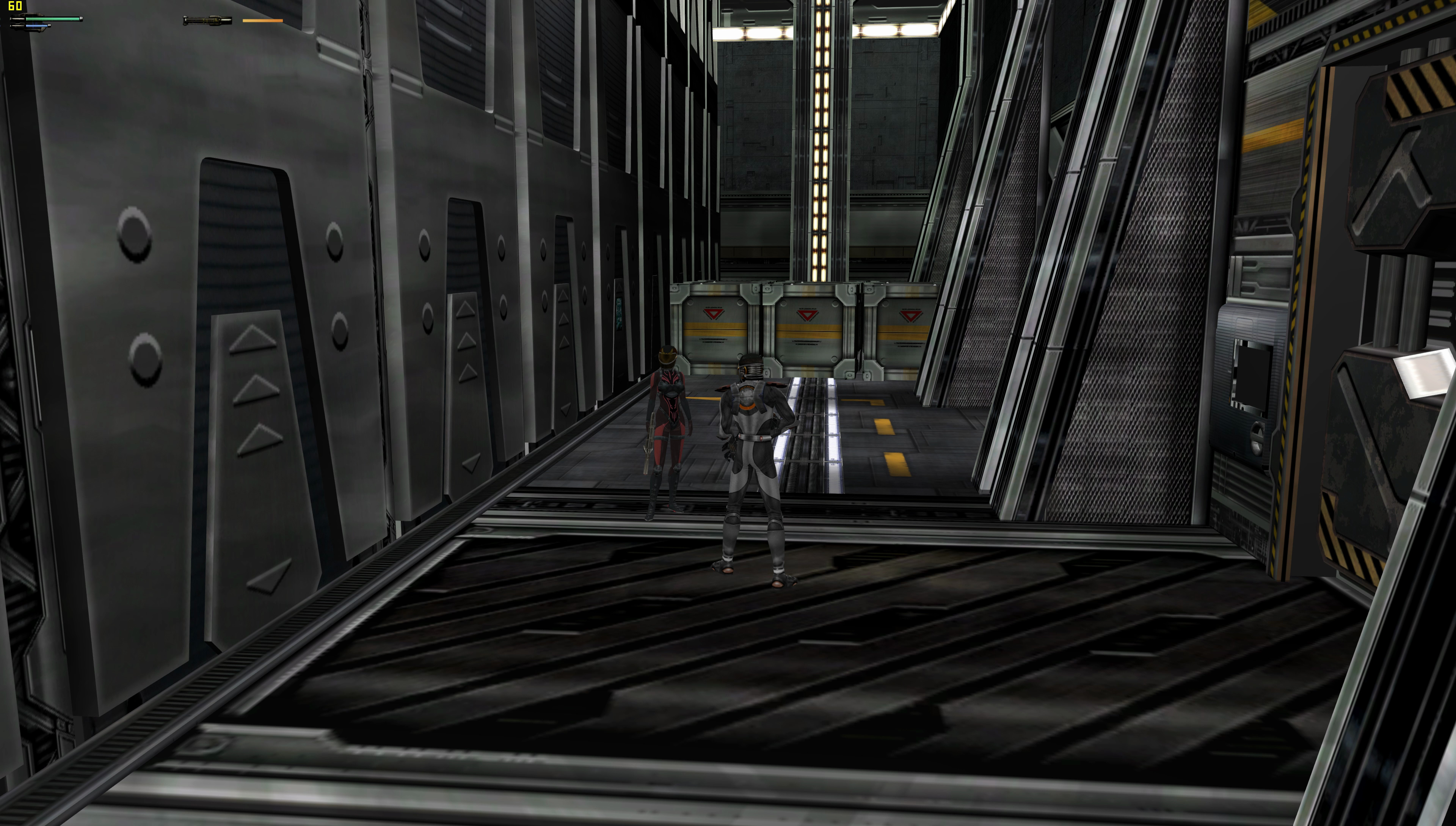


Dumps
Dumps : [un-modified]
Dumps : [HLECache modified : CreatePixelShader = 0]
[There is no PSDef List with that modification]
 zaykho
on 6 Nov 2017
zaykho
on 6 Nov 2017
Literalmente{Game} obviously noticed this and made a new video showcasing this game's emulation. Uses build 6f5016a.
His description is in Portuguese but it seems to indicate that he's made some HLE cache hack to get the game working in the emulator.
Another AAA coming in-game (and an exclusive, despite being Dino Crisis 3 = x). I did not capture benchmark data for this test because the results were very inconsistent. Another detail is that the game crashes where the video ends, making progress impossible.
Note: In some cases, you may need to edit a line in the emulator HLE cache for this game to render the scenario correctly. To make this issue:
- Run the game until it boota and render something on the screen
- Open the file "C: Users YOUR_USERNAME AppData Roaming Cxbx-Reloaded HLECache GAME.INI_NAME" with Notepad
- Look for the value "D3DDevice_CreatePixelShader =" and change what is there for "D3DDevice_CreatePixelShader = 0"
- Save the file and run the game again
Oh look, he's got a CXBX-R compat list (Jogável means playable).
 ObiKKa
on 11 Nov 2017
ObiKKa
on 11 Nov 2017
For the CreatePixelShader issue, there's a dedicated issue now, here : https://github.com/Cxbx-Reloaded/Cxbx-Reloaded/issues/794
PatrickvL
on 11 Nov 2017
His description is in Portuguese but it seems to indicate that he's made some HLE cache hack to get the game working in the emulator.
^ He just did I what I did actually, look back my post and the Dumps : [HLECache modified : CreatePixelShader = 0] section : )
zaykho
on 11 Nov 2017
This game is able to progress further past the first level whereas it used to hang previously as Literalmente's new video shows.
The glitches are: Garbled visual splashes show up sometimes (Same as with JSRF) especially during some small screen transitions (Pop-up menu & level transition windows?); tiny render-draw glitches; in the 2nd & 3rd mini levels, the cropped title screen of another game (From a previous test?) shows up in the top-left quarter of the screen; some flying creatures are invisible (2nd level). The timing is perhaps slightly sped up (Notice the way the PC's jetpak propels him up & down in air too quickly).
Emulação - Dino Crisis 3 in-game no CxBx-Reloaded (emulador de XBox) (Literalmente{Game}. Published on Mar 3, 2018. Build used: fb5436e; PR#957.).)
Cxbx-Reloaded Xbox Emulator - Dino Crisis 3 Ingame! (4ed8bce1) (John GodGames Emus. Published on Feb 28, 2018.
Weirdly in some spots the framerate freezes almost to a halt. The big dinosaur's body is pink - fixed in the next video below.)- Cxbx-Reloaded Xbox Emulator - Dino Crisis 3 Ingame! (fb5436e4) (John GodGames Emus. Published on Mar 1, 2018.
Much better, no freezes. Also as the internal FPS is locked to 30 FPS the PC's jetpak propels him up & down in normal time. So Literalmente's video must have been out of sync. You can see the 4th mini level in this video?)
Edit (07/03/2018): Even the popular emulation gamer girl 'reznoire' doesn't want to be left out of the loop! In her video the emulation has somewhat improved. Also the PC goes much further in-game than any video above.
The timing here is too fast - it's 60 FPS instead of the normal 30 FPS. Hardly any render draw glitches at all, the garbage visual splashes during mini-level transitions are now downsized to a small square in the top-left corner. Although the menu pop-up is now equally as small (See before 1:28) - probably caused by the ultra-high 4K resolution, making it smaller.
- Cxbx-Reloaded (3/4/18) 4k IR | Dino Crisis 3 Gameplay (reznoire. Published on Mar 5, 2018. Build: 052499c8.)
Yep, this video from JGG confirms the same tiny menu/transition screen problems as reznoire's above, running at 4K rez. Still has render-draw glitches. After 19:27 there's a vehicle or prop close-up that's in white only - untextured (Also seen from a different view after 21:35).
- Cxbx-Reloaded Xbox Emulator - Dino Crisis 3 4k Ingame 4k 2160p! (97b7a2e9 + WIP) (John GodGames Emus. Published on Mar 6, 2018. Master build + 2 WIP merges - yuv2 hack, sound buffer warning (instead of message).)
ObiKKa
on 4 Mar 2018
In the Mar 1, 2018 video how did they manage to set the correct speed of 30 fps?
And will the invisible dinosaurs (minute 3:15) ever be fixed?
Thanks.
 psennermann
on 18 Mar 2018
psennermann
on 18 Mar 2018
In version 436897d0 (2018-04-05) the "double speed" issue is aren't fixed yet, but there's a simple way to "work around" the problem for now.
- The game is running in incorrect 60 FPS when in the original hardware it's run at 30 FPS
- You can install Cheat Engine and select the process which is open when the game starts to running
- Mark "Enable Speedhack"
- Set the value to 0.5 and click "apply"
It's not the ideal, but it's a simple workaround until the problem can be solved properly
 Shideravan
on 5 Apr 2018
Shideravan
on 5 Apr 2018
Some regressions in d784ce1f (2018-04-07): a lot of new artifacts (tested using HLE mode, Windows 10, Nvidia GPU)


Also, when dashing a full screen artifacts now appears

Shideravan
on 7 Apr 2018
I made a test in video for this game. For some reason, the game froze to me in the door after the room with the first enemies in the version 0d1c7c2a
https://www.youtube.com/watch?v=ia1nC3iUQd4
Shideravan
on 8 Apr 2018
Hi there!
I've tried to run DC3 today with your emulator, but it keeps stucking to a black page after selecting the difficulty... I've also tried to set CreatePixelShader to 0, but with no results..
Any suggestions?
EDIT: I've downloaded the latest release
 slim71
on 14 May 2018
slim71
on 14 May 2018
51fb5483: regression comparising with older builds - black screen
Shideravan
on 19 May 2018
as of 23.11.2018 release, this game is still broken (freezes); march 2018 releases are still the ones to use...
psennermann
on 23 Nov 2018
Im using the latest version but still when i choosing difficulty the game only showing an black screen!waited for 30mins too but still black screen
Any fix coming for this problem?
 Sanaka94
on 13 Dec 2019
Sanaka94
on 13 Dec 2019
Build Dec 14 2019


Sanaka94
on 15 Dec 2019
Same issue here with the latest development build, only blackscreen...
https://github.com/Cxbx-Reloaded/game-compatibility/issues/921
 LuismaSP89
on 12 Feb 2020
LuismaSP89
on 12 Feb 2020
game starts nomally but
screen freezes when control jumping
 adokachin
on 24 Jun 2020
adokachin
on 24 Jun 2020
@adokachin Please provide a KrnlDebug.txt.
 Margen67
on 24 Jun 2020
Margen67
on 24 Jun 2020
@Margen67
Thanks to reply.
What is KmlDebug.text?
I don't know what to do.
#
@Margen67
this is what you sey?
KrnlDebug.txt
adokachin
on 25 Jun 2020
@Margen67
Thanks to reply.
What is KmlDebug.text?
I don't know what to do.@Margen67
this is what you sey?
KrnlDebug.txt
Yes. Thanks.
Margen67
on 26 Jun 2020
Related issues
PatrickvL
·
4Comments
 fatjohnny118
·
3Comments
fatjohnny118
·
3Comments
 NNX3x
·
3Comments
Shideravan
·
3Comments
NNX3x
·
3Comments
Shideravan
·
3Comments
 jeltaqq
·
3Comments
jeltaqq
·
3Comments
Most helpful comment
Dino Crisis 3 NTSC-US [43430003] [Region 3] [XDK-5558] [In-Game]
Cxbx-Reloaded Version 262810b8 (Oct 30 2017)
Description
The game is rendered perfectly and now reach "in-game" but for some reasons, the game ( menu, CGI, cutscene, gameplay, everything ) is too fast, even with v-sync on and the FPS locked to 60.
The game crash after Sonya and Patrick get separated by the AI "mother". (before the crash, the sound start to loop very fast and get louder, only one sound is played (multiple in the real game), so maybe a crash related to sound ?)
4K video and 4K screenshot
The game can render 3D in any resolution by simply selecting your resolution on the video setting of CXBX-R, so no resolution hack/patch needed.
https://www.youtube.com/watch?v=06IuZZsHi3w
https://imgur.com/a/rOzeQ
^ Imgur gallery
Dumps
Xbe.txt
Dumps : [un-modified]
CxbxDebug.txt
KrnlDebug.zip
DINO CRISIS 3-65933cb4.txt
PSDef_dc3_list.zip
Dumps : [HLECache modified : CreatePixelShader = 0]
CxbxDebug.txt
KrnlDebug.zip
DINO CRISIS 3-65933cb4.txt
[There is no PSDef List with that modification]