Game-compatibility: 4D5307E6 - Halo 3
Tested on https://github.com/xenia-project/xenia/commit/068b2056ca02a707b164693fefc9e0dd9637e6f2
Log:
https://gist.github.com/thesymbol/aa2e7305fde89c4a57be
Issues:
- Nothing happens black screen.
Screenshots:

 thesymbol
All 58 comments
Halo 3 depends on unimplemented IO Completion Ports. See MSDN.
Kernel methods would be NtCreateIoCompletion/NtRemoveIoCompletion
 DrChat
on 2 Nov 2015
DrChat
on 2 Nov 2015
Someone with nVidia should check this now. With git 16c9718 I am hearing sound for about 10-15 sec. and then it crash. Unfortunately, I have AMD HD7870. Maybe with nVidia someone could see intro.
 ivicamarkovic
on 2 Jan 2016
ivicamarkovic
on 2 Jan 2016
I just checked with 750 ti, same, only sound.
 Nikola112
on 2 Jan 2016
Nikola112
on 2 Jan 2016
Also checked with 980. Black screen with main menu audio. Can hear main menu reacting to dpad movement but cannot see results.
 uselesscunt
on 9 Feb 2016
uselesscunt
on 9 Feb 2016
After running the game in menu for a few minutes (crashes shortly after):
w> 0000000C libav: Too small input buffer
w> 0000000C libav:  is not implemented. Update your Libav version to the newest one from Git. If the problem still occurs, it means that your file has a feature which has not been implemented.
w> 0000000C libav: If you want to help, upload a sample of this file to ftp://upload.libav.org/incoming/ and contact the libav-devel mailing list.
!> 0000000C libav: Could not collect frame!
A> 0000000C libav failed to decode a frame!
A> 0000000C Processing context 85 (offset 30612, buffer 0, ptr 07304000)
!> 0000000C libav: Could not collect frame!
A> 0000000C libav failed to decode a frame!
 Nukem9
on 30 Jul 2016
Nukem9
on 30 Jul 2016
Still sound and black screen, no crash.
 spectrumm
on 17 Apr 2017
spectrumm
on 17 Apr 2017
I get a black screen with sound with little issue then i pulled out my controller and click some buttons and heard clicks and got into what i assume is the game then then some sounds would repeat over and over and after letting it set there my windows froze with the audio still playing i was forced to restart.
 MrSkully1
on 6 Dec 2017
MrSkully1
on 6 Dec 2017
Intel HD reporting in. No crash for me, but black screen and just audio as well.
 LandonPowell
on 29 Apr 2018
LandonPowell
on 29 Apr 2018
i7 6700, MSI GTX 1070 running latest drivers as of 30/04/2018, black screen with audio on latest version of Xenia.
Interfacing with the game works sounds and responds, lack of graphical display.
 Spohdur
on 30 Apr 2018
Spohdur
on 30 Apr 2018
Tested on (https://github.com/xenia-project/xenia/commit/b623c33e0038414824ccf7bd4828a3aeadcd1627)
Issues:
(Black screen during startup intro videos and during main menu, audio is correct however. Wait until you think you should be at the main menu and press "A" twice I think it was, and a new solo campaign will start. Audio is sped up and garbled, out of sync with video which is not hard because the video is slow, and badly corrupt. When you are supposed to have control of master chief, the video from the cutscene had froze, but audio continued. You are asked to look up and then eventually look down, after doing this the game hangs with no further progression.)
Log:
Screenshot(s):


Labels:
(audio-slow gpu-corrupt-drawing gpu-missing-drawing gpu-slow)
I gave my best educated guess for the labels.
tested on windows 10 april2018update, intel i5-7600k, 16gb ram, PowerColor PCS+ AMD Radeon R9-290, 3840x2160@60hz monitor
 CovertSlinky
on 28 May 2018
CovertSlinky
on 28 May 2018
Was able to get into custom games from the menu, menu function seems to work fine just not visible. Once in custom game, shaders and textures do not all load properly, it appears audio is out of sync.
Performance is around 0-1fps while playing in custom game but still game play nonetheless.

Game play video - https://youtu.be/vokAxZQOrdc
 Xufau
on 30 May 2018
Xufau
on 30 May 2018
Campaign now works and fps is much more playable. Fps spikes happen a lot though, audio is sped up during cut scenes, graphics still missing textures and shaders.
Video: https://youtu.be/qAdMc3kx9is
may 30th release
Xufau
on 31 May 2018
https://youtu.be/wpm_nWcQWuc
Another video showcasing Campaign working, graphic device lost seems to happen commonly around enemy encounters
 MarksterC
on 31 May 2018
MarksterC
on 31 May 2018
For me, Halo 3 has now entered regression, crashing when attempting to load into any campaign level. Levels load fine with previous builds of Xenia. Anyone else having same issue?
xenia-project/xenia@43b987d

 timernight
on 6 Jun 2018
timernight
on 6 Jun 2018
@timernight just about EVERYONE using a Nvidia GPU is having this issue, nobody knows why as it happens at random intervals
i got all the way to the part where Chief's vitals spike then got xenia to crash like everyone else
later i tried to do this again but got the infamous graphics device lost error way before that.
MarksterC
on 6 Jun 2018
@aharkboy1006 I was having random crashes like you mention with previous builds with Xenia. With the latest build of Xenia, 43b987da, it consistently crashes at the start the level.
Have you tested the latest build or is it just something going on with my computer?
timernight
on 6 Jun 2018
black screen :(
 PyramidH
on 6 Jun 2018
PyramidH
on 6 Jun 2018
@PyramidH spam the a button the menu still works
You could like READ THE COMMENTS AND FIGURE THAT OUT YOURSELF IN 20 SECONDS
MarksterC
on 6 Jun 2018

PyramidH
on 7 Jun 2018

Ingame campaign, some major fps drops and freezes, playable framerate most of the time
spectrumm
on 19 Aug 2018
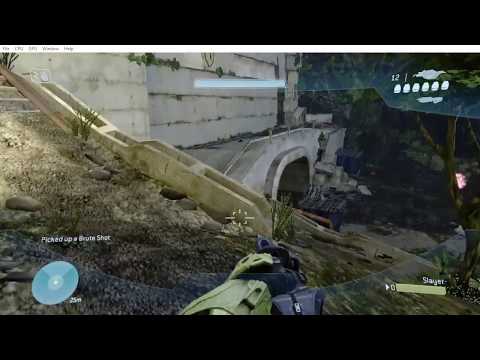
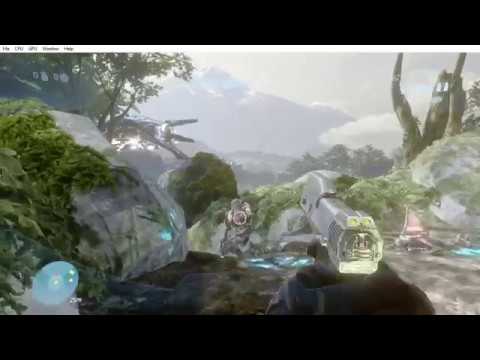
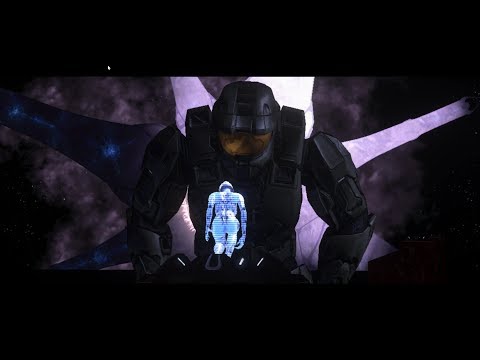
New dxd renders textures now
Still vortex issues
 Dniboy
on 29 Sep 2018
Dniboy
on 29 Sep 2018
 theTwist84
on 29 Sep 2018
theTwist84
on 29 Sep 2018
theTwist84
on 30 Sep 2018
theTwist84
on 26 Oct 2018
It loads the game, audio works, the buttons response quickly, except the display which is corrupt most of the time. I'm using the build 1.0.1537-master-pweayvfm from AppVeyor.
PC specs:
- Intel Core i5 4460 3,20 Ghz
- 8 GB RAM DDR3 1600 Mhz
- NVIDIA GT 610 2 GB VRAM
- Windows 10 1809 October Update 2018
I know that this graphics card doesn't satisfy the requirements, but the game has never crashed, so I think it could be fixed with some kind of patch.
The intro works well.
Once it loads the menu, the drawing corruptions start appearing. (This time it showed the difficulty menu, which is rare because most of the time is just a noisy pattern as shown in the background).
Then, the campaign is being loaded but the screen still corrupted all the time. In the right section of the window, you can see a dark part where the Halo ring is moving, but the rest of the window just got stuck there and gets brighter until the mission starts.
The cinematic works and I can skip it. I can interact with the game but nothing is being shown on the display except for the load screen. Then, it loads the next mission and it keeps doing the same thing as above.
Here's the log file:
xenia.zip


Is the same happening on the d3d12 branch because I am not getting these issues
 PotatoAndSickle
on 17 Nov 2018
PotatoAndSickle
on 17 Nov 2018
It seems like no matter what version of Xenia I use, I still only get a black screen with audio and launching campaign is met with rainbows. Seems to only do this with Halo 3. Reach (somewhat) works.
I'm Running an Nvidia GTX 1050ti, Intel i5 7th gen, 8 Gb of ram. I see no reason why it shouldn't be running. Maybe I'm just stupid? What am I missing?
 JustinTheWeak
on 29 Nov 2018
JustinTheWeak
on 29 Nov 2018
The game seems to be working at a decent rate with Xenia D3D12, But has the black screen with audio with the Vulkan version of Xenia. I said decent because there are some noticeable loading times/freezing between each menu and graphical issues. The Graphical issues that its having are some shading and probably choppy models and geometry (unless the game is already like that).
So what I am saying in a nutshell, is that Halo 3 is working at a very decent rate with a good frame rate of around 50 FPS.
PC Specs:
CPU: Intel Core i7-8700K CPU @ 3.7GHz
RAM: Corsair Vengeance RGB 32gb 3200mhz ddr4
GPU: NVIDIA GeForce GTX 1080
OS: Windows 10 version 1803
 CARLO5ONIC
on 30 Nov 2018
CARLO5ONIC
on 30 Nov 2018
The game seems to be working at a decent rate with Xenia D3D12, But has the black screen with audio with the Vulkan version of Xenia. I said decent because there are some noticeable loading times/freezing between each menu and graphical issues. The Graphical issues that its having are some shading and probably choppy models and geometry (unless the game is already like that).
So what I am saying in a nutshell, is that Halo 3 is working at a very decent rate with a good frame rate of around 50 FPS.PC Specs:
CPU: Intel Core i7-8700K CPU @ 3.7GHz
RAM: Corsair Vengeance RGB 32gb 3200mhz ddr4
GPU: NVIDIA GeForce GTX 1080
OS: Windows 10 version 1803
the game can not go higher then 30 its capped
PotatoAndSickle
on 30 Nov 2018
okay so I've been using the D3D12 Version of xenia and I've been testing Halo 3 just to see how far I can get. I've played up to The Storm. I've experienced a few crashes. Had 2 on Arrival, 2 on Crows Nest, and one on Tsavo Highway. It's really only thanks to rally points that I could get this far. I Should also mention that I got a crash on the cutscene between Tsavo Highway and The Storm. Sadly the Storm is where my journey came to an end. Seems Like every time I get to the scarab battle, my game crashes. It's always at the exact point that the scarab gets loaded in on the checkpoint. I might try looking at the ground to see if it can make it through that way. That's how I got through some other trouble areas.
JustinTheWeak
on 4 Dec 2018
Update: So other problems I've noticed is that I cannot see the muzzle flash, projectile, and trajectory of the projectiles. the game at random points has a frame spike. And only experienced one crash (i played for a short while for testing). I've probably missed other bugs in the game (excluding this post and the previous one) so I will list them as I continue.
CARLO5ONIC
on 6 Dec 2018
Progress isn't being saved
 BiatuAutMiahn
on 11 Dec 2018
BiatuAutMiahn
on 11 Dec 2018

Whenever a bubble shield is within your FOV, the display gets very distorted. Also no explosion effects whatsoever.
 benjymansy123
on 15 Dec 2018
benjymansy123
on 15 Dec 2018
An update for anybody wondering how far in the game you can get. As of the January 19th build the game will still crash when loading the Scarabs in The Storm.

 ghost
on 20 Jan 2019
ghost
on 20 Jan 2019
We have Scarabs rendering!! I'll let you know how much further in game you can get.

ghost
on 25 Jan 2019
January 24th 2019 Build (DirectX12)
Specs:
Zotac 1080 ti
i7 8086k
16GB DDR4 RAM


ghost
on 25 Jan 2019
I have a few more screenshots showing the beauty of Xenia


ghost
on 25 Jan 2019
Here's a few more cinematic screenshots


ghost
on 25 Jan 2019
So far I've made it to the eighth mission (The Covenant) with no major game stopping issues. I've come across a few more minor graphical issues too, like sand blown around by the wind or vehicles are just squares.
Most cutscenes do stutter but are watchable


ghost
on 26 Jan 2019
Okay I found the next major crash point of the game, in the mission The Covenant. After deactivating one of the three spear towers holding up the barrier, you make your way down an elevator. Where you reach the main floor, something in that room causes Xenia to exit abruptly. I can manipulate when Xenia crashes by adjusting the Time Scalar.
log:
log.txt

ghost
on 26 Jan 2019
Okay I found the next major crash point of the game, in the mission The Covenant. After deactivating one of the three spear towers holding up the barrier, you make your way down an elevator. Where you reach the main floor, something in that room causes Xenia to exit abruptly. I can manipulate when Xenia crashes by adjusting the Time Scalar.
log:
log.txt
If these posts are from the same build, combine them into one to avoid spam. @jtcaseley
PotatoAndSickle
on 28 Jan 2019
Using Latest Build
As I was playing the campaign the game tends to crash at some point
Crash dump attached
CrashLog.txt
 ReservedRegister
on 8 Mar 2019
ReservedRegister
on 8 Mar 2019
Using Latest Build
As I was playing the campaign the game tends to crash at some point
Crash dump attached
CrashLog.txt
Could you be a little more specific of when and where it happens? What's going on in game will also help @ReservedRegister
ghost
on 8 Mar 2019
An update to how playable this game is:
March 7th 2019 Update (DirectX12)
Specs:
Zotac 1080 ti
i7 8086k
16GB DDR4 RAM
A render bug where your FOV is distorted when in vicinity of bubble shields or driving Covenant vehicles


Game still crashes upon descent of the spear tower in the mission The Covenant.
ghost
on 8 Mar 2019
What appears to be happening is when I start the campaign and play for a bit I get at a specific part of the mission and then it crashes. I then start Xenia up again and continue from where Xenia crashed and this time it does not crash and so I continued playing. At a specific point into the mission again it crashes, but when I start Xenia up again and continue from where it last crashed It does not crash.
Therefore, you can assume that its going to do that until the end of the campaign.
When I checked the crash dump I saw a list of registers so the cause must be registers values getting trashed or simply Xenia does not know how to handle it, so sometimes you get a runtime error, sometimes it just quits to desktop.
Not sure why, hopefully the issue can be identified.
Here are some YouTube links:
The first time Xenia crashed:
https://www.youtube.com/watch?v=087KKhEDOGU
The second time Xenia crashed from last crash:
https://www.youtube.com/watch?v=k8u-l9YkErE
UPDATE:
OK just confirmed that it does not matter at which point it crashes it crashes at any point depending on the start point.
So, if I started at sierra 117 - rally point alpha, before where it usually crashes which is sierra 117 - rally point bravo. Its going to crash just a bit after crows nest - mission start, but it usually crashes when you get to the warthog explosion.
So this means that the cause is not Xenia's ability to emulate instructions properly from original hardware, but from Xenia handling instructions as the campaign progresses or handling instructions as the whole process progresses.
Hardware:
NVIDIA GeForce GTX 1060 6GB - Palit
Intel Core i7 4790K
8GB DDR3 RAM
Magnetic Storage
This might be useful to developers:
CrashLog.txt
ReservedRegister
on 8 Mar 2019
The furthest I managed to get before Xenia's crashing makes it impossible to save progress was just before the first scarab fight.
Assuming the reason why it crashes before the scarab fight is because its trying to obtain an enormous amount of physical resources and once it is unable to it crashes.
Also I was monitoring Xenia's memory usage it appears to be increasing as the campaign progresses so the cause might be memory leaks. I did not see decrease just increase.
ReservedRegister
on 10 Mar 2019
e5-1620v4
32g
rx-vega64
Enter the game and choose the difficulty and then closed.
is radeon not support?
 willy8752
on 17 Apr 2019
willy8752
on 17 Apr 2019
@willy8752
e5-1620v4
32g
rx-vega64
Enter the game and choose the difficulty and then closed.
is radeon not support?
Could you post a sample of the log file?
ghost
on 17 Apr 2019
@willy8752
e5-1620v4
32g
rx-vega64
Enter the game and choose the difficulty and then closed.
is radeon not support?Could you post a sample of the log file?
willy8752
on 17 Apr 2019
@willy8752
I could tell you from the log file the problem is that a virtual drive and two caches are not properly mounting:
ResolvePath(\Device\Harddisk0\) failed - no root found
ResolvePath(cache0:\) failed - no root found
ResolvePath(cache1:\) failed - no root found
But why is beyond me. Someone else would figure that out
ghost
on 17 Apr 2019
Been working on this issue lately. first I enabled the cache0 and cache1, also I created an entry for /Device/Harddisk0 the same way that scratch, cache0, and cache1 are done. (FWIW I don't expect this to work) Now, Halo tries to check if an autosave folder exists in cache1, this fails and creates a file for some reason, when I deleted the file and created a folder, a new file with the .temp ext was created inside that autosave folder (as I hit a checkpoint I guess) I analyzed it with HxD to find BLF mentioned in the header and strings about what map I've progressed through. I do not know what this file really is for. Either way Xenia is creating a file instead of a directory in cache1
I'm also noticing that each time I start the game, start a mission, then save & exit a new profile is created in the content\4D5307E6\00000001 directory. So this leads me to believe that a new profile is being generated each start, and therefore maybe why the last profile isn't shown when starting the game again.
BiatuAutMiahn
on 16 Jun 2019
xenia-project/xenia#1382
BiatuAutMiahn
on 16 Jun 2019
Hi! I'm having a trouble with the game, the game crash and generate a folder called "scratch"...
I'll give you the file you're finding in the subfolder "gpu", I think you can examine it and find a solution.
Specs
2700x
GTX 970
8x2 GB Ram 2400Mhz
Windows 10 Last Version (1903)
 slogive
on 17 Jun 2019
slogive
on 17 Jun 2019
Currently testing Halo 3 and constantly having crashing after a certain amount of play. I find levels which have more going on cause the crash to happen more times than none.
I do have a 1.53GB crash report which I can quite happy to share. Not to sure how I can send this massive file though?
I don't have a folder called "scratch" though.
Specs: i7-6700k, 64GB RAM, GTX 980M, Win 10 - 1903
 Vivimagic
on 12 Jul 2019
Vivimagic
on 12 Jul 2019
@CloudFR No. Stop spamming.
 Margen67
on 14 Aug 2019
Margen67
on 14 Aug 2019
Requires GPU>CPU resolve readback for eye adaptation to brightness (but even without it, the screen is not overly bright/dark).
 Triang3l
on 4 Aug 2020
Triang3l
on 4 Aug 2020
Tested on https://github.com/xenia-project/xenia/commit/06AB8589
Issues:
You can finally complete the 1st mission of Halo 3 without crashing. Originally it would crash once you met Johnson on older Xenia builds, but after the changes Rick implemented involving KeSetCurrentStackPointers, now it no longer crashes.
The 2nd mission is also fully completable. Given you have all the shaders cached 1st of course.
Screenshots:


Log:
To be honest any log that I'd show here with me completing the entire mission would be way to huge in size.
So here's one of me loading in-game on the mission Tsavo Highway, but exiting it after 3 seconds in-game.
Actual size is 516MB's
xenia.zip
Specs:
Ryzen 3600
2x8GB 3600MHz
GTX 1070
 Nighterlev
on 7 Dec 2020
Nighterlev
on 7 Dec 2020
That is amazing
slogive
on 8 Dec 2020
The Halo 3 08172 'delta' build that was recently released works fine after a few small changes.
(title ID is the same so I posted it here, maybe should have its own issue though since this build is from months before the retail one, even earlier than the Halo 3 beta...)


For it to start loading some XBDM exports needed their return values changed:
- DmRegisterCommandProcessorEx: right now it's defined via MAKE_DUMMY_STUB_STATUS which makes it return an error code, unfortunately H3 debug requires this to return success for it to continue loading.
- DmWalkLoadedModules: returns X_STATUS_INVALID_PARAMETER atm, but H3 has a
while(DmWalkLoadedModules() != 0x82DA0104)loop which will keep looping forever since we don't return the code it's looking for, changing it to return that code lets it break out of that and continue loading.
(I've made a branch with the XBDM changes needed here: https://github.com/emoose/xenia/commit/78b459a8db83100ca7edd26dc441a154868e2aaf, unsure about PRing though since there might be reasons these had the values they did...)
Besides those there's also missing NtReadFileScatter & XeCryptBnQwNeRsaPubCrypt exports that the game needs to start loading, (EDIT: these have now been added to xenia-master!)
In addition cache:\ needs to be mounted for the game to load, currently xenia only mounts cache0/cache1 though, so another small change is needed: https://github.com/xenia-project/xenia/pull/1664
With all the linked branches merged together, and mount_cache = true inside xenia.config.toml, hopefully the halo3_cache_debug/release.xex should run fine for you!
 emoose
on 28 Dec 2020
emoose
on 28 Dec 2020
Related issues
 rockleevk
·
5Comments
rockleevk
·
5Comments
 SakataGintokiYT
·
7Comments
SakataGintokiYT
·
7Comments
 kattjevfel
·
5Comments
kattjevfel
·
5Comments
 benvanik
·
6Comments
benvanik
·
6Comments
 ok122234
·
6Comments
ok122234
·
6Comments
Most helpful comment