Galaxy: fontawesome icons are sometimes missing from places
Happens unpredictably on homepage load (every ~5th). Some icons elsewhere (upload modal, scratchbook) are showing so the font itself must be present?
Chrome Version 48.0.2564.103 (64-bit)
screenshot is from Main but I have seen this also on Test and locally

edit: other places seems to be affected too

 martenson
All 27 comments
@martenson I refreshed a bunch of times and haven't been able to make it happen yet. Can you pop open developer tools and see if it's the fontawesome resource failing to load, or if it is something else?
 dannon
on 11 Feb 2016
dannon
on 11 Feb 2016
@dannon nope, no javascript error, no failed load; I would have reported it otherwise
martenson
on 11 Feb 2016
This seems to happen when font awesome is loaded twice:
- In chrome, open the dev tools and go to network
- Filter shown requests to just 'Font'
- Occasionally, it will load the woff twice - those seem to be the same times that the icons disappear
EDIT: Nope - too small of a sample size
 carlfeberhard
on 16 Feb 2016
carlfeberhard
on 16 Feb 2016
@martenson Were you using chrome and was the console open when you saw these? Have you seen it happen when the console is closed?
carlfeberhard
on 16 Feb 2016
@carlfeberhard yeah Chrome, the version is in the first post; I have seen it both with and without console open
martenson
on 16 Feb 2016
Have you (or anyone for that matter) seen this happen on dev or just 16.01?
carlfeberhard
on 17 Feb 2016
I have seen this on both dev and Main recently.
martenson
on 17 Feb 2016
When it will happen:
- I can reproduce it on chrome reliably (100%) of the time by opening dev tools and using refresh
- This will reproduce (much less frequently) with dev tools closed (and using 'refresh')
- Only in the history panel and tool form (more strangely it doesn't seem to effect the 'clear search' button)
- Seems to happen only on the webpack'd main page (dev and 16.01)
- Calling Galaxy.currHistoryPanel.render() doesn't help
When it won't:
- I've been unable to reproduce this on firefox or the other webkit-esques opera, or safari
- It will not reproduce when using 'open location' (super+L to highlight the address, Enter)
- It does not effect other icons (in the page layout or masthead)
- Seems to not happen with 15.10 (at least)
Other stuff:
- Seems to be a race-condition
- All fonts will re-paint properly and show up if any of the css attributes are changed (e.g. removing the unicode content from :before in the icon span on icon A will show _all the other icons_)
I have not seen any bug, question, or report on the net that describes what's happening here (yet).
carlfeberhard
on 18 Feb 2016
Ok - I can't reproduce _this bug_ in Canary (it's a different, worse, rendering bug). I'm still thinking this is a rendering problem with Chrome, tho.
Has anyone seen this happen on something other than a Mac?
carlfeberhard
on 23 Feb 2016
I did not see it for a long time, #1784 probably fixed it well. Thanks @carlfeberhard
martenson
on 18 Apr 2016
I am seeing this again on Main. Full cache clean and hard reset with devtools don't help.

martenson
on 16 May 2016
on 9a86a03661ac000db5903aaf4268a2d5ebb7a04f I see the icons missing from toolform

martenson
on 7 Jun 2016
In response to the Mac question - I exclusively use Chrome under Linux and I have never seen this problem.
 jmchilton
on 9 Jun 2016
jmchilton
on 9 Jun 2016
I use Chrome on Linux and am experiencing this problem on Main right now. It _seems_ to correlate somewhat with poor response times by the server.
 natefoo
on 9 Jun 2016
natefoo
on 9 Jun 2016
happens fairly often on Main now

martenson
on 15 Jun 2016
Heya @martenson - what version of Chrome are you using? before 51.0.2704.84?
I've updated and it's not happening even with the dev tools open.
carlfeberhard
on 15 Jun 2016
Version 51.0.2704.84 (64-bit) OSX 10.11.5
martenson
on 15 Jun 2016
Here's an update: I've tried about a dozen ways to workaround this (Chrome) bug and done quite a bit of research trying to find someone having this issue with both font-awesome and Chrome. Here's some review of when this seems to happen:
- Only on chrome/chromium
- Only with font awesome (but it's the only font-face definition it has)
- Only when base.css (which contains the font-face definition for font-awesome and causes another url() load attempt) is loaded twice, e.g. once in the outer Analysis view and once in (for example) welcome.html (Note that the second load attempt is often a cache hit.)
- Only on a subset of font awesome icons that have their font-size altered in base.css, e.g. .state-icons for datasets, input selectors buttons for the tool form. Removing the size change rules will render the icons properly every time.
Here are some relevant(?) chromium bug reports:
https://bugs.chromium.org/p/chromium/issues/detail?id=602968
https://bugs.chromium.org/p/chromium/issues/detail?id=582198
Especially see the thread at and after this comment (It seems to be related to calling font-face twice):
https://bugs.chromium.org/p/chromium/issues/detail?id=582198#c11
But I also think it has something to do with font awesome's warning about directly altering the size of the icon elements. See: https://github.com/FortAwesome/Font-Awesome/issues 5128 "global .fa command is breaking custom icon sizes"
Or possibly because it sets any default size:
https://bugs.chromium.org/p/chromium/issues/detail?id=582198#c12
The only way I've found to fix this is a fairly heavy handed approach:
- reduce the font-face definition to only woff and woff2 (as per here: https://css-tricks.com/snippets/css/using-font-face/#article-header-id-1)
- base64 encode the woff file (that Chrome is using) and put it directly in the font-face as a data uri
After that, the fonts (_so far_) have appeared in Chrome and every other browser consistently and without changing sizes. The very real con of this is the base64 adds quite a bit of data to base.css and we load that file (an already too large and bloated stylesheet) into the page at the head, blocking further page rendering until it's loaded.
carlfeberhard
on 21 Jun 2016
Just FYI - I've seen this too since 16.01. Chrome Version 51.0.2704.84. I had thought was related to server load and size of the history. Most were imported histories (if am recalling when it came up properly) but all of that seems not directly related. Am upgrading Chrome so I can follow and report new observed behavior, should I run into it again under specific circumstances not completely correlated with the known triggers above. I'll also follow here, for fixes, test impacted tools noted or linked, and watch for it "passively" as I use Main daily for support activities.
@carlfeberhard will give feedback for the issue you linked last week, in that ticket. Bit of a quick test again first, since all observed behavior that is "off" didn't seem directly related (form select issues), but trust if you think there are some root causes in common. Thanks!
 jennaj
on 22 Jun 2016
jennaj
on 22 Jun 2016
I haven't been seeing this much lately. Possibly due to the new-and-improved Main performance?
Anyone else who was experiencing this see similar improvements?
natefoo
on 17 Nov 2016
I have seen this multiple times lately, including during last week's admin
training (even on other people's machines).
On Thu, Nov 17, 2016 at 2:27 PM Nate Coraor [email protected]
wrote:
I haven't been seeing this much lately. Possibly due to the
new-and-improved Main performance?Anyone else who was experiencing this see similar improvements?
—
You are receiving this because you were mentioned.
Reply to this email directly, view it on GitHub
https://github.com/galaxyproject/galaxy/issues/1716#issuecomment-261343877,
or mute the thread
https://github.com/notifications/unsubscribe-auth/ABuxqms-yXDA8xf9WBcUtA0pWPpoh4B1ks5q_KqogaJpZM4HYWjA
.
martenson
on 17 Nov 2016
Bummer.
natefoo
on 17 Nov 2016
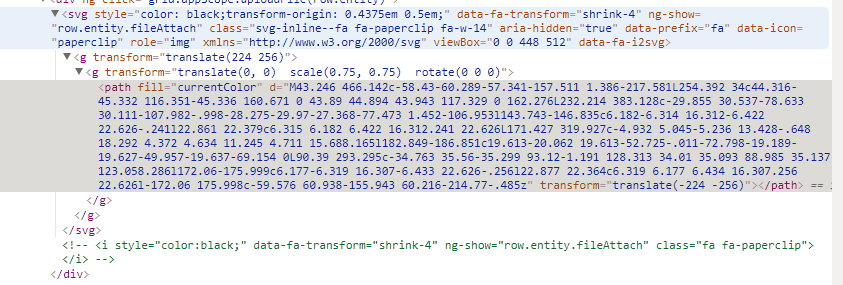
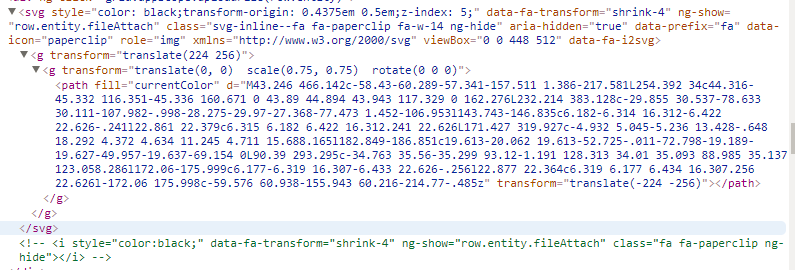
I am experiencing something similar on chrome...I am using layers and in some cases the 2nd icon shows up when it supposed to and in some cases it doesn't. When I inspect it, I see that the 2nd icon is there in the layer, the ng-if statement that would hide it is commented out, but it doesn't actually show up.
The html looks identical to the cases where it does show up, so I am unsure why this is happening.
Here is the html for the one that shows the paperclip in the layer:
And here is the html for the one that doesn't...its exactly the same:
 WorkMAE
on 8 Jun 2018
WorkMAE
on 8 Jun 2018
We haven't had any reports of this recently so I think it might be fixed
 hexylena
on 15 Aug 2019
hexylena
on 15 Aug 2019
Well, we're in December 2019 and I still have this behavior in Chrome 79.0.3945.79
 ExauceFiction
on 19 Dec 2019
ExauceFiction
on 19 Dec 2019
@ExauceFiction what version of Galaxy?
martenson
on 19 Dec 2019
It's WIP that I don't want in 20.01, but #9101 should finish this off for good, swapping from the font to svg.
dannon
on 19 Dec 2019
Related issues
 mtekman
·
4Comments
mtekman
·
4Comments
 afgane
·
4Comments
afgane
·
4Comments
 selten
·
4Comments
jennaj
·
4Comments
mtekman
·
3Comments
selten
·
4Comments
jennaj
·
4Comments
mtekman
·
3Comments
Most helpful comment
This seems to happen when font awesome is loaded twice:EDIT: Nope - too small of a sample size