Galacticraft: forge 1.12.2 carshing with galacticraft planets
hi there, i added galacticraft planets to galacticraftcore and micdoodle and the game crashed(wich obviousely will lead to the crash of the add-on extraplanets), however, when i run it without galacticraft planets the game works just fine, so i tried adding some other mods and the game crashed again, giving me this crash report:
---- Minecraft Crash Report ----
WARNING: coremods are present:
MicdoodlePlugin (MicdoodleCore-1.12.2-4.0.1.142.jar)
Contact their authors BEFORE contacting forge
// Don't do that.
Time: 2/26/18 4:54 PM
Description: Initializing game
net.minecraft.client.renderer.StitcherException: Unable to fit: extraplanets:model/blank_rocket_dark_red - size: 1024x1024 - Maybe try a lowerresolution resourcepack?
at net.minecraft.client.renderer.texture.Stitcher.func_94305_f(Stitcher.java:70)
at net.minecraft.client.renderer.texture.TextureMap.finishLoading(TextureMap.java:213)
at net.minecraft.client.renderer.texture.TextureMap.func_110571_b(TextureMap.java:112)
at net.minecraft.client.renderer.texture.TextureMap.func_174943_a(TextureMap.java:91)
at net.minecraftforge.client.model.ModelLoader.func_177570_a(ModelLoader.java:172)
at net.minecraft.client.renderer.block.model.ModelManager.func_110549_a(ModelManager.java:28)
at net.minecraft.client.resources.SimpleReloadableResourceManager.func_110542_a(SimpleReloadableResourceManager.java:121)
at net.minecraft.client.Minecraft.func_71384_a(Minecraft.java:512)
at net.minecraft.client.Minecraft.func_99999_d(Minecraft.java:377)
at net.minecraft.client.main.Main.main(SourceFile:123)
at sun.reflect.NativeMethodAccessorImpl.invoke0(Native Method)
at sun.reflect.NativeMethodAccessorImpl.invoke(Unknown Source)
at sun.reflect.DelegatingMethodAccessorImpl.invoke(Unknown Source)
at java.lang.reflect.Method.invoke(Unknown Source)
at net.minecraft.launchwrapper.Launch.launch(Launch.java:135)
at net.minecraft.launchwrapper.Launch.main(Launch.java:28)
A detailed walkthrough of the error, its code path and all known details is as follows:
-- Head --
Thread: Client thread
Stacktrace:
at net.minecraft.client.renderer.texture.Stitcher.func_94305_f(Stitcher.java:70)
at net.minecraft.client.renderer.texture.TextureMap.finishLoading(TextureMap.java:213)
at net.minecraft.client.renderer.texture.TextureMap.func_110571_b(TextureMap.java:112)
at net.minecraft.client.renderer.texture.TextureMap.func_174943_a(TextureMap.java:91)
at net.minecraftforge.client.model.ModelLoader.func_177570_a(ModelLoader.java:172)
at net.minecraft.client.renderer.block.model.ModelManager.func_110549_a(ModelManager.java:28)
at net.minecraft.client.resources.SimpleReloadableResourceManager.func_110542_a(SimpleReloadableResourceManager.java:121)
at net.minecraft.client.Minecraft.func_71384_a(Minecraft.java:512)
-- Initialization --
Details:
Stacktrace:
at net.minecraft.client.Minecraft.func_99999_d(Minecraft.java:377)
at net.minecraft.client.main.Main.main(SourceFile:123)
at sun.reflect.NativeMethodAccessorImpl.invoke0(Native Method)
at sun.reflect.NativeMethodAccessorImpl.invoke(Unknown Source)
at sun.reflect.DelegatingMethodAccessorImpl.invoke(Unknown Source)
at java.lang.reflect.Method.invoke(Unknown Source)
at net.minecraft.launchwrapper.Launch.launch(Launch.java:135)
at net.minecraft.launchwrapper.Launch.main(Launch.java:28)
-- System Details --
Details:
Minecraft Version: 1.12.2
Operating System: Windows 7 (amd64) version 6.1
Java Version: 1.8.0_161, Oracle Corporation
Java VM Version: Java HotSpot(TM) 64-Bit Server VM (mixed mode), Oracle Corporation
Memory: 280511472 bytes (267 MB) / 812781568 bytes (775 MB) up to 3207856128 bytes (3059 MB)
JVM Flags: 6 total; -XX:HeapDumpPath=MojangTricksIntelDriversForPerformance_javaw.exe_minecraft.exe.heapdump -Xmx3G -XX:+UseConcMarkSweepGC -XX:+CMSIncrementalMode -XX:-UseAdaptiveSizePolicy -Xmn128M
IntCache: cache: 0, tcache: 0, allocated: 0, tallocated: 0
FML: MCP 9.42 Powered by Forge 14.23.2.2611 9 mods loaded, 9 mods active
States: 'U' = Unloaded 'L' = Loaded 'C' = Constructed 'H' = Pre-initialized 'I' = Initialized 'J' = Post-initialized 'A' = Available 'D' = Disabled 'E' = Errored
| State | ID                  | Version      | Source                                    | Signature                                |
|:----- |:------------------- |:------------ |:----------------------------------------- |:---------------------------------------- |
| UCH   | minecraft           | 1.12.2       | minecraft.jar                             | None                                     |
| UCH   | mcp                 | 9.42         | minecraft.jar                             | None                                     |
| UCH   | FML                 | 8.0.99.99    | forge-1.12.2-14.23.2.2611.jar             | e3c3d50c7c986df74c645c0ac54639741c90a557 |
| UCH   | forge               | 14.23.2.2611 | forge-1.12.2-14.23.2.2611.jar             | e3c3d50c7c986df74c645c0ac54639741c90a557 |
| UCH   | micdoodlecore       |              | minecraft.jar                             | None                                     |
| UCH   | galacticraftcore    | 4.0.1.142    | GalacticraftCore-1.12.2-4.0.1.142.jar     | None                                     |
| UCH   | galacticraftplanets | 4.0.1.142    | Galacticraft-Planets-1.12.2-4.0.1.142.jar | None                                     |
| UCH   | mjrlegendslib       | 1.12.2-1.1.1 | MJRLegendsLib-1.12.2-1.1.1.jar            | b02331787272ec3515ebe63ecdeea0d746653468 |
| UCH   | extraplanets        | 1.12.2-0.2.5 | ExtraPlanets-1.12.2-0.2.5.jar             | b02331787272ec3515ebe63ecdeea0d746653468 |

Loaded coremods (and transformers):
MicdoodlePlugin (MicdoodleCore-1.12.2-4.0.1.142.jar)
micdoodle8.mods.miccore.MicdoodleTransformer
GL info: ' Vendor: 'Intel' Version: '2.0.0 - Build 8.14.10.1930' Renderer: 'Intel 965/963 Graphics Media Accelerator'
Launched Version: 1.12.2-forge1.12.2-14.23.2.2611
LWJGL: 2.9.4
OpenGL: Intel 965/963 Graphics Media Accelerator GL version 2.0.0 - Build 8.14.10.1930, Intel
GL Caps: Using GL 1.3 multitexturing.
Using GL 1.3 texture combiners.
Using framebuffer objects because EXT_framebuffer_object is supported.
Shaders are available because ARB_shader_objects, ARB_vertex_shader, and ARB_fragment_shader are supported.
VBOs are available because OpenGL 1.5 is supported.
Using VBOs: No
Is Modded: Definitely; Client brand changed to 'fml,forge'
Type: Client (map_client.txt)
Resource Packs:
Current Language: English (US)
Profiler Position: N/A (disabled)
CPU: 2x Intel(R) Core(TM)2 CPU 6400 @ 2.13GHz
can someone pllz help me with this, i've been looking for a fix for abt 3 days now, what im trying to achieve here is adding mods to galacticraftcore (galacticraft planet included)
 MehdiSalhi
All 9 comments
Duplicate of #3182 and #2972
The problem is your modlist is too large for your PC. You need more graphics card memory, or less mods.
You can maybe fix the issue by changing graphics card settings if you have knowledge of advanced settings for your card.
Otherwise, you will have to choose some mods to remove. Remove ExtraPlanets is a good idea, that has large graphics requirements. If your game works without it, then you will still be able to have the experience of going to Moon, Mars, Venus and Asteroids in Galacticraft proper.
 radfast
on 26 Feb 2018
radfast
on 26 Feb 2018
Yeah its very hard to work with old hardware, from doing a bit of googling your using a 10-12 year old CPU that has integrated graphics, sorry @MehdiSalhi but yeah you will probably have to just use like 1-2 mods that have high content in :P
 MJRLegends
on 26 Feb 2018
MJRLegends
on 26 Feb 2018
well, i succeed at running with 30 pretty big mods but not with galacticraft included, if i can remove galacticraftplanets and Extraplanets as @radfast said, keep galacticraftcore aloone with his micdoodle and add other different mods all alond with these too, i will be more than satisfied, but i can't do it (basically im trying to add mods to galacticraftcore wich is working fine alone, and the other mods in the other hand are working fine on their own too without galacticraftcore)
MehdiSalhi
on 26 Feb 2018
You can try manually edit the GalacticraftCore .jar file on your PC and take out some of the largest textures. Then the game will run but will show that purple/white "missing texture" for some things.
The .jar file is a Zip file - use 7Zip or WinZip or any other good program to look inside it. Look in folder /assets/galacticraftcore/textures. Look for the largest .png images (buggy, meteor, rockets). Delete them from the .jar file and see if that helps. (Don't delete all the small ones or you will see nothing!)
If you really want, you can EDIT the largest .png images to smaller image files - like 32x32 instead of 512x512 - and put them back into the correct folder in the .jar.
radfast
on 26 Feb 2018
@radfast, Thank you for responding, how do u think i can EDIT those large .png images ? and i suppose like u mentioned that buggy, meteor and rockets have the largest .png images right ???!
MehdiSalhi
on 26 Feb 2018
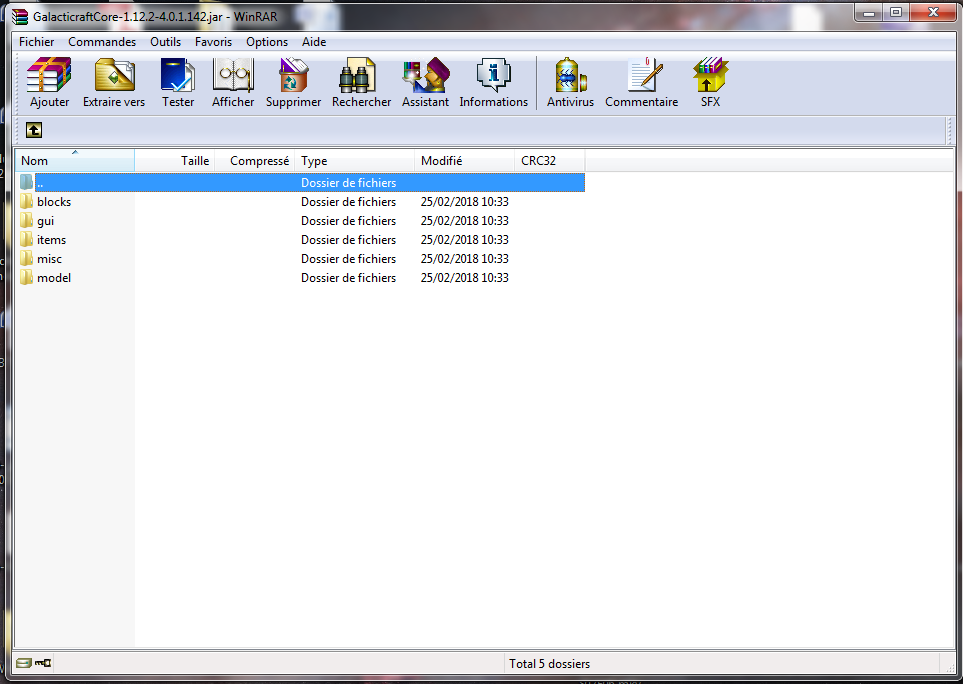
do i have to delete every large image from each folder? cuz they all contain pratically the same .png images
MehdiSalhi
on 26 Feb 2018
look for the large ones, blocks and model probably. Maybe gui
You can pull all those texture folders out, edit the .png in some image program to reduce the pixel size, and then put them back. In a Windows folder if you "View Thumbnails" you can see the images in preview.
All the files have different sizes - small ones are 12x12 pixels. 16x16 is very common, so is 32x32. Look at the pixel size of all of them. Windows thumbnails will give you an impression of the size.
Every texture > 256x256 is a problem for your graphics memory, I guess.
Irfanview is a very good and fast image viewer, can easily resize with the Y key. There are presets for 1/2 size etc.
radfast
on 26 Feb 2018
@radfast thank you for your help
MehdiSalhi
on 27 Feb 2018
ExtraPlanets in the next version will have no textures more than 256 x 256 :D will be released as soon as GC build 144 is released :D @MehdiSalhi cc @radfast
MJRLegends
on 27 Feb 2018
Related issues
 xaviergm
·
4Comments
xaviergm
·
4Comments
 runescapejon
·
4Comments
runescapejon
·
4Comments
 SteveKunG
·
4Comments
SteveKunG
·
4Comments
 danilbor11
·
4Comments
danilbor11
·
4Comments
 GregoriusT
·
4Comments
GregoriusT
·
4Comments