Gala: On a new workspace, opening a instance of an app should open a new window.
Actual behaviour:
Let's say I have workspace A with Files opened.
Now I switch to an empty workspace B and:
- Press the Files icon in Plank:It sends me back to workspace A.
Or
- Press the Files icon inside the Applications menu: Doesn't do anything or shows a red dot under the plank icon.
Improved behaviour:
Let's say I have workspace A with Files opened.
Now I switch to workspace B and:
- Press the Files icon in Plank: It opens a new window of said app.
Or
- Press the Files icon inside the Applications menu: It opens a new window of said app.
I think this would be a more expected behaviour. Right now it's a bit confusing.
 Maccer1
All 10 comments
Hi.
I understand your opinion, but this would make it impossible to switch to a workspace just by using the mouse.
On "1" you can press Ctrl+"Left Click" if you see the blue dot on the Icon of the application that you want to open a new window. If you press just "Left Click" it should go to the last used window. Something that doesn't work right now, unfortunately.
On the "2" I kind of agree, but I don't know if it would be beneficial to have different behaviours between Applications menu and Plank.
 Blast-City
on 12 Jan 2020
Blast-City
on 12 Jan 2020
I mean... you still have the "Multitasking view" Icon in Plank, that let's you switch between workspaces. I'm not sure if it is enabled by default but maybe it should be..
Thanks for the Ctrl+click tip, I didn't know that!
Maccer1
on 12 Jan 2020
I mean... you still have the "Multitasking view" Icon in Plank, that let's you switch between workspaces. I'm not sure if it is enabled by default but maybe it should be..
Thanks for the Ctrl+click tip, I didn't know that!
Hi.
You're right that is a default feature, but it takes one more click and if you have multiple windows of the same application spread through multiple workspaces you have to memorize which workspace have the desired window. When Plank is fixed it will take you to the last viewed window by default.
P.S: Middle Click also works to open a new window. It's even easier than Ctrl+Click.
Blast-City
on 13 Jan 2020
you have to memorize which workspace have the desired window.
But, do you? And, would it be too big of a problem?
Maybe what I say goes a bit against the elementary philosophy. I see the team is trying different things with workspaces like moving fullscreen windows to a new workspace or moving maximized apps to a new workspace.. I see they want to make workspaces more important but I think the result is a bit messy.
What I believe is better would be using workspaces as literally "work spaces": Isolated spaces in which you do activities. Think of it as the rooms inside your house (kitchen, bathroom, bedroom...).
So for example, you would use workspace 1 to work: You open your editors and your web browser to do whatever you need to do.
Then on workspace 2 you use it for social activities or watching videos: You have another web browser opened with facebook, reddit or whatever.
This is just an example but it's actually how I use it. I don't want to mix work stuff with my hobbies but sometimes they require using the same apps.
Another alternative for plank would be using stacks or decks for different workspaces (like this. So imagine you are in workspace 2, you'd have one stack on the left side of plank with all the icons of the windows opened on the first workspace.
Maccer1
on 13 Jan 2020
you have to memorize which workspace have the desired window.
But, do you? And, would it be too big of a problem?
Maybe what I say goes a bit against the elementary philosophy. I see the team is trying different things with workspaces like moving fullscreen windows to a new workspace or moving maximized apps to a new workspace.. I see they want to make workspaces more important but I think the result is a bit messy.
What I believe is better would be using workspaces as literally "work spaces": Isolated spaces in which you do activities. Think of it as the rooms inside your house (kitchen, bathroom, bedroom...).
So for example, you would use workspace 1 to work: You open your editors and your web browser to do whatever you need to do.
Then on workspace 2 you use it for social activities or watching videos: You have another web browser opened with facebook, reddit or whatever.
This is just an example but it's actually how I use it. I don't want to mix work stuff with my hobbies but sometimes they require using the same apps.
Another alternative for plank would be using stacks or decks for different workspaces (like this. So imagine you are in workspace 2, you'd have one stack on the left side of plank with all the icons of the windows opened on the first workspace.
I understand what you're saying. It's like having a different plank for every workspace, but I still think that would make elementary more keyboard driven, which is not a bad thing per se.
Have you checked Plank's current-workspace-only option? I think that it was made as a response to what you describe, but it doesn't seem to work 100% of the times.
Blast-City
on 14 Jan 2020
Yeah I've tried it. But sadly it just doesn't work with pinned apps.
If you have one app opened on the first workspace and you switch to another, the icon will show the blue dot and will go back to said app when you click on it.
Maccer1
on 14 Jan 2020
Yeah I've tried it. But sadly it just doesn't work with pinned apps.
If you have one app opened on the first workspace and you switch to another, the icon will show the blue dot and will go back to said app when you click on it.
Yeah that was it. I remember having a problem, but I didn't know what it was. I found this 2013 bug...
https://bugs.launchpad.net/plank/+bug/1248689
Blast-City
on 14 Jan 2020
Hi.
Since there will be some changes to the Dock: Do you think it would improve the workflow if a context menu with the "Desktop Actions" and "Open Windows" would be shown when the app icon is clicked from a new workspace/focused window?
Blast-City
on 26 Feb 2021
So do you mean that the pinned apps will open a contextual menu instead of going back to another workspace? Like the image below:
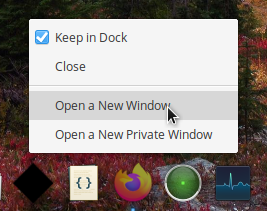
If so, I don't feel really comfortable with that. It will be one more click. Since we already have the "isolated workspaces" option inside plank maybe a better solution would be:
A) Isolated workspaces disabled. Current behaviour. Left clicking over a pinned app switches back to previous workspace.
B) Isolated workspaces ON. My previous proposal. Left clicking over a pinned app opens a new window.
If you want to try that, do it! But I have mixed feelings about it.
Maccer1
on 7 Mar 2021
Hi.
This is not official - I'm just an elementary user - It was just an Idea that I had that could solve this issue.
Apparently it is up to the App to support new instances when the middle click is used (elementary/dock#77). That is why the middle click is broken on some Apps. You can see the same behavior when clicking the application icon in the Applications Menu when on a new workspace. That's probably why the isolate workspace setting doesn't work also. elementary/dock#82 could fix it, but is kind of hacky.
I agree that an extra click is tedious, I mention it above, but since elementary/dock#85 is happening, until there is some new workflow redesign, a streamlined context menu could be a nice way of switching/open a new window when an user doesn't use the Multitasking View/Keyboard shortcut to switch workspaces. It would also fix elementary/dock#23.
Blast-City
on 9 Mar 2021
Related issues
 peteruithoven
·
3Comments
peteruithoven
·
3Comments
 worldofpeace
·
3Comments
worldofpeace
·
3Comments
 uncertainquark
·
4Comments
Blast-City
·
4Comments
uncertainquark
·
4Comments
Blast-City
·
4Comments
 hanaral
·
3Comments
hanaral
·
3Comments
Most helpful comment
Hi.
I understand your opinion, but this would make it impossible to switch to a workspace just by using the mouse.
On "1" you can press Ctrl+"Left Click" if you see the blue dot on the Icon of the application that you want to open a new window. If you press just "Left Click" it should go to the last used window. Something that doesn't work right now, unfortunately.
On the "2" I kind of agree, but I don't know if it would be beneficial to have different behaviours between Applications menu and Plank.