Gadgetbridge: [Device Request] Honor Band 3
It would be great to have support for this device
Device names:
- Honor Band 3
EAN-Codes:
- black: 6901443188611, 6901443188642
- orange: 6901443188666
- blue: 6901443188628, 6901443188659
Device links:
App link: "Huawei Wear"
Some specs:
- Display: 0.91", 128x12 pixels, PMOLED, monochrome
- One Capacitance Home Button
- OS: proprietary
- Interfaces: Bluetooth 4.2
- Sensors: 3-axis accelerometer; Detached PPG cardiotachometer; Infrared wear sensor
- Compatibility: from iOS 8.0, from Android 4.4
- Power supply: rechargeable battery (100mAh)
- Dimensions (Cases/Enclosures): 43x16.5x10.3mm
- Weight: 18g
- Special features: 5ATM (waterproof up to 50m)
- CPU: "M4 core technology" (ARM Cortex-M4), floating point, 48 Mhz (?)
- RAM: 256KB, ROM: 1MB, Flash: 16MB (source)
This device supports continuous heart-rate monitoring and is getting very affordable.
Possibly related:
- colorbuzz, an open source app to send notifications to Huawei Color (Honor) Band A1
 neuhaus
All 173 comments
I have started looking into this. The protocol doesn't seem to be related to the Band A1. It seems to use symmetrical AES encryption, the key is derived from multiple components as far as I can tell. I hope to find some more time to investigate this.
 unverbraucht
on 20 Mar 2018
unverbraucht
on 20 Mar 2018
Interesting! If you have any bluetooth dumps etc please link them to this thread
neuhaus
on 20 Mar 2018
Here's a hci.log of the initial "pairing" between band and the Huawei Wear app. After the initial LE scan and GATT read it gets interesting at second 12. There's a write of these bytes to handle 0x0037: 5a000b0001010100020003000400f13b.
Then the band responds by a long sequence, and after that communication makes even less sense :D. I remember reading somewhere that it somebody was working on an older version of the band protocol and that there was a handshake where a key was agreed upon.
unverbraucht
on 21 Mar 2018
Hi,
I have been looking into this issue. Huawey band 2 uses the same kind of protocol.
The encryption is symetrical aes. Key is derived from MAC address and 2 secret strings . Both can be found in "firmware" update file and in huawei wear app (they are scattered over 6 files for obfuscation). Some commands are not encrypted at all - eg the one you mention - link parameter discovery 5a000bxxx.
The encryption key is stored in "btsdk_sharedpreferences_name4.xml" file in shared preferences. This key is encrypted by combination of keys from "btsdk_sharedpreferences_name[1-3].xml". So it should be possible to extract the key, to further sniff the traffic.
 robots
on 27 May 2018
robots
on 27 May 2018
@robots good find! I also did some research and it seems to me that these secret strings are always the same on each installation, because two of those xml pref files always seem to contain the same stuff regardless of which phone or watch I pair?
unverbraucht
on 28 May 2018
I will write python script that can parse messages and decrypt them, so we can study the communication better. I think i understand now how the communication works. Pairing is harder. Because you would need to "restore" the band every time you pair, for full pairing sequence. The band remembers my phone, and pairing is very fast - without key exchange. I think this is so that you can easily repair band with different phone/android thing.
robots
on 28 May 2018
xmls 1 and 2 contain "oujymwq4clv9378y" and "b10jgfd9y7vsuda9" respectively, xml 3 contains MAC address without ":" but with "0000" appended.
xml 4 contains AES encrypted link key. first 32chars (16bytes) are IV and next 64chars (32bytes) are AES-CBC encrypted. The actual link key is just random bytes, generated at first pair. Key to encrypt link key is derrived from xml1 and xml2 by some shifting and xoring and sha256 and shifting and xoring and sha256 again :-)
The encrypted link key and IV are transfered during pair sequence to band.
robots
on 28 May 2018
Good thing is that linkkey is actually made of printable characters. So you know when its correctly decoded.
Script to decode trafic:
band.txt
Its written in python3, requires pycrypt and crcmod to work.
Packets are composed of so called TLVs. If tlv number 124 with value 1 exists, packet is encrypted and tlv 125 is IV and tlv 126 is data. So you need to decrypt and parse tlvs again. What all other TLVs mean is another story.... :-D
Most responses (if not all) from band i have seen were without encryption at all. It makes me wonder, if the encryption is needed at all.
robots
on 28 May 2018
Awesome work! So now we could start with the contents of the actual packets? Do you have an idea already if they adhere to a certain format?
I’m under the impression that the encryption is also to avoid fake hardware and to just make the lives of implementors of alternative clients a little harder ;)
On 28. May 2018, at 22:26, Michal notifications@github.com wrote:
Good thing is that linkkey is actually made of printable characters. So you know when its correctly decoded.
Script to decode trafic:
band.txt https://github.com/Freeyourgadget/Gadgetbridge/files/2046102/band.txt
Its written in python3, requires pycrypt and crcmod to work.Packets are composed of so called TLVs. If tlv number 124 with value 1 exists, packet is encrypted and tlv 125 is IV and tlv 126 is data. So you need to decrypt and parse tlvs again. What all other TLVs mean is another story.... :-D
Most responses (if not all) from band i have seen were without encryption at all. It makes me wonder, if the encryption is needed at all.—
You are receiving this because you commented.
Reply to this email directly, view it on GitHub https://github.com/Freeyourgadget/Gadgetbridge/issues/1021#issuecomment-392598361, or mute the thread https://github.com/notifications/unsubscribe-auth/ABygXzifZXAQg1DncFwA9kQgammyVYPmks5t3F1YgaJpZM4SmaT5.
unverbraucht
on 29 May 2018
I have spend few nights on this, trying to understand what does the band provide, and how is the data transferred, etc. This is just random notes:
Packet parsing is bit more complex than in my script. But I have updated my script. I will try to write script that tries to communicate with the band from command-line over bluetooth.
On beginning of connection the phone asks the band about supported commands and services and capabilities. This is a "huge" list that gets transferred to band and from band. Currently about 72 capabilities are queried. If this implemented correctly it would allow to support almost all bands from huawei (even android wear devices from huawei) which use V2 protocol.
All commands are divided into "services":
1 - common settings (pairing and discovery, basic settings like automatic display on, battery state, time setting, time format, DND, ... )
2 - notifications (push messages, setting whether to notify when not wearing band, ...)
7 - fitness
8 - alarm/smartalarm
9 - OTA update
10 - file transfer (initiated by phone)
12 - language
22 - exercise manager
23 - workout manager (data about running, swiming)
28 - file transfer (initiated by band, used to transfer ephemeris)
31 - ephemeris manager
34 - onelevel menu manager
Push notifications are easy. This is just simple packet with text and bitmap that should be displayed. There is "unnotify" commands also, probably to remove notification once its acked on the phone.
Fitness/training data seems to be easy also. This gets transferred in bulk for each training/exercise. Steps, calories, heart-rate, distance all gets computed in the band.
File transfers: The protocol supports file transfers - both phone and band initiated. This is to support large data transfers - for sleep (sleep_data.bin, sleep_state.bin) , gps location of workout (%d.bin) and GPS ephemeris (transfered to band, gpslocation.dat). There are few magical filenames like: btdebug.log, btdump.log, dump.log, event.log, mcudebug.log (?) ... i might examine those one day
Sleep data - this one is hard. Sleep data is downloaded as 2 files and passed to some magical library that computes everything - states, duration, sleep quality, etc etc. I don't know how to extract this data from the file, nor i know the format. And i don't know how to easily implement this. (HwCoreSleepDataProvider calls native GetSleepResult from libDetailSleepJni.so(wrapper) which calls libDetailSleep.so which calculates sleep and loads libCPC.so as helper)
GPS: band provides link to phone where to get ephemeris data from. My band requests this from ublox servers. After successful download the file is downloaded from phone by the band. This serves the gps to get faster fix.
robots
on 4 Jun 2018
GPS: band provides link to phone where to get ephemeris data from. My band requests this from ublox servers. After successful download the file is downloaded from phone by the band. This serves the gps to get faster fix.
Some analysis of the AGPS data for Amazfit Bip was done here: #1089 I wonder if the GPS sensor is using the same format.
 danielegobbetti
on 4 Jun 2018
danielegobbetti
on 4 Jun 2018
https://online-live1.services.u-blox.com/GetOnlineData.ashx?token=iXEvQLCV3U2ZpoqTt-NraA;gnss=gps,glo,qzss;datatype=eph,aux
https://online-live2.services.u-blox.com/GetOnlineData.ashx?token=iXEvQLCV3U2ZpoqTt-NraA;gnss=gps,glo,qzss;datatype=eph,aux
these are the data feeds for ephemeris data.
robots
on 4 Jun 2018
@robots I'll be on vacation now for three weeks and might find some time to start working on basic support in GB. If you have time to update your script I'd be happy to use it as a basis. This is probably also good clean-room practice :)
Anyway, awesome work.
unverbraucht
on 7 Jun 2018
@robots @unverbraucht
I am trying to access the database files generated by the Huawei Health app directly to figure out the format of stored data. While some of the .db files are plain sqlite, others [larger ones like hihealth_003.db - probably containing data] seem to be encrypted.
I found some keys in HwCPDatas.db and HwCPBackupDatas.db but I don't know much about encryption and can't figure out what to do with them.
Do take a look at databases located at /data/data/com.huawei.health/databases if you haven't been there yet.
Cheers.
 bandupahile
on 27 Jun 2018
bandupahile
on 27 Jun 2018
Hello,
Looking at your understandment of connection, you will probably know - is it possible to change the default language of honor band 3 from chineese to english?
 mckoval
on 28 Jun 2018
mckoval
on 28 Jun 2018
Sorry for late reply, i have been on vacation. Here is the latest python script i have:
band.txt
I use it with extracted data from wireshark, i then pass the extracted data through other script to make it more python compatible and then into my script. Anyway, the packet decoding is included also with decryption.
@mckoval: no its not that simple. The huawei (wear and health) application is checking the language of the phone and sends this to the band. If the band doesn't recognize this language it switches to default (chineese). In custom app its just matter of sending few bytes over to the band for language change.
robots
on 28 Jun 2018
It would be very useful to change the language of the band. But anyway, I'm waiting for the news.
 joaoeudes7
on 10 Jul 2018
joaoeudes7
on 10 Jul 2018
Hi all, how's the analysis/development going? I just bought one of the Band 2s and discovered that it's basically unusable for me with the Huawei Health app (no ability to export data to Strava). I can help out with either protocol decoding (I have access to BT sniffers) or GB integration (some previous Android app development experience) if you think it'd help?
 tritan
on 17 Jul 2018
tritan
on 17 Jul 2018
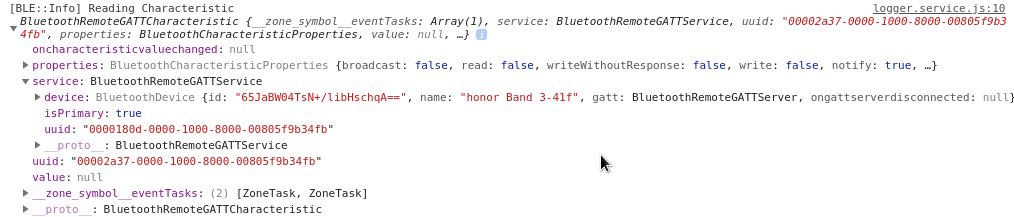
Is this information useful to you?
joaoeudes7
on 18 Jul 2018
Is it possible to grab the global firmware and upload it to the chinese version?
Does anybody know location of the firmware files?
Thanks
 iherbak
on 6 Aug 2018
iherbak
on 6 Aug 2018
Just to let you know guys. Honor Band 4 has been announced today.
 davidlt
on 6 Sep 2018
davidlt
on 6 Sep 2018
@robots
Were you able to go through the database files I mentioned earlier?
It seems that the db file with health data is encrypted with SQLCipher.
According to this page it needs a passphrase or the raw key in 64 character hex string format to decrypt. Inspecting the databases with sqlitebrowser turned up some keys in HwCPBackupDatas.db which probably might help. Do take a look.
bandupahile
on 19 Sep 2018
Hey guys i just bought the honor band 4 and want to get on board with hacking this device. What can I do to help the efforts? What are some common paths to find out what protocols the device uses?
 IhsanMujdeci
on 10 Oct 2018
IhsanMujdeci
on 10 Oct 2018
Hello all)
Do you have anything new information about get data from Honor Band 3(or 4)?
 Z-13
on 21 Nov 2018
Z-13
on 21 Nov 2018
Did anyone try reverse engineering the Health app or the Wear app and get gist of what's going on? @robots
 RT4U
on 22 Nov 2018
RT4U
on 22 Nov 2018
I got a honor band A2 few day ago.
I am now working on deobfuscation for the com.huawei.bond application. Will upload the jadx deobfuscation profile once I finished the hwbtsdk part.
 LionNatsu
on 28 Nov 2018
LionNatsu
on 28 Nov 2018
Python script for bonding works well now. There's still lot of code needs to deobf...
LionNatsu
on 2 Dec 2018
Quite didn't get time for this, I deobfuscated the Dex files and and left it open on jd gui. Haven't looked into the reversed codes yet.
RT4U
on 2 Dec 2018
As for the stream format, there are three things:
Endianess
All integers are big-endian.
Variable-length integer
I named it varint in my script
def read_varint(data: bytes, start_pos: int) -> (int, int):
    i = 0; pos = start_pos
    while True:
        part = data[pos] & 0b01111111
        i += part
        if part == data[pos]:
            return i, pos + 1
        i <<= 7; pos += 1

def make_varint(i: int) -> bytes:
    buf = []
    while True:
        part = i & 0b01111111
        buf.append(part | 0b10000000)
        if part == i:
            buf[0] &= 0b01111111
            return bytes(reversed(buf))
        i >>= 7;
Technically speaking, it splits integer into 7-bit byte array, uses the most-significant-bit (the 8th bit) to tell if it is the last byte.
Packet (BLE device, V2 Protocol)
Packet
0x5a LLLL BODY CRC16
|field|description|
|-|-|
|LLLL | length of BODY, 16 bits |
|BODY| 0x00 + Content|
|CRC16| calculate all bytes start from 0x5a, 16 bits|
Content
SS CC TLV
|field|description|
|-|-|
|SS | service id, 8 bits |
|CC | command id, 8 bits |
|TLV| key-value pairs and/or lists of key-value pairs |
TLV
TAG LENGTH VALUE
|field|description|
|-|-|
|TAG | 8 bits |
|LENGTH | length of VALUE, varint |
|VALUE| bytes |
If the MSB of tag is set, VALUE is a sub TLV.
In practice, using tree structure will be easier to access.
class TLV(object):
    def __init__(self):
        self.lists = list()
        self.vals = dict()
    def __str__(self):
        if len(self.lists) == 0:
            return str(self.vals)
        elif len(self.vals) == 0:
            return str(self.lists)
        else:
            return str(self.vals) + '; ' + str(self.lists)
    def put_value(self, tag: int, value: bytes = b''):
        self.vals[tag] = value
        return self
    def put_list(r):
        self.lists.append(TLV)
        return self
    def serialize(self):
        out = b''
        for t, v in self.vals.items():
            out += bytes([t])
            out += make_varint(len(v))
            out += v
        for i, root in enumerate(self.lists):
            part = root.serialize()
            out += bytes([0b10000000 + i])
            out += make_varint(len(part))
            out += part
        return out
    @staticmethod
    def deserialize(raw: bytes):
        root = TLV()
        if raw == b'': return root
        i = 0
        while i != len(raw):
            tag = raw[i]
            length, i = read_varint(raw, i+1)
            body = raw[i : i+length]
            if tag & 0b10000000:
                root.put_list(deserialize(body))
            else:
                root.put_value(tag, body)
            i += length
        return root
Nice progress. Could you please share the python script you're working on? @LionNatsu
RT4U
on 2 Dec 2018
The handshake process (authentication):
Service IDs are all = 1
- request link layer parameter (cmd id = 1), and you will get
auth_versionand 16-byterand_a. - generate 16-byte
rand_b. - select by
auth_version == 2, you'll get a hard-codedprefix - calculate
nonce = concat(rand_a, rand_b)
Now we have nonce and prefix. Next, challenge-response:
message = [0x01 0x00]hash = hmacsha256(key=hmacsha256(key=prefix+message, msg=nonce), msg=nonce)- Send hash (cmd id = 19) and will get another hash, it should match the same hash with
message = [0x01 0x10]
Could you please share the python script you're working on?
Yes, sure
LionNatsu
on 2 Dec 2018
Command IDs:
get link parameters 1
authenticate 19
get bond parameters 15
bond 14
BTW, It is not necessarily a Bluetooth bond but a logic bond, all communication is on GATT protocol.
LionNatsu
on 2 Dec 2018
I've finished boring exam yesterday.
Update:
    def reqeust_set_time(self):
        p = Packet(srvid=1, cmdid=5)
        import time
 # 1 - Timestamp
 # 2 - Time offset (u8, u8)  = hours, minutes (time zone + daylight saving)
        p.content\
            .put_value(1, int(time.time()).to_bytes(4, 'big'))\
            .put_value(2, int(time.timezone / -3600).to_bytes(1, 'big') + int(0).to_bytes(1, 'big'))
        self.send_data(bytes(p))

    def resolve_set_time(self, c: TLV):
        pass
Hello,
I'm currently reversing the Huawei Watch GT BLE protocol. The watch is connected to the mobile phone via the Huawei Health App and not via the Huawei Wear App. RE of the Health App is a pain in the ass ;)
However, it also seems to use the the BLE V2 protocol. The first message is 5A 000B 00 01010100020003000400 F13B.
Structure of the message:
5A xxxx 00 y{1:?} z
5A constant
xxxx length of y, including constant 00 (so it is length(00 + y))
00 constant
y message
z CRC-CCITT (XModem) crc(5Axxxx00y{1:?})
I will continue the reversing and I'm going to compare my results to the results of @LionNatsu. Does it make sense to open a new issue for the Huawei Watch GT, or should I post my results in this issue if the V2 protocol is the same?
 ckudera
on 28 Dec 2018
ckudera
on 28 Dec 2018
Here are my first results for the Huawei Watch GT. So far, I have the same results as @LionNatsu. However, I discovered multi packages and sliced packages. I haven't noticed the usage of multi packages in my BLE recordings, but I identified some sliced packages. I will continue the reversing in the next few days.
V2 Protocol
Message Structure
According to the Huawei Health App (v9.0.4.307) there are single packages and multi packages. Shortened code:
// package o.dfh
// n2 = length of received package; object = content of package
@Override
public List<det> e(int n2, byte[] object) {
    dod.a("01", 0, "BTDeviceV2ProtocolDataWrap", "Enter parseResponsePacket().");
    ArrayList<det> arrayList = new ArrayList<det>();
    // [...]
    int n4 = Integer.parseInt(object2.substring(2, 6), 16);
    if (n4 + 3 + 2 == n2) {
        dod.a("01", 0, "BTDeviceV2ProtocolDataWrap", "Single package.");
        det det2 = new det();
        if (object[0] == 90) {
            // [...]
            int n5 = Integer.parseInt(object2.substring(6, 8), 16) & 3;
            if (n5 == 0) {
                det2.a = false;
                det2.d = Arrays.copyOfRange((byte[])object, 4, n2 - 2);
                det2.b = true;
                det2.e = n4 - 1;
                det2.c = true;
            } else {
                det2.a = true;
                det2.d = Arrays.copyOfRange((byte[])object, 5, n2 - 2);
                det2.b = true;
                det2.e = n4 - 1 - 1;
                det2.c = 3 == n5;
            }
            arrayList.add(det2);
            return arrayList;
        }
        return null;
    }
    dod.a("01", 0, "BTDeviceV2ProtocolDataWrap", "Multi package.");
    // [...]
    return arrayList;
}
Single Package
Package Structure
Not Sliced
Package: 0x5a LLLL 0x00 CONTENT CRC16
| Field | Description |
| --- | --- |
| LLLL | length of BODY + 1 , 16 bits |
| CONTENT | content |
| CRC16 | CRC-CCITT (XModem): crc(0x5aLLLL0x00BODY)
Sliced
Package: 0x5a LLLL XX YY CONTENT CRC16
| Field | Description |
| --- | --- |
| LLLL | length of BODY + 2 , 16 bits |
| XX | unknown, can be 0x01, 0x02, 0x03 |
| YY | unknown, maybe slice index? |
| CONTENT | content |
| CRC16 | CRC-CCITT (XModem): crc(0x5aLLLLXXYYBODY)
CONTENT Structure
CONTENT: SS CC TLV
| Field | Description |
| --- | --- |
| SS | service id, 8 bits |
| CC | command id, 8 bits |
| TLV | key-value pairs and/or lists of key-value pairs |
TLV Structure
TAG LENGTH VALUE
| Field | Description |
| --- | --- |
| TAG | 8 bits |
| LENGTH | length of VALUE, varint |
| VALUE | bytes |
If the MSB of TAG is set, VALUE is a sub TLV.
Variable-Length Integer (varint)
Splits an integer into 7-bit byte array, uses the most-significant-bit (the 8th bit) to tell if it is the last byte.
Multi Package
TODO, but so far I haven't seen a multi package during the BLE V2 protocol communication.
Handshake
TODO
Services
Services
| ID | Name | Description |
| --- | --- | --- |
| 0x01 | DeviceConfig | linking, basic settings and information
Service DeviceConfig (0x01)
Commands
| ID | Name | Description |
| --- | --- | --- |
| 0x01 | LinkData | request link information
Command LinkData (0x01)
TLVs
| Tag | Length | Description |
| --- | --- | --- |
| 0x01 | 0x01 | device protocol version |
| 0x02 | 0x02 | device max frame size |
| 0x03 | 0x02 | bt_service_mtu |
| 0x04 | 0x02 | BLE connection interval [ms] |
| 0x05 | 0x12 | XX Y*16
XX BTDeviceLinkParameter Authentic version
Y*16 BTDeviceLinkParameter Authentic randA |
ckudera
on 29 Dec 2018
Great Work guys!! This is way out of my comfort zone so I'll just lurk for now. I'm an Android dev so can probably start pitching in when we get to the custom notifications and stuff.
 shahimclt
on 23 Jan 2019
shahimclt
on 23 Jan 2019
hi, just in case smb may need this - successfully received all detailed data from Huawei Health in easy readable xmls
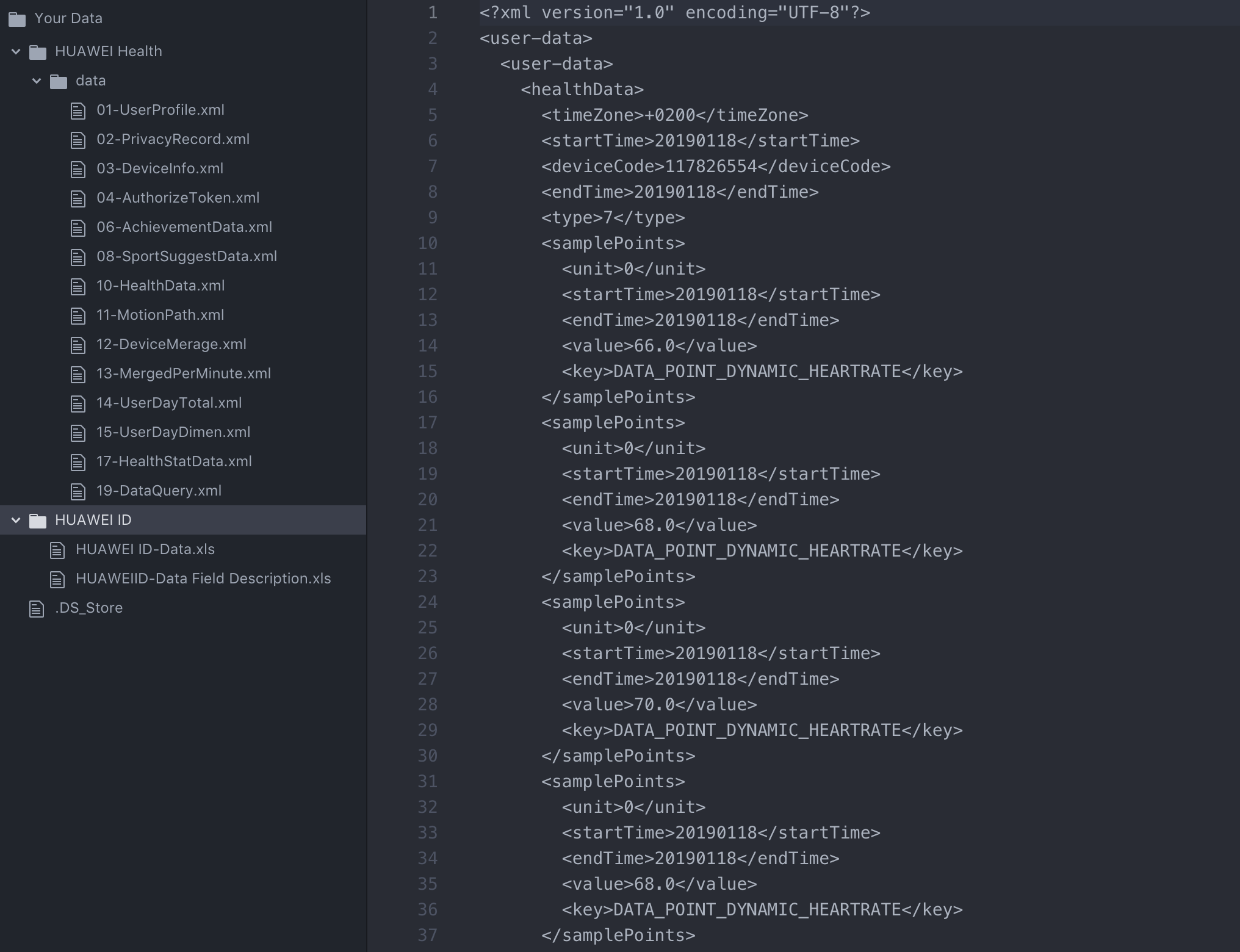
All data is collected by my Honor4 band via Huawei Health android app.
- Go to
cloud.huawei.comwith yourHUAWEI_ID(band needs to be successfully paired and backuped to cloud beforehand) - Go to
My Huawei ID > Settings > Request Your data - Fill in whatever and you'll get zipped detailed xmls to your email (as above ^^^)
- Just that simple.
This method is suitable only for backups/data extractions but not for syncs - they say you could do it only every 5 month. Anyway, if I ever decide to move out from Huawei, there is now a way to do it rather simply.
I guess I've not seen this page before in Huawei Cloud as well never have seen somebody told it is possible (despite very simple), so putting it here.
From first glance it includes all basic data available in the app (general steps, heartbeat, detailed trainings, swimming, detailed sleeping, even medals 🏅 )
 dzirtusss
on 2 Feb 2019
dzirtusss
on 2 Feb 2019
Very interesting data dump. I just got an Honor Band 4 as well and I am pissed that the iPhone app is even worse than existing Android App
 xbliss
on 14 Feb 2019
xbliss
on 14 Feb 2019
Was able to sniff out the update checker traffic from the Huawei Health app. Found some interesting URLs also was able to sniff out the latest firmware bin file.
Below is the POST data done by the app to when checking for new firmware updates.
POST /Ring/v2/CheckEx.action?ruleAttr=true HTTP/1.1
Content-Type: application/json; charset=UTF-8
Content-Length: 404
Connection: close
User-Agent: Dalvik/2.1.0 (Linux; U; Android 9; BKL-L09 Build/HUAWEIBKL-L09S)
Host: query.hicloud.com

{"components":[{"PackageName":"com.huawei.nyx.firmware","PackageVersionCode":"0","PackageVersionName":"1.5.35"}],"rules":{"FingerPrint":"HONOR\/BKL-L09\/HWBKL:9\/HUAWEIBKL-L09S\/190C675R1:user\/release-keys","DeviceName":"BKL-L09","FirmWare":"ro.build.display.id","IMEI":"<imei of band>","Language":"en-us","OS":"Android 9","C_version":"ro.product.CustCVersion","D_version":"ro.product.CustDVersion"}}
Requesting the above would just respond with "{"status": 1}".
So after further digging I changed the firmware version to the previous version that is 1.5.19 and retrieved the below response
{"status":"0","components":[{"name":"com.huawei.nyx.firmware","version":"1.5.35","versionID":"155123","description":"NYX 2018年7月上线OTA版本","ruleAttr":"","createTime":"2018-08-02T02:48:24+0000","url":"http://update.hicloud.com:8180/TDS/data/files/p7/s131/G3533/g3039/v155123/f1/","size":"1414708"}]}
And I let the app to continue it's job, it made requests to the below two URLs and retrieves the changelog and file list.
http://update.hicloud.com:8180/TDS/data/files/p7/s131/G3533/g3039/v155123/f1/full/filelist.xml
http://update.hicloud.com:8180/TDS/data/files/p7/s131/G3533/g3039/v155123/f1/full/changelog.xml
And at last once I click the update button in the app, it requests the firmware file.
Firmware version - 1.5.35
http://update.hicloud.com:8180/TDS/data/files/p7/s131/G3533/g3039/v155123/f1/full/Nyx_1.5.35.bin.apk
Anyone can download the above firmware file, as that link has no protection like user agent checks of sort.
It took some time to do this. I tried to analyze the firmware file but it looks like it's encrypted.
Will continue when I get enough time... In the meanwhile everyone is free to dig into the firmware file.
RT4U
on 21 Feb 2019
Some updates after Chinese New Year.
I am continuing on de-obfuscating Android APK. More detailed lists of Services and Commands are shown. Interestingly, due to many copy-pasting typos in strings misleading me to correctly interpret the mechanism of codes, I have to check and fix them first.
The application constructs every packet manually, concating hex strings together to create every Tag-Length-Value pair, without any abstract encapsulation in codes. On the other hand, the recieving parts does have such abstraction. Just for fun, if I were the boss, I would fire who wrote this.
As for implementation, now I can send text notifications to my Honor A1 band.
LionNatsu
on 22 Feb 2019
Was able to sniff out the update checker traffic from the Huawei Health app. Found some interesting URLs also was able to sniff out the latest firmware bin file.
Below is the POST data done by the app to when checking for new firmware updates.
POST /Ring/v2/CheckEx.action?ruleAttr=true HTTP/1.1
Content-Type: application/json; charset=UTF-8
Content-Length: 404
Connection: close
User-Agent: Dalvik/2.1.0 (Linux; U; Android 9; BKL-L09 Build/HUAWEIBKL-L09S)
Host: query.hicloud.com

{"components":[{"PackageName":"com.huawei.nyx.firmware","PackageVersionCode":"0","PackageVersionName":"1.5.35"}],"rules":{"FingerPrint":"HONOR\/BKL-L09\/HWBKL:9\/HUAWEIBKL-L09S\/190C675R1:user\/release-keys","DeviceName":"BKL-L09","FirmWare":"ro.build.display.id","IMEI":"<imei of band>","Language":"en-us","OS":"Android 9","C_version":"ro.product.CustCVersion","D_version":"ro.product.CustDVersion"}}
Requesting the above would just respond with "{"status": 1}".
So after further digging I changed the firmware version to the previous version that is 1.5.19 and retrieved the below response
{"status":"0","components":[{"name":"com.huawei.nyx.firmware","version":"1.5.35","versionID":"155123","description":"NYX 2018年7月上线OTA版本","ruleAttr":"","createTime":"2018-08-02T02:48:24+0000","url":"http://update.hicloud.com:8180/TDS/data/files/p7/s131/G3533/g3039/v155123/f1/","size":"1414708"}]}And I let the app to continue it's job, it made requests to the below two URLs and retrieves the changelog and file list.
http://update.hicloud.com:8180/TDS/data/files/p7/s131/G3533/g3039/v155123/f1/full/filelist.xml
http://update.hicloud.com:8180/TDS/data/files/p7/s131/G3533/g3039/v155123/f1/full/changelog.xmlAnd at last once I click the update button in the app, it requests the firmware file.
Firmware version - 1.5.35
http://update.hicloud.com:8180/TDS/data/files/p7/s131/G3533/g3039/v155123/f1/full/Nyx_1.5.35.bin.apkAnyone can download the above firmware file, as that link has no protection like user agent checks of sort.
It took some time to do this. I tried to analyze the firmware file but it looks like it's encrypted.
Will continue when I get enough time... In the meanwhile everyone is free to dig into the firmware file.
Hi, can you share some info on this. I would like to help.
 djstkg
on 24 Feb 2019
djstkg
on 24 Feb 2019
Was able to sniff out the update checker traffic from the Huawei Health app. Found some interesting URLs also was able to sniff out the latest firmware bin file.
Below is the POST data done by the app to when checking for new firmware updates.
POST /Ring/v2/CheckEx.action?ruleAttr=true HTTP/1.1
Content-Type: application/json; charset=UTF-8
Content-Length: 404
Connection: close
User-Agent: Dalvik/2.1.0 (Linux; U; Android 9; BKL-L09 Build/HUAWEIBKL-L09S)
Host: query.hicloud.com

{"components":[{"PackageName":"com.huawei.nyx.firmware","PackageVersionCode":"0","PackageVersionName":"1.5.35"}],"rules":{"FingerPrint":"HONOR\/BKL-L09\/HWBKL:9\/HUAWEIBKL-L09S\/190C675R1:user\/release-keys","DeviceName":"BKL-L09","FirmWare":"ro.build.display.id","IMEI":"<imei of band>","Language":"en-us","OS":"Android 9","C_version":"ro.product.CustCVersion","D_version":"ro.product.CustDVersion"}}
Requesting the above would just respond with "{"status": 1}".
So after further digging I changed the firmware version to the previous version that is 1.5.19 and retrieved the below response
{"status":"0","components":[{"name":"com.huawei.nyx.firmware","version":"1.5.35","versionID":"155123","description":"NYX 2018年7月上线OTA版本","ruleAttr":"","createTime":"2018-08-02T02:48:24+0000","url":"http://update.hicloud.com:8180/TDS/data/files/p7/s131/G3533/g3039/v155123/f1/","size":"1414708"}]}And I let the app to continue it's job, it made requests to the below two URLs and retrieves the changelog and file list.
http://update.hicloud.com:8180/TDS/data/files/p7/s131/G3533/g3039/v155123/f1/full/filelist.xml
http://update.hicloud.com:8180/TDS/data/files/p7/s131/G3533/g3039/v155123/f1/full/changelog.xmlAnd at last once I click the update button in the app, it requests the firmware file.
Firmware version - 1.5.35
http://update.hicloud.com:8180/TDS/data/files/p7/s131/G3533/g3039/v155123/f1/full/Nyx_1.5.35.bin.apkAnyone can download the above firmware file, as that link has no protection like user agent checks of sort.
It took some time to do this. I tried to analyze the firmware file but it looks like it's encrypted.
Will continue when I get enough time... In the meanwhile everyone is free to dig into the firmware file.
Mate, your file is a treasure. It's not just unencrypted, it an open book.
Just analyzed it and found that they use
"Apollo2 Blue" from "ambiqmicro", SDK and all infos can be seen here: https://ambiqmicro.com/mcu/
It seams like this is going to be some fun. :-)
F:\nyx_mcu_code\temp\application\driver\common\vendor\apollo2\Apollo_Hal_Driver\hal\am_hal_pwrctrl.c
I think we should organize this thread according to topics.
djstkg
on 24 Feb 2019
Also found out they are probably using Nordic BLE chip:
D:\nyx_ble\BLE\vendor\bt_if\bdi\src\nordic_ble.c
also Nordic is naming their devices "Softdevices"
D:\nyx_ble\BLE\SDK.mod\softdevice\common\softdevice_handler\softdevice_handler.c
All chips from Nordic are here, can we figure out which one it is from those BLE sniffs?
Also found this one for Nordic for Wireshare: https://github.com/ambrice/nordic_ble. Looks promising. @ckudera , @unverbraucht , @robots , @LionNatsu
djstkg
on 24 Feb 2019
Also found out they are probably using Nordic BLE chip:
D:\nyx_ble\BLE\vendor\bt_if\bdi\src\nordic_ble.c
also Nordic is naming their devices "Softdevices"
D:\nyx_ble\BLE\SDK.mod\softdevice\common\softdevice_handler\softdevice_handler.cAll chips from Nordic are here, can we figure out which one it is from those BLE sniffs?
Also found this one for Nordic for Wireshare: https://github.com/ambrice/nordic_ble. Looks promising. @ckudera , @unverbraucht , @robots , @LionNatsu
In the Nordic SDK, just found similar organization of code, seams like Nordic updated meanwhile.
See Nordic SDK under:
/nRF5_SDK_15.2.0_9412b96/components/ble/ble_services/
From the hex file from above:
D:\nyx_ble\BLE\vendor\bt_if\bdi\src\nordic_ancs.c
D:\nyx_ble\BLE\vendor\bt_if\bdi\src\nordic_bas.c
D:\nyx_ble\BLE\vendor\bt_if\bdi\src\nordic_ble.c
D:\nyx_ble\BLE\vendor\bt_if\bdi\src\nordic_dis.c
D:\nyx_ble\BLE\vendor\bt_if\bdi\src\nordic_hid.c
D:\nyx_ble\BLE\vendor\bt_if\bdi\src\nordic_hrs.c
djstkg
on 24 Feb 2019
If it is any of them at all it should be one of those 3
nRF52810
nRF52832
nRF52840
I highly suspect on nRF52832 because of WLCSP packaging, which is really small, and very unlikely on nRF52840.
djstkg
on 24 Feb 2019
Another finding:
it is using LiteOS because:
LOS_ERRNO_MUX_PEND_IN_LOCK
LOS_ERRNO_SEM_PEND_INTERR
LOS_ERRNO_SEM_PEND_IN_LOCK
LOS_SemPost
are to be found.
djstkg
on 24 Feb 2019
If it is any of them at all it should be one of those 3
nRF52810
nRF52832
nRF52840I highly suspect on nRF52832 because of WLCSP packaging, which is really small, and very unlikely on nRF52840.
Have a look here and:
Standard_NRF51822_BLE.
https://www.nordicsemi.com/Products/Low-power-short-range-wireless/nRF51822, and the packaging is also small.
Though it might be the other ones as well
https://github.com/LiteOS/LiteOS/blob/master/doc/Huawei_LiteOS_Developer_Guide_en.md
nRF52840 nRF52832
djstkg
on 24 Feb 2019
stringsInHex.txt
those should be all strings found in hex file
djstkg
on 24 Feb 2019
binwalk Nyx_1.5.35.bin.apk

DECIMAL       HEXADECIMAL     DESCRIPTION
--------------------------------------------------------------------------------
40926         0x9FDE          SHA256 hash constants, little endian
177800        0x2B688         SHA256 hash constants, little endian
1114264       0x110098        SHA256 hash constants, little endian
1135284       0x1152B4        Unix path: /system/vendor/firmware/libpn548ad_fw_platform.so
1136504       0x115778        Unix path: /system/vendor/firmware/libpn548ad_fw_pku.so
1138424       0x115EF8        Unix path: /system/vendor/firmware/libpn548ad_fw.so
1151699       0x1192D3        mcrypt 2.2 encrypted data, algorithm: blowfish-192, mode: CBC, keymode: 4bit
libpn548ad means it is using NFC chip from NXP: Official firmware here https://github.com/NXP/nfc-NXPNFCC_FW/tree/master/pn548ad
LionNatsu
on 25 Feb 2019
I didn't even know it has an NFC.
Is it saying something about which compiler was used?
Or maybe some confirm for the uC?
Lion Yang notifications@github.com schrieb am Mo., 25. Feb. 2019, 11:07:
binwalk Nyx_1.5.35.bin.apk
DECIMAL HEXADECIMAL DESCRIPTION
40926 0x9FDE SHA256 hash constants, little endian
177800 0x2B688 SHA256 hash constants, little endian
1114264 0x110098 SHA256 hash constants, little endian
1135284 0x1152B4 Unix path: /system/vendor/firmware/libpn548ad_fw_platform.so
1136504 0x115778 Unix path: /system/vendor/firmware/libpn548ad_fw_pku.so
1138424 0x115EF8 Unix path: /system/vendor/firmware/libpn548ad_fw.so
1151699 0x1192D3 mcrypt 2.2 encrypted data, algorithm: blowfish-192, mode: CBC, keymode: 4bitlibpn548ad means it is using NFC chip from NXP: Official firmware here
https://github.com/NXP/nfc-NXPNFCC_FW/tree/master/pn548ad—
You are receiving this because you commented.
Reply to this email directly, view it on GitHub
https://github.com/Freeyourgadget/Gadgetbridge/issues/1021#issuecomment-466952168,
or mute the thread
https://github.com/notifications/unsubscribe-auth/AdPdjxzu24obABrzhqZlx6OquxY5sH7Nks5vQ7XlgaJpZM4SmaT5
.
djstkg
on 25 Feb 2019
I have uploaded some files that might be useful to you guys.
https://www.mediafire.com/file/03wnmf8188hx92u/Honor_Band_4.rar/file
The honor band 4 has an apollo 3 blue MCU
 leosedf
on 25 Feb 2019
leosedf
on 25 Feb 2019
I have uploaded some files that might be useful to you guys.
https://www.mediafire.com/file/03wnmf8188hx92u/Honor_Band_4.rar/fileThe honor band 4 has an apollo 3 blue MCU
Dude, this is awesome.
Would you happen to have it for Honor Band 3.
Or at least a confirmation if it is using Apollo 2 Blue (it seams since it uses Apollo 3 in Honor Band 4), so I know where to focus.
djstkg
on 27 Feb 2019
Hello!
I will see what i can find, i was only interested for 4 because i just got it and i wanted to fool around with it :D but i'm not that great on reversing lol.
But yes the band 3 uses the Apollo 2 blue .
leosedf
on 27 Feb 2019
Hello!
I will see what i can find, i was only interested for 4 because i just got it and i wanted to fool around with it :D but i'm not that great on reversing lol.But yes the band 3 uses the Apollo 2 blue .
Awesome, thanks.
Appreciated any more feedback you can get.
djstkg
on 27 Feb 2019
@leosedf Do you also find some details about the Huawei Watch GT?
ckudera
on 28 Feb 2019
@ckudera, the tools shared by @leosedf are supporting Watch GT also, at least DDTCom application for troubleshooting the update process (it states on the changes file that it has support for Fortuna devices, which is Watch GT).
I made some analysis on the Watch GT update binary file and is seems to be similar with Band 4, as it uses the same LiteOS.
Maybe we should create a different ticket for Watch GT?
 silviu001
on 28 Feb 2019
silviu001
on 28 Feb 2019
@ckudera I don't have these devices so it never crossed my mind to find stuff for them, i will try to dig around to see what i can come up with.
Btw on a word document there is also the bootloader bin file if you need it.
leosedf
on 28 Feb 2019
binwalk -Y Nyx_1.5.35.bin.apk
DECIMAL HEXADECIMAL DESCRIPTION
615 0x267 ARM executable code, 16-bit (Thumb), big endian, at least 522 valid instructions
djstkg
on 1 Mar 2019
binwalk -A Nyx_1.5.35.bin.apk
DECIMAL HEXADECIMAL DESCRIPTION
115305 0x1C269 Ubicom32 instructions, function epilogue
115349 0x1C295 Ubicom32 instructions, function epilogue
1099894 0x10C876 ARM instructions, function prologue
1099982 0x10C8CE ARM instructions, function prologue
1100028 0x10C8FC ARM instructions, function prologue
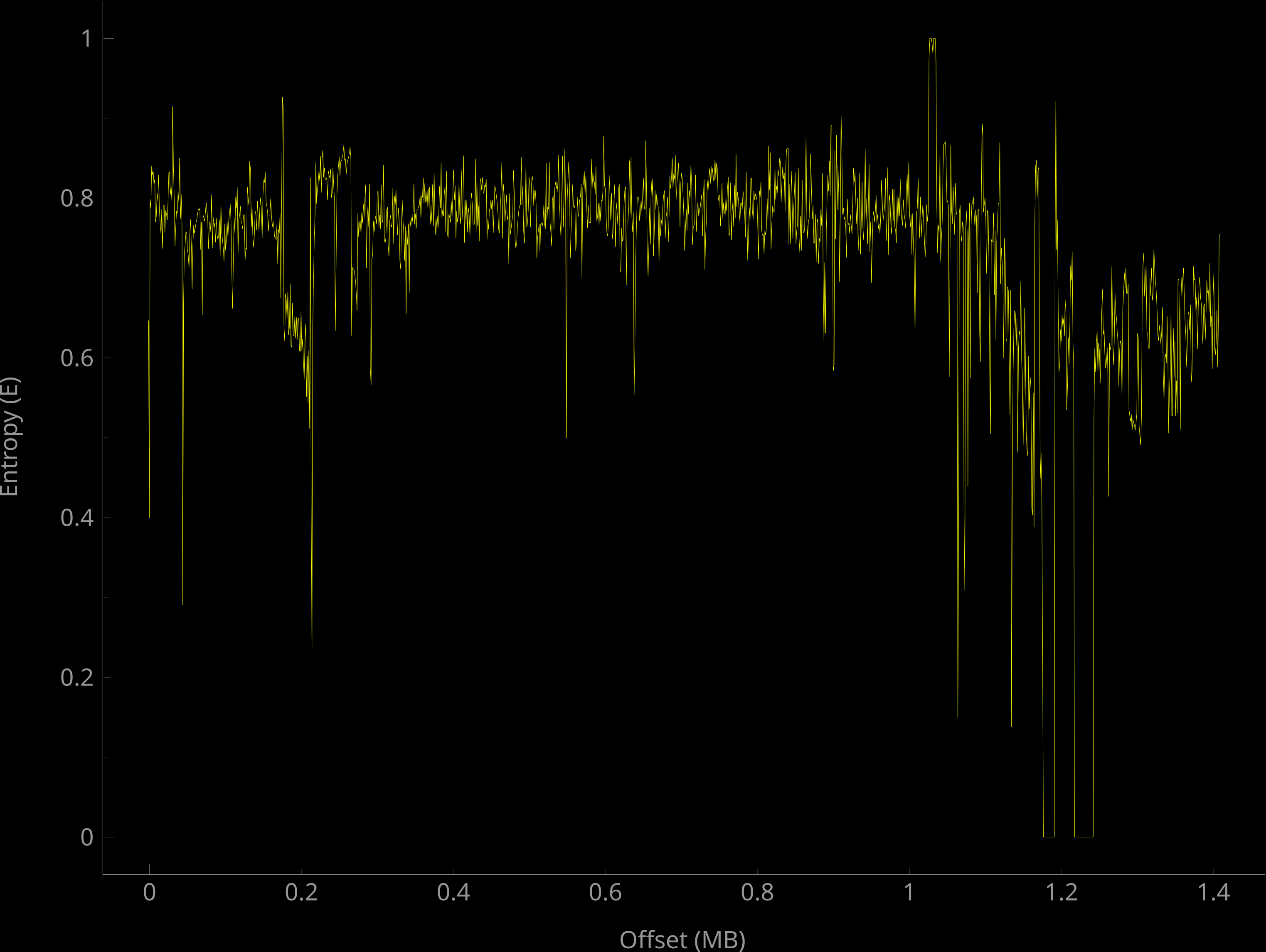
binwalk -E Nyx_1.5.35.bin.apk
DECIMAL HEXADECIMAL ENTROPY
0 0x0 Falling entropy edge (0.646516)
32768 0x8000 Falling entropy edge (0.838653)
41984 0xA400 Falling entropy edge (0.774418)
178176 0x2B800 Falling entropy edge (0.640856)
227328 0x37800 Falling entropy edge (0.806957)
230400 0x38400 Falling entropy edge (0.825814)
251904 0x3D800 Falling entropy edge (0.828073)
258048 0x3F000 Falling entropy edge (0.847078)
267264 0x41400 Falling entropy edge (0.627778)
415744 0x65800 Falling entropy edge (0.744247)
491520 0x78000 Falling entropy edge (0.790954)
540672 0x84000 Falling entropy edge (0.796596)
545792 0x85400 Falling entropy edge (0.763202)
548864 0x86000 Falling entropy edge (0.791037)
600064 0x92800 Falling entropy edge (0.815050)
635904 0x9B400 Falling entropy edge (0.779063)
655360 0xA0000 Falling entropy edge (0.809471)
694272 0xA9800 Falling entropy edge (0.798525)
774144 0xBD000 Falling entropy edge (0.789000)
817152 0xC7800 Falling entropy edge (0.810527)
819200 0xC8000 Falling entropy edge (0.735733)
842752 0xCDC00 Falling entropy edge (0.741426)
866304 0xD3800 Falling entropy edge (0.771481)
872448 0xD5000 Falling entropy edge (0.807258)
900096 0xDBC00 Falling entropy edge (0.785197)
904192 0xDCC00 Falling entropy edge (0.748649)
906240 0xDD400 Falling entropy edge (0.785157)
913408 0xDF000 Falling entropy edge (0.779739)
944128 0xE6800 Falling entropy edge (0.770582)
1027072 0xFAC00 Rising entropy edge (0.972686)
1037312 0xFD400 Falling entropy edge (0.789760)
1042432 0xFE800 Falling entropy edge (0.720731)
1049600 0x100400 Falling entropy edge (0.845634)
1056768 0x102000 Falling entropy edge (0.784746)
1098752 0x10C400 Falling entropy edge (0.782258)
1121280 0x111C00 Falling entropy edge (0.692584)
1195008 0x123C00 Falling entropy edge (0.735412)
djstkg
on 1 Mar 2019
binwalk -Y Nyx_1.5.35.bin.apk
DECIMAL HEXADECIMAL DESCRIPTION
615 0x267 ARM executable code, 16-bit (Thumb), big endian, at least 522 valid instructions
Detection of big endian is WRONG, if .bin is for Apollo2 Blue
From the SDK of Ambiq it says Apollo 2 Blue is little endian.
SDK/AmbiqSuite-Rel2.0.0/pack/SVD/apollo2.svd
<cpu><!-- details about the cpu embedded in the device -->
     <name>CM4</name>
     <revision>r1p0</revision>
     <endian>little</endian>
     <mpuPresent>true</mpuPresent>
     <fpuPresent>true</fpuPresent>
     <nvicPrioBits>3</nvicPrioBits>
     <vendorSystickConfig>false</vendorSystickConfig>
</cpu>
djstkg
on 1 Mar 2019
Cortex-M4?
leosedf
on 1 Mar 2019
Cortex-M4?
Seems from their SDK.
Verbose binwalk with no-stop on first result gives:
https://pastebin.com/raw/pHFjEJHK
apollo2.svd.zip
just as a reference for digging: Cortex-M4
djstkg
on 1 Mar 2019
@silviu001 I think we should create an issue for the Huawei Link Protocol v2 where we discuss the protocol and a separate issue for each model (Huawei Band 3 Pro, Huawei Watch GT and Honor Band 4) to discuss firmware and hardware issues.
@leosedf I'm not sure what you mean with "Btw on a word document there is also the bootloader bin file if you need it", but everything you can provide me would be helpful :)
ckudera
on 1 Mar 2019
For band 2 there are actually 3 firmwares in the firmware update file. I think that the Nyx file has the same format. First there is header with some checksums, then bootloader for BLE chip, firmware for BLE chip, and firmware for apollo chip. Both are Cortex-Mx based, both have very similar structure of interrupt vector, thats how you find start.
After the firmwares there is "strings" file and graphics file. I didnt try to extract those. But reversing firmware without symbols is very diferent story than reversing android APP. And i think this issue has been diverted to wrong way.
robots
on 1 Mar 2019
I think too we should divide discussions.
In the .doc file there are firmwares embedded, I already extracted. You can
do too.
ckudera notifications@github.com schrieb am Fr., 1. März 2019, 10:50:
@silviu001I think we should create an issue for the Huawei Link Protocol
v2 where we discuss the protocol and a separate issue for each model
(Huawei Band 3 Pro, Huawei Watch GT and Honor Band 4) to discuss firmware
and hardware issues.@leosedf https://github.com/leosedf I'm not sure what you mean with
"Btw on a word document there is also the bootloader bin file if you need
it", but everything you can provide me would be helpful :)—
You are receiving this because you commented.
Reply to this email directly, view it on GitHub
https://github.com/Freeyourgadget/Gadgetbridge/issues/1021#issuecomment-468607744,
or mute the thread
https://github.com/notifications/unsubscribe-auth/AdPdjw8m47OvsE7hhlIQWvOC5Swd6lzBks5vSPfIgaJpZM4SmaT5
.
djstkg
on 1 Mar 2019
Has anyone been able to get the raw heart rate (light sensor values) off the band?
 basdvries
on 5 Mar 2019
basdvries
on 5 Mar 2019
Hi all, there is some update about this issue?
 ronison
on 21 Apr 2019
ronison
on 21 Apr 2019
I gave the talk "All Your Fitness Data Belongs to You: Reverse Engineering the Huawei Health Android App" on Easterhegg 2019. You can find the talk here: https://www.youtube.com/watch?v=xQflFhj8Z2w
I will publish more information about the database decryption as far as I have summarized the details.
ckudera
on 22 Apr 2019
@basdvries - Did you ever find out if we're able to get raw HR data or beat to beat measurements from the band?
 LivNao
on 28 Apr 2019
LivNao
on 28 Apr 2019
Christian,
awesome work! That will make moving data from Huawei Health to another solution much easier.
On 22. Apr 2019, at 01:07, ckudera notifications@github.com wrote:
I gave the talk "All Your Fitness Data Belongs to You: Reverse Engineering the Huawei Health Android App" on Easterhegg 2019. You can find the talk here: https://www.youtube.com/watch?v=xQflFhj8Z2w https://www.youtube.com/watch?v=xQflFhj8Z2w
I will publish more information about the database decryption as far as I have summarized the details.—
You are receiving this because you were mentioned.
Reply to this email directly, view it on GitHub https://github.com/Freeyourgadget/Gadgetbridge/issues/1021#issuecomment-485288899, or mute the thread https://github.com/notifications/unsubscribe-auth/AAOKAX3TPE5524YNC7MWFGDPRTXU5ANCNFSM4EUZUT4Q.
unverbraucht
on 29 Apr 2019
I'm eager to beta test everything that supports my Honor Band 3! :)
 glassum
on 10 May 2019
glassum
on 10 May 2019
@LivNao We couldn't get the b-b intervals but were able to get hr (however quite unreliable in terms of accuracy)
basdvries
on 10 May 2019
As promised here are some details about the hihealth_003.db. Please find attached a Python script to extract the key for the encrypted hihealth_003.db database. The script requires the unencrypted database HwCPDatas.db. You can find this database in the Huawei Health data folder (/data/data/com.huawei.health/databases/).
The database HwCPDatas.db stores three encrypted keys (key_1, key_2, key_3) which needed to be decrypted with the native library libwhiteBoxJniLib.so. Since I can't judge if the full disclosure of the libraries functionality has a security impact to Huawei, I am currently releasing only a compiled version of my LibWhiteBox implementation. At the moment the script only works on 64-bit Linux systems, but if required I can also create a Microsoft Windows version. After the decryption the three keys are deobfuscated into the root_key. Furthermore, HwCPDatas.db also contains entry 13, which contains work_key_iv and work_key. work_key is the encrypted key for hihealth_003.db and can be decrypted with the root_key and the work_key_iv. After receiving the database key, the database can be decrypted with the tools from Zetetic (https://www.zetetic.net/sqlcipher/).
Please let me know if the script is working for you.
Edit: New updated version. Requires Python 3.7 64 bit and may also works with Python 3.6. Execute with python3 decrypt.py <path_to_HwCPDatasDB>
ckudera
on 12 May 2019
Hi there, that sounds like an excellent solution. I would though very much appreciate a Windows version. Many thanks in advance !
 bpalob
on 25 May 2019
bpalob
on 25 May 2019
In the meantime I have made myself a Ubuntu VM in VMWare :-) Neverhteless, I face some issues, for instance installing the required packages for Python (which version of Python for example) and what to do with the .so file in your package. Would you mind giving some more detailed instructions to a newbie? thanks :-)
xxx@osboxes:~/Downloads/hihealth003_key_extractor$ python3 decrypt.py
Traceback (most recent call last):
File "decrypt.py", line 7, in
from whitebox import LibWhiteBox
ImportError: cannot import name 'LibWhiteBox' from 'whitebox' (/home/xxx/.local/lib/python3.7/site-packages/whitebox/__init__.py)
bpalob
on 26 May 2019
I think getting Gadgetbridge to work with Honor Band 3 will open the road for other smart bands (I own a Color Band 2 aka Honor Band 2). What is the status on reverse engineering the Huawei Health App? In the context of Huawei ban alternate this app gets a higher importance.
 tmihai20
on 28 May 2019
tmihai20
on 28 May 2019
In the meantime I have made myself a Ubuntu VM in VMWare :-) Neverhteless, I face some issues, for instance installing the required packages for Python (which version of Python for example) and what to do with the .so file in your package. Would you mind giving some more detailed instructions to a newbie? thanks :-)
xxx@osboxes:~/Downloads/hihealth003_key_extractor$ python3 decrypt.py
Traceback (most recent call last):
File "decrypt.py", line 7, in
from whitebox import LibWhiteBox
ImportError: cannot import name 'LibWhiteBox' from 'whitebox' (/home/xxx/.local/lib/python3.7/site-packages/whitebox/init.py)
Thank you for testing. Do you have the file whitebox.cpython-36m-x86_64-linux-gnu.so in the same folder?
Folder tree should look like this:
$ tree
.
├── decrypt.py
├── HwCPDatas.db
└── whitebox.cpython-36m-x86_64-linux-gnu.so
The compiled library requires a 64 bit Linux system. It should be possible to execute the script with Python3:
$ python3 decrypt.py HwCPDatas.db
Key for database hihealth_003.db: ***********
Good day, the folder looks as follows:
/Downloads/hihealth003_key_extractor$ ls
decrypt.py HwCPDatas.db
hihealth_003.db whitebox.cpython-36m-x86_64-linux-gnu.so
When running decrpyt, I get:
python3 decrypt.py
Traceback (most recent call last):
File "decrypt.py", line 7, in
from whitebox import LibWhiteBox
ImportError: cannot import name 'LibWhiteBox' from 'whitebox' (/home/bpalob/.local/lib/python3.7/site-packages/whitebox/__init__.py)
Am running a Ubuntu 64bit in VMWare...
bpalob
on 28 May 2019
btw:
ImportError: cannot import name 'LibWhiteBox' from 'whitebox' (/home/bpalob/.local/lib/python3.7/site-packages/whitebox/__init__.py)
__init__.py is not in the folder....
/.local/lib/python3.7/site-packages/whitebox$ ls
automation.py __init__.py WBT whitebox_tools
cli.py __pycache__ whitebox.cpython-36m-x86_64-linux-gnu.so WhiteboxTools_linux_amd64.tar.xz
download_wbt.py testdata whitebox_example.py whitebox_tools.py

bpalob
on 28 May 2019
Have you installed https://pypi.org/project/whitebox/? If so please try pip uninstall whitebox. Maybe you have to use pip3 uninstall whitebox
ckudera
on 28 May 2019

No luck, uninstalled Whitebox.... Pip is not installed, only pip3....
bpalob
on 28 May 2019
I tried on a "virgin" Ubuntu Image without having had Whitebox installed at all... here it requests me to install it:

bpalob
on 28 May 2019
I have updated my comment. Does it work now?
ckudera
on 28 May 2019
It does work, thank you, you´re my hero :-) But when trying to decrpyt with SQLViewer, which now seems to have SQLCipher included, I kind of get stuck. It doesn´t accept the key. Am not sure if I am choosing the right parameters though... (SQL Cipher3, Cipher4 or custom)....
Tried also with SQLCipher on Android. It tells me "error: not an error" when trying to decrypt. So yes, I get a key, but am unsure if it actually works,... or haven´t figured out yet the way to decript it.
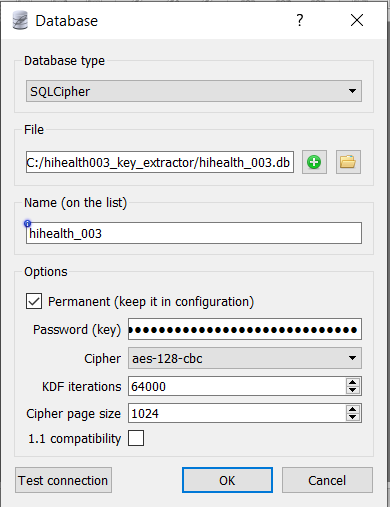
I would not know which parameters to choose... and there is not much information about the encryption of the database around.
bpalob
on 29 May 2019
I think I figured out how to use the key which the script by @ckudera produces. The key derived from the script is likely a raw_key. It looks just right with exactly 32bytes of data as expected in SQLCipher Raw Key mode.
SQLCipher usually expects a passphrase that is passed through a key derivation function to obtain the raw_key (decryption key) of length 32bytes (256bit). So passing the "utf8" output from script wont work as SQLCipher will consider it as a passphrase, which it is not. We need to provide it as hex.
Attaching slightly modified script to output the key additionally in hex for convenience.

bandupahile
on 4 Jun 2019
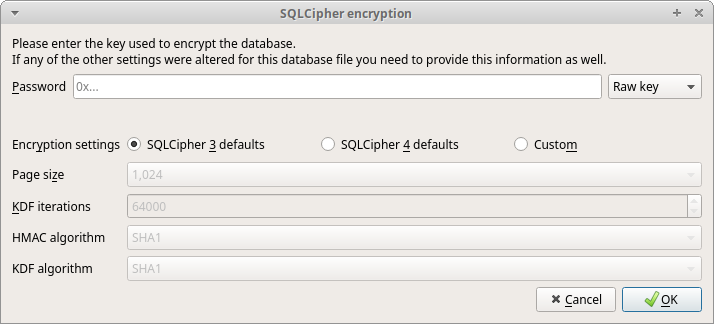
I tried passing the key as a hex raw key first in the DB Browser gui, This didn't work.
The key looks like 0x2DD29CA851E7B56E4697B0E1F08507293D761A05CE4D1B628663F411A8086D99 (this one's representative, not my real key)
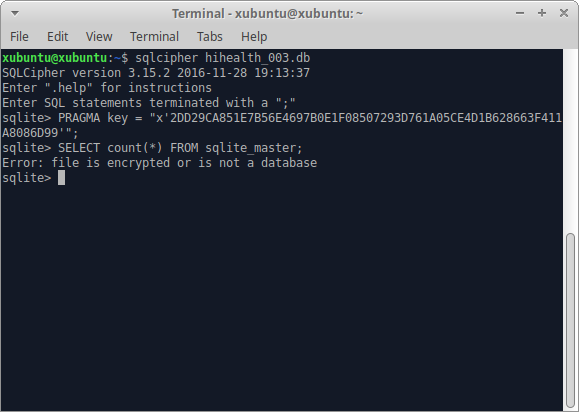
I then tried to directly use sqlcipher according to API given here.
For me that also failed.
If you see the methods of providing key here it mentions a third method of providing key with salt explicitly. I suspect explicit salt may be required to decrypt the database file. Although I am hoping another hunt for the salt isnt required.
In either case I wasn't unable to decrypt the hihealth_003.db using the key from script.
@bpalob can you try passing the key as hex to confirm if it works (or not).
bandupahile
on 4 Jun 2019
@bandupahile I think the problem is that you use an outdated sqlcipher version. Please try it with v4.2.0. I have attached a precompiled version (compiled on Fedora 30 64 bit). I also had some issues with older Huawei Health Android applications. They switched some settings but so far I haven't figured out which one. Therefore for an outdated Huawei Health Android application you have to use an older sqlcipher version. For Huawei Health Android Application v9.0.4.387 it's working with the above linked sqlcipher version.
In the following you can see my steps. Be aware that the key is NOT a raw key!
$ ls
decrypt.py  hihealth_003.db  HwCPDatas.db  sqlcipher  whitebox.so

$ python3 decrypt.py HwCPDatas.db
Key for database hihealth_003.db: ********************************

$ ./sqlcipher hihealth_003.db
SQLCipher version 3.28.0 2019-04-16 19:49:53
Enter ".help" for usage hints.
sqlite> PRAGMA key = '********************************';
sqlite> .tables
config_data                 hihealth_unit
config_stat_day             hihealth_user
goal_value                  real_time_health
hihealth_account            sample_point
hihealth_app                sample_point_health
hihealth_authorization      sample_point_health_stress
hihealth_dataclient         sample_sequence
hihealth_datatype           sample_session
hihealth_device             sample_session_core
hihealth_permission         sample_session_health
hihealth_source_order       sync_anchor
hihealth_stat_day           sync_cache
hihealth_temp               user_preference
hihealth_type_inherit
The binary spurted out some error so I built the same version (4.2.0) on my machine.
It still doesn't seem to be working with the latest sqlcipher
xubuntu:~/sqlcipher-4.2.0$ ./sqlcipher ~/Documents/hihealth_003.db
SQLCipher version 3.28.0 2019-04-16 19:49:53
Enter ".help" for usage hints.
sqlite> PRAGMA key = '********************************';
sqlite> .tables
Error: file is not a database
I am using exactly the key provided by the script.
xubuntu:~/Documents$ ls
HwCPDatas.db  decrypt.py  hihealth_003.db  sqlcipher  whitebox.so
xubuntu:~/Documents$ python3 decrypt.py HwCPDatas.db
Key for database hihealth_003.db: ********************************
And the latest Huawei Health Android v9.0.4.397
I will try again later with some older database backups I made earlier.
bandupahile
on 4 Jun 2019
Sorry it took me a while. I tried, and it does actually give me the HEX key.
bpalob@osboxes:~/Downloads/hihealth003_key_extractor/hex version$ python3 decrypt.py HwCPDatas.db
Key for database hihealth_003.db (utf-8) : xxxxxxxxxxxxxxxxxxxxxxxxxxxxxxx
Key for database hihealth_003.db (hex) : xxxxxxxxxxxxxxxxxxxxxxxxxxxxxxx
Key for database hihealth_003.db (hex-string): xxxxxxxxxxxxxxxxxxxxxxxxxxxxxx
I then tried in Windows with DBBrowser for SQLCipher, no luck. When I try on my Ubuntu 64bit, I get the following:
bpalob@osboxes:~/Downloads/hihealth003_key_extractor/hex version$ ./sqlcipher hihealth_003.db
SQLCipher version 3.28.0 2019-04-16 19:49:53
Enter ".help" for usage hints.
sqlite>
That´s about how far I get,...
bpalob
on 5 Jun 2019
OK, I tried to compile SQLCipher 4.2 in Ubuntu... "make" then somehow fails. Guess I´m not the brightes bulb on the tree :-)
bpalob@osboxes:~/Downloads/hihealth003_key_extractor/hex version/sqlcipher-4.2.0$ ./configure
configure: WARNING: Libtool does not cope well with whitespace in pwd
checking build system type... x86_64-unknown-linux-gnu
checking host system type... x86_64-unknown-linux-gnu
checking how to print strings... printf
checking for gcc... gcc
checking whether the C compiler works... yes
checking for C compiler default output file name... a.out
checking for suffix of executables...
checking whether we are cross compiling... no
checking for suffix of object files... o
checking whether we are using the GNU C compiler... yes
checking whether gcc accepts -g... yes
checking for gcc option to accept ISO C89... none needed
checking for a sed that does not truncate output... /usr/bin/sed
checking for grep that handles long lines and -e... /usr/bin/grep
checking for egrep... /usr/bin/grep -E
checking for fgrep... /usr/bin/grep -F
checking for ld used by gcc... /usr/bin/ld
checking if the linker (/usr/bin/ld) is GNU ld... yes
checking for BSD- or MS-compatible name lister (nm)... /usr/bin/nm -B
checking the name lister (/usr/bin/nm -B) interface... BSD nm
checking whether ln -s works... yes
checking the maximum length of command line arguments... 1572864
checking how to convert x86_64-unknown-linux-gnu file names to x86_64-unknown-linux-gnu format... func_convert_file_noop
checking how to convert x86_64-unknown-linux-gnu file names to toolchain format... func_convert_file_noop
checking for /usr/bin/ld option to reload object files... -r
checking for objdump... objdump
checking how to recognize dependent libraries... pass_all
checking for dlltool... no
checking how to associate runtime and link libraries... printf %s\n
checking for ar... ar
checking for archiver @FILE support... @
checking for strip... strip
checking for ranlib... ranlib
checking for gawk... no
checking for mawk... mawk
checking command to parse /usr/bin/nm -B output from gcc object... ok
checking for sysroot... no
checking for a working dd... /usr/bin/dd
checking how to truncate binary pipes... /usr/bin/dd bs=4096 count=1
checking for mt... mt
checking if mt is a manifest tool... no
checking how to run the C preprocessor... gcc -E
checking for ANSI C header files... yes
checking for sys/types.h... yes
checking for sys/stat.h... yes
checking for stdlib.h... yes
checking for string.h... yes
checking for memory.h... yes
checking for strings.h... yes
checking for inttypes.h... yes
checking for stdint.h... yes
checking for unistd.h... yes
checking for dlfcn.h... yes
checking for objdir... .libs
checking if gcc supports -fno-rtti -fno-exceptions... no
checking for gcc option to produce PIC... -fPIC -DPIC
checking if gcc PIC flag -fPIC -DPIC works... yes
checking if gcc static flag -static works... yes
checking if gcc supports -c -o file.o... yes
checking if gcc supports -c -o file.o... (cached) yes
checking whether the gcc linker (/usr/bin/ld -m elf_x86_64) supports shared libraries... yes
checking whether -lc should be explicitly linked in... no
checking dynamic linker characteristics... GNU/Linux ld.so
checking how to hardcode library paths into programs... immediate
checking whether stripping libraries is possible... yes
checking if libtool supports shared libraries... yes
checking whether to build shared libraries... yes
checking whether to build static libraries... yes
checking for a BSD-compatible install... /usr/bin/install -c
checking for special C compiler options needed for large files... no
checking for _FILE_OFFSET_BITS value needed for large files... no
checking for int8_t... yes
checking for int16_t... yes
checking for int32_t... yes
checking for int64_t... yes
checking for intptr_t... yes
checking for uint8_t... yes
checking for uint16_t... yes
checking for uint32_t... yes
checking for uint64_t... yes
checking for uintptr_t... yes
checking for sys/types.h... (cached) yes
checking for stdlib.h... (cached) yes
checking for stdint.h... (cached) yes
checking for inttypes.h... (cached) yes
checking malloc.h usability... yes
checking malloc.h presence... yes
checking for malloc.h... yes
checking for fdatasync... yes
checking for gmtime_r... yes
checking for isnan... yes
checking for localtime_r... yes
checking for localtime_s... no
checking for malloc_usable_size... yes
checking for strchrnul... yes
checking for usleep... yes
checking for utime... yes
checking for pread... yes
checking for pread64... yes
checking for pwrite... yes
checking for pwrite64... yes
checking for tclsh8.7... no
checking for tclsh8.6... tclsh8.6
configure: Version set to 3.28
configure: Release set to 3.28.0
configure: Version number set to 3028000
checking whether to support threadsafe operation... yes
checking for library containing pthread_create... -lpthread
checking for library containing pthread_mutexattr_init... none required
checking for crypto library to use... openssl
checking for HMAC_Init_ex in -lcrypto... yes
checking whether to allow connections to be shared across threads... no
checking whether to support shared library linked as release mode or not... no
checking whether to use an in-ram database for temporary tables... no
checking if executables have the .exe suffix... unknown
checking for Tcl configuration... found /usr/lib/tclConfig.sh
checking for existence of /usr/lib/tclConfig.sh... loading
checking for library containing readline... no
checking for library containing tgetent... no
checking for readline in -lreadline... no
checking readline.h usability... no
checking readline.h presence... no
checking for readline.h... no
checking for /usr/include/readline.h... no
checking for /usr/include/readline/readline.h... no
checking for /usr/local/include/readline.h... no
checking for /usr/local/include/readline/readline.h... no
checking for /usr/local/readline/include/readline.h... no
checking for /usr/local/readline/include/readline/readline.h... no
checking for /usr/contrib/include/readline.h... no
checking for /usr/contrib/include/readline/readline.h... no
checking for /mingw/include/readline.h... no
checking for /mingw/include/readline/readline.h... no
checking for library containing fdatasync... none required
checking zlib.h usability... yes
checking zlib.h presence... yes
checking for zlib.h... yes
checking for library containing deflate... -lz
checking for library containing dlopen... -ldl
checking whether to support MEMSYS5... no
checking whether to support MEMSYS3... no
configure: creating ./config.status
config.status: creating Makefile
config.status: creating sqlcipher.pc
config.status: creating config.h
config.status: config.h is unchanged
config.status: executing libtool commands
bpalob@osboxes:~/Downloads/hihealth003_key_extractor/hex version/sqlcipher-4.2.0$ make
make: * No rule to make target '/home/bpalob/Downloads/hihealth003_key_extractor/hex', needed by 'Makefile'. Stop.
bpalob
on 5 Jun 2019
It seems you are already using the latest sqlcipher in this comment. You don't need to make it yourself.
When you get to the sqlite prompt just set your key, like so:
sqlite> PRAGMA key = '********************************';
Where ********** is your 32 character utf-8 key
You can then try to fetch the tables to check if it decrypts the database
sqlite> .tables
If it succeeds you should see output like in this comment.
bandupahile
on 5 Jun 2019
I tried excatly this, with PRAGMA key. But with .tables I get no response...
bpalob
on 5 Jun 2019
bpalob@osboxes:~/Downloads/hihealth003_key_extractor/hex version$ python3 decrypt.py HwCPDatas.db
Key for database hihealth_003.db (utf-8) : W]:[bX+xxxxZPwR'O
Key for database hihealth_003.db (hex) : 0x575d3a5b62582b6a57572xxxx5a507752274f20
Key for database hihealth_003.db (hex-string): "x'575d3a5b62582b6a57xxxx0'"
Then:
bpalob@osboxes:~/Downloads/hihealth003_key_extractor/hex version$ ./sqlcipher hihealth_003.db
SQLCipher version 3.28.0 2019-04-16 19:49:53
Enter ".help" for usage hints.
sqlite> PRAGMA key = '575d3xxxxxxxxxxxxxxxxxxxxxxxxxxxxx575e544428696a5a507752274f20'
...> .tables
...>
I have tried with all 3 keys,.... Sometimes I get nothing to the .tables command as above, sometimes I get a response that "file is no database".
bpalob
on 5 Jun 2019
@bpalob Can you mention exactly which key gives which response? Could be helpful in troubleshooting.
I don't see why you would be getting different responses if all the keys were similarly wrong.
The odd one out _might_ be interesting.
bandupahile
on 5 Jun 2019
OK. I understood that the key I am supposed to use is the 32 character UTF 8 key, so the first of the 3 I am getting from the decrypt.py.
Here I do see a difference to when I try other keys. What I am unsure is about the ' and ; characters, if I shall use them.... but here we go.
bpalob@osboxes:~/Downloads/hihealth003_key_extractor/hex version$ ./sqlcipher hihealth_003.db
SQLCipher version 3.28.0 2019-04-16 19:49:53
Enter ".help" for usage hints.
sqlite> PRAGMA key = 'W]:[bxxxxxxxxxxPwR'O';
...> .tables
...>
In this attempt I took the 32 character UTF8 key and put it between ' and terminated with ;
The prompt I get is ...>
If I enter the HEX key, I get
bpalob@osboxes:~/Downloads/hihealth003_key_extractor/hex version$ ./sqlcipher hihealth_003.db #
SQLCipher version 3.28.0 2019-04-16 19:49:53
Enter ".help" for usage hints.
sqlite> PRAGMA key = 'x575d3a5b62582xxxxxxxxxxxxxxxx507752274f20';
sqlite> .tables
Error: file is not a database
sqlite>
This does somehow tell me that with the UTF8 version he did something, potentially good.... with the HEX version he doesn´t recognize the file as database.
bpalob
on 5 Jun 2019
It seems that you may have some characters in your key (like ') that are terminating the key string early, (And therefore starting a new string with the ' before ;). The ...> implies that the command has not yet terminated.
Try using double-quotes ("xxxxxxxx") instead.
If your key has that too then try escaping that particular character with a backslash.
bandupahile
on 6 Jun 2019
bpalob@osboxes:~/Downloads/hihealth003_key_extractor/hex version$ ./sqlcipher hihealth_003.db
SQLCipher version 3.28.0 2019-04-16 19:49:53
Enter ".help" for usage hints.
sqlite> PRAGMA key = "W]:[bXxxxxxxxxxxxxxijZPwR'O";
sqlite> .tables
Error: file is not a database
sqlite>
I read above that maybe sqlcipher 4.2 may be needed. That´s why I was trying to compile that one. The one which was provided pre-compiled seeps to be version 3.28. Can that be an issue?
bpalob
on 6 Jun 2019
I have compiled from the latest sqlcipher version 4.2.0 source and I can assure you that it shows the same 3.28.0 while greeting. Its not an issue.
The version reported there is the sqlite version that it is based on (Current stable release of sqlite is 3.28.0).
You might want to open an issue about the confusing info displayed over at the sqlcipher repo. :-)
bandupahile
on 6 Jun 2019
I give up... :-(
bpalob
on 8 Jun 2019
Can you please provide me your libwhiteBoxJniLib.so (path com.huawei.health/lib/)? Maybe every installation has a own symmetric key. So far, I've assumed that there is a preshared key.
Edit: I have compared different versions of the Huawei Health app and libwhiteBoxJniLib.so is always identical. So this cant be the issue.
Are you interested in sending me your Huawei Health app data, so I can try to identify the problem? But I would understand if you don't want to provide me your personal wearable recordings.
ckudera
on 8 Jun 2019
Hi, since I dont have a Huawei phone (and thus cannot install huawei backup) nor my phone isnt rooted, I am particularly interested the status of the link protocol v2. I'd like to help, if possible.
I just hate the fact I cannot export the data from by band pro 3 so much :(
 the-nic
on 9 Jun 2019
the-nic
on 9 Jun 2019
Can you please provide me your
libwhiteBoxJniLib.so(pathcom.huawei.health/lib/)? Maybe every installation has a own symmetric key. So far, I've assumed that there is a preshared key.Edit: I have compared different versions of the Huawei Health app and
libwhiteBoxJniLib.sois always identical. So this cant be the issue.Are you interested in sending me your Huawei Health app data, so I can try to identify the problem? But I would understand if you don't want to provide me your personal wearable recordings.
This file is static and can be found by opening the APK as ZIP and entering the lib folder
joaoeudes7
on 9 Jun 2019
I am not sure how to get to this file. Am not rooted, on a P20 Pro.
bpalob
on 9 Jun 2019
OK, I downloaded the APK from Google Play using a browser extension and extracted the ZIP file. I found the file in the folder \AF3DWBexsd0viV96e5U9-SkM_V5zTkNWsh4o0WxLpbSNQwwgyPX7qA5rcG5PNysArec_pPP98E5GtFoV0iuuS-CGC5e2aMA2M-kazZy3wOIhEWyfz_2Ev48~lib\arm64-v8a.
bpalob
on 9 Jun 2019
Thanks for the effort, but as I wrote in my edit, this can't be the issue =/
I am not sure how to get to this file. Am not rooted, on a P20 Pro.
How can you access the Huawei Health app data directory if your phone isn't rooted?
ckudera
on 10 Jun 2019
Thanks for the effort, but as I wrote in my edit, this can't be the issue =/
I am not sure how to get to this file. Am not rooted, on a P20 Pro.
How can you access the Huawei Health app data directory if your phone isn't rooted?
I have rooted, but like I said before, the file is the same, but if need be I can upload
joaoeudes7
on 10 Jun 2019
@joaoeudes7 I already agreed that the libwhiteBoxJniLib.so is static ;) Have you tried my script from this comment?
However, I'm curios how @bpalob has accessed the data directory to extract hihealth_003.db and HwCPDatas.db, if his phone isn't rooted.
ckudera
on 10 Jun 2019
I have made a backup using the Huawei Backup App and a USB cable to my PC. Easy and straight forward...
bpalob
on 10 Jun 2019
@joaoeudes7 I already agreed that the
libwhiteBoxJniLib.sois static ;) Have you tried my script from this comment?
I ran the script now, result
joaoeudes7
on 10 Jun 2019
@joaoeudes7 I already agreed that the
libwhiteBoxJniLib.sois static ;) Have you tried my script from this comment?I ran the script now, result
Thanks for the upload! I can open the database, so my script seems to be working :)
$ ./sqlcipher hihealth_003.db
SQLCipher version 3.28.0 2019-04-16 19:49:53
Enter ".help" for usage hints.
sqlite> PRAGMA key = "URK~Mt{Kt%'********iScyKKiqY{oHt";
sqlite> .tables
config_data                 hihealth_unit
config_stat_day             hihealth_user
goal_value                  real_time_health
hihealth_account            sample_point
hihealth_app                sample_point_health
hihealth_authorization      sample_point_health_stress
hihealth_dataclient         sample_sequence
hihealth_datatype           sample_session
hihealth_device             sample_session_core
hihealth_permission         sample_session_health
hihealth_source_order       sync_anchor
hihealth_stat_day           sync_cache
hihealth_temp               user_preference
hihealth_type_inherit
If you send me a mail (check below) with your contact details I can provide you the decrypted database.
Security warning: The database contains some sensitive information, therefore I would recommend to delete it from the internet ;)
In future you can send me a (encrypted) mail: contact
ckudera
on 10 Jun 2019
@joaoeudes7 I already agreed that the
libwhiteBoxJniLib.sois static ;) Have you tried my script from this comment?I ran the script now, result
Thanks for the upload! I can open the database, so my script seems to be working :)
$ ./sqlcipher hihealth_003.db
SQLCipher version 3.28.0 2019-04-16 19:49:53
Enter ".help" for usage hints.
sqlite> PRAGMA key = "URK~Mt{Kt%'********iScyKKiqY{oHt";
sqlite> .tables
config_data                 hihealth_unit
config_stat_day             hihealth_user
goal_value                  real_time_health
hihealth_account            sample_point
hihealth_app                sample_point_health
hihealth_authorization      sample_point_health_stress
hihealth_dataclient         sample_sequence
hihealth_datatype           sample_session
hihealth_device             sample_session_core
hihealth_permission         sample_session_health
hihealth_source_order       sync_anchor
hihealth_stat_day           sync_cache
hihealth_temp               user_preference
hihealth_type_inherit
If you send me a mail (check below) with your contact details I can provide you the decrypted database.
Security warning: The database contains some sensitive information, therefore I would recommend to delete it from the internet ;)
In future you can send me a (encrypted) mail: contact
OK no problems. I forgot to mention that I currently have an Honor Band 4
joaoeudes7
on 11 Jun 2019
@Ckudera, would you mind giving my db a shot? Thanks!
bpalob
on 11 Jun 2019
OK no problems. I forgot to mention that I currently have an Honor Band 4
@joaoeudes7 No problem, I already saw this in your database ;) Great to know it's working also for the Honor Band 4.
@ckudera, would you mind giving my db a shot? Thanks!
@bpalob Send me a mail with your hihealth_003.db and HwCPDatas.db, if you haven't already.
ckudera
on 11 Jun 2019
Is there a chance to get this hi health_key_extractor to run on my android phone?
I want to
- do a backup of the HuaweiHealth
- then extract the keys
- decrypt the hihealth_003
- work with my data
The first two steps are done. But I'm stuck in the decrypt...
 frarude
on 27 Jun 2019
frarude
on 27 Jun 2019
I have a huawei band 2 pro i'd be happy to test with, except my phone is too up to date to root :/
 jjl
on 21 Jul 2019
jjl
on 21 Jul 2019
I made it to extract the encrypted database with the help of https://www.sba-research.org/wp-content/uploads/2019/04/easterhegg19.pdf
It took me 15minutes.
 lkwg82
on 4 Aug 2019
lkwg82
on 4 Aug 2019
Hey, just one question: Is there a realistic chance to get the Huawei hardware working in some time and is there any help needed? I'm looking forward to buy a Huawei Band 3 Pro...
 StarPicard
on 15 Aug 2019
StarPicard
on 15 Aug 2019
Hello,
I won the fight to decode the database hihealth_003.db :-)
I use decrypt.py from ckudera (great work, thank you very much)
My key contains ' and I can not put this to PRAGMA key.
I use hex key (no hex-string !) a correct syntax is PRAGMA hexkey = 'my hex key';
bpalob@osboxes:~/Downloads/hihealth003_key_extractor/hex version$ ./sqlcipher hihealth_003.db
SQLCipher version 3.28.0 2019-04-16 19:49:53
Enter ".help" for usage hints.
sqlite> PRAGMA key = "W]:[bXxxxxxxxxxxxxxijZPwR'O";
sqlite> .tables
Error: file is not a database
sqlite>I read above that maybe sqlcipher 4.2 may be needed. That´s why I was trying to compile that one. The one which was provided pre-compiled seeps to be version 3.28. Can that be an issue?
 dan1967
on 15 Aug 2019
dan1967
on 15 Aug 2019
@ckudera @robots I've got a Huawei Band 2 lying on my desk and naively tried to write a Python script with Bleak to talk to it via BLE, but quickly discovered that it uses proprietary Huawei BLE Link v2 Protocol, which lead me to this issue.
You both have done some awesome reverse engineering work so far, so I wanted to ask what's the latest status of your efforts and where you do want to bring it? Is there any structured protocol documentation available from you? Are you already able to pair and talk to the devices? I think that a protocol support Python library that could be used e.g. with Bleak would be an awesome toy to play with...
 zyv
on 17 Aug 2019
zyv
on 17 Aug 2019
I have published my bare-bones LPv2 implementation here: https://github.com/zyv/huawei-lpv2 . My goal was write clean and easily understandable code, that would make it convenient to play with the devices. I have also started writing a state machine using this implementation, but didn't even get to bonding yet, because this is where the other reversers codes end, and I don't have time to invest into this project :( I don't even have an Android device to work with, and relying on disassembly only without snooping is very time-consuming.
@ckudera @robots @LionNatsu thank you very much for your contributions! If you can share some more functional code, I can try to eventually integrate it in my framework... I understood that you are already able to send notifications, etc.
My long-term goal would be to write an easy to use library to extract health data without needing an app, and otherwise directly interact with the devices via any BLE-capable client.
zyv
on 25 Aug 2019
>
I don't even have an Android device to work with
Been already hinted to use Android-x86 on a PC?
 ildar
on 27 Aug 2019
ildar
on 27 Aug 2019
Been already hinted to use Android-x86 on a PC?
Yes, just now :) but would it help? I don't think Huawei apps run on x86. Maybe an emulator built into Android Studio can be used to run these apps to snoop on them? No idea if that's possible.
zyv
on 27 Aug 2019
Android-x86 has the emulation. In case your PC has the good BT, the app
will likely work.
ildar
on 27 Aug 2019
The Huawei Health app will not work on the x86 emulator. The app doesn't contain x86 libraries. Furthermore, the Android emulator doesn't support Bluetooth (see https://developer.android.com/studio/run/emulator#limitations).
ckudera
on 28 Aug 2019
I can assure you that Huawei Health app works on Windows with Virtualbox x86 emulator via Bluetooth dongle. Perhaps VmWare will work even faster but only in Ubuntu.
There are 2 things to pay attention:
- Huawei .apk needs Bluetooth LE,, so you need to support Blueetooth USB-adapter in virtual machine. "Lightweight" emulators like Bluestacks, Genymotion, Nox etc. do not work.
- Arm architecture. So you need to install Native Bridge mode and add Houdini library.
glassum
on 28 Aug 2019
Am I correct that I have to download android-x86-8.1-r2.iso (not x86_64) and then install it in VMware? I'm on Mac. Is there a tutorial on how to get an emulator running, including the libraries you mentioned (Native Bridge / Houdini)?
P.S. I'm finally able to establish a bond with the watch using my library!
The interpretation of the process posted in this thread was not fully correct. In fact, there is a two-part hardcoded key in the firmware and app, then watch MAC is mixed into it, and finally the phone generates an IV, which will actually be used for encryption in the future. Then, all this is sent to the watch, which asks the user to authorise the bond by clicking a button. If user accepts, then the watch remembers this IV and you can communicate with it in the future without explicit acknowledgement. The reason for this mixing is that app authors wanted to store IV "securely" on the phone by encrypting it using a key mixed with watch MAC, so that the key is unique per watch. In how much all of this makes sense is a different question :-/
Now I need to add support for encrypted TLVs and split-packet, which I have read about, but haven't seen yet, add more services and command, and generally figure out what can / should happen after bonding...
zyv
on 28 Aug 2019
I'm not sure about 8.1-r2 because even 5.1 can be quite slow on common hardware.
There's no completer tutorial. Try to install a plain simple android in virtual machine at least.
Then you could try something like [https://stackoverflow.com/questions/49634762/how-to-install-libhoudini-on-a-custom-android-x86-rig]
The link to the android-x86.ISO with Houdini libs will be very welcome though I didn't find any.
glassum
on 28 Aug 2019
Okay, I'm able to boot in Android under VMware Fusion, but only with nomodeset xforcevesa vga=341 and it's slow as hell :-/ both x86 and x86_64 versions. 7.1 seems to be a bit faster than 8.1... Not sure if this will be really useable. I wonder how people work with it and why it is so slow.
zyv
on 28 Aug 2019
I've warned you ;) Try 5.1 release.
My rig has Quad Core X3320. Not lightning fast but I can cope with it.
glassum
on 29 Aug 2019
If the apk has no x86 native libs as you mentioned then the bottleneck in terms of performance and also stability will be the proprietary ARM-to-X86 translation layer. I had to use it for a few projects, it has quite a few limitations. If you’re at least a little serious about working on this I’d just go out and buy a 30$ second hand entry level Android device from eBay, it will save you so much hassle and wasted time.
On 29. Aug 2019, at 08:18, glassum notifications@github.com wrote:
I've warned you ;) Try 5.1 release.
My rig has Quad Core X3320. Not lightning fast but I can cope with it.—
You are receiving this because you were mentioned.
Reply to this email directly, view it on GitHub https://github.com/Freeyourgadget/Gadgetbridge/issues/1021?email_source=notifications&email_token=AAOKAX3KKCQW76KMEOHMWXLQG5S3XA5CNFSM4EUZUT42YY3PNVWWK3TUL52HS4DFVREXG43VMVBW63LNMVXHJKTDN5WW2ZLOORPWSZGOD5NMCJQ#issuecomment-526041382, or mute the thread https://github.com/notifications/unsubscribe-auth/AAOKAX3Y43GU3KA7W4GICNDQG5S3XANCNFSM4EUZUT4Q.
unverbraucht
on 29 Aug 2019
And anyway VMware isn't the optimal choice for VM.
https://www.youtube.com/results?search_query=virtual+machine+os-x
ildar
on 29 Aug 2019
Well, in my practice...
Android in VirtualBox under Windows is just as slow as VirtualBox under Ubuntu.
But VmWare under Ubuntu runs quite faster.
glassum
on 29 Aug 2019
There isn't much choice for Mac users anyways, is there? It's either VMware Fusion or Parallels, and both are rather sucky if you ask me. I did some work on VirtualBox in the past, but it used to drive me nuts with its "guru meditation". At least VMware doesn't crash that often...
In any case, Android is running, but Bluetooth sharing doesn't seem to be working - the VM doesn't see any Bluetooth devices. I also don't seem to be able to attach Apple USB Bluetooth controller directly to the VM. I guess I will have to get a native device eventually, and for now try some more disassembly based reversing.
zyv
on 29 Aug 2019
Added code to set watch time, but the device rejects my command with an error code :(
DEBUG:lpv2:State: BandState.Connected, sending: 5A 00 0D 00 01 05 01 04 5D 68 17 C7 02 02 03 00 07 F5
DEBUG:bleak.backends.corebluetooth.PeripheralDelegate:Write Characteristic Value
DEBUG:lpv2:State: BandState.Connected, received from 'FE02': 5A 00 09 00 01 05 7F 04 00 01 86 A4 96 D1
DEBUG:lpv2:Parsed: Packet(service_id=1, command_id=5, command=Command(tlvs=[TLV(tag=127, value=b'00 01 86 A4')]))
Implemented TLV encryption, the watch still rejects now encrypted set time command :(
zyv
on 30 Aug 2019
Yay! I'm able to set time at least on Huawei Band 2 and Honor Band 3, finally :-) thanks a lot to @robots for example keys! This helped me to find mistakes in my crypto.
Meanwhile, I've got a HCI dump from someones Honor Band 3, but sadly Android device was not rooted, so I was not able to extract the key... so can't really read what the app was doing beyond services and commands.
zyv
on 31 Aug 2019
I'd love to test it on my Honor Band 4, is everything in https://github.com/zyv/huawei-lpv2 ?
 JulienMaille
on 31 Aug 2019
JulienMaille
on 31 Aug 2019
@neFAST, that would be awesome - yes, everything is there - you would need Python 3.7 and listed requirements, tested on macOS, but should work on Windows & Linux too. Upon first run lpv2 demo will create a config file - you need to edit it with your device MAC addresses (and UUID, if on macOS). After that during second run it should establish a bond (confirm by tapping on the screen) and set the time. Nothing else is implemented at the moment...
zyv
on 1 Sep 2019
@zyv Thanks for your work! I tested it out; works fine (connects and sets the time) on my Honor Band 4. Let me know if I could help you in any way.
 aviraldg
on 1 Sep 2019
aviraldg
on 1 Sep 2019
@aviraldg How did you do? I failed to make it work with mine, created an issue here: https://github.com/zyv/huawei-lpv2/issues/1
JulienMaille
on 1 Sep 2019
Hey @aviraldg, thanks for your positive feedback! Any easy commands that you would like to see next? :-) For example, I have seen that setting personal information (sex, weight, height) should be uncomplicated.
I have started a wiki to systematise our findings - https://github.com/zyv/huawei-lpv2/wiki - I have written down some most important things not obvious from the source code, but my prio in the little time I have left is to continue with reversing and implement some useful commands. If anyone has time and interest to document stuff, any help is welcome. I haven't even ported over all the information from this thread by far...
Most work will be to reverse services and document their commands & tags. This does not necessarily require much programming / reversing expertise. Basically you need a rooted Android device, and a Band. Then you can record HCI dumps by also writing down what exactly did you do with the app, decode them with my library and figure out what services & commands are called, and with which parameters :-) It's not very easy to use for now, but I will be working on it.
zyv
on 1 Sep 2019
Could someone with rooted phone please record a HCI dump of talking to the band while changing the Android system language to English, German, French etc. ?
I'm interested in service_id=12 & command_id=1, specifically, what the hell is the contents of TLV with tag=1? I tried everything that came to mind, and ended up changing the language of my band to Chinese :-( , because no matter what I try, it doesn't recognise the language codes I'm giving to it. No idea what they can use as language identifiers - should be short, less than 128 bytes.
zyv
on 2 Sep 2019
sorry for being late to the party , but i am watching your progress ;)
so change language sends these TLVs:
(1, b'en-US')
(2, b'\x00')
This will change the language to en us :-) ... it always sends the locale of your phone, if not recognized by the band it will display chineese. If such language exists in the band it will change to that language.
I have written "decoder" for the tlvs from HCIdump, but i dont have rooted phone anymore:
http://robot.mysteria.cz/band.tar.gz
I have made some dumps of what the health app communicates with the band, there is file transfer, there is fitnes data transfer and sleep data transfer. I have also captured update data transfer.
if you change line:
540 for p in tup[0]:
to
540 for p in tup[1]:
it will try to decode the responses from the band, default it decodes what phone sends. Have fun.
Argument is the .pickle file. needs Crypto and crcmod python modules (python3)
robots
on 2 Sep 2019
can you guys ask in google fit feedback , for help from their side explaining them this is how far you all together have reached . _thanks for your contribution 🎉✔✔✔✔✔✨🐱🏍🐱💻_ .
" the major thing i think is the app should be able to extract data from the honor band regardless of the ram and system resources in device like kaios , android, ios, sailfish os then the interpretation can be done in google fit, huawei health etc. "
 1kaiser
on 3 Sep 2019
1kaiser
on 3 Sep 2019
@robots hey man, thank you very much for your help once again! I tried exactly what you suggested, while trying to change the language yesterday and it actually worked ;-) whereas I was totally convinced otherwise and panicked, because I was always getting tag=127 back... and I never did get it before, simply because I didn't wait long enough, just terminated the program immediately.
It seems that 127 is not necessarily an error code. Apparently it is also used simply as an acknowledgement if the result code is 100000 ^__^ I wonder also if they consistently acknowledge all commands that do not return results otherwise... need to change my code and update the wiki, but hell yeah, now my Band speaks English instead of Chinese!
Also thank you very much for the dump, I will have a look - I was thinking of writing a Wireshark parser, because one doesn't get too far with copy & paste, since you need to reassemble the stupid 32 byte packets by hand all the time... wonder how you solved the problem. Your input is truly very useful :-)
zyv
on 3 Sep 2019
Pushed code to set locale, still needs more cleanup :-/
zyv
on 3 Sep 2019
from whireshark you can dump the packets into json, i then translate the json into pickle (serialized python object) - using "loadjson.py". The pickle contains packet type 37 and 39 as tuple of 2 lists, i don't remember the meaning correctly but one is sent to device, the other is reply.
and in the band.py script i just iterate over the list. Either tup[0] or tup[1].
robots
on 3 Sep 2019
be carefull that packets: service 10 command 5, service 9 command 3 and service 9 command 4 contain no tlvs! these should be not parsed into TLVs, these are raw data. There are probably more of such, but these are what i found
robots
on 3 Sep 2019
Yes, I now had a look at your dump, and that's a really cool idea - one just needs to reassemble packets after exporting the dissection. I will try that if and when I can get a rooted device - I don't have keys for the dump I've got and Bluetooth doesn't work on Android under VMware :(
zyv
on 4 Sep 2019
I have been fighting with notifications yesterday :-/ apparently at the beginning one needs to set some parameters by sending commands to service_id=2, command_id=5 and service_id=2, command_id=2, and then one can trigger notifications via service_id=2, command_id=1. However, I haven't found yet how to interpret the answers (tag=1 and tag=129), and how to construct tag=132 - it seems to have weird substructure - maybe these are those sub-TLVs, which I have seen mentioned before. If I send notifications with tag=4 without content, then they are ignored by the watch...
zyv
on 4 Sep 2019
We're making a lot of progress, awesome, thanks!
I have an unrelated reverse engineering problem with a simple bluetooth remote for a Samsung Gear 360 SM-C200 camera. I want to create the camera trigger via an app instead of the hardware remote control so I can automate taking pictures at regular intervals. Can someone point me to some guides on how to get started with bluetooth packet captures etc? Thanks again. Sorry for the unrelated spam.
neuhaus
on 4 Sep 2019

zyv
on 4 Sep 2019
What does that mean? A forged call notification?
JulienMaille
on 4 Sep 2019
Yep, I'm finally able to send phone call notifications and normal (message) notifications :-) This code is not committed yet, but I was wrong that I need to add support for sub-TLV - it's already there in my library - I didn't need to do anything other than reverse the service - thanks again to @robots for his dump! I will only need to add one small extra convenience function for deserialisation. Unfortunately, I don't fully understand the mechanics of notifications yet. For example, if you long-press to hang up, I don't know how to make the band show notifications afterwards.
zyv
on 4 Sep 2019
Pushed support for nested TLVs, documented some notification stuff.
zyv
on 5 Sep 2019
Might be related #820 and https://github.com/plugnburn/colorbuzz
StarPicard
on 8 Sep 2019
@StarPicard replied in #820.
zyv
on 9 Sep 2019
I can read today totals from the band and the code is now reasonably clean! I also have a much better understanding of notifications now, but there is still a lot of work to implement them properly. I have cleaned up the wiki a bit, the basic structure is there, but I think that for details it's OK for code to be authoritative...
Sadly my vacation is long over, so I won't be able to work much if at all on this code :( I'm happy to cooperate with anyone who has more time, but it's my pet project, so I expect same or better code quality and style / wiki structure.
zyv
on 22 Sep 2019
Committed basic notification code! Also added minor convenience features, such as the ability to set the wrist, configure rotation actions and read current battery level via LPv2 instead of GATT.
zyv
on 28 Sep 2019
I can now perform a factory reset on the band and set user profile, including weight, height, age and so on, which is necessary for correct step counting, etc.! Also reversed API to set date/time format. So the band is now fully usable without the app, albeit only as a stupid watch.
Next big and interesting challenge would be to understand sleep and activity data, but this would require a lot of effort :(
zyv
on 5 Oct 2019
Please add some userfriendly guide for Huwaei band 2. I tried Gadgetbridge rom F-Droid, but app dont see my device. I have obtained AES key for my band.
 atirage21
on 7 Oct 2019
atirage21
on 7 Oct 2019
Hey @atirage21, sorry, but there is no support for Huawei LPv2 in Gadgetbridge that you can test at the moment - I'm currently working on reversing the protocol and only have a stand-alone console app that runs on desktops to control the band that you can try.
If somebody else can already start porting my code to Gadgetbridge, that would be great, but I don't have the capacity and interest to work on that right now - I don't even own an Android device to start with... but anyways, it will only become really interesting for the users when/if I manage to reverse sleep & activity data.
zyv
on 7 Oct 2019
https://www.reddit.com/r/Huawei/comments/dpzuqb/huawei_health_app_data_export/ < vote here for huawei health app data export
1kaiser
on 1 Nov 2019
@zyv Can you pull data or perform functions in Honor Band 4 with the "Huawei-lpv2" project you created? I tried and it did not work here, I have to pull the password and configure the macs?
joaoeudes7
on 2 Nov 2019
@joaoeudes7 have you updated the firmware on your Band 4 a couple of days ago? Can you tell me the version that you are running now? The LPv2 handshake has been changed in the firmware patches released on 28th of October, so my code will not work with new firmwares, until the reworked handshake is reversed.
zyv
on 2 Nov 2019
@zyv I am on the latest version: 1.0.10.60
What parameters change when updating the firmware?
joaoeudes7
on 2 Nov 2019
@joaoeudes7 okay, I see - you are indeed running an incompatible version of the firmware - my code works up to version 1.0.10.60 on Band 4, sorry about that! Normally nothing changes in the handshake between the updates, but this patch was special and the reason will be disclosed next week.
Unfortunately, I didn't have a chance to study new firmwares yet and the coming weeks are going to be so crazy at work, that I probably won't get there until Christmas, unless somebody helps me with decrypted Wireshark dumps...
zyv
on 2 Nov 2019
@zyv I understand. I'll be waiting, because I have no idea how to capture data from Bluetooth, but I try to help you and study your code.
joaoeudes7
on 3 Nov 2019
@joaoeudes7 alright, but in fact capturing Bluetooth traffic is easy - you just need to enable "Developer options" on your Android device by tapping many times on the build number in the About dialog, and then turn on "Enable Bluetooth HCI snoop log" in "Developer options". After that you need to copy btsnoop_hci.log to your computer with adb and there are your packets. If you choose to do so, be sure to capture the initial pairing sequence by resetting the Band first, because otherwise you would need a rooted device to extract the encryption key.
zyv
on 3 Nov 2019
Yes, this step is really easy to capture hahaha just do not know how to decrypt the data, root will not be problems :)
joaoeudes7
on 3 Nov 2019
@joaoeudes7 having a rooted device makes things a lot easier, but capturing the pairing sequence is still a good thing, because I don't know whether Huawei changed the way they store the encryption keys in the preferences files - if you have root, then you can check out whether the files btsdk_sharedpreferences_name[1-4].xml are still there in the new version of the app and what is their content.
Working with the captured data has also now become relatively easy with my code - you need to install Wireshark, latest Python 3 and PyCharm, checkout my project and open Python Console in PyCharm. In Wireshark load your packet capture. In PyCharm, import my protocol implementation classes and inspect the results. For example,
from huawei.protocol import Packet

p = Packet.from_bytes(bytes.fromhex("5a...."))
print(p)
From there on you can go down the rabbit hole examining commands, TLVs and so on :) Be sure to read wiki documentation and check existing code, to know approximately what to expect.
zyv
on 3 Nov 2019
1kaiser
on 10 Nov 2019
@1kaiser so now that you've learned the basics of BLE, help me to fix the bonding ;) Here is one of the reasons for the changes, the embargo has been now lifted - sorry about the inconvenience:
https://www.huawei.com/en/psirt/security-advisories/huawei-sa-20191106-01-band-en
zyv
on 10 Nov 2019
Related issues
 bigretromike
·
8Comments
bigretromike
·
8Comments
 RustyRaptor
·
3Comments
RustyRaptor
·
3Comments
 cpfeiffer
·
4Comments
cpfeiffer
·
4Comments
 raku-cat
·
7Comments
raku-cat
·
7Comments
 NeverUsedID
·
5Comments
NeverUsedID
·
5Comments
Most helpful comment
I have spend few nights on this, trying to understand what does the band provide, and how is the data transferred, etc. This is just random notes:
Packet parsing is bit more complex than in my script. But I have updated my script. I will try to write script that tries to communicate with the band from command-line over bluetooth.
On beginning of connection the phone asks the band about supported commands and services and capabilities. This is a "huge" list that gets transferred to band and from band. Currently about 72 capabilities are queried. If this implemented correctly it would allow to support almost all bands from huawei (even android wear devices from huawei) which use V2 protocol.
All commands are divided into "services":
1 - common settings (pairing and discovery, basic settings like automatic display on, battery state, time setting, time format, DND, ... )
2 - notifications (push messages, setting whether to notify when not wearing band, ...)
7 - fitness
8 - alarm/smartalarm
9 - OTA update
10 - file transfer (initiated by phone)
12 - language
22 - exercise manager
23 - workout manager (data about running, swiming)
28 - file transfer (initiated by band, used to transfer ephemeris)
31 - ephemeris manager
34 - onelevel menu manager
Push notifications are easy. This is just simple packet with text and bitmap that should be displayed. There is "unnotify" commands also, probably to remove notification once its acked on the phone.
Fitness/training data seems to be easy also. This gets transferred in bulk for each training/exercise. Steps, calories, heart-rate, distance all gets computed in the band.
File transfers: The protocol supports file transfers - both phone and band initiated. This is to support large data transfers - for sleep (sleep_data.bin, sleep_state.bin) , gps location of workout (%d.bin) and GPS ephemeris (transfered to band, gpslocation.dat). There are few magical filenames like: btdebug.log, btdump.log, dump.log, event.log, mcudebug.log (?) ... i might examine those one day
Sleep data - this one is hard. Sleep data is downloaded as 2 files and passed to some magical library that computes everything - states, duration, sleep quality, etc etc. I don't know how to extract this data from the file, nor i know the format. And i don't know how to easily implement this. (HwCoreSleepDataProvider calls native GetSleepResult from libDetailSleepJni.so(wrapper) which calls libDetailSleep.so which calculates sleep and loads libCPC.so as helper)
GPS: band provides link to phone where to get ephemeris data from. My band requests this from ublox servers. After successful download the file is downloaded from phone by the band. This serves the gps to get faster fix.