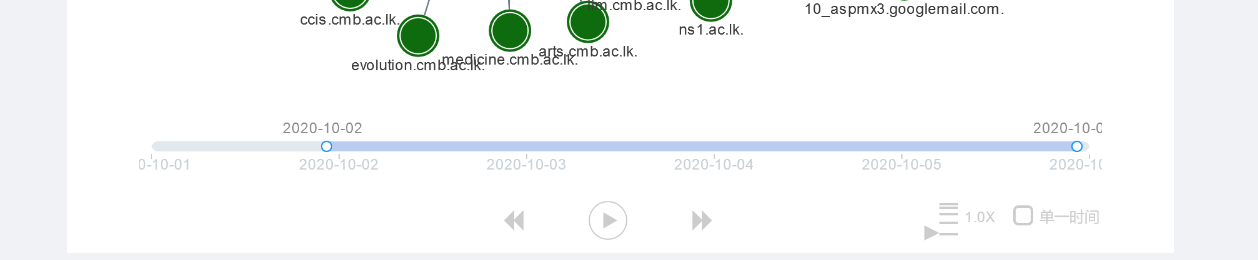
Given below is an image of the time bar I am using. I want my time bar to have the initial range set to 2020-10-05 to 2020-10-06. I have tried the start and the end configuration but seems to be not working.
 const timebar = new G6.TimeBar({
    x: 0,
    y: 0,
    width: 770,
    height: 114,
    padding: 10,
    type: 'simple',
    trend: {
      data: timeBarData
    },
    minLimit:1,
    maxLimit:5,
    start: 3,
    end: 5,

    rangeChange: (graph, min, max) => {
      // Get the instance of the graph and the range of the timebar, you can control the rendering of the graph by yourself here
      console.log(graph, min, max)
      filterData(min, max)(dispatch)
    }
  });
 Wathsara
All 6 comments
Hi, Wathsara. Configure the start and end in the slider and it ranges from 0 to 1, e.g.
slider: {
  start: 0.5,
  end: 0.9,
},
 Yanyan-Wang
on 25 Jan 2021
Yanyan-Wang
on 25 Jan 2021
Sorry for the un-updated english version docs which is only updated in Chinese version. We will update it ASAP
Yanyan-Wang
on 25 Jan 2021
Hi @Yanyan-Wang Thank you for letting me know. I append my other question to this as well. The time bar has a word from Chinese (right bottom) to tick and disable the range. Can we change that to a language we like
Wathsara
on 27 Jan 2021
Hi @Yanyan-Wang Thank you for letting me know. I append my other question to this as well. The time bar has a word from Chinese (right bottom) to tick and disable the range. Can we change that to a language we like
Of course, it will be fixed in next version. And the english docs for TimeBar is updated https://g6.antv.vision/en/docs/api/Plugins#timebar
Yanyan-Wang
on 27 Jan 2021
Thank you very much for the Update @Yanyan-Wang. Now the documentation is great. It is great to hear that the word will change in the next version.
Wathsara
on 28 Jan 2021
v4.1.5 is released. Now you can assign the timePointControllerText to any string as you want for controllerCfg. If it is not assigned, the default value Chinese will take effect.
Yanyan-Wang
on 29 Jan 2021
Related issues
 GPL1
·
3Comments
GPL1
·
3Comments
 hongshou
·
4Comments
hongshou
·
4Comments
 huyaocode
·
7Comments
huyaocode
·
7Comments
 chaserstrong
·
5Comments
chaserstrong
·
5Comments
 12345678starry
·
8Comments
12345678starry
·
8Comments