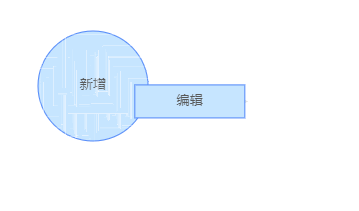
如上, 拖拽 “编辑(文本)节点” 经过 “新增(文本)” 节点,节点上将会出现 各种不规则的花边线条
完整代码如下
`import React,{useEffect,useState} from 'react';
import G6 from '@antv/g6';
export default function () {
let [graph, setGraph] = useState();
let [mode, setMode] = useState("default");

// 通过 React.userRef 函数的 current 获取绑定 ref 的元素
const ref = React.useRef();
let data = {

    // 点集
    nodes: [{
        size: 100,
        id: 'node1', // String,该节点存在则必须,节点的唯一标识
        x: 100,      // Number,可选,节点位置的 x 值
        y: 100,       // Number,可选,节点位置的 y 值
        label: "新增",
        // 设置节点的形状
        type: "circle",
        style: {
            cursor: "pointer"
        },
        // 节点中文本样式和其他配置
        labelCfg: {
            // 文本在元素中的位置
            positions: "center",

        },
        // anchorPoint 配置,右上角 0 0 , 左下角 1 1, 按比例向x,y 轴计算边线和节点交接点
        anchorPoints: [
            [0.5,1],
            [1,0.5],
            [0.5,0],
            [0,0.5]
        ]

    },{
        id: 'node2', // String,该节点存在则必须,节点的唯一标识
        x: 300,      // Number,可选,节点位置的 x 值
        y: 100,       // Number,可选,节点位置的 y 值
        label: "编辑",
        class: "n1",
        type: "rect",
        style: {
            cursor: "pointer"
        },
        anchorPoints: [
            [0.5,0],
            [1,0.5],
            [0.5,1],
            [0,0.5]
        ]
    }],
    // 边集
    edges: [{
        source: 'node1', // String,必须,起始点 id
        target: 'node2',  // String,必须,目标点 id
        label: "连接",
        type: "cubic-horizontal",
        strokeOpacity: 0.5,
        sourceAnchor: 1,
        targetAnchor: 1,
        style: {
            lineWidth: 2,
            endArrow: true,
            cursor: "crosshair"
        }
    }]
};

useEffect(() => {

    // 使用 defaultNode 和 defaultEdge 实现默认配置(全局配置)
    let currentGraph = new G6.Graph({
        container: ref.current,
        width: 400,
        height: 400,
        groupByTypes: false,
        // 交互模式有两种 , 分别是 default 和  edit , 默认为 default
        modes: {
            default: [ 'drag-canvas', 'zoom-canvas', "drag-node"]
        },
        nodeStateStyles: {
            active: {
                stroke: "green",
                lineWidth: 3
            }
        }
    });
    currentGraph.data(data);
    currentGraph.render();
    setGraph(currentGraph);
},[]);

function updateMode() {
    graph.setMode(mode);
}
return (
    <React.Fragment>
            <div ref={ref}></div>
    </React.Fragment>
)
}`
 linkai0001
All 6 comments
哪个版本 G6
 Yanyan-Wang
on 1 Apr 2020
Yanyan-Wang
on 1 Apr 2020
哪个版本 G6
目前使用的是 3.4.4 ,但似乎 3.3.0 以上的版本都会额
linkai0001
on 1 Apr 2020
应该与浏览器的缩放比例有关。如果浏览器是 100% 就没有问题,缩放后导致 pixelRatio 发生改变会出现问题。目前正在修复中。
Yanyan-Wang
on 2 Apr 2020
好的,感谢
linkai0001
on 2 Apr 2020
可以暂时通过关闭局部渲染解决:
graph.get('canvas').set('localRefresh', false)
Yanyan-Wang
on 3 Apr 2020
👍4
更新到 3.6.2 可解决类似问题
Yanyan-Wang
on 22 Aug 2020
Was this page helpful?
0 / 5 - 0 ratings
Related issues
 aisujian
·
5Comments
aisujian
·
5Comments
 huyaocode
·
7Comments
huyaocode
·
7Comments
 cike8899
·
9Comments
cike8899
·
9Comments
 GPL1
·
3Comments
GPL1
·
3Comments
 bluce
·
4Comments
bluce
·
4Comments
Most helpful comment
可以暂时通过关闭局部渲染解决:
graph.get('canvas').set('localRefresh', false)