Fzf: anyway to exclude commented and empty lines from --preview "cat {}"?
- [x] I have read through the manual page (
man fzf) - [x] I have the latest version of fzf
- [x] I have searched through the existing issues
Info
- OS
- [ ] Linux
- [ ] Mac OS X
- [x] Windows
- [ ] Etc.
- Shell
- [ ] bash
- [x] zsh
- [ ] fish
Problem / Steps to reproduce
my terminal emulator (cmder) is set to only 8 lines in height (i want it visible all the time) and when i use the preview option most of the config and dot files i have start with commented and empty lines which is not a good way to see the contents inside,
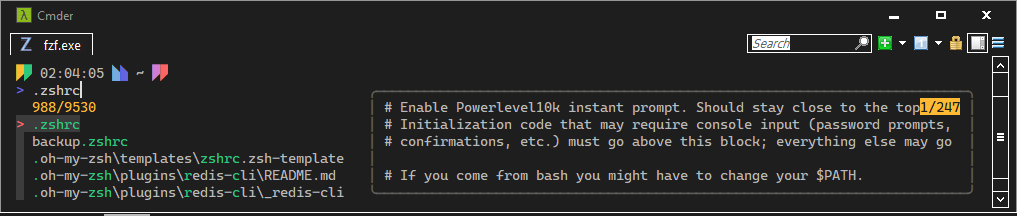
i want to know if there is a way to only show un-commented and lines including text with the preview option? i'm using zsh from cygwin btw if it makes any difference.
 junguler
All 8 comments
hey so for preview have you tried --preview-window='right:100:wrap' the wrap is options but setting height to 100 should overwrite any height option before it (except it cannot exceed your window size but 100 will fill the window so you'll either need to make it bigger or accept as is) for empty lines you can pipe to sed (what im showing you is in bash but the commands not exclusive to bash so it shouldn't really make a huge difference but you'll need sed which you can get on cmder (if not installed by default i can't remember) or another regex stream editor
cat file.txt | sed -e '/^$/d' | sed 's/[ \s]*#$//'| sed '/^#.*$/d' | fzf --preview-window='right:100:wrap'
so the first one sed -e '/^$/d' (using regular expression ^= beginning of line $=end of line so empty line) delete
second line if it starts with one or more space followed by #till the end of the line replace with null (for comments in the middle of the line without deleting the whole line
third deletes lines that start with a comment
on a side note, i find i get better results using wsl (windows subsystem for linux) you get actually full Linux on your windows machine
and for emulator check out https://github.com/microsoft/terminal it lets you multi-tab different shells (for example bash/cmd/powershell) all on different tabs
 rayiik
on 24 Sep 2020
rayiik
on 24 Sep 2020
rayiik
on 24 Sep 2020
rayiik
on 24 Sep 2020
@rayiik thanks for the code snippet and the explanation, it worked. i've been meaning to install wsl for a while now but it's a huge time commitment because i have de-bloated my windows and ripped a bunch of it features out including windows store, anyway thanks again, i'm closing this issue.
junguler
on 24 Sep 2020
@rayiik you got a response to this. I know because I got the email. @junguler not sure if editing the @ corrects the notification. I'd assume it doesn't. In other news I found out I have a github account. Who knew?
 Rayik
on 24 Sep 2020
Rayik
on 24 Sep 2020
@Rayik sorry, i mistyped your name, i have just woken up and couldn't see clearly.
junguler
on 24 Sep 2020
all good and no worries :) yea I line win term because it lets me side by side bash/pwsh and really easy theme options
rayiik
on 24 Sep 2020
thanks again, i might check windows terminal but i heard it doesn't remember window position yet and it briefly flashesh white when opening like many other win32 programs, which cmder does not (i'm using a dark theme)
junguler
on 24 Sep 2020
Ahhh it’s pretty configurable but I generally don’t launch applications from it I just like the multi tab and more use it because it ties right to wsl and you ran run different shells on each tab and set up theme in a way that’s either the same for both shells or each shell separate and you can pretty much port your vs code right to shell theme
rayiik
on 26 Sep 2020
Related issues
 natemara
·
3Comments
natemara
·
3Comments
 jberglinds
·
3Comments
jberglinds
·
3Comments
 asilvadesigns
·
3Comments
asilvadesigns
·
3Comments
 chrisamow
·
3Comments
chrisamow
·
3Comments
 fenuks
·
3Comments
fenuks
·
3Comments