Fzf: Elements in the list of choices overflow their lines
- [ ] I have read through the manual page (
man fzf) - [ ] I have the latest version of fzf
- [ ] I have searched through the existing issues
Info
- OS
- [ ] Linux
- [ ] Mac OS X
- [ ] Windows
- [ ] Etc.
- Shell
- [ ] bash
- [ ] zsh
- [ ] fish
Problem / Steps to reproduce
- Set terminal width to 80 and terminal height to at least 4.
- If you have
docker, run this command:
docker run -e TERM -it --rm alpine:3.11.6 sh -uec "
  cd
  apk add bash zsh git
  git clone --depth=1 https://github.com/junegunn/fzf.git
  ~/fzf/install --bin
  for i in 1 2; do
    cat /usr/share/zsh/5.7.1/functions/Misc/run-help
    printf '\0'
  done | ~/fzf/bin/fzf --read0 --query setcap"
- If you don't have
dockerbut havefzfinPATH, run this command from a POSIX-compatible shell:
x="$(printf '#!/bin/zsh\n#\n# Figure out where to get the best help, and get it.\n#\n# Install this function by placing it in your FPATH and then\n# adding to your .zshrc the lines:\n#\tunalias run-help\n#\tautoload -Uz run-help\n#\n\nemulate -RL zsh\n\nlocal HELPDIR="${HELPDIR:-/usr/share/zsh/5.7.1/help}"\n\n[[ $1 == "." ]] && 1="dot"\n[[ $1 == ":" ]] && 1="colon"\n\n# Check whether Util/helpfiles has been used to generate zsh help\nif [[ $# == 0 || $1 == "-l" ]]\nthen\n    if [[ -d $HELPDIR ]]\n    then\n\techo "Here is a list of topics for which special help is available:"\n\techo ""\n\tprint -rc $HELPDIR/*(:t)\n    else\n\techo "There is no list of special help topics available at this time."\n    fi\n    return 0\nelif [[ -n "${HELPDIR:-}" && -r $HELPDIR/$1 && $1 != compctl ]]\nthen\n    ${=PAGER:-more} $HELPDIR/$1\n    return $?\nfi\n\n# No zsh help; use "whence" to figure out where else we might look\nlocal what places noalias newline='\''\n'\''\ninteger i=0 didman=0\n\nplaces=( "${(@f)$(builtin whence -va $1)}" )\nif [[ $places = *"not found"* && $1 != ${(Q)1} ]]; then\n  # Different when unquoted, so try stripping quotes.\n  places=( "${(@f)$(builtin whence -va ${(Q)1})}" )\n  if (( ${#places} )); then\n      set -- "${(Q)@}"\n  fi\n  # Quotation is significant to aliases, so suppress lookup.\n  noalias=1\nfi\n\n{\nwhile ((i++ < $#places))\ndo\n    what=$places[$i]\n    [[ -n $noalias && $what = *" is an alias "* ]] && continue\n    builtin print -r $what\n    case $what in\n    (*( is an alias for (noglob|nocorrect))*)\n\t[[ ${what[(w)7]:t} != ${what[(w)1]} ]] &&\n\t  run_help_orig_cmd=${what[(w)1]} run-help ${what[(w)7]:t}\n\t;;\n    (*( is an alias)*)\n\t[[ ${what[(w)6]:t} != ${what[(w)1]} ]] &&\n\t  run_help_orig_cmd=${what[(w)1]} run-help ${what[(w)6]:t}\n\t;;\n    (*( is a * function))\n\tcase ${what[(w)1]} in\n\t(comp*) man zshcompsys;;\n\t(zf*) man zshftpsys;;\n\t(run-help) man zshcontrib;;\n\t(*) builtin functions ${what[(w)1]} | ${=PAGER:-more};;\n\tesac;;\n    (*( is a * builtin))\n\tcase ${what[(w)1]} in\n\t(compctl) man zshcompctl;;\n\t(comp*) man zshcompwid;;\n\t(bindkey|vared|zle) man zshzle;;\n\t(*setopt) man zshoptions;;\n\t(cap|getcap|setcap) ;&\n\t(clone) ;&\n\t(ln|mkdir|mv|rm|rmdir|sync) ;&\n\t(sched) ;&\n\t(echotc|echoti|sched|stat|zprof|zpty|zsocket|zstyle|ztcp) man zshmodules;;\n\t(zftp) man zshftpsys;;\n\t(*) man zshbuiltins;;\n\tesac\n\t;;\n    (*( is hashed to *))\n\tman ${what[(w)-1]:t}\n\t;;\n    (*( is a reserved word))\n\tman zshmisc\n\t;;\n    (*)\n\tif ((! didman++))\n\tthen\n\t    if whence "run-help-$1:t" >/dev/null\n\t    then\n\t\tlocal cmd_args\n\t\tbuiltin getln cmd_args\n\t\tbuiltin print -z "$cmd_args"\n\t\tcmd_args=( ${(z)cmd_args} )\n\t\t# Discard environment assignments, etc.\n\t\twhile [[ $cmd_args[1] != ${run_help_orig_cmd:-$1} ]]\n\t\tdo\n\t\t    shift cmd_args || return 1\n\t\tdone\n\t\teval "run-help-$1:t ${(q@)cmd_args[2,-1]}"\n\t    else\n\t\tPOSIXLY_CORRECT=1 man $@:t\n\t    fi\n\tfi\n\t;;\n    esac\n    if ((i < $#places && ! didman))\n    then\n\tbuiltin print -nP "%%SPress any key for more help or q to quit%%s"\n\tbuiltin read -k what\n\t[[ $what != $newline ]] && echo\n\t[[ $what == [qQ] ]] && break\n    fi\ndone\n} always {\n  unset run_help_orig_cmd\n}')"
for i in 1 2; do
  printf '%s\0' "$x"
done | fzf --read0 --query setcap
- Observe this result (unexpected: elements in the list overflow their lines):
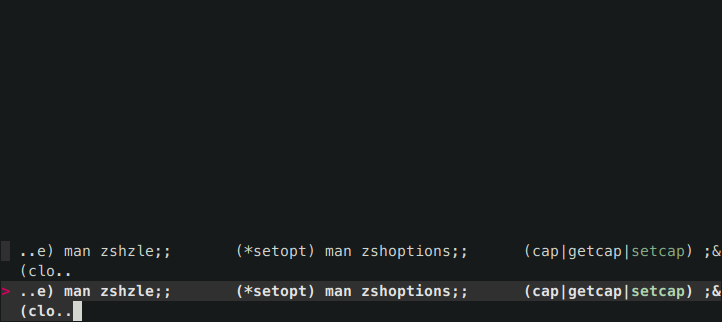
If you then delete query with backspace, the UI will get fixed:
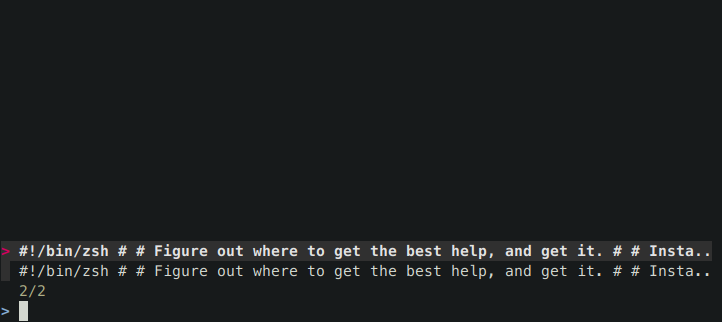
Try slowly typing "setcap" and observe how the UI breaks when lines start to overflow. Note how the bottom line (the one normally containing query) disappears.
I'm using the content of run-help from Zsh as an example of content that triggers this bug. This is how I've bumped into it. I have the definition of run-help in my shell history, so fzf-history-widget (bound to Ctrl-R) gets scrambled whenever my query matches it. I've tried to minimize it but was unable to figure out what exactly causes the length of the line to be miscalculated. It's not a single character (I thought tabs could do this, but that would've been noticed by other users already) nor the size of payload. Eventually I figured you have more efficient means than trial-and-error to debug this, hence this issue.
I've reproduced this on Linux, macOS and FreeBSD. I haven't tried other operating systems.
I haven't tried it on any fzf version other than 0.21.1 (334a4fa).
Please forgive my not ticking any boxes in the issue template. It's unclear to me what ticking them implies. Please don't read the absence of ticks as having any meaning. Normally I would delete the template if I don't understand it but I left it due to the all-caps notice.
 romkatv
All 11 comments
Yeah, clearly there's a bug in the way fzf processes tab stops. I'll look into it when I get some time. A workaround would be to use --tabstop 1. You can add it to your $FZF_CTRL_R_OPTS.
 junegunn
on 7 May 2020
junegunn
on 7 May 2020
Thanks for the quick and useful reply. I did suspect that tabs had something to do with it because when I removed all tabs from the payload, the issue didn't reproduce. However, I was unable to trigger the bug with a smaller synthetic payload containing tabs in various amounts and places.
The workaround works perfectly :100: I think I'll keep --tabstop 1 forever, as it makes text more compact. Feel free to deprioritize this issue or close altogether. As far as I'm concerned, you've already fixed it.
romkatv
on 7 May 2020
Just FYI, this still happens if I set --tabstop 1:

This is on ubuntu 18.04.
FZF version 0.21.1
 pedromss
on 26 Jul 2020
pedromss
on 26 Jul 2020
Just FYI, this still happens if I set
--tabstop 1:
The bug I reported in this issue can be successfully worked around by adding --tabstop 1 to the invocation of fzf. If "this still happens" to you, it means you are experiencing a different issue or you aren't passing --tabstop 1 to the invocation of fzf.
romkatv
on 26 Jul 2020
@romkatv you're right. I meant adding it to FZF_CTRL_R_OPTS doesn't fix it. Only passing --tabstop 1 after fzf works.
Maybe I'm doing something wrong, I don't know.
pedromss
on 26 Jul 2020
@pedromss Commands in the description of this issue do not use FZF_CTRL_R_OPTS, so it's expected that setting this parameter to anything will have no effect.
romkatv
on 26 Jul 2020
https://github.com/junegunn/fzf/issues/2021#issuecomment-625372108 this comment led me to believe it would work
pedromss
on 26 Jul 2020
#2021 (comment) this comment led me to believe it would work
OK.
Do I understanding it correctly that you are experiencing an issue with fzf that seems related to this one? If so, please describe it. This will allow others to understand what you mean and to offer workarounds and/or solutions.
romkatv
on 26 Jul 2020
Doing: fzf --tabstop 1 works.
Doing: FZF_CTRL_R_OPTS='--tabstop 1' fzf does not work, and from https://github.com/junegunn/fzf/issues/2021#issuecomment-625372108 I would expect it to.
@romkatv its probably my confusion as thinking about it a bit more, FZF_CTRL_R_OPTS is probably only taken into account when you press CTRL+R (duh) so you can disregard what I said.
Sorry for the confusion
pedromss
on 26 Jul 2020
Doing:
FZF_CTRL_R_OPTS='--tabstop 1' fzfdoes not work
It's expected that setting FZF_CTRL_R_OPTS to any value will have no effect on the commands listed in this issue's description because those commands simply don't reference FZF_CTRL_R_OPTS.
[...] and from #2021 (comment) I would expect it to.
So, now you are OK, right? There is no issue you are experiencing for which you would like to know a solution and/or workaround? If there is such an issue, you'll increase the chances of finding a solution and/or workaround for it enormously by describing the issue.
romkatv
on 26 Jul 2020
Yes, I'm ok now. There's no issue
pedromss
on 27 Jul 2020
Related issues
 heliohead
·
19Comments
heliohead
·
19Comments
 SolidStill
·
14Comments
SolidStill
·
14Comments
 rburgst
·
14Comments
rburgst
·
14Comments
 alotofnoodles
·
20Comments
alotofnoodles
·
20Comments
 sbrl
·
23Comments
sbrl
·
23Comments