Fzf: Ubuntu: "command failed" error with FZF_DEFAULT_COMMAND="rg --files"
- [x] I have read through the manual page (
man fzf) - [x] I have the latest version of fzf
- [x] I have searched through the existing issues
Info
- OS
- [x] Linux
- [ ] Mac OS X
- [ ] Windows
- [ ] Etc.
- Shell
- [x] bash
- [ ] zsh
- [ ] fish
Problem / Steps to reproduce
- Pipe in
rg --files | fzf=> Works fine. - set/export
FZF_DEFAULT_COMMAND='rg --files'=> Error

(✓) 11:17:08 [~]
$ cat /etc/lsb-release
DISTRIB_ID=Ubuntu
DISTRIB_RELEASE=18.04
DISTRIB_CODENAME=bionic
DISTRIB_DESCRIPTION="Pop!_OS 18.04 LTS"
(✓) 11:17:42 [~]
$ uname -a
Linux p5520 5.3.0-7625-generic #27~1576774585~18.04~c7868f8-Ubuntu SMP Thu Dec 19 20:37:47 UTC  x86_64 x86_64 x86_64 GNU/Linux
 pckilgore
All 23 comments
Does $SHELL -c 'rg --files' work?
 junegunn
on 19 Jan 2020
junegunn
on 19 Jan 2020
(✓) 14:22:15 [~]
$ echo $SHELL
/bin/bash
(✓) 14:15:07 [~]
$ $FZF_DEFAULT_COMMAND
(✓) 14:15:11 [~]
$ $SHELL -c 'rg --files' | head -n 3
macos-guest-virtualbox.sh
1
2
(✓) 14:15:32 [~]
$ echo "That worked"
That worked
Piping also works:
(✓) 14:21:51 [~]
$ $SHELL -c 'rg --files' | fzf
Thank you for assisting!
pckilgore
on 19 Jan 2020
You might want to check the stderr output of the process.
FZF_DEFAULT_COMMAND='rg --files 2> /tmp/error-log' fzf
@pckilgore, did you run the above command, or is this not an issue anymore? :point_up:
 LuRsT
on 22 Feb 2020
LuRsT
on 22 Feb 2020
I missed @junegunn 's comment but I cannot test until I return to the machine in a few days.
pckilgore
on 25 Feb 2020
Let us know when you can @pckilgore :+1:
LuRsT
on 25 Feb 2020
I'm seeing this error as well. Latest version (0.24.3), shell is Zsh 5.8. @junegunn's suggestion of sending errors to a file doesn't work either (no file is produced).
 henrebotha
on 14 Nov 2020
henrebotha
on 14 Nov 2020
This might get you your log file (what i use when redirection isn't working)
FZF_DEFAULT_COMMAND='rg --files 2>&1’ tee -a logfile <<<$(fzf)
Pretty sure zsh heresting syntax is the same
 rayiik
on 17 Nov 2020
rayiik
on 17 Nov 2020
@rayiik I just get an empty file. Assuming the command you posted is correct (I had to fix a curly apostrophe), it must mean Fzf is not producing any error output.
henrebotha
on 17 Nov 2020
@rayiik Please avoid posting code snippets with curly quotes.
- https://github.com/junegunn/fzf/issues/1830#issuecomment-728921781
- https://github.com/junegunn/fzf/issues/2243#issuecomment-725413275
You probably have an OS option enabled that automatically converts quotes on paste. (e.g. "Use smart quotes and dashes" in macOS).
@henrebotha Please post the output of the following commands to better understand the situation.
echo $SHELL

$SHELL -c 'echo it works'

type fzf

FZF_DEFAULT_COMMAND='echo it works' fzf -f works

# Does it show "it works"?
FZF_DEFAULT_COMMAND='echo it works' fzf
Hey sorry yea the curly quotes are an issue when i post from my phone all mu singles are under the same popup menu and it tries to guess some times
rayiik
on 17 Nov 2020
@junegunn Here are the results from those commands. A red prompt icon indicates a non-zero exit from the previous command.
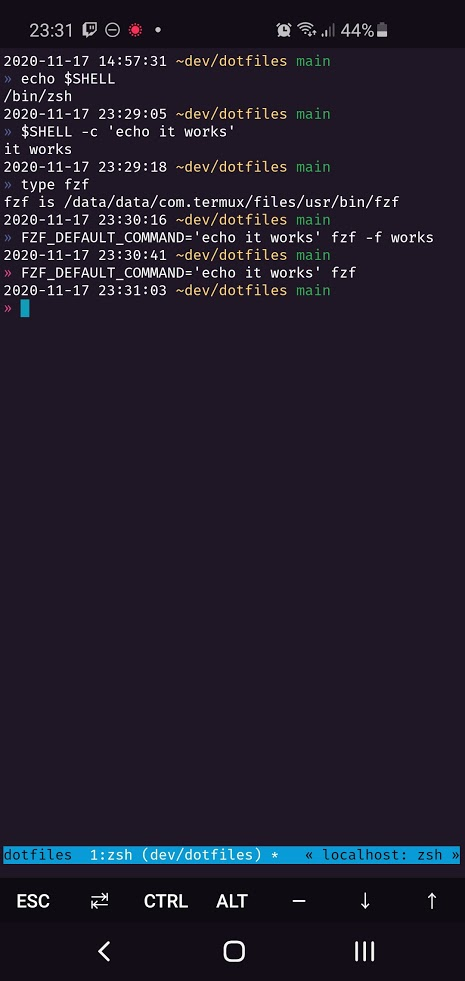
The last command looks like this when it's running.

henrebotha
on 17 Nov 2020
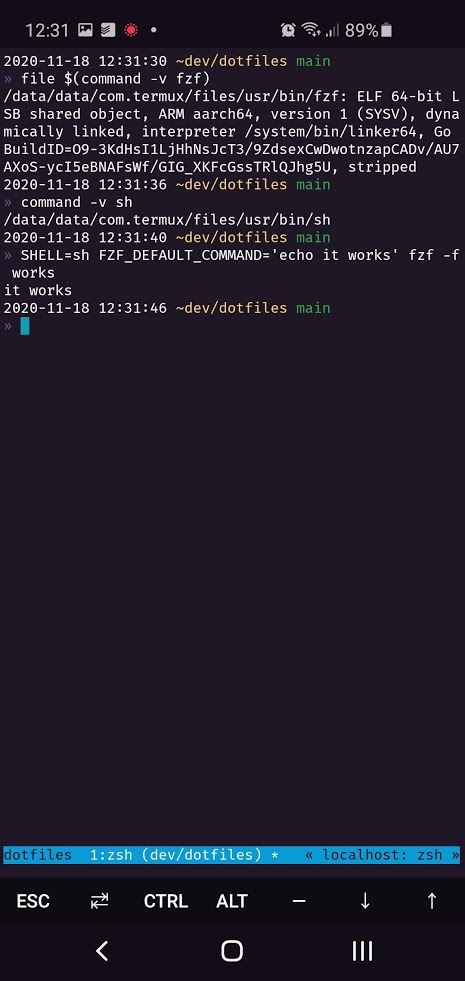
That's strange. Let's check a few more things.
file $(command -v fzf)

command -v sh

SHELL=sh FZF_DEFAULT_COMMAND='echo it works' fzf -f works
@junegunn
henrebotha
on 18 Nov 2020
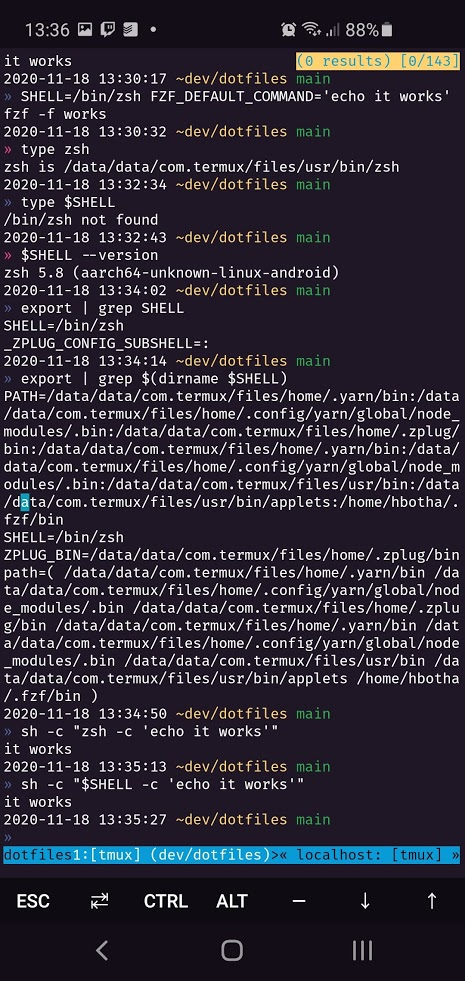
So it works with sh but not with zsh. Interesting. Any clue?
SHELL=sh FZF_DEFAULT_COMMAND='echo it works' fzf -f works

SHELL=zsh FZF_DEFAULT_COMMAND='echo it works' fzf -f works

SHELL=/bin/zsh FZF_DEFAULT_COMMAND='echo it works' fzf -f works

type zsh

type $SHELL

$SHELL --version

export | grep SHELL

export | grep $(dirname $SHELL)

sh -c "zsh -c 'echo it works'"

sh -c "$SHELL -c 'echo it works'"
Ah, interesting! I have no /bin/zsh (verified with which & ls), so the third command fails. Looks like somewhere my $SHELL is being set to /bin/zsh, which doesn't exist; but that doesn't explain to me why commands like /bin/zsh --version don't fail. :thinking:

henrebotha
on 18 Nov 2020
export SHELL=$(which zsh) does fix the issue. I still don't understand how /bin/zsh is able to execute when there is no /bin/zsh file…
henrebotha
on 18 Nov 2020
Maybe that's an alias? 🤔
alias | grep zsh
It's not an alias.
I think I've found the root cause here. From https://github.com/termux/termux-exec:
A lot of Linux software is written with the assumption that
/bin/sh,/usr/bin/env
and similar file exists. This is not the case on Android where neither/bin/nor/usr/
exists.When building packages for Termux those hard-coded assumptions are patched away - but this
does not help with installing scripts and programs from other sources than Termux packages.
I'm using the Termux terminal environment on Android, so this explains why /bin/zsh both does and does not exist, and why things that rely on such shebangs might be breaking. Installing the linked package & fully restarting Termux fixed the issue permanently for me.
I consider my issue resolved, but @pckilgore was on Linux, not Android, and so I don't think we can say the same for their problem.
henrebotha
on 18 Nov 2020
And my fault, this was fixed for me when the machine in question was upgraded to 20.04, unfortunately without me really understanding why, but at this point I suspect the universe of people who need to be on 18.04 and need to have FZF installed is pretty small.
Since @henrebotha 's issue is resolved I'll close.
pckilgore
on 18 Nov 2020
Oh, and thanks @junegunn, FZF is pretty much at the heart of my env, awesome piece of software.
pckilgore
on 18 Nov 2020
hey just a though as to why (being on ubuntu) did you check
update-alternatives --get-selections
dpkg-reconfigure
covers the maintaining of sh and why they chose dpkg-reconfigure over update-alternatives
https://unix.stackexchange.com/questions/437849/update-alternatives-vs-dpkg-reconfigure/437926#437926
shed some clues, im not sure how the "alternatives are set (they're not aliases) but they replace your default command with another of your choices that's in i believe /etc/alternatives because i know vi will return version despite it being vim or nvim but no vi installed
also just found
rayiik
on 19 Nov 2020
so the alternatives are symbolic links it looks like but i think its more likely the answer is more likely to do with the configuration of the package (dpkg-reconfigure) which isnt limited to symlinks as mentioned in the linked post, or at least the behavior sounds pretty close to package diversion behavior mentioned @pckilgore @henrebotha
rayiik
on 19 Nov 2020
Related issues
 netei
·
29Comments
netei
·
29Comments
 rburgst
·
14Comments
rburgst
·
14Comments
 anstadnik
·
15Comments
anstadnik
·
15Comments
 tmpm697
·
26Comments
tmpm697
·
26Comments
 SolidStill
·
14Comments
SolidStill
·
14Comments