- Category
- [ ] fzf binary
- [ ] fzf-tmux script
- [ ] Key bindings
- [x] Completion
- [ ] Vim
- [ ] Neovim
- [ ] Etc.
- OS
- [ ] Linux
- [x] Mac OS X
- [ ] Windows
- [ ] Windows Subsystem for Linux
- [ ] Etc.
- Shell
- [x] bash
- [ ] zsh
- [ ] fish
When typing vim bash**<TAB> it finds .bashrc but not .bash_profile even though I use it way more often.
 redreceipt
All 11 comments
I've had similar problems, but never posted a issue about it.
In my case it finds .bash_logout and .bash_profile, but not .bashrc nor .bash_history.
Plus, I have some folders (not empty, if it is of importance) in the home directory that I cannot cd to through Alt-C and I cannot search in through Ctrl-T. @redreceipt , do you really have problems only with those bash-related files you mentioned?
Now I've tried to rename a directory which is visible to fzf (in which I can both cd and search). It is no more visible now. I've tried to rename it back to its original name, but it is still invisible to fzf.
Maybe some kind of refresh is required?
 Aster89
on 1 Oct 2018
Aster89
on 1 Oct 2018
The ** script uses the following code :
    command find -L "$1" \
      -name .git -prune -o -name .svn -prune -o \( -type d -o -type f -o -type l \) \
      -a -not -path "$1" -print 2> /dev/null | sed 's@^\./@@'
So you should try to run this command and see what it outputs.
You can redeclare _fzf_compgen_path to fix the issue on your side.
 _fzf_compgen_path() {
    echo "$1"
    command find -L "$1" \
      -name .git -prune -o -name .svn -prune -o \( -type d -o -type f -o -type l \) \
      -a -not -path "$1" -print 2> /dev/null | sed 's@^\./@@'
  }
 edi9999
on 15 Oct 2018
edi9999
on 15 Oct 2018
I've had similar problems, but never posted a issue about it.
In my case it finds
.bash_logoutand.bash_profile, but not.bashrcnor.bash_history.Plus, I have some folders (not empty, if it is of importance) in the home directory that I cannot cd to through Alt-C and I cannot search in through Ctrl-T. @redreceipt , do you really have problems only with those bash-related files you mentioned?
Now I've tried to rename a directory which is visible to fzf (in which I can both cd and search). It is no more visible now. I've tried to rename it back to its original name, but it is still invisible to fzf.
Maybe some kind of refresh is required?
@Aster89 I'm not sure what directories it's not working for, that's just the first one I've come across and it's frustrating because I edit it so much.
redreceipt
on 15 Oct 2018
The ** script uses the following code :
    command find -L "$1" \
      -name .git -prune -o -name .svn -prune -o \( -type d -o -type f -o -type l \) \
      -a -not -path "$1" -print 2> /dev/null | sed 's@^\./@@'
So you should try to run this command and see what it outputs.
You can redeclare _fzf_compgen_path to fix the issue on your side.
 _fzf_compgen_path() {
    echo "$1"
    command find -L "$1" \
      -name .git -prune -o -name .svn -prune -o \( -type d -o -type f -o -type l \) \
      -a -not -path "$1" -print 2> /dev/null | sed 's@^\./@@'
  }
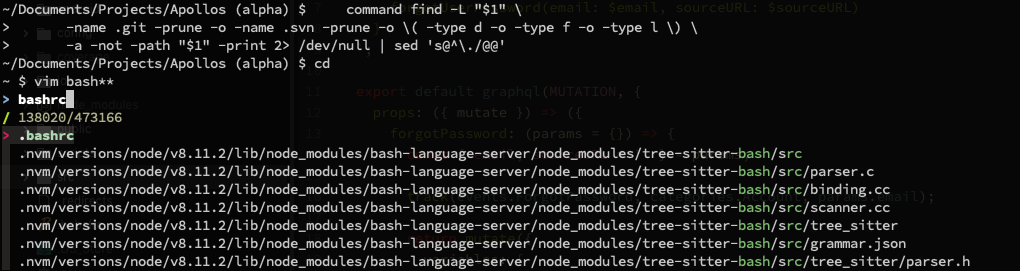
@edi9999 That script does nothing when I paste it in, but I'm not really sure what to expect or what it's supposed to do. but I can confirm fzf works in other instances.
redreceipt
on 15 Oct 2018
I've had similar problems, but never posted a issue about it.
In my case it finds.bash_logoutand.bash_profile, but not.bashrcnor.bash_history.
Plus, I have some folders (not empty, if it is of importance) in the home directory that I cannot cd to through Alt-C and I cannot search in through Ctrl-T. @redreceipt , do you really have problems only with those bash-related files you mentioned?
Now I've tried to rename a directory which is visible to fzf (in which I can both cd and search). It is no more visible now. I've tried to rename it back to its original name, but it is still invisible to fzf.
Maybe some kind of refresh is required?@Aster89 I'm not sure what directories it's not working for, that's just the first one I've come across and it's frustrating because I edit it so much.
I can't find my .vimrc with fzf either. It's located in .vim/.vimrc.
redreceipt
on 15 Oct 2018
I can see that the _fzf_compgen_path is the right thing.
If I overwrite _fzf_compgen_path() with the following :
  _fzf_compgen_path() {
      echo "foobar"
    echo "$1"
    command find -L "$1" \
      -name .git -prune -o -name .svn -prune -o \( -type d -o -type f -o -type l \) \
      -a -not -path "$1" -print 2> /dev/null | sed 's@^\./@@'
  }
I can see foobar in the list.
The find command is executed with the . argument, so the command executed is actually :
command find -L "." -name .git -prune -o -name .svn -prune -o \( -type d -o -type f -o -type l \) -a -not -path "." -print 2> /dev/null | sed 's@^\./@@'
The problem you get is probably that find is finding so many files that you don't see .bashrc because it is not loaded yet.
edi9999
on 15 Oct 2018
This is a bit linked to https://github.com/junegunn/fzf/pull/1380
I would advise you to add some ignores to the find command for directories that have lots of files but you don't need them.
edi9999
on 15 Oct 2018
@edi9999, I've hit Alt-C and written sufficient letters to identify the directoriey I'm looking for, then left the terminal alone. Eventually the directory is found. (I've done it for two directories.)
Concerning the dotted files, I couldn't wait enough time to have them found, not sooner than hitting system performances while working.
Aster89
on 6 Nov 2018
@redreceipt , what if you rename a directory that fzf successfully lists in reasonable time?
In my case, I renamed Dropbox to somthing else and then renamed it back to Dropbox, as a result, fzf finds it only after a long search.
Aster89
on 7 Nov 2018
find command uses depth-first traversal strategy. You probably want to look for or write a program that performs breadth-first directory traversal and use it as the command that generates the input.
By the way, in this particular case, I would just the normal tab completion.
 junegunn
on 8 Nov 2018
junegunn
on 8 Nov 2018
I might have had a similar issue: I couldn't find directories that are beyond directories starting with a dot. Alt-C looking for ytools which resides beyond .cache wasn't found. FZF Version 0.17.5 (b46227d).
I solved it with leaving out the -path parameter for find in the (zsh-)widget (~/.fzf/shell/key-bindings.zsh):
local cmd="${FZF_ALT_C_COMMAND:-"command find -L . -mindepth 1 \( -fstype 'sysfs' -o -fstype 'devfs' -o -fstype 'devtmpfs' -o -fstype 'proc' \) -prune
-o -type d -print 2> /dev/null | cut -b3-"}"
Original was:
local cmd="${FZF_ALT_C_COMMAND:-"command find -L . -mindepth 1 \( -path '/\.' -o -fstype 'sysfs' -o -fstype 'devfs' -o -fstype 'devtmpfs' -o -fstype 'proc' \) -prune
-o -type d -print 2> /dev/null | cut -b3-"}"
Maybe that helps!
I didn't elaborate much on the implications to leave out the -path-parameter.
 d-nnis
on 19 Mar 2019
d-nnis
on 19 Mar 2019
Related issues
 dboneham
·
17Comments
dboneham
·
17Comments
 vaxXxa
·
20Comments
vaxXxa
·
20Comments
 gerases
·
15Comments
gerases
·
15Comments
 gbnaidu
·
20Comments
gbnaidu
·
20Comments
 alotofnoodles
·
20Comments
alotofnoodles
·
20Comments