Fzf: Duplicates in history search and auto-Enter upon selections
- Category
- [ ] fzf binary
- [ ] fzf-tmux script
- [x] Key bindings
- [ ] Completion
- [ ] Vim
- [ ] Neovim
- [ ] Etc.
- OS
- [x] Linux
- [x ] Mac OS X
- [ ] Windows
- [ ] Windows Subsystem for Linux
- [ ] Etc.
- Shell
- [x] bash
- [ ] zsh
- [ ] fish
I have a couple of suggestions:
When searching through the history, provide an option to remove the duplicates in the history. I know that bash has options to remove duplicates, but I don't want to remove them since they provide important info for debugging and forensics.
How do I make fzf behave for CTRL-R/CTRL-T the same way it behaves for ALT-C. That is, I would like Enter to pressed automatically upon me selecting an entry?
 gerases
All 15 comments
1) For removing duplicates, use nauniq or similar to remove the duplicates :
Personally, I have written __fzf_history__()
by adding :
tac |
nauniq --skip-chars="$countskip" |
tac |
$(__fzfcmd) +s --tac +m -n2..,.. --tiebreak=index --toggle-sort=ctrl-r |
2) For having the same behaviour, the problem is that it is not possible with just bash. you can do cd $(fzf) which will work for CTRL-T however, in case of CTRL-R , we want to be able to see the output of the command and it should be attached.
It is probably possible if you use tmux (you could use tmux send-keys "Enter")
 edi9999
on 8 Jun 2018
edi9999
on 8 Jun 2018
Hi @edi9999,
Maybe it should be an option to fzf? It seems useful enough for me.
Thanks,
Sergei
gerases
on 8 Jun 2018
If you want an option about uniqueness, this won't be part of fzf, because we want to have tools that do one thing and one thing well, and they should be able to be combined (using stdin/stdout and pipes).
edi9999
on 9 Jun 2018
I'm interested in the "unique" feature, and I'm perfectly happy adding this to key-bindings.bash (which is where I found a __fzf_history__ function, which I assume you're talking about). But I'm unclear how to exactly put your changes in there. And nauniq, is that in reference to the Perl function? Thanks for your help.
 sverhagen
on 2 Sep 2018
sverhagen
on 2 Sep 2018
My current __fzf_history function is the following :
__fzf_history__() {
local line
countskip="$(history | tail -n 1 | grep -E '^ *[0-9]+' -o | wc -c)"
countskip="$(( countskip + 1 ))"
line=$(
HISTTIMEFORMAT= history |
grep '^.\{1,130\}$' --text |
sed 's/ *$//g' |
{ i=$(cat); head --lines=-50 <<<"$i" ; cat ~/shared_history | while read line; do echo " 0000 $line"; done; tail -n 50 <<< "$i"; } |
tac |
nauniq --skip-chars="$countskip" |
tac |
$(__fzfcmd) +s --tac +m -n2..,.. --tiebreak=index --toggle-sort=ctrl-r |
\grep '^ *[0-9]') && sed 's/ *\([0-9]*\)\** \(.*\)/\2/' <<< "$line"
}
However it has quite diverged from the base fzf_history function.
edi9999
on 2 Sep 2018
@sverhagen You don't have to edit key-bindings.bash directly. Just redefine it in your shell configuration file after the point key-bindings.bash is sourced.
# Load the default implementation
[ -f ~/.fzf.bash ] && source ~/.fzf.bash
# My version
__fzf_history__() {
...
}
 junegunn
on 3 Sep 2018
junegunn
on 3 Sep 2018
~That's all really helpful, thanks. Could you additionally tell me more about nauniq, I'm unclear on where that should be coming from?~
_Edit: never mind, found this._
sverhagen
on 3 Sep 2018
I use this one : https://github.com/perlancar/perl-App-nauniq/blob/master/script/nauniq but I guess they are the same
edi9999
on 3 Sep 2018
They are, and your script/additions are increasingly making sense to me. Thanks for putting me on that path. I think fzf is a great addition to my shell, and with your _uniqueness_ suggestion it's even better!
sverhagen
on 3 Sep 2018
fwiw, I used sort and uniq and it was fast enough on my machine for a history size of 15000. I changed only 1 line (the line starting with HISTTIMEFORMAT) from the default __fzf_history__ function in /usr/local/opt/fzf/shell/key-bindings.bash. (I'm running on macOS Sierra.)
~/.bashrc:
[ -f ~/.fzf.bash ] && source ~/.fzf.bash

# make fzf history search unique
__fzf_history__() (
    local line
    shopt -u nocaseglob nocasematch
    line=$(
        HISTTIMEFORMAT= history | sort -r -k 2 | uniq -f 1 | sort -n |
            FZF_DEFAULT_OPTS="--height ${FZF_TMUX_HEIGHT:-40%} $FZF_DEFAULT_OPTS --tac --sync -n2..,.. --tiebreak=index --bind=ctrl-r:toggle-sort $FZF_CTRL_R_OPTS +m" $(__fzfcmd) |
            command grep '^ *[0-9]'
        ) &&
        if [[ $- =~ H ]]; then
            sed 's/^ *\([0-9]*\)\** .*/!\1/' <<< "$line"
        else
            sed 's/^ *\([0-9]*\)\** *//' <<< "$line"
        fi
)
 saltycrane
on 5 Sep 2018
saltycrane
on 5 Sep 2018
@saltycrane's modified __fzf_history__ function works great for me, it could be an idea to have something like this in the default install and let it be enabled via an environment variable (e.g. FZF_UNIQUE_HISTORY=1).
 jameshiew
on 20 Jan 2019
jameshiew
on 20 Jan 2019
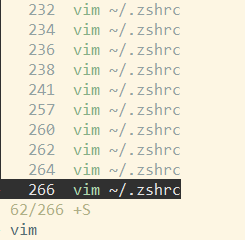
@edi9999 can you please help me troubleshoot why this function isn't working under zsh.
Please note that under _bash_ it does, but _zsh_ is the shell I work in.
I've added it using @junegunn 's directions, like this:
#[ ~/.zshrc ]
[ -f "$HOME/.fzf.zsh" ] && source "$HOME/.fzf.zsh"
__fzf_history__() {
local line
countskip="$(history | tail -n 1 | grep -E '^ *[0-9]+' -o | wc -c)"
countskip="$(( countskip + 1 ))"
line=$(
HISTTIMEFORMAT= history |
grep '^.\{1,130\}$' --text |
sed 's/ *$//g' |
{ i=$(cat); head --lines=-50 <<<"$i" ; cat ~/shared_history | while read line; do echo " 0000 $line"; done; tail -n 50 <<< "$i"; } |
tac |
nauniq --skip-chars="$countskip" |
tac |
$(__fzfcmd) +s --tac +m -n2..,.. --tiebreak=index --toggle-sort=ctrl-r |
\grep '^ *[0-9]') && sed 's/ *\([0-9]*\)\** \(.*\)/\2/' <<< "$line"
}
and got this:
Thank you!
 ovidiu-eremia
on 26 Mar 2019
ovidiu-eremia
on 26 Mar 2019
I made a slight modification to the solution of @saltycrane to retain the numbering/order of the latest commands:
HISTTIMEFORMAT= history | sort -k2 -k1rn | uniq -f 1 | sort -n |
basically subsorting the first number column in reverse as uniq only keeps the first of all duplicates.
Found this little quirk when fzf kept suggesting a typo'd command instead of the latest correct one.
 prokrypt
on 10 Sep 2019
prokrypt
on 10 Sep 2019
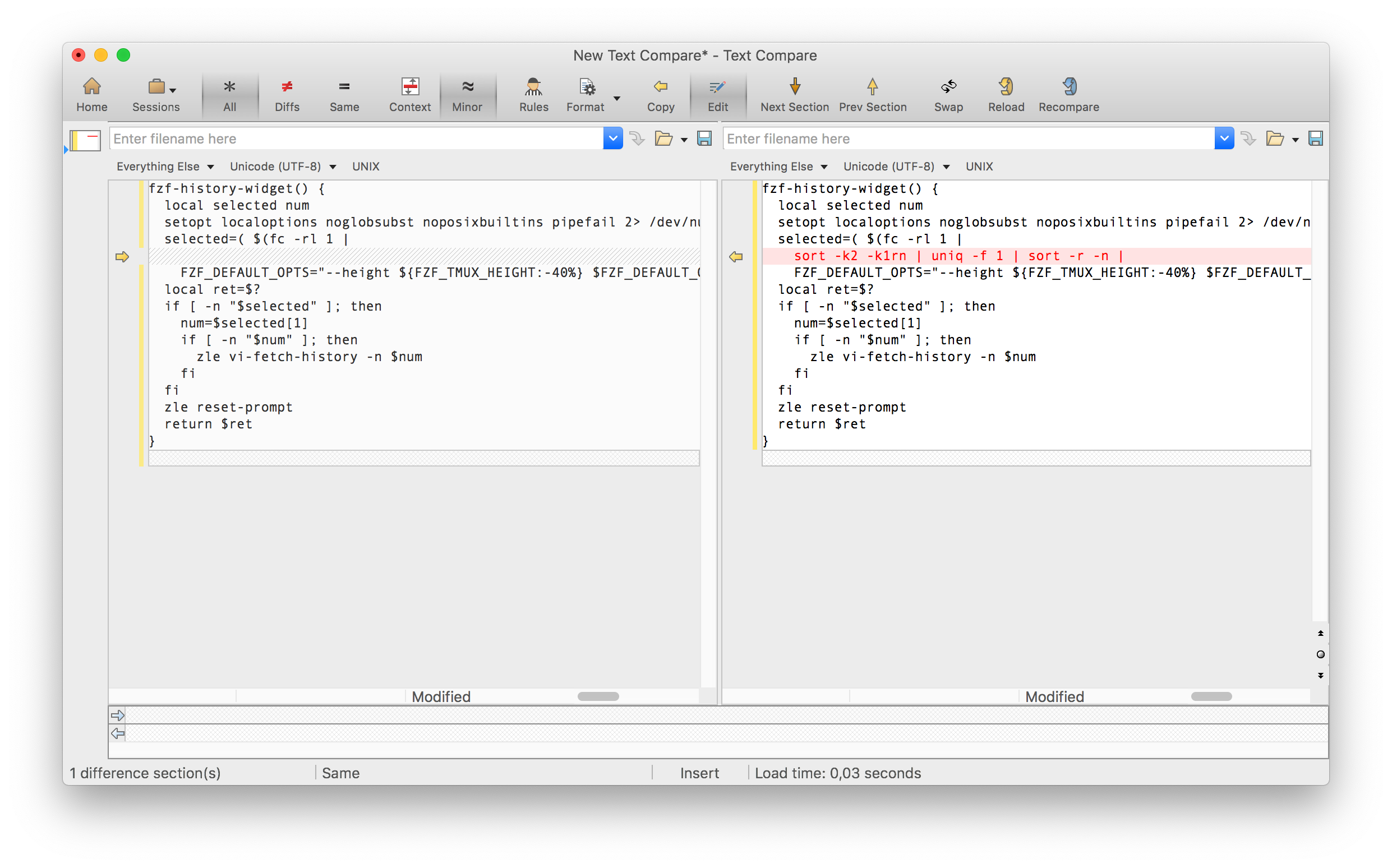
If somebody interesting this is the variant of @saltycrane function with @prokrypt fix for zsh that I use:
fzf-history-widget() {
  local selected num
  setopt localoptions noglobsubst noposixbuiltins pipefail 2> /dev/null
  selected=( $(fc -rl 1 |
    sort -k2 -k1rn | uniq -f 1 | sort -r -n |
    FZF_DEFAULT_OPTS="--height ${FZF_TMUX_HEIGHT:-40%} $FZF_DEFAULT_OPTS -n2..,.. --tiebreak=index --bind=ctrl-r:toggle-sort $FZF_CTRL_R_OPTS --query=${(qqq)LBUFFER} +m" $(__fzfcmd)) )
  local ret=$?
  if [ -n "$selected" ]; then
    num=$selected[1]
    if [ -n "$num" ]; then
      zle vi-fetch-history -n $num
    fi
  fi
  zle reset-prompt
  return $ret
}
 anuvyklack
on 12 Oct 2019
anuvyklack
on 12 Oct 2019
@anuvyklack Thanks a lot, this solution works!
For anyone wondering what the change against the original code is:
 borekb
on 7 Nov 2019
borekb
on 7 Nov 2019
Related issues
 alistaircolling
·
3Comments
alistaircolling
·
3Comments
 ghost
·
3Comments
ghost
·
3Comments
 nordlow
·
3Comments
nordlow
·
3Comments
 jan-warchol
·
3Comments
jan-warchol
·
3Comments
 chrisamow
·
3Comments
chrisamow
·
3Comments
Most helpful comment
fwiw, I used
sortanduniqand it was fast enough on my machine for a history size of 15000. I changed only 1 line (the line starting withHISTTIMEFORMAT) from the default__fzf_history__function in/usr/local/opt/fzf/shell/key-bindings.bash. (I'm running on macOS Sierra.)~/.bashrc: