Fzf: Search in files also searches against the filename
- Category
- [ ] fzf binary
- [ ] fzf-tmux script
- [ ] Key bindings
- [ ] Completion
- [x] Vim
- [x] Neovim
- [ ] Etc.
- OS
- [ ] Linux
- [x] Mac OS X
- [ ] Windows
- [ ] Windows Subsystem for Linux
- [ ] Etc.
- Shell
- [x] bash
- [ ] zsh
- [ ] fish
Using the command from this post: https://mkaz.tech/geek/unix-is-my-ide/
which is:
`command! -bang -nargs=* Find call fzf#vim#grep( 'rg --column --line-number --no-heading --fixed-strings --ignore-case --hidden --follow --color "always" '.shellescape(<q-args>), 1, <bang>0)
(Also happened when I used :Ag in fzf)
When I search for file content, the search string is also matched against the filename. For example, if I'm searching my code for the word "foo", it will give me results for the files that include the word "foo" in it's contents, but also list ALL the files with the word "foo" in it's filename.
How do I get it to only show me results against file contents and not against file name?
EDIT: Adding an example
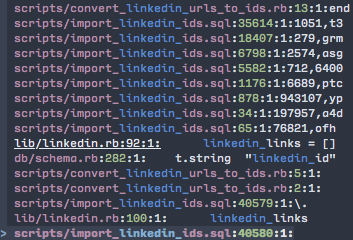
I searched for linkedin_ and in the screenie, it shows 2 files whose contents have linkedin_ in it. The rest of the results are polluted by the results against filenames that have linkedin_ in them.
 hahuang65
All 4 comments
 junegunn
on 26 Oct 2017
junegunn
on 26 Oct 2017
I'm not sure how to fit your answer to junegunn/fzf.vim#346 into my configuration. I'm using your default configuration for using ripgrep in your README.md,
specifically:
" Similarly, we can apply it to fzf#vim#grep. To use ripgrep instead of ag:
command! -bang -nargs=* Rg
  \ call fzf#vim#grep(
  \   'rg --column --line-number --no-heading --color=always '.shellescape(<q-args>), 1,
  \   <bang>0 ? fzf#vim#with_preview('up:60%')
  \           : fzf#vim#with_preview('right:50%:hidden', '?'),
  \   <bang>0)
You can pass additional options to fzf#vim#with_preview, so:
fzf#vim#with_preview({'options': '--delimiter : --nth 4..'}, 'up:60%')
By the way, to be clear, it's not the "default" configuration, it's just an example, and I don't use that one.
junegunn
on 27 Oct 2017
Thank you, worked out well!
hahuang65
on 27 Oct 2017
Related issues
 erusev
·
3Comments
erusev
·
3Comments
 aleclarson
·
3Comments
aleclarson
·
3Comments
 olethanh
·
3Comments
olethanh
·
3Comments
 natemara
·
3Comments
natemara
·
3Comments
 firedev
·
3Comments
firedev
·
3Comments
Most helpful comment
You can pass additional options to
fzf#vim#with_preview, so:By the way, to be clear, it's not the "default" configuration, it's just an example, and I don't use that one.