Fyne: Regarding the question of the form, hello dear fyne team, sorry I am here again, hope to help me this time
Is your feature request related to a problem? Please describe:
Now I have a json data, for example:
{[one1 one2 one3} {two1 tow2 two3} {tree1 three2 three3} {four1 four2 four3}]}
myJson.Results[0].first : one1
myJson.Results[0].second : one2
myJson.Results[0].third : one3
I hope to have this display effect:

But I can only do this:
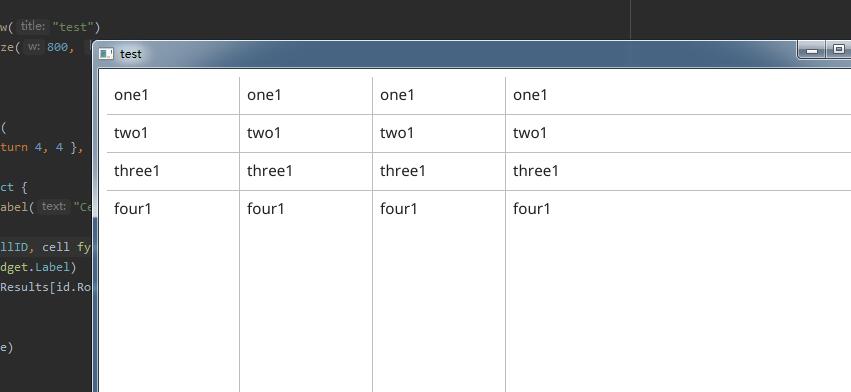
Below is my json file and code:
testJSON.zip
The above is the code file, in order to facilitate your reading, I also organized the following text code:
About main.go:
`package main
import (
"encoding/json"
"fmt"
"io/ioutil"
"os"
"fyne.io/fyne"
"fyne.io/fyne/app"
"fyne.io/fyne/widget"
)
type zhenshuju struct {
First string json:"first"
Second string json:"second"
Third string json:"third"
}
type jsonshuju struct {
Results []zhenshuju json:"results"
}
func main() {
myApp := app.New()
myWindow := myApp.NewWindow("test")
myWindow.Resize(fyne.NewSize(800, 600))
cut := jsonCut()

myTable := widget.NewTable(
    func() (int, int) { return 4, 4 },

    func() fyne.CanvasObject {
        return widget.NewLabel("Cell 000000, 000")
    },
    func(id widget.TableCellID, cell fyne.CanvasObject) {
        label := cell.(*widget.Label)
        label.SetText(cut.Results[id.Row].First)
    })

myWindow.SetContent(myTable)
myWindow.ShowAndRun()
}
func jsonCut() jsonshuju {
var data jsonshuju
resp, err := os.Open("./json.json")
if err != nil {
    fmt.Println(err)
}

bytes, err := ioutil.ReadAll(resp)
if err != nil {
    panic(err)
}

json.Unmarshal(bytes, &data)

return data
}
`
About json.json:
{
  "status":0,
  "message":"ok",
  "results":[
    {
      "first":"one1",
      "second":"one2",
      "third":"one3"
    },
    {
      "first":"two1",
      "second":"two2",
      "third":"two3"
    },
    {
      "first":"three1",
      "second":"three2",
      "third":"three3"
    },
    {
      "first":"four1",
      "second":"four2",
      "third":"four3"
    }
  ]
}
Hope to get your help!
Is it possible to construct a solution with the existing API?
Describe the solution you'd like to see:
 cplasfwst
All 17 comments
You have ignored id.Col when filling your results in the methiod:
func(id widget.TableCellID, cell fyne.CanvasObject) {
        label := cell.(*widget.Label)
        label.SetText(cut.Results[id.Row].First)
    }
 andydotxyz
on 12 Nov 2020
andydotxyz
on 12 Nov 2020
You have ignored
id.Colwhen filling your results in the methiod:func(id widget.TableCellID, cell fyne.CanvasObject) { label := cell.(*widget.Label) label.SetText(cut.Results[id.Row].First) }
Could you please show me how to watch it? I have already used id.Col
cplasfwst
on 12 Nov 2020
You are indexing into cut.Results with id.Row, but they you are always accessing First. Why not make cut.Results[id.Row][id.Col]?
 stuartmscott
on 12 Nov 2020
stuartmscott
on 12 Nov 2020
cut.Results[id.Row][id.Col]
Yes, Boss, I also considered cut.Results[id.Row][id.Col] before, but I don’t know how to define No is cut.Results[id.Row].First in json, but cut. Results[id.Row][id.Col]
Can you help me answer how JSON defines the structure as cut.Results[][]
T.T
cplasfwst
on 12 Nov 2020
Do you have control of the source of JSON? If so then instead of an array of maps:
{ "status":0, "message":"ok", "results":[ { "first":"one1", "second":"one2", "third":"one3" }, { "first":"two1", "second":"two2", "third":"two3" }, { "first":"three1", "second":"three2", "third":"three3" }, { "first":"four1", "second":"four2", "third":"four3" } ] }
Use an array of arrays:
{ "status":0, "message":"ok", "results":[ [ "one1", "one2", "one3" ], [ "two1", "two2", "two3" ], [ "three1", "three2", "three3" ], [ "four1", "four2", "four3" ] ] }
If you cannot change the JSON, then you need to map from int (id.Col) to string ("first", "second", "third", ...)
stuartmscott
on 12 Nov 2020
id.Col
Very enthusiastic god, boss! Unfortunately, I don’t have control over JSON, how should I change the setting to id.Col
cplasfwst
on 12 Nov 2020
There are probably several ways to do this, but maybe this will work;
func(id widget.TableCellID, cell fyne.CanvasObject) {
    label := cell.(*widget.Label)
    result := cut.Results[id.Row]
    var text string
    switch id.Col {
    case 0:
        text = result.First
    case 1:
        text = result.Second
    case 2:
        text = result.Third
    }
    label.SetText(text)
}
There are probably several ways to do this, but maybe this will work;
func(id widget.TableCellID, cell fyne.CanvasObject) {
  label := cell.(*widget.Label)
  result := cut.Results[id.Row]
  var text string
  switch id.Col {
  case 0:
      text = result.First
  case 1:
      text = result.Second
  case 2:
      text = result.Third
  }
  label.SetText(text)
}
This is a good solution, thanks, I am using it now! !
I'm really sorry to interrupt your precious time! thank
When closing the question, I will ask you one last time. Because json data is returned through API, I am not sure about func() (int, int) {return ?,? }, the length of the table, do you know how to judge JSON data For example, how many rows does cut.Results have, because I can’t make it generate a fixed number of rows
cplasfwst
on 13 Nov 2020
Assuming you will always have 3 columns;
func() (int, int) {
    return len(cut.Results), 3
}
Assuming you will always have 3 columns;
func() (int, int) {
    return len(cut.Results), 3
}
Okay, perfect! Thanks for the extreme! I have learned a lot and I feel that interest is coming up!
Because I use GET to get the JSON API, I need to input it on GET, for example &page_num=0 or &page_num=1 or &page_num=2
Only 20 JSON pages can be retrieved each time
I don’t want to update the data that the table has acquired
How to add new row JSON into TABLE
I used Table.UpdateCell, it seems to delete the original data
cplasfwst
on 13 Nov 2020
Assuming you don't want pagination in your UI then create a new slice var data []zhenshuju and update your callbacks to use it;
func() (int, int) {
    return len(data), 3
}
func(id widget.TableCellID, cell fyne.CanvasObject) {
    label := cell.(*widget.Label)
    result := data[id.Row]
    var text string
    switch id.Col {
    case 0:
        text = result.First
    case 1:
        text = result.Second
    case 2:
        text = result.Third
    }
    label.SetText(text)
}
Then whenever you do a GET, append the new results to data then call table.Refresh()
If you do want pagination then it is more complicated and I would suggest you hire @andydotxyz or myself to help you write the code.
stuartmscott
on 13 Nov 2020
Assuming you don't want pagination in your UI then create a new slice
var data []zhenshujuand update your callbacks to use it;func() (int, int) { return len(data), 3 } func(id widget.TableCellID, cell fyne.CanvasObject) { label := cell.(*widget.Label) result := data[id.Row] var text string switch id.Col { case 0: text = result.First case 1: text = result.Second case 2: text = result.Third } label.SetText(text) }Then whenever you do a GET, append the new results to
datathen calltable.Refresh()If you do want pagination then it is more complicated and I would suggest you hire @andydotxyz or myself to help you write the code.
I understand what you mean, I just thought of using a thing to store it! ! ! Great, if I encounter a problem, I will hire you to write a simple demo to help me learn. If the cost is not very high, haha no problem! ! ! I'm about to rest, it's morning on my side, I haven't slept yet, I'm a little tired! good night! I will close the topic, but this topic will not be deleted by the system, right? I will come back to watch and review
and goodnight!
cplasfwst
on 13 Nov 2020
Sleep well!
stuartmscott
on 13 Nov 2020
Sleep well!
good morning !!!
How should I set the width of each cell in TABLE, or a different width for each column? For example, three33333333333 is too long, it will extend the cell beyond
cplasfwst
on 13 Nov 2020
The cell size is determined by the template object returned from CreateCell. @andydotxyz is working on the functionality for setting individual column width.
stuartmscott
on 14 Nov 2020
Table.SetColumnWidth is now part of the release/v1.4.x branch ready for v1.4.1 release
andydotxyz
on 14 Nov 2020
Table.SetColumnWidthis now part of therelease/v1.4.xbranch ready forv1.4.1release
OK THANKS!!you
cplasfwst
on 18 Nov 2020
Related issues
 mhf-ir
·
6Comments
mhf-ir
·
6Comments
 bulatenkom
·
7Comments
andydotxyz
·
9Comments
bulatenkom
·
7Comments
andydotxyz
·
9Comments
 steveoc64
·
7Comments
steveoc64
·
7Comments
 boussou
·
9Comments
boussou
·
9Comments