Functions-samples: Firebase search by child value?
Hello guys,
I am trying to get "pushToken" value by searching child value called "deviceUid". Since my query returning null, I cant send notification to user..
Here is my db and I cant get push token value with following code;
Thank you..
  const deviceUID = event.params.deviceUID;
  console.log("deviceUID: ", deviceUID);
  //deviceUID: 1f2d34d

  const getpushTokenPromise = admin.database().ref('/users').child('pushToken').orderByChild('deviceUid').equalTo(deviceUID).once('value');

  getpushTokenPromise.then(pushTokenSnapshot => {
    const token = pushTokenSnapshot.val();
    console.log("token:" ,token);
    //token: null
  });

 beratuslu
All 4 comments
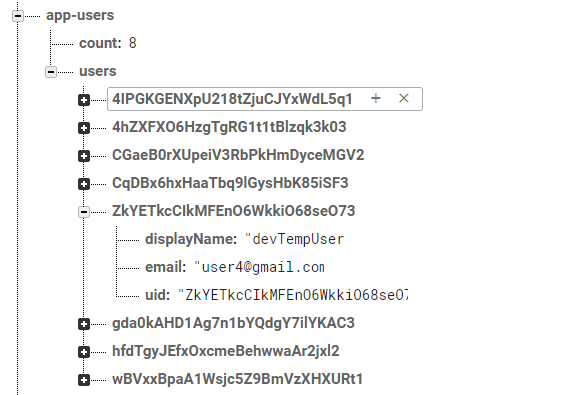
here is a quick sample
firebase().database().ref('/app-users/users/').orderByChild("email").equalTo('[email protected]').on('value', function (snapshot) {
       //snapshot would have list of NODES that satisfies the condition
    console.log(snapshot.val())
        console.log('-----------');

       //go through each item found and print out the emails
       snapshot.forEach(function(childSnapshot) {

       var key = childSnapshot.key;
      var childData = childSnapshot.val();

        //this will be the actual email value found
         console.log(childData.email);
  });

});
in your case
_childData.email_ would be childData.pushToken
_orderByChild("email")_ would be orderByChild("deviceUid")
 davvit
on 31 Oct 2017
davvit
on 31 Oct 2017
It looks like @davvit solved your problem before we could get to it. To make sure your query is efficient, also add this to your firebase database rules:
{
  "users": {
    "$userId": {
      ".indexOn": "deviceUid"
    }
  }
}
 inlined
on 5 Dec 2017
inlined
on 5 Dec 2017
Hi @inlined , I'm just wondering what the database rule that you listed does in this situation?
 alanscarpa
on 20 Apr 2018
alanscarpa
on 20 Apr 2018
It allows you to (efficiently) use orderByChild('deviceUid'). When the Firebase Realtime Database loads your node, it will keep a view of that data in deviceUid order.
Also, if you need complex querying, consider using Cloud Firestore.
inlined
on 24 Apr 2018
Related issues
 abhilash1in
·
4Comments
abhilash1in
·
4Comments
 inglesuniversal
·
5Comments
inglesuniversal
·
5Comments
 kaceo
·
3Comments
kaceo
·
3Comments
 Midhilaj
·
5Comments
Midhilaj
·
5Comments
 nhathiwala
·
4Comments
nhathiwala
·
4Comments
Most helpful comment
here is a quick sample
in your case
_childData.email_ would be childData.pushToken
_orderByChild("email")_ would be orderByChild("deviceUid")