Fullpage.js: On iOS in fp-responsive mode my callbacks are not firing and scrolling doesn't update anything
I'm using fullpage.js with responsiveWidth and responsiveHeight. On desktop using Chrome's web inspector at mobile size, fullpage.js functions fine. It adds the correct classes to the body and sections and my onLeave callback fires correctly.
But on my iPhone everything seems to initialize correct, however the callbacks don't work and nothing changes when scrolling. fp-responsive gets added to the body and so does fp-viewing-0 but fp-viewing-0 doesn't change when scrolling through the page.
Any idea why it's not listening to the scrolling on my iPhone?
fp = new fullpage( '#fullpage', {
    scrollingSpeed: 1100,
    scrollOverflow: true,
    responsiveWidth: 1025,
    responsiveHeight: 641,
    navigation: true,
    navigationPosition: 'left',
    onLeave: function( origin, destination, direction ) {
        console.log( 'onLeave' );
    }
} );
 gavin310
All 34 comments
It works as expected on the demo page:

Can you please provide an isolated reproduction in jsfiddle or codepen, with no CSS or JS files external to fullPage.js and the minimum amount of HTML code? Use empty sections unless strictly necessary for the reproduction.
 alvarotrigo
on 19 Oct 2020
alvarotrigo
on 19 Oct 2020
Will do. Thanks for the quick response!
gavin310
on 19 Oct 2020
Here's the fiddle, however please remember that this works fine using a desktop browser in dev tools/mobile view. The problem only occurs in Safari on iOS. https://jsfiddle.net/zf1r7cvm/2/ When I try to view this fiddle on my phone the layout is a mess and unusable, so I simplified the HTML below so I can upload to my website. The problem still occurs in this example.
- When you refresh the page and you are scrolled at the top of the page,
fp-viewing-0gets added but will not refresh when scrolling. - When you refresh the page and you are already scrolled down a bit, things will work correctly for a few seconds while scrolling and then the
fp-viewing-Xclass stops updating. - I think this is actually an issue with scrolloverflow.min.js.
<!DOCTYPE html>
<html>
<head>
  <meta http-equiv="content-type" content="text/html; charset=UTF-8">
  <title>test</title>
  <meta name="viewport" content="width=device-width, initial-scale=1">
  <script type="text/javascript" src="//code.jquery.com/jquery-git.js"></script>
  <link rel="stylesheet" type="text/css" href="https://unpkg.com/fullpage.js/dist/fullpage.min.css">
  <script type="text/javascript" src="https://unpkg.com/[email protected]/vendors/scrolloverflow.min.js"></script>
  <script type="text/javascript" src="https://unpkg.com/fullpage.js/dist/fullpage.min.js"></script>
  <style id="compiled-css" type="text/css">
    .section {
        text-align: center;
        font-size: 3em;
        font-family: arial;
    }
    body.fp-responsive .section {
      height: 600px;
    }
  </style>
</head>
<body>
    <div id="fullpage">
    <div class="section">Section 1</div>
    <div class="section">Section 2</div>
    <div class="section">Section 3</div>
    <div class="section">Section 4</div>
</div>
<script type="text/javascript">//<![CDATA[
  new fullpage( '#fullpage', {
      sectionsColor: ['yellow', 'green', 'purple', 'orange'],
      scrollingSpeed: 1100,
      scrollOverflow: true,
      responsiveWidth: 1025,
      responsiveHeight: 641,
      navigation: true,
      navigationPosition: 'left',
      onLeave: function( origin, destination, direction ) {
          console.log( 'onLeave' );
      }
  } );
//]]></script>
</body>
</html>
Do you experience the issue when using scrollOverflow: false?
On your fiddle scrollOverflow won't be used in any case as you have no need to use it with a single text in each section.
alvarotrigo
on 19 Oct 2020
I need scrollOverfow: true in my actual implementation of the plugin, so that's why I had it in there. I actually just removed scrolloverflow.min.js and the line scrollOverflow: true, and the problem still persists. Guess it's not a scrolloverflow.js issue.
gavin310
on 19 Oct 2020
@alvarotrigo Just want to follow up and see if you were able to reproduce this issue. Thanks!
gavin310
on 20 Oct 2020
I haven't had the time for it yet.
alvarotrigo
on 20 Oct 2020
Hi, I'm still having this issue. The onLeave event does not fire on iOS in Safari in responsive mode.
gavin310
on 25 Nov 2020
I'll give it a look tomorrow and see if I find anything.
alvarotrigo
on 25 Nov 2020
This might be related with this issue?
https://github.com/alvarotrigo/fullPage.js/issues/4114
I was testing it and I am not able to reproduce the issue on Safari using my own iPhone or using Browserstack iPhone 12 real device.
Here's the prof using the code you provided:
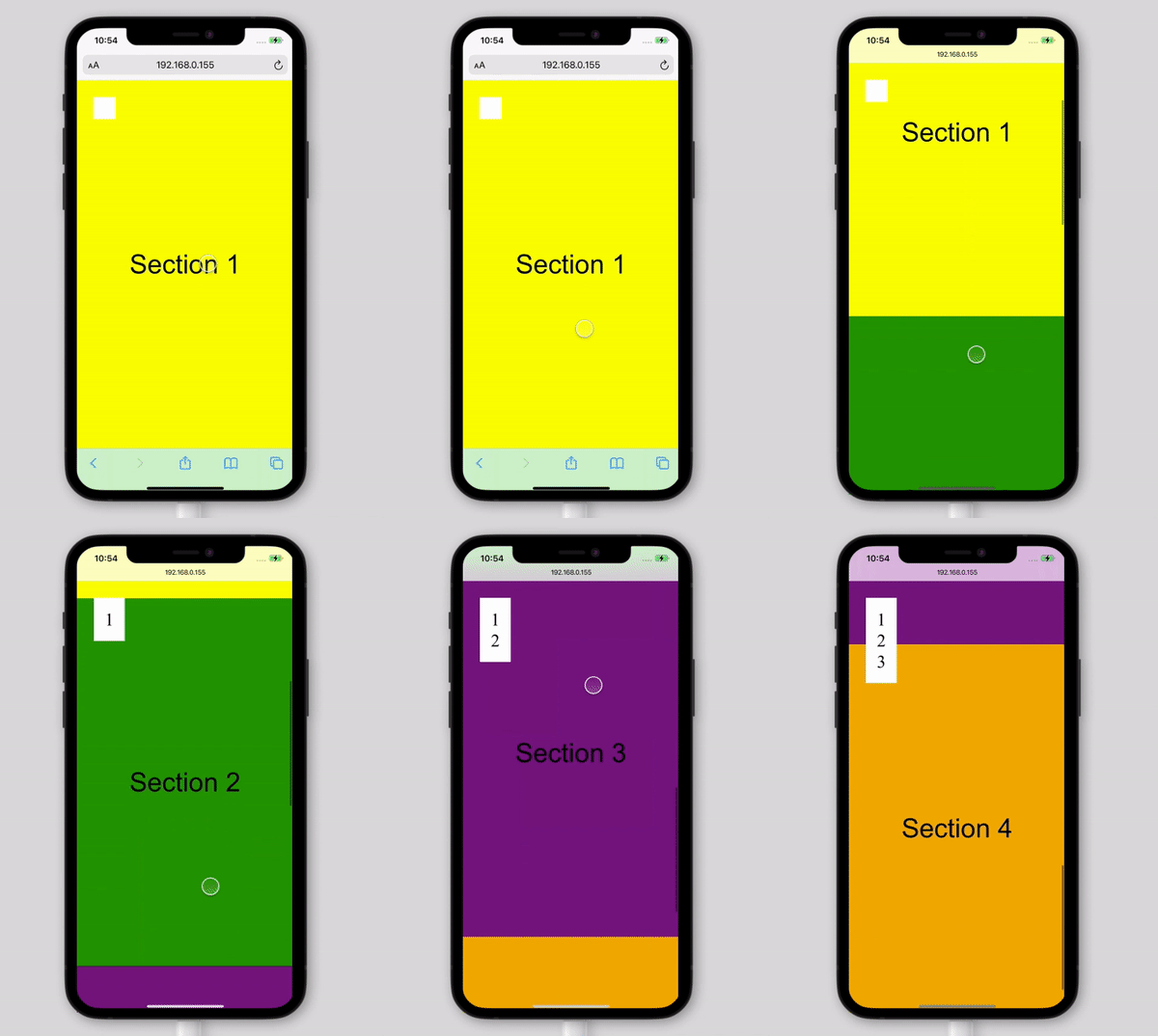
alvarotrigo
on 27 Nov 2020
@alvarotrigo Do you mind testing these URLs on your phone? All 3 of them do not work for me on my iPhone 6 in Safari:
http://www.pixeldigital.com/fullpage/test1.html (<meta name="viewport" content="width=device-width, initial-scale=1">)
http://www.pixeldigital.com/fullpage/test2.html (<meta name="viewport" content="width=640">)
http://www.pixeldigital.com/fullpage/test3.html (No viewport meta tag)
gavin310
on 27 Nov 2020
Yeah, all of them are working for me.
Using iPhone 11 Pro, iOS 14.2, Safari and Chrome.
alvarotrigo
on 27 Nov 2020
Ok, thank you for checking.
gavin310
on 27 Nov 2020
I'm not sure if this is related, but when viewing my website on Android, the animations (which I have hooked to the callbacks) don't fire while scrolling. Weirdly they work just fine, when testing in the Chrome developer tools, and using the responsive view tool. I'm not sure what's causing the problem.
Chrome Android: 87.0.4280.101
Chrome on Desktop: 87.0.4280.88
I've also tried using the device inspector, with my phone connected via USB. The only issues reported by my Android Chrome browser are the following:
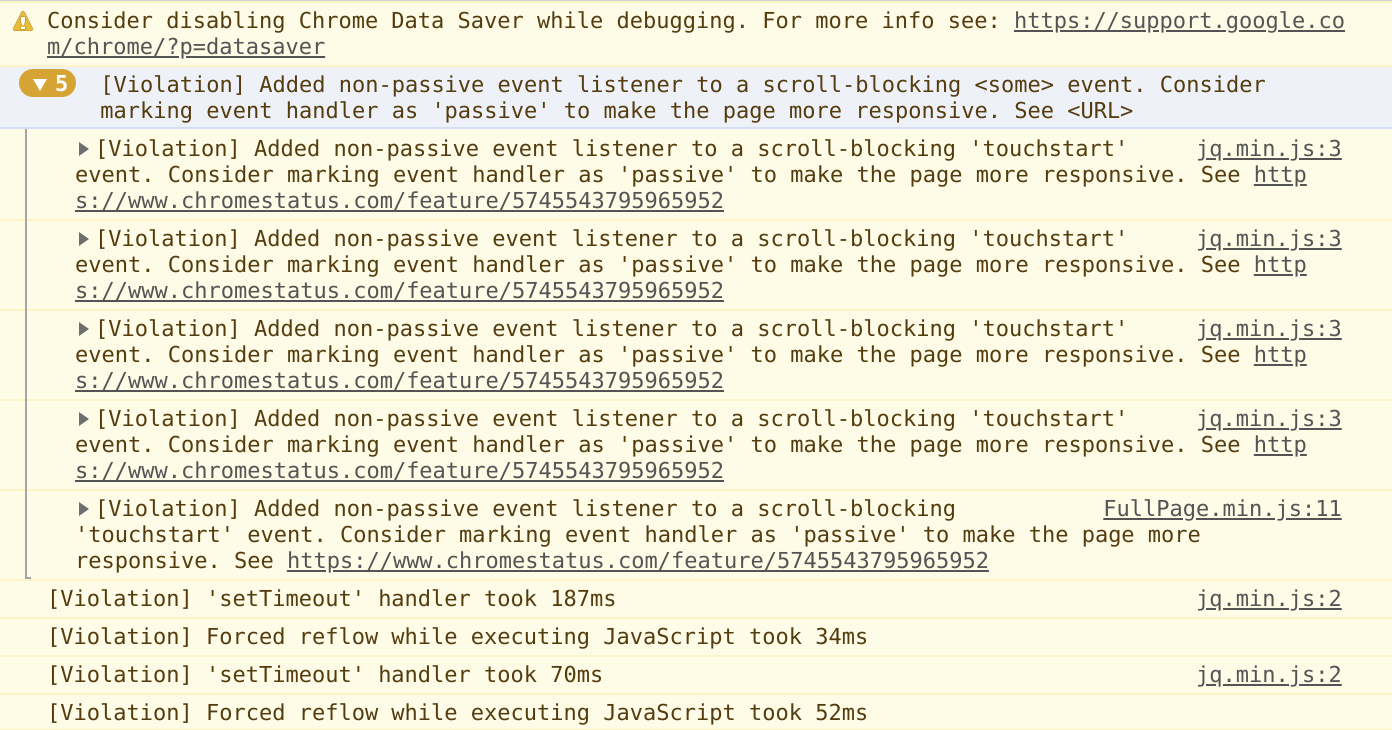
If you or anyone has an idea why this might be happening, I would be greatly appreciative. This is currently stopping us from releasing the website and going live.
This seems relevant to the issue: https://github.com/alvarotrigo/fullPage.js/issues/4082
Though nothing changes with removing or adding the initial-scale meta tag.
 Netroxen
on 16 Dec 2020
Netroxen
on 16 Dec 2020
@Netroxen
I assume jg.min.js doesn't contain fullpgae.js script so I guess not a fullpage.js issue.
alvarotrigo
on 16 Dec 2020
@alvarotrigo That's just for reference, as I can't debug why my callback animations placed in the onLoad function don't execute on mobile. On Desktop it works without issue...
$('#fullpage').fullpage({
    licenseKey: '',

    // Scrolling
    css3: true,

    // Design
    responsiveWidth: 1024,

    // Custom Selectors
    sectionSelector: '.scrollify',

    lazyLoading: true,

    // Events

    onLeave: function (origin, destination, direction) {

      let next = $(destination.item);
      let background_video = document.getElementById('background-video');

      if (direction == 'down' && destination.index == 1) {
        background_video.pause();
      } else if (direction == 'up' && destination.index == 0) {
        background_video.play();
      }

      // Run Once

      if (next.hasClass('is-init') != true) {
        if (next.hasClass('about-slider')) {
          requestAnimationFrame(animateAbout);
        } else if (next.hasClass('typer-slider')) {
          let text = $('#typer').data('text');
          requestAnimationFrame(textTyper.bind(null, text));
        } else if (next.hasClass('reverse-slider')) {
          animateSlide(next);
        }
        next.addClass('is-init');
      }

      // Header & Back to Top
      if (next.hasClass('eltdf-page-footer')) {
        $('#eltdf-back-to-top').addClass('invert');
      }

    },
    afterLoad: function (origin, destination, direction) {

      let secondary = destination.index;
      let sections = $('#fullpage').find('.scrollify');

      /* if (destination.index == 0) {
        requestAnimationFrame(overlayScaleOut);
      } */

      // Adjust Secondary to Direction

      let before;

      if (origin.index > 0) {

        before = (secondary - 1);

        if (direction == 'up') {

          secondary = (secondary - 1);

          if ($(origin.item).hasClass('eltdf-page-footer')) {
            $('#eltdf-back-to-top').removeClass('invert');
          }

        } else if (direction == 'down') {
          secondary = (secondary + 1);
        }
      } else {
        secondary = (secondary + 1);
      }

      // Add 'load' to Secondary

      let _before = $(sections[before]);
      let _primary = $(sections[destination.index])
      let _secondary = $(sections[secondary]);

      let sal_anims = _primary.find('*[data-sal]');

      sal_anims.each(function () {
        $(this).addClass('sal-animate');
      });

      if (before != null) {
        _before.addClass('load');
      }
      _primary.addClass('load');
      _secondary.addClass('load');

    }
  });
Weirdly, when I scroll really fast on mobile, the callbacks are triggered, however if I load the page, pause for a second and then scroll, nothing animates and the callbacks fail. Not even fullpage.js modifies the body classes.
Netroxen
on 16 Dec 2020
@Netroxen try the demos provided by @gavin310 on his comment.
http://www.pixeldigital.com/fullpage/test1.html ()
http://www.pixeldigital.com/fullpage/test2.html ()
http://www.pixeldigital.com/fullpage/test3.html (No viewport meta tag)
Those are fully isolated.
alvarotrigo
on 16 Dec 2020
@alvarotrigo Issue is reproducible on the first 2 links, the last one works.
http://www.pixeldigital.com/fullpage/test1.html After load, pause for 3 seconds, white box doesn't update.
http://www.pixeldigital.com/fullpage/test2.html After load, pause for 3 seconds, white box updates, but only for the first slide.
http://www.pixeldigital.com/fullpage/test3.html After load, pause for 3 seconds, white box updates, no problems.
I'll try and make a video to show this error. It only seems to happen on Android or iOS as it seems. On desktop it works fine, even in responsive view with the same window dimensions.
Netroxen
on 16 Dec 2020
Please watch the video here: http://imgur.com/a/uB1s6of
This is with the first link, as you see, loading and scrolling instantly works. Loading and waiting before scrolling does not. This is the same issue I have on my site, as the animation callbacks do not run.
Netroxen
on 16 Dec 2020
I also had the issue where if I quickly scrolled when the page first loaded, the white box updated. But very quickly it would stop updating.
gavin310
on 16 Dec 2020
@gavin310 Alternatively, could you please test with the first link, if you load the page, wait some seconds and then slowly scroll down like in my video. Could you try reproducing the same..?
This is a very strange issue.
If there's no solution to this issue, then I'm going to have to use an additional library to trigger the animations when the elements are in view. I don't want to do this if I don't have to, as it means rewriting a bunch of stuff.
@alvarotrigo I sent a message from your website with my project testing site URL (do not want to post it publicly here). Perhaps it's useful for testing..?
Netroxen
on 16 Dec 2020
@Netroxen Yes I experience the same behavior. However, when I scroll quickly it does work correctly, but after continuing to scroll it will stop working again and the number will stop changing.
gavin310
on 16 Dec 2020
@gavin310 Okay it's the same for me, I guess we need to wait for some more input on this then...
Netroxen
on 16 Dec 2020
I'm just glad someone else is experience this lol. I was planning on removing fullPage.js from my site in the next few days because of this bug, but if the issue could get fixed that would be awesome!
gavin310
on 16 Dec 2020
I'm also on my last legs with this, tried everything, have tried some other plug-ins and they work fine - the nice thing for me at least, is that fullpage.js supports variable section heights. I haven't found an alternative which does the same unfortunately.
With that said, if I can't find a solution to this, I'll have to find something else...
Netroxen
on 16 Dec 2020
http://www.pixeldigital.com/fullpage/test1.html After load, pause for 3 seconds, white box doesn't update.
Right! After waiting for those 3 seconds I was able to reproduce the issue.
I believe it has been fixed in the latest developing version 3.1.0.
Can you guys please try again with the file on the dev branch?
https://github.com/alvarotrigo/fullPage.js/blob/dev/src/fullpage.js
Let me know if that works for you. It worked for me.
alvarotrigo
on 16 Dec 2020
@alvarotrigo @Netroxen It works for me now! I made a new test page at http://www.pixeldigital.com/fullpage/update/test1.html
This is such a huge relief, thank you @alvarotrigo !
gavin310
on 16 Dec 2020
@alvarotrigo Oh my... It actually works, this is incredible! Thank you guys!
Netroxen
on 16 Dec 2020
Glad it got solved! :)
alvarotrigo
on 16 Dec 2020
I'm facing the same issue on iOS 12 Safari and on Android in latest Chrome 87.
Tried to use dev build of fullpage 3.1.0, but unfortunately the issue is still there =(
UPD: My bad. Used another dev version apparently.
With https://github.com/alvarotrigo/fullPage.js/blob/dev/src/fullpage.js everything works fine. Thanks @alvarotrigo!
 suxscribe
on 23 Dec 2020
suxscribe
on 23 Dec 2020
@suxscribe glad you managed to fix it! :)
alvarotrigo
on 23 Dec 2020
In vue-full page I think I am facing the same issue as this. Would you mind update vue-page to the latest 3.1.0 pls? @alvarotrigo
 antyoxydant
on 10 Jan 2021
antyoxydant
on 10 Jan 2021
@antyoxydant please comment on the vue-fullpage repository
alvarotrigo
on 10 Jan 2021
Fixed on fullpage.js 3.1.0
alvarotrigo
on 1 Mar 2021
Related issues
 Sperziemone
·
5Comments
Sperziemone
·
5Comments
 Andi-Stevenson
·
4Comments
Andi-Stevenson
·
4Comments
 meceware
·
3Comments
meceware
·
3Comments
 VanIvano
·
5Comments
VanIvano
·
5Comments
 lunaandyou
·
4Comments
lunaandyou
·
4Comments
Most helpful comment
I'm not sure if this is related, but when viewing my website on Android, the animations (which I have hooked to the callbacks) don't fire while scrolling. Weirdly they work just fine, when testing in the Chrome developer tools, and using the responsive view tool. I'm not sure what's causing the problem.
Chrome Android: 87.0.4280.101
Chrome on Desktop: 87.0.4280.88
I've also tried using the device inspector, with my phone connected via USB. The only issues reported by my Android Chrome browser are the following:
If you or anyone has an idea why this might be happening, I would be greatly appreciative. This is currently stopping us from releasing the website and going live.
This seems relevant to the issue: https://github.com/alvarotrigo/fullPage.js/issues/4082
Though nothing changes with removing or adding the
initial-scalemeta tag.