Fullpage.js: How to enable arrow key scrolling up/down when using scrollOverflow
Hello, I wrote an issue few weeks ago, and I could release a page with fullPage.js. Thank you so much!
Today I have another issue. First of all, let me write the layout of the page.
The page has scrollOverflow: true setting.
It's like this,
Section1 -- full screen page
Section2 -- full screen page
Section3 -- a long section in the bottom of the page. This section scrolls.
Few days ago, my client mentioned an issue that arrow key scrolling up/down doesn't work in Section3. And I'm trying to solve it.
I read iScroll.js library is used. So I set scrollOverflowOptions like below.
        scrollOverflowOptions:{
            keyBindings: {
                pageUp: 33,
                pageDown: 34,
            }
        },
It worked. I can scroll Section3 with the down arrow key.
But, once I try to up the page with the up arrow key, the screen moves to Section2 immediately. It looks like Section 3 disappeared.
I thought it happens because the height of Section3 isn't recognized...? I have no idea how to solve this situation.
Could you please give me some advice?
I've been wondering if it's better to write on the iScroll github page.
Thank you,
 akikokubo
All 12 comments
Can you please provide an isolated reproduction in jsfiddle or codepen, with no CSS or JS files external to fullPage.js and the minimum amount of HTML code? Use empty sections unless strictly necessary for the reproduction.
Perhaps you might find useful to read my article regarding how to create isolated reproductions.
 alvarotrigo
on 25 May 2019
alvarotrigo
on 25 May 2019
Thank you so much for your kind reply!
I'll prepare and show an isolated reproduction this week.
akikokubo
on 27 May 2019
Hello, I prepared a reproduction. I appreciate if you take a look.
Description
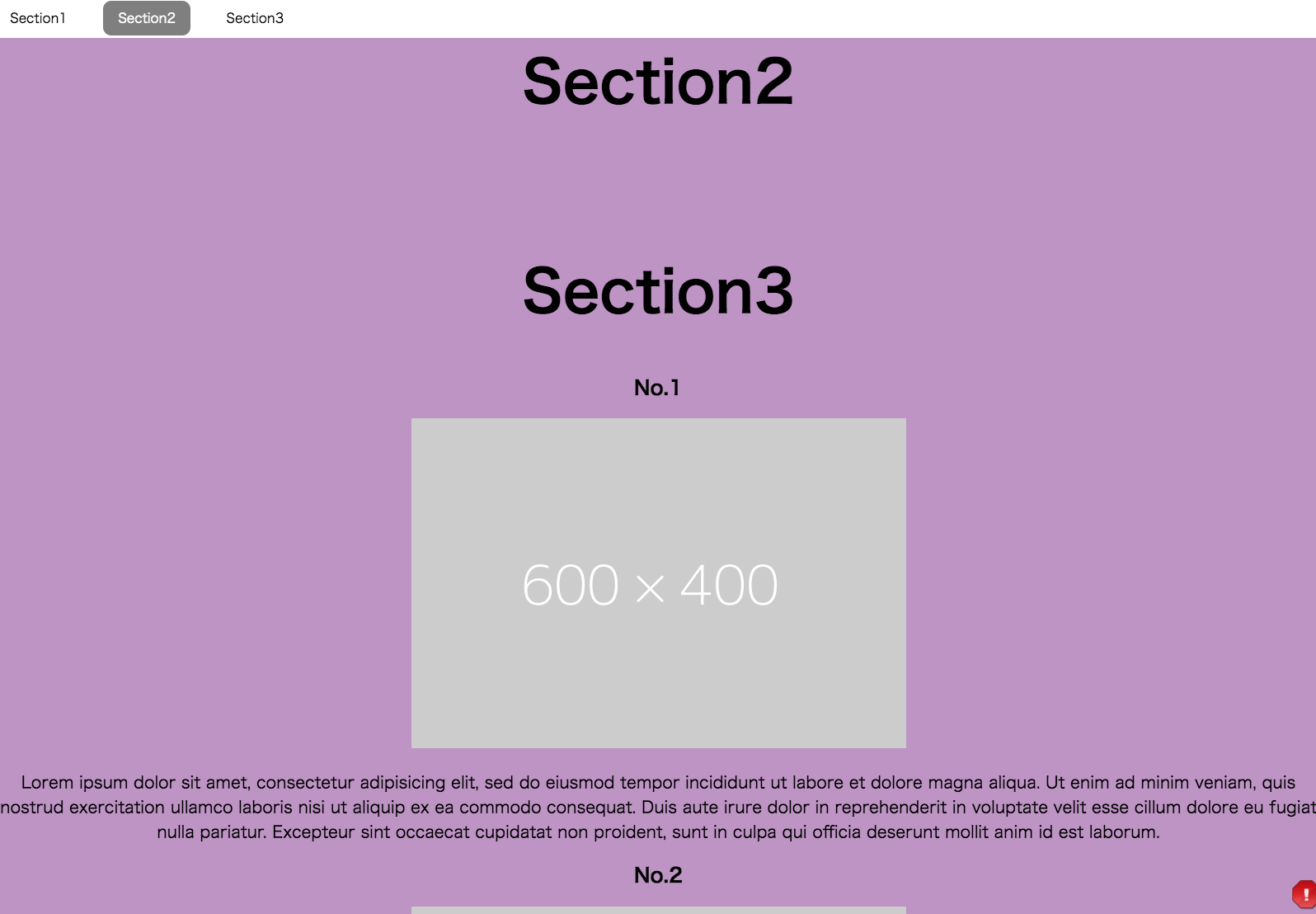
A scrolling section covers a section above, when I scroll with the down/up arrow keys.
But I'd like to show the contents without covering.
Link to isolated reproduction with no external CSS / JS
https://codepen.io/akikokubo/pen/NVzWPV
Steps to reproduce it
- Go to Section3 with a down arrow key.
- Scroll to No.4 in Section3 with keeping pressing the down arrow key.
- Press the up arrow key to scroll up and find No.1 in Section3. No.1 is hunging over Section2 as below.
Versions
Chrome 74.0.3729.169 Mac
got the same result on Windows Chrome
Thank you,
akikokubo
on 30 May 2019
Hi,
I don't see the CSS file at the page.
https://rawgit.com/alvarotrigo/fullPage.js/dev/src/fullpage.css
If you add it, I don't see a problem.
 meceware
on 3 Jun 2019
meceware
on 3 Jun 2019
Hello, thank you so much for taking a look of my issue.
I should have added the CSS file at the page. I added it.
https://codepen.io/akikokubo/pen/NVzWPV
Section3 doesn't hang over Section2, but Section3 is hidden under Section2.
- Go to Section3 with a down arrow key.
- Scroll to No.4 in Section3 with keeping pressing the down arrow key.
- Press the up arrow key to scroll up to Section2.
- Press the down arrow key to see No.1 in Section3. But Section3 is shown like this.
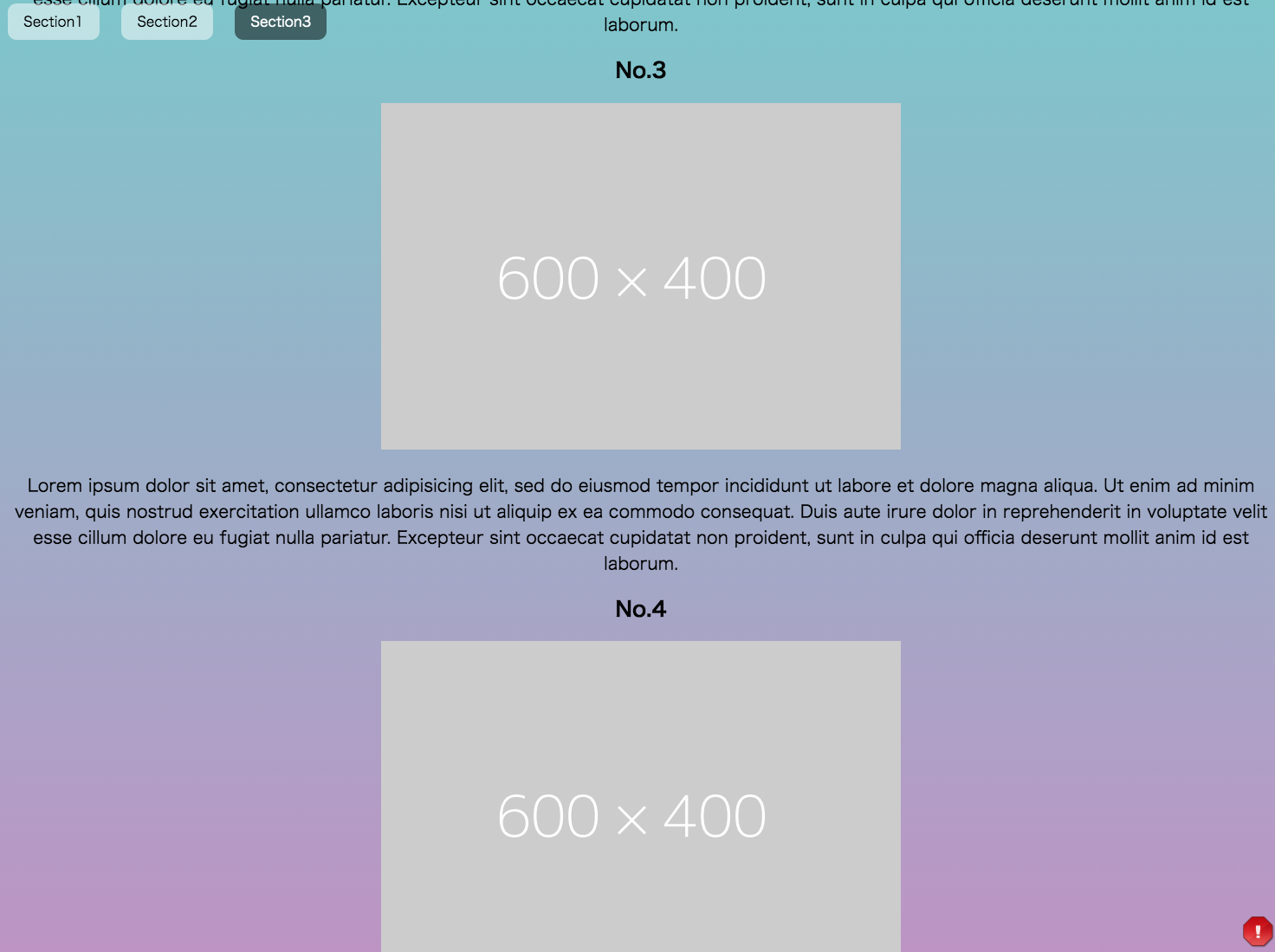
No.1 in Section3 doesn't appear as if it is drawn into Section2. (I'm sorry if this expression is weird...)
akikokubo
on 3 Jun 2019
Scroll overflow does not reset itself. That's why it doesn't go to no 1 in the section. But it's still there and there is no error here.
meceware
on 3 Jun 2019
Thank you so much! I think I understand... that means, if there's a page with the scrolling section, and I'd like to use the scroll up/down key, the behavior of the page is not the same as a mouse operation. Is this understanding is correct?
akikokubo
on 3 Jun 2019
Thanks for those replies @meceware ! 👍
the behavior of the page is not the same as a mouse operation. Is this understanding is correct?
That's it. It is a nice observation!
I think this is something that can be improved, so I've labeled it as a possible enhancement.
The behaviour could be:
- Add a new option "scrollOverflowKeyboard" (default false?)
- When set to true, user will be able to use the arrow keys to scroll within the scrollOverflow section.
- When reaching the top or the bottom, if there's any section above or below, it would scroll to the previous or next one.
I usually prefer not to add many more options into fullPage.js, but I guess this is the only way to solve this issue, as I guess some prefer to keep the current behaviour?
alvarotrigo
on 3 Jun 2019
Hello,
I appreciate your kind support @meceware.
And I am grateful for your thoughtful consideration @alvarotrigo .
I look forward to the future enhancement. Thanks for your great work.
akikokubo
on 4 Jun 2019
Hello!
I solved this by doing this
onLeave(origin, destination, direction) {
  const scroll = origin.item.querySelector('.fp-scrollable');
  if (scroll) {
      const cannotPrev = origin.index > destination.index && scroll.fp_iscrollInstance.y < 0;
      const cannotNext = origin.index < destination.index && scroll.fp_iscrollInstance.y > scroll.fp_iscrollInstance.maxScrollY
      if (cannotPrev || cannotNext) {
        return false;
      }
   }
}
Here's a fork of @akikokubo's codepen
https://codepen.io/Trollhag/pen/gOarBdZ
Edit;
Check direction, so not to disable scroll to next section.
Edit 2;
Need to check if at the bottom of the page to allow scroll to next.
 Trollhag
on 17 Apr 2020
Trollhag
on 17 Apr 2020
but did you notice @Trollhag that the menu does not work properly now. What can be a solution to this? If you are in the middle of the scrollable page and click the menu items it does not scroll to another page.
 learncopycode
on 17 Dec 2020
learncopycode
on 17 Dec 2020
@learncopycode Oh, I didnt use a navigation for the application I used this for so I didnt notice. I'll take a look at it.
Trollhag
on 17 Dec 2020
Related issues
 anonet1
·
3Comments
anonet1
·
3Comments
 cavias
·
3Comments
cavias
·
3Comments
 lunaandyou
·
4Comments
lunaandyou
·
4Comments
 pigerla
·
4Comments
pigerla
·
4Comments
 ortonomy
·
3Comments
ortonomy
·
3Comments
Most helpful comment
Hello!
I solved this by doing this
Here's a fork of @akikokubo's codepen
https://codepen.io/Trollhag/pen/gOarBdZ
Edit;
Check direction, so not to disable scroll to next section.
Edit 2;
Need to check if at the bottom of the page to allow scroll to next.