Fullpage.js: scrollOverflow and paddingTop toghether Issue.
I have a problem using toghether the options paddingTop and scrollOverflow.
On all resizing of the window the section alternatively create the scroll wrapper and then destroy it. This create some problems on my real layout.
Here the example: https://jsfiddle.net/StepBaro/h1g41yzu/
I think the problem is in the the function scrolloverflow.js > createScrollBar.
First it get the content height
contentHeight = element.get(0).scrollHeight;the content is the whole page height with padding.Then the function get the scroll viewport height without padding
var scrollHeight = $(window).height() - parseInt(section.css('padding-bottom')) - parseInt(section.css('padding-top'));
- Finally the function check this:
    //needs scroll?
    if ( contentHeight > scrollHeight) {
_And this is true! the contentHeight is bigger than scrollHight._
This generate a loop of creation and destroy of the scroll wrapper, because when the scroll plugin wrap the section, at the next resizing the same check is false and the wrapped section becomes clean.
How can I solve it ? it is a bug or I missing some options ?
 Baro82
All 6 comments
You are using fp-tableCell as a wrapper as in the section element itself.
You should not be using any class of fullpage.js by yourself. They are for internal use only.
The fp-tableCell class gets applied when using verticalCentered: true. You are currently using verticalCentered:false and trying to apply it by yourself.
Solution online
Use the following structure and you should be ok:
<div id="fullpage">
    <div class="section">Section 1</div>
    <div class="section">Section 2</div>
    <div class="section">Section 3</div>
    <div class="section">Section 4</div>
</div>
And use instead verticalCentred: true:
$(document).ready(function() {
    $('#fullpage').fullpage({
        paddingTop: '80px',

        verticalCentered: true,
        css3: false,
        setAllowScrolling: false,
        animateAnchor: false,

        scrollOverflow: true,
    });
});
 alvarotrigo
on 26 Nov 2017
alvarotrigo
on 26 Nov 2017
Hi Alvaro,
thanks for your support ! Probably my example was not significant and the use of internal classes was misleading (due to many tests for debug the problem).
My real page is much more complex, and my goal is not the vertical center, but the problem remains without the use of internal classes.
If you look at the new example below where I left the main section intact, and I worked only on the content, the layout seems to be correct, but the wrong calculation of height is still there (and the console report an error TypeError: iScrollInstance is null).
I had import the whole scrolloverflow.js in code section for add a console.log to test the values.
https://jsfiddle.net/h1g41yzu/3/
Probably with this discussion I can resolve my own problem, but this can be a bug...
Thanks again :)
Alessandro
Baro82
on 27 Nov 2017
My real page is much more complex, and my goal is not the vertical center, but the problem remains without the use of internal classes.
I don't see any problem on this demo:
https://jsfiddle.net/h1g41yzu/4/
Where's the issue? Please details the steps to reproduce it.
alvarotrigo
on 27 Nov 2017
First of all, check the new version of the jsfiddle (updated from the version 3), where I add a console.log on scrolloverflow.js:
//needs scroll?
console.log('need scroll ? contentHeight > scrollHeight // ' + contentHeight + '>' + scrollHeight);
if ( contentHeight > scrollHeight) {
For test it try to resize the window more times. The result is an alternate wrap and unwrap of the section with and without the scrollbar... in this example is more evident: https://jsfiddle.net/h1g41yzu/5/
Here the console log of the problem:
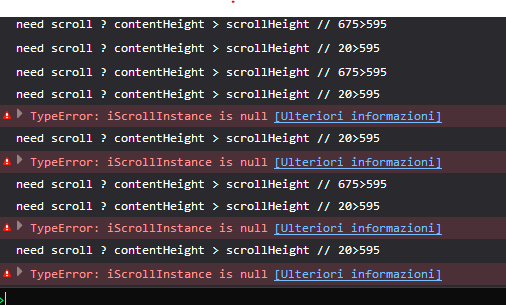
If you set the verticalCentered:true the problem is no longer there, this is my solution for my current site.
Hope this help you.
Baro82
on 27 Nov 2017
Ok, I see the issue now!
Thanks for reporting it!
alvarotrigo
on 27 Nov 2017
Fixed on dev. Scrolloverflow v0.0.5
alvarotrigo
on 10 Jan 2018
Related issues
 lunaandyou
·
4Comments
lunaandyou
·
4Comments
 rslcdmc
·
3Comments
rslcdmc
·
3Comments
 Sperziemone
·
5Comments
Sperziemone
·
5Comments
 vishnu1212
·
5Comments
vishnu1212
·
5Comments
 kacho
·
3Comments
kacho
·
3Comments
Most helpful comment
Hi Alvaro,
thanks for your support ! Probably my example was not significant and the use of internal classes was misleading (due to many tests for debug the problem).
My real page is much more complex, and my goal is not the vertical center, but the problem remains without the use of internal classes.
If you look at the new example below where I left the main section intact, and I worked only on the content, the layout seems to be correct, but the wrong calculation of height is still there (and the console report an error
TypeError: iScrollInstance is null).I had import the whole
scrolloverflow.jsin code section for add aconsole.logto test the values.https://jsfiddle.net/h1g41yzu/3/
Probably with this discussion I can resolve my own problem, but this can be a bug...
Thanks again :)
Alessandro