Fullpage.js: Pagescroll when Keyboard is invoked on mobile devices
In cases where I have a form on a mobile devices an input and an input is on focus, the keyboard appears which overlaps some fields. The issue is that I cannot use those fields because as soon as I swipe to reveal the overlapped field, the page scrolls to the next section.
Also slimscroll doesnt work because it calculates the height without the keyboard and so the slimscroll plugin isn't invoked. Any insights on how to solve this?
Device: Nexus 7
OS: Kitkat
autoscroll: true
 AdityaNayak
All 29 comments
Having a "similar" issue on iOS. When an input field is active and the keyboard appears, iOS automatically scrolls the field into view. (For some designs this can make the fullpage site/section look a bit weird, but that's not the main issue here.)
When the keyboard is dismissed again the offset in the scrollTop is not reset, resulting in all the sections scrolling to incorrect positions, for example in the middle of two sections.
My current workaround is to reset the scrollTop on blur like so:
$('input[type="text"]').blur(function() {
$(window).scrollTop(0,0);
});
This works for now and I've also confirmed it's compatible with slimScroll since it only targets the window scrollTop value, but it causes a little annoying "flicker"/"jump" when moving from one input field to another, but that can probably be solved using some JS.
EDIT:
This should handle the flicker/jump if moving from one field to another:
$('input[type="text"]').blur(function() {
setTimeout(function() {
if (!$(document.activeElement).is('input[type="text"]')) {
$(window).scrollTop(0,0);
}
}, 0);
});
 thomey
on 12 Apr 2014
thomey
on 12 Apr 2014
You can consider to float the input field on the top when it is focused and go back when blur? It works well and do not destroy the structure. Tested on chrome on Note III / android 4.4.2
 suny838
on 8 Sep 2014
suny838
on 8 Sep 2014
I've noticed on any android with 4.4.2 that whenever I focus on an input field, it jumps to another page altogether. If I have "autoScrolling: true" , it will jump back to the page with the input field, but of course the field is no longer active, so I can't every actually use the keyboard. if "autoScrolling: false" it jumps halfway to another page and the field is out of view. Anyone have a workaround / fix for this?
 chaddweston
on 15 Sep 2014
chaddweston
on 15 Sep 2014
@chaddweston You can feel free to checkout my demo page for this issue : http://www.sunnykong.com/q/labmade2.html
I have used with another plugin "floatlabel.js". View it in your phone and ignore the chinese words.
suny838
on 15 Sep 2014
@suny838 Thanks for the suggestion. Floating the field to the top of the screen would be an eye-sore. We have title and sub-title copy at the top of each panel (portrait only) so if we were to float the field above the text it would look disruptive to the flow. But this certainly seems to be an option, thanks for providing. What confuses me is that there is no issues of this sort on Apple IOS? Everything is perfect in IOS, the fields just shift upwards above the keyboard and stay put while you type. I'd really like to achieve this on android.
chaddweston
on 15 Sep 2014
I had the same problem with a form in the last section.
The solution is to disable the autoScrolling on input focus event, and enable it after on blur event.
I uses angularJS :
$scope.ngFocus = function(){
      $.fn.fullpage.setAutoScrolling(false);
  }

  $scope.ngBlur = function(){
        $.fn.fullpage.setAutoScrolling(true);
  }
but i think you can do that :
$('input').focus(function() { $.fn.fullpage.setAutoScrolling(false); }
$('input').blur(function() { $.fn.fullpage.setAutoScrolling(true); }
I hope that will help anyone :-)
PS: Sorry for my english.
 kodistudio
on 8 Nov 2014
kodistudio
on 8 Nov 2014
@kodistudio
Much better, but causes next section to show halfway. What to do?
 nadeemja
on 3 Jan 2015
nadeemja
on 3 Jan 2015
Guys,
Rebuilding totally fixes this issue.
$('input').focus(function() { $.fn.fullpage.rebuild(); }
$('input').blur(function() { $.fn.fullpage.rebuild(); }
nadeemja
on 3 Jan 2015
@nadeemja
Does the fix happen using just your code under "Rebuilding totally fixes this issue"? or does it go along with @kodistudio fix above? And where do I place this code? index.html in script tags? Or a js file? Thanks.
chaddweston
on 11 Jan 2015
I had a similar problem, where tabbing through form fields on desktop or using the < / > arrows on iOS would cause the slides/layout to break.
I was able to solve it by enabling and disabling all the form fields of the form, depending on which section and/or slide is active.
afterSlideLoad: (anchorLink, index, slideAnchor, slideIndex) ->
  $(this).find(':input').attr('disabled', false)
onSlideLeave: (anchorLink, index, slideIndex, direction) ->
  $(this).find(':input').attr('disabled', true)
onLeave: (index, nextIndex, direction) ->
  if nextIndex is 2
    if direction is "down"
      $(this).next().find('.active :input').attr('disabled', false)
    if direction is "up"
      $(this).prev().find('.slide:not(.active) :input').attr('disabled', true)
  if nextIndex is 3
    $(this).find(':input').attr('disabled', false)
NOTE: Will have to refactor this a bit more, pretty much every callback should make use of cached selector instead of having having to use $(this).
Hope this helps someone :)
 pzi
on 7 May 2015
pzi
on 7 May 2015
@pzi that's another problem. Not related with this one.
 alvarotrigo
on 7 May 2015
alvarotrigo
on 7 May 2015
Do you want me to log a new issue @alvarotrigo ? :)
pzi
on 8 May 2015
@pzi you can do yep. The tabs thing.
alvarotrigo
on 8 May 2015
Hi @nadeemja,
I came across the same issue on Chrome iOS and it annoys the hell out of me. You mentioned in an earlier post that this should be the fix:
$('input').focus(function() { $.fn.fullpage.rebuild(); }
$('input').blur(function() { $.fn.fullpage.rebuild(); }
Can you explain to me how, and if it works?
I'm much looking forward to your reply.
- Chris
 chrisamsterdam1986
on 15 Jun 2016
chrisamsterdam1986
on 15 Jun 2016
So let me share some screenshots so I can describe myself better.

^ This is the standard view

^ And when you click on an input field, the keyboard falls over the input fields.
For some kind of reason, it only happens on Chrome iOS. On Android Chrome it works fine, just like on Safari iOS.
Do you have any ideas? You can visit the page here: http://www.happiness-design.com
Thank you very much in advance,
Chris
P.S. @alvarotrigo your ideas are also very much welcome :-)
chrisamsterdam1986
on 15 Jun 2016
P.S. @alvarotrigo your ideas are also very much welcome :-)
Nop. Not easy to deal with these things as browsers do not provide us much information about when they open the keyboard or in which way they do it.
alvarotrigo
on 15 Jun 2016
@alvarotrigo - Thanks for your feedback. Too bad Chrome is being annoying here.
chrisamsterdam1986
on 15 Jun 2016
@chrisamsterdam1986 I don't see any problem to be honest.
The textarea only gets hidden when focusing the 1st input. Tested in iPhone 6S on Chrome:


alvarotrigo
on 15 Jun 2016
Amazing! I just tested it on another iPhone and there it worked exactly as in your screenshots.
Cheers!
Chris
chrisamsterdam1986
on 15 Jun 2016
Make sure you have the Apple's default keyboard. Other's might work in a different way. For example, swiftkey will cause your issue in both Safari and Chrome.
alvarotrigo
on 15 Jun 2016
Hi, it seems like "chrisamsterdam1986" fixed this problem in his project, right?
I have checked this website "http://www.happiness-design.com" and this problem is fixed, at least on my mobile (Android Samsung Note 3).
Can you say me how have you done it?
I can´t find the way to solve it... ;/
Thanks in advance.
 brokoly250
on 16 Aug 2017
brokoly250
on 16 Aug 2017
Your solutions haven't worked fine in my case.
I made a new one, hope it helps:
// Saves the offset when the user clicks the input
let initialOffset = $('body').scrollTop();
$('input, textarea, select').focus(function(e) {
    let offset = $(e.target).offset();
    initialOffset = $('body').scrollTop();
    $('body').scrollTop(offset.top-100);
});
$('input, textarea, select').focusout(function(e) {
    // Reset to the initial offset
    $('body').scrollTop(initialOffset);
});
 SyncroIT
on 4 Jan 2018
SyncroIT
on 4 Jan 2018
I can confirm that SyncroIT's solution worked beautifully. Thanks!
 necropsique
on 22 Apr 2018
necropsique
on 22 Apr 2018
Hi, I have a similar problem in react full page. There is an input on the page. On mobile phones, the keyboard on top (closes) above the input.
This code did not help. It works, but did not give the result I need.
$ scope.ngFocus = function () {
$ .fn.fullpage.setAutoScrolling (false);
}
$ scope.ngBlur = function () {
$ .fn.fullpage.setAutoScrolling (true);
}
The keyboard always closes the input. This is very annoying.
How can I fix this?
Sorry for my English.
 westprophet
on 25 Oct 2019
westprophet
on 25 Oct 2019
@alvarotrigo
westprophet
on 25 Oct 2019
@westprophet can you please provide an isolated reproduction in jsfiddle or codepen, with no CSS or JS files external to fullPage.js and the minimum amount of HTML code? Use empty sections unless strictly necessary for the reproduction.
Perhaps you might find useful to read my article regarding how to create isolated reproductions.
alvarotrigo
on 28 Oct 2019
just detect browser size change, when keyboard pops up, the browser window size will change
 jafar690
on 27 Feb 2020
jafar690
on 27 Feb 2020
@jafar690 that seems to be correct but what then? should we rebuilt full-page on each height change (keyboard popup)
here is an example of what happens when the keyboard opens on android/chrome
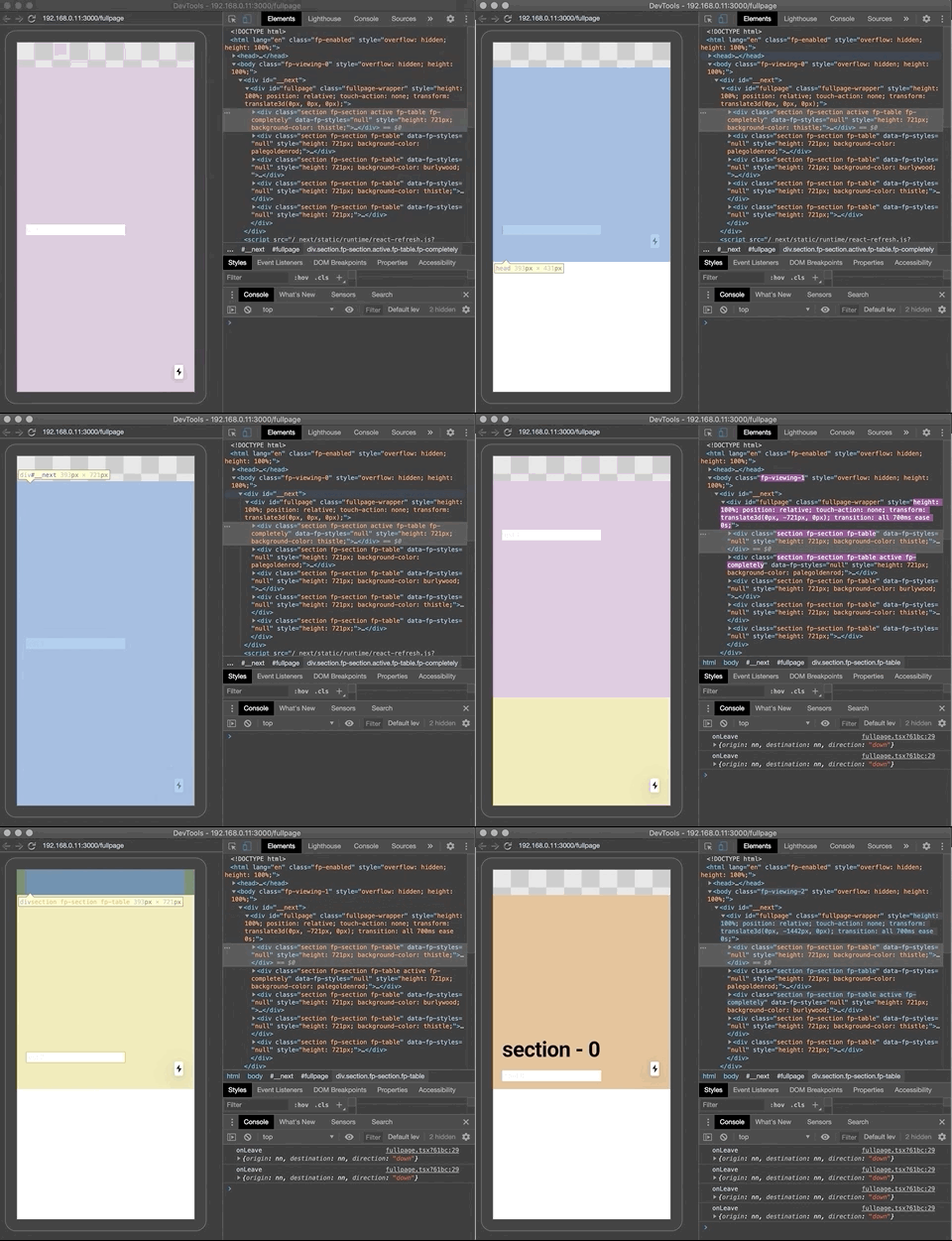
So you will notice when the keyboard opens (the white block at the bottom = keyboard on mobile) the container height changes but the full-page sections stay the same.
Also, it has no effect if I set my section heights dynamically with an event listener. Maybe I should rebuild the API on each height change event? window.fullpage_api.reBuild()? I'm not too sure, @alvarotrigo any input/advice on how to better accommodate container height changes?
I'm not sure if the offset sections extension would be of any help? It does not seem to set any dynamically adjustable heights?
UPDATE:
so using the fp-auto-height on my sections I am able to set the content height dynamically in order to simulate the height changes caused by the keyboard. but then the problem is the scrolling won't work anymore:
It is important to realise that it doesn't make sense to have all of your sections using this feature. If there is more than one section in the initial load of the site, fullPage.js won't scroll at all to see the next one as it will be already in the viewport.
UPDATE:
Okey what seems to help is setting autoScrolling={false} redacting the fp-auto-height class and rather just do a reBuild() when height changes.
 window.addEventListener('resize', () => {
      console.log('height changed')
      const fullpage = window.fullpage_api
      if (fullpage) fullpage.reBuild()
 }, true)
 PaulPCIO
on 25 May 2020
PaulPCIO
on 25 May 2020
Having a short delay between the focus/blur events and the rebuild seems to work well for me.
window.setTimeout(() => {
        fpApi.reBuild();
}, 500);
 ckingsbury20
on 31 Dec 2020
ckingsbury20
on 31 Dec 2020
Related issues
 lunaandyou
·
4Comments
lunaandyou
·
4Comments
 sloyer
·
3Comments
sloyer
·
3Comments
 ortonomy
·
3Comments
ortonomy
·
3Comments
 kacho
·
3Comments
kacho
·
3Comments
 pepi3
·
4Comments
pepi3
·
4Comments
Most helpful comment
I had the same problem with a form in the last section.
The solution is to disable the autoScrolling on input focus event, and enable it after on blur event.
I uses angularJS :
but i think you can do that :
I hope that will help anyone :-)
PS: Sorry for my english.