Fullcalendar: Navigate previous/next when dragging event to edges
Originally reported on Google Code with ID 2277
I'm trying to get dragScroll (http://fullcalendar.io/docs/event_ui/dragScroll/) working,
but when a dragged event reaches the edge of the calendar, nothing happens.

jsFiddle - http://jsfiddle.net/9c2hdzd1/1/
Reported by [email protected] on 2014-09-05 10:57:46
Imported with 3 stars.
 arshaw
All 45 comments
Could you please describe what you observe versus the expected behavior?
Reported by [email protected] on 2014-09-05 11:27:42
arshaw
on 19 Aug 2015
I think the following scenario describes the problem which the 'dragScroll' option solves:
[1] Open http://jsfiddle.net/wijgerden/w0546y25/ and adjust the layout such that the
Result pane shows the whole calendar; and observe the vertical scrollbar on 'agendaWeek'
to scroll the visible times
[2] Start dragging an event, like 'Lunch' and keep it (while dragging) on either the
bottom edge or the upper edge of the calendar area that has the scrollbar
[3] Observe how the scrollbar marker and associated times adjust to allow you to drag
the event into time slots not previously visible
[4] Change the 'dragScroll: true,' (default) to 'dragScroll: false' and run the fiddle
again (or for convenience: use http://jsfiddle.net/wijgerden/w0546y25/5/ which is an
update with this change done)
[5] Repeat step [2]
[6] Observe how it does *NOT* change the visible area of time slots...
Reported by [email protected] on 2014-09-05 11:46:43
arshaw
on 19 Aug 2015
Thanks for the reply.
The behaviour I'd have expected is for the calendar to go to the previous or next period
when the dragged event reaches either the left or right hand edge or the calendar area.
I.e. on the example at http://jsfiddle.net/9c2hdzd1/1/ , I would expect the calendar
to advance to Sep 8 - 14 2014 when the event reaches the right hand edge.
Hope that makes sense.
Reported by [email protected] on 2014-09-05 12:17:25
arshaw
on 19 Aug 2015
Understand your expectation, but this is AFAIK not implemented. Perhaps you could look
into detecting that something is dragged outside of the calendar (have something left/right
of it that fires some event) and then advance the calendar through code.
For this issue though, I would recommend it to be closed as Invalid; though perhaps
the concept of 'scroll container' can be better explained in the documentation, on
or linked from http://fullcalendar.io/docs/event_ui/dragScroll/
Reported by [email protected] on 2014-09-05 12:24:41
arshaw
on 19 Aug 2015
As @van.wijgerden has stated, this is not what dragScroll is meant to do. I'll repurpose
this ticket to represent what you describe and see if more people demand it.
Reported by adamrshaw on 2014-09-05 19:44:12
- Status changed:
Accepted - Labels added: Type-Feature
arshaw
on 19 Aug 2015
I have been looking for exactly this feature. It would greatly increase fullcalendar's
usability in situations where event dates may change. I would be extremely grateful,
as I'm sure many others would, if it were to be implemented.
(I have tried to implement this myself but unfortunately to no avail)
Reported by kcaow.code on 2014-10-20 13:18:21
arshaw
on 19 Aug 2015
Issue 2583 has been merged into this issue.
Reported by adamrshaw on 2014-10-31 02:48:55
arshaw
on 19 Aug 2015
Searched all over but this is the only place I can find what I want to do - is there
any way to do this?
Reported by smiffy0sm on 2014-12-06 16:28:48
arshaw
on 19 Aug 2015
This proposed so useful , exchange month automatically when the intem this off the edge
. I'll try to do something about it.
Reported by [email protected] on 2014-12-15 18:15:59
arshaw
on 19 Aug 2015
+1 for me. I've implemented something very basic and roughly similar in my application but its not suitable for directly incorporating here since it is built using angular (like the rest of my system).
 jokester01au
on 21 Nov 2015
jokester01au
on 21 Nov 2015
+1 for me. I would also like this to work in all views.
 mathijsvoss
on 15 Jan 2016
mathijsvoss
on 15 Jan 2016
+1
 nuxodin
on 1 Mar 2016
nuxodin
on 1 Mar 2016
+1
 Goddard
on 14 Apr 2016
Goddard
on 14 Apr 2016
Does anyone have any snippet/patch for this feature? We really need this
 Stichoza
on 20 May 2016
Stichoza
on 20 May 2016
+1
 anoikesis
on 3 Jun 2016
anoikesis
on 3 Jun 2016
+1
 jtpetro
on 9 Jun 2016
jtpetro
on 9 Jun 2016
+1; I really need this for my application. My client needs to be able to reschedule events to different weeks sometimes and that is currently not possible without first canceling the event, and making a new one in another week which is tedious.
 Grandclosing
on 3 Jan 2017
Grandclosing
on 3 Jan 2017
+1
 surudoiryu
on 23 Jan 2017
surudoiryu
on 23 Jan 2017
+1
 chubz
on 13 Apr 2017
chubz
on 13 Apr 2017
+1
 ghost
on 29 Apr 2017
ghost
on 29 Apr 2017
+1
 AndrewDavid
on 1 May 2017
AndrewDavid
on 1 May 2017
+1
 BartWillems
on 17 May 2017
BartWillems
on 17 May 2017
+1
 YaroslavOsetrov
on 29 Jun 2017
YaroslavOsetrov
on 29 Jun 2017
I want this for my application
 vinothini3
on 15 Jul 2017
vinothini3
on 15 Jul 2017
+1
 Swiod
on 31 Aug 2017
Swiod
on 31 Aug 2017
+1
 Folrond
on 8 Jan 2018
Folrond
on 8 Jan 2018
Hey,
I've been doing some hacking on this but I am currently stuck. For now I'm capable of moving to the next (resp. previous) week when moving an event on the right (resp. left) of the calendar however refreshing the view stops the dragging and the event is back to it's original place. At this point the segment holding the event is not displayed anymore, thus it seems quite complex to restart the dragging.
I have four ideas on how to overpass this limitation :
- Find a programmatic way to restart the dragging only from the event, but I have no clue on how to do this
- Move the event to the next (previous) week automatically before refreshing the view and then restart the drag. This solutions brings to issues that I don't know how to handle :
- How to find the right
segmentto restart the dragging with the right event (what if there are several events at the same time) ? - I might I have done my hacking at a too low level because from where I am (see code at the end), I don't see how to access the required objects (
view,seg,DropLocationandel)
- How to find the right
- Have a temporary buffer outside the calendar, as here but I think it might be hard for the user.
- A variation of the previous solution where the temporary buffer is hidden, when we drag to the right (left), the event is dropped to the buffer, then we got to the next (previous) view and restart the drag from the buffer. This solution is probably the easiest but I have the same issue as explained in 2.ii.
Any thoughts ?
There is my small hack, running on fullcalendar 3.4.0 (near line 3725) :
// Called when the drag moves
handleDrag: function(dx, dy, ev) {
    var hit;

    DragListener.prototype.handleDrag.apply(this, arguments); // call the super-method

    hit = this.queryHit(getEvX(ev), getEvY(ev));

    if (!isHitsEqual(hit, this.hit)) { // a different hit than before?
        if (this.hit) {
            this.handleHitOut();
        }
        if (hit) {
            this.handleHitOver(hit);
        }else{
            // Detect if out from left or right
            i = 0;
            hitl=null;
            hitr=null;
            while(!hitl && !hitr && i < 100){
                hitl = this.queryHit(getEvX(ev)+i, getEvY(ev));
                hitr = this.queryHit(getEvX(ev)-i, getEvY(ev));
                i = i + 10;
            }
            if(hitl){
                console.log(this);
                console.log(this.subjectEl);
                // TODO drop event 1 week before
                //  view / seg ?
                // view.reportSegDrop(seg, dropLocation, _this.largeUnit, el, ev);
                this.component.calendar['prev']();
                // TODO : restart drag
                console.log("left");
                console.log(this.subjectEl);
            }else if(hitr){
                $().find('.fc-next-button').click();
                console.log("right");
            }
        }
    }
},
 dbeniamine
on 29 Mar 2018
dbeniamine
on 29 Mar 2018
Any news about this feauture we really need it !!!
 chaouiy
on 4 Apr 2018
chaouiy
on 4 Apr 2018
+1
 infomobi
on 8 Apr 2018
infomobi
on 8 Apr 2018
+1 I really nedd this feature too.
 fklee
on 26 Apr 2018
fklee
on 26 Apr 2018
+1 This feature will be very useful.
 prgpascal
on 15 Jun 2018
prgpascal
on 15 Jun 2018
+1
 cmersinli
on 19 Jun 2018
cmersinli
on 19 Jun 2018
+1
 tuncs
on 1 Jul 2018
tuncs
on 1 Jul 2018
+1 Could really do with this feature!
 neildrichards
on 7 Jan 2019
neildrichards
on 7 Jan 2019
+1 This feature will be very useful.
 ziedmahdi
on 23 Jan 2019
ziedmahdi
on 23 Jan 2019
+1
 fwend
on 8 Feb 2019
fwend
on 8 Feb 2019
+1
 danrice01
on 1 Mar 2019
danrice01
on 1 Mar 2019
+1
 VilasPT
on 6 Mar 2019
VilasPT
on 6 Mar 2019
Hey everyone,
I figured something that works for me and it's very simple - Also i only need to work with full 24hour slots, so it probably won't be useful to everyone here.
1. Changed the timelineFiveDays duration to 14 days, like this:
views: {
       timelineFiveDays: {
       type: 'timeline',
       duration: { days: 14 }
        }
    }
2. Added dateAlignment: 'week' to the code so it wont show the Current day + 14 days ahead
Now it looks like this:
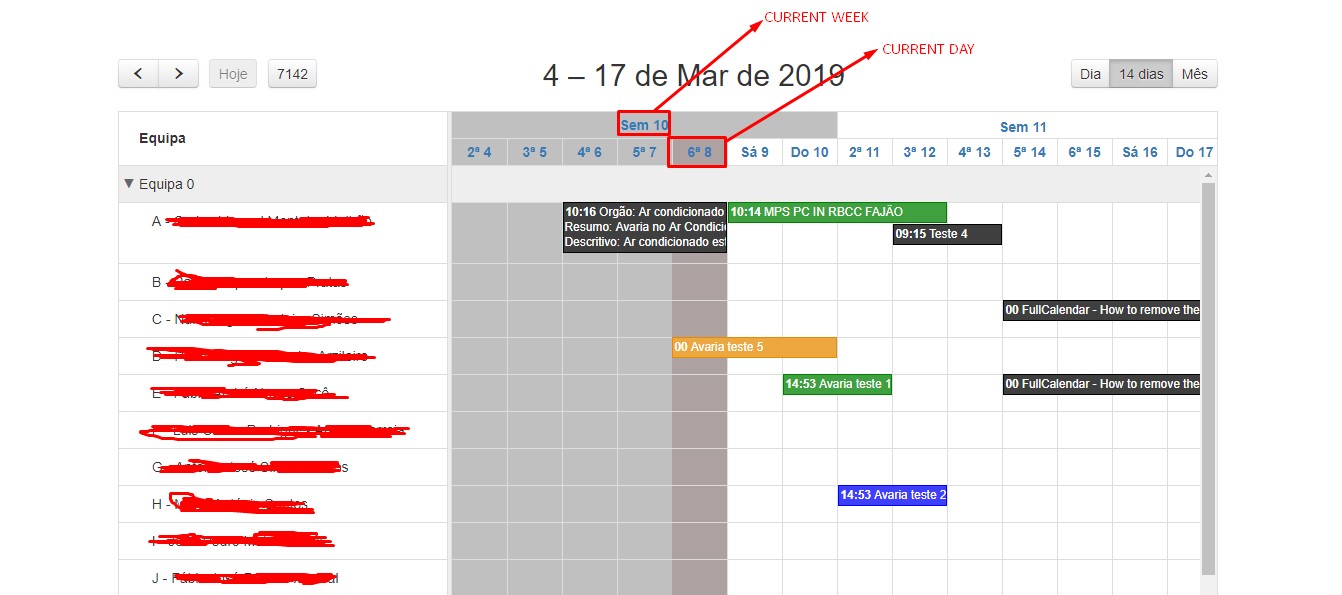
So theres week 10 and 11 - What i can do is drag an event from Week 10 to 11 and then press the Next button ( > ) and it will show me week 11 and 12, like this:

Hope this was helpful to anyone o7
VilasPT
on 8 Mar 2019
how do i drag events from one month to another?
 latchu1195
on 7 Jun 2019
latchu1195
on 7 Jun 2019
Any updates? This still isn't in the full calendar yet. Please add this feature, it is crucial +1
 ElectricCarbon
on 30 Jun 2019
ElectricCarbon
on 30 Jun 2019
any news on this?
 devpato
on 11 Aug 2019
devpato
on 11 Aug 2019
Hoping that this is added in the next version
ElectricCarbon
on 15 Aug 2019
Hi, anything new on this regard? Is there any estimation for this feature to be released? Are you guys planning on adding this feature in the future?
 plannie-nezer
on 25 Oct 2020
plannie-nezer
on 25 Oct 2020
Man this would be a great feature. I am wondering if it can be done in a custom view of some sort. I don't have time to follow that rabbit hole just yet but will hopefully have a look at it soon. Anyone of the current devs have any info on this feature?
 timbacon
on 30 Nov 2020
timbacon
on 30 Nov 2020
Related issues
arshaw
·
30Comments
arshaw
·
73Comments
arshaw
·
178Comments
arshaw
·
56Comments
arshaw
·
67Comments
Most helpful comment
Hey,
I've been doing some hacking on this but I am currently stuck. For now I'm capable of moving to the next (resp. previous) week when moving an event on the right (resp. left) of the calendar however refreshing the view stops the dragging and the event is back to it's original place. At this point the segment holding the event is not displayed anymore, thus it seems quite complex to restart the dragging.
I have four ideas on how to overpass this limitation :
segmentto restart the dragging with the right event (what if there are several events at the same time) ?view,seg,DropLocationandel)Any thoughts ?
There is my small hack, running on fullcalendar 3.4.0 (near line 3725) :