Fsnotes: Markdown renders text between dollar signs
Describe the bug
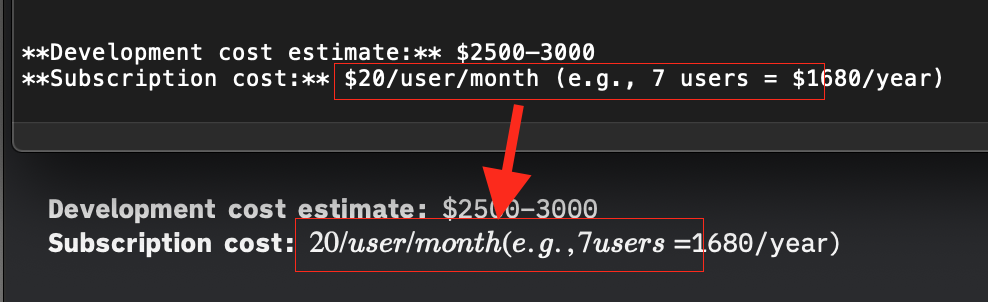
The text between the dollar signs ($) in the following text is rendered as italics with spaces removed:
**Subscription cost:** $20/user/month (e.g., 7 users = $1680/year)
Screenshot:
To Reproduce
- Create a new note
- Paste in the text above
- Enter preview mode
Expected behavior
Dollar signs should not have special meaning in Markdown.
Actual behavior
The text is italic, and spaces are removed.
Workaround
Use the emoji dollar sign 💲 instead of $. 🤷♂️
Desktop (please complete the following information):
- OS: macOS
- OS version: 10.14.6
- FSNotes version: 4.0.18 (354)
 quinncomendant
All 4 comments
Text detected as MathJax formula and correspondently highlighted.
 glushchenko
on 22 Jan 2020
glushchenko
on 22 Jan 2020
When is it triggered though? Could it be limited to inside code blocks? or even to <pre> tags?
Authors text seems like a pretty common use case where you don't want it to be triggered.
 relikd
on 23 Jan 2020
relikd
on 23 Jan 2020
I went to check if you can escape the things through \$, but it appears that it still renders. It would be a good idea to make MathJax optional in the settings, especially if you can't escape them.
 matchavez
on 29 Jan 2020
matchavez
on 29 Jan 2020
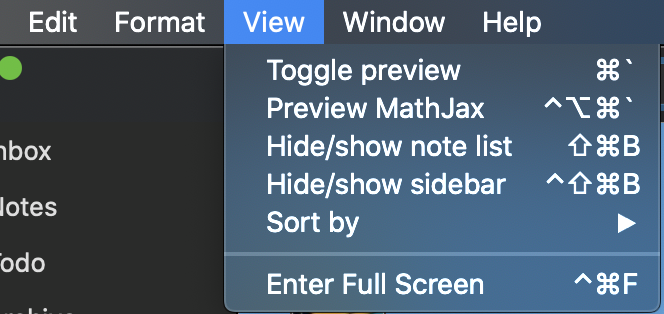
Finally! Yo can toggle ⌘-option-control-` or click menu item.
glushchenko
on 29 Mar 2020
Related issues
 ebsmv
·
4Comments
ebsmv
·
4Comments
 jakemkc
·
4Comments
jakemkc
·
4Comments
 peanutputter
·
4Comments
peanutputter
·
4Comments
 ulab
·
3Comments
ulab
·
3Comments
 yene
·
3Comments
yene
·
3Comments
Most helpful comment
I went to check if you can escape the things through \$, but it appears that it still renders. It would be a good idea to make MathJax optional in the settings, especially if you can't escape them.