Fsnotes: New install on Catalina fails to open (possibly due o notarization)
Describe the bug
After installing a new version of FSNotes (or updating an existing working version), we are greeted with the following "error" message.
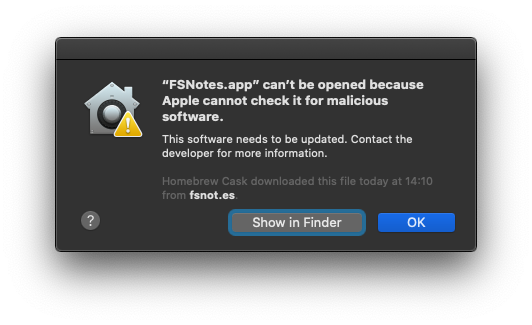
This is possibly due to issues with notarization, however I was under the impression that was already solved for Mojave.
To Reproduce
Steps to reproduce the behavior:
- Install FSNotes via
brew cask install fsnotes(or download via github release) - Open FSNotes normally (not using any of the workarounds)
Expected behavior
FSNotes should open normally.
Actual behavior
Mac OS displays the above error and we are forced to open the app via known workarounds
Workaround
Right click on FSNotes and choose open or go to System Preferences > Security and allow execution
Desktop (please complete the following information):
- OS: macOS
- OS version: 10.15.2
- FSNotes version: 4.0.14 (also happens on 4.0.13 and 4.0.12)
Additional Notes
spctl -v -a /Applications/FSNotes.app
/Applications/FSNotes.app: accepted
source=Developer ID
 pslobo
All 9 comments
If needed, for troubleshooting, I have another machine where FSNotes hasn't been updated and is working as expected (was upgraded from Mojave to Catalina with FSNotes already installed and working)
pslobo
on 8 Jan 2020
Could it be that only the Mac App Store version has been notarised and the interim releases are not notarised? Does notarisation need to be done with every release?
 gingerbeardman
on 8 Jan 2020
gingerbeardman
on 8 Jan 2020
Not entirely sure how the notarisation works, but I'm under the impression that each new version is notarised and it probably part of the build process.
pslobo
on 8 Jan 2020
I don't know why this going on. Every release notarized already.
Dear Oleksandr,
Your Mac software has been notarized. You can now export this software and distribute it directly to users.
Bundle Identifier: co.fluder.FSNotes
 glushchenko
on 9 Jan 2020
glushchenko
on 9 Jan 2020
Very weird indeed!
This is what I see on the other Mac which has been updated to catalina, but I still haven't updated FSNotes:
~ % brew cask info fsnotes
fsnotes: 4.0.12
https://fsnot.es/
/usr/local/Caskroom/fsnotes/4.0.12 (121B)
From: https://github.com/Homebrew/homebrew-cask/blob/master/Casks/fsnotes.rb
==> Name
FSNotes
==> Artifacts
FSNotes.app (App)
~ % spctl -v -a /Applications/FSNotes.app
/Applications/FSNotes.app: accepted
source=Notarized Developer ID
I'm pretty sure that as soon as I update this version, I'll hit the same issue there too.
pslobo
on 9 Jan 2020
Please re-download 4.0.15
glushchenko
on 9 Jan 2020
Yep, that fixed it!
λ brew cask info fsnotes
fsnotes: 4.0.15
https://fsnot.es/
/usr/local/Caskroom/fsnotes/4.0.15 (121B)
From: https://github.com/Homebrew/homebrew-cask/blob/master/Casks/fsnotes.rb
==> Name
FSNotes
==> Artifacts
FSNotes.app (App)

~
λ spctl -v -a /Applications/FSNotes.app
/Applications/FSNotes.app: accepted
source=Notarized Developer ID
Please re-download 4.0.15
What was the problem @glushchenko ?
gingerbeardman
on 10 Jan 2020
@gingerbeardman i incorrectly exported build from xcode :-)
glushchenko
on 10 Jan 2020
Related issues
 tewe
·
3Comments
tewe
·
3Comments
 sepich
·
3Comments
sepich
·
3Comments
 jakemkc
·
3Comments
jakemkc
·
3Comments
 dmattera
·
3Comments
jakemkc
·
4Comments
dmattera
·
3Comments
jakemkc
·
4Comments
Most helpful comment
@gingerbeardman i incorrectly exported build from xcode :-)