Fsnotes: notes are not syncing with iOS
I type a note on my iMac or on my iPad or iPhone and they don't sync.
 GiacomoGiammatteo
All 19 comments
Did you have enough space on you device?
 glushchenko
on 5 May 2019
glushchenko
on 5 May 2019
Yes, plenty
On May 5, 2019, 12:53 AM -0500, glushchenko notifications@github.com, wrote:
Did you have enough space on you device?
—
You are receiving this because you authored the thread.
Reply to this email directly, view it on GitHub, or mute the thread.
GiacomoGiammatteo
on 5 May 2019
Please open Files.app on iOS and check files availability. FSNotes should be enabled for iCloud Drive usage.
glushchenko
on 5 May 2019
I have just bought he macOS and iOS versions. Files on the Mac are only having the titles synced to IOS whereas a test note on IOS appears on the Mac. I have FSNotes enabled for iCloud on the iPad.
 sdclee
on 10 May 2019
sdclee
on 10 May 2019
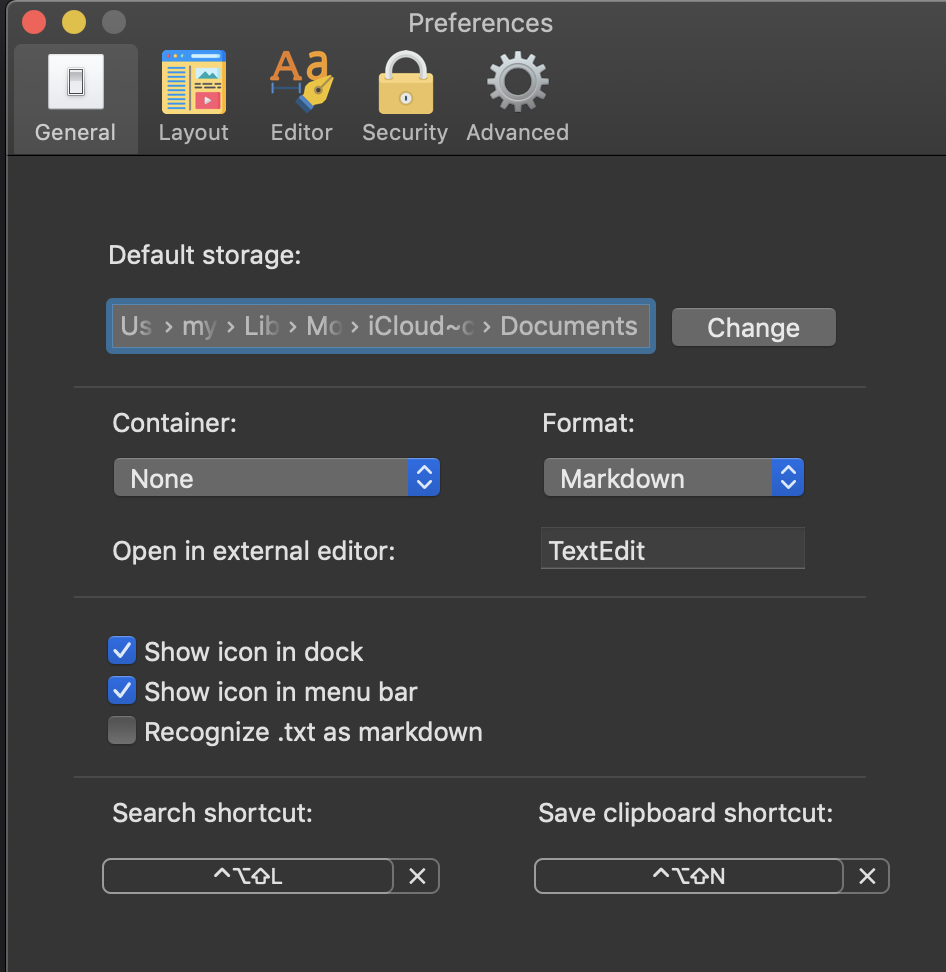
What is your default storage in Preferences?

glushchenko
on 10 May 2019
Storae is in “iCloud, FS notes”
Jim
On May 5, 2019, 2:06 AM -0500, [email protected], wrote:
Yes, plenty
On May 5, 2019, 12:53 AM -0500, glushchenko notifications@github.com, wrote:
Did you have enough space on you device?
—
You are receiving this because you authored the thread.
Reply to this email directly, view it on GitHub, or mute the thread.
GiacomoGiammatteo
on 10 May 2019
What is in your Files app - FSNotes dir on iOS? Files exist?
glushchenko
on 10 May 2019
The docs that came with the app, plus one i created
On May 10, 2019, 2:04 PM -0500, glushchenko notifications@github.com, wrote:
What is in your Files app - FSNotes dir on iOS? Files exist?
—
You are receiving this because you authored the thread.
Reply to this email directly, view it on GitHub, or mute the thread.
GiacomoGiammatteo
on 10 May 2019
I don’t think that FSNotes related bug. Looks like iCloud Drive troubles
glushchenko
on 10 May 2019
I seem to be having this same issue.
I have a folder created on my Mac with a new note... the new note has some text.
On my iPhone the folder and note appeared but are empty...
On my iPad the folder and note appeared but are empty, when I added a image to the note here it shows up only on iPad.
If I look in my iClould files on the mac the image I added on my iPad seems to be there but under the Archive folder not the main FSnotes folder.
The same on my iPad.
When I look in my Archive on iPhone or iPad in FSNotes it is empty. However on my Mac it has some notes. This is the archive at the top of FSNotes: NOTES - TODO - ARCHIVE - TRASH not the Archive folder under my iCloud section (MacOS)
I am also noticing now that my iOS apps don't have an iCloud -> Archive folder.
However in my iClould -> FSNotes folder on all platforms I do have a Archive folder....
Moving the files out of the iCloud -> FSNotes -> Archive folder and into the main FSNotes folder seems to haved fixed the problem. Although I had to manually download the info.json text.markdown and text 2.markdown files on iOS platforms and then restart the apps. The image I added on iPad doesn't load up anywhere now as whatever was on macOS seems to have overwritten everything.
Also my Archive folder on MacOS has 3 notes but Archive on both iOS platforms has 0.
When I choose 'reveal folder' on macOS it opens iCloud not iCloud -> FSNotes and I can see the 3 files. It seems that the built in Archive in MacOS is using the base iCloud folder not FSNotes folder.
To fix I think making sure the file structure in iCloud matches what is displayed in FSNotes app works.
I tried to create a note in the default Archive folder on iOS and it worked however renaming it did not work, and after a restart the note vanished, BUT an FSNotes -> Archive folder did appear in iCloud Drive....
After restarting MacOS the Archive folder now points to the FSNotes -> Archive folder (empty) but the list shows the files it did before that are in iCloud folder below FSNotes....
Edit: Just deleted the 3 files that where showing up incorrectly in my archive, manually moved to trash, then tried adding a new note in Archive and my previous 3 files suddenly appeared back in the archive list!
A new notetitle.textbundle was created in my iClould Drive folder below FSNotes. However when I tried to reveal the other archive notes that popped back into existence nothing showed up. Until I edited them and then appeared back in the iCloud Drive folder.
Sorry if that is not clear!
 hellonoko
on 11 May 2019
hellonoko
on 11 May 2019
Yes I think it is an iCloud issue. I have been experimenting. One or two notes only seem to get the title (and blank content) on the iPad but work fine the other way. Most of the notes sync ok so I'll try deleting the earlier test ones and keep n eye on things. Thanks for the contributions :)
sdclee
on 11 May 2019
I am also experiencing what @sdclee is - new notes made on Mac appear on iOS but there’s no content in them. When I go into the files app on iOS and tap on the note to download it and the. Go back to the FSNotes app the content appears.
 cathcartd
on 10 Jun 2019
cathcartd
on 10 Jun 2019
@cathcartd what file container and iOS version do you use?
glushchenko
on 10 Jun 2019
I have the latest version of both Mac OS and iOS. Apple recommended a reinstall, so I’m going to try that.
Have a great day,
Giacomo
Giacomo (Jim) Giammatteo is the author of gritty crime dramas http://giacomogiammatteo.com/ about murder, mystery, and family. And he also writes non-fiction books http://nomistakes.org/ including the No Mistakes Careers series.
He lives in Texas where he and his wife have an animal sanctuary with 45 loving “friends.”
Book Trailer
http://www.youtube.com/watch?v=UL4UVQ0pwysWebsite: Giacomo Giammatteo
http://giacomogiammatteo.com/eMail: [email protected]
http://www.linkedin.com/in/jimgiammatteo http://www.youtube.com/giacomogiammatteo https://twitter.com/JimGiammatteo http://jgiammatteo.tumblr.com/ http://www.slideshare.net/JimGiacomoGiammatteo http://www.reddit.com/user/Ggiammatteo/
http://www.facebook.com/GiacomoGiammatteo
On Jun 9, 2019, at 11:57 PM, glushchenko notifications@github.com wrote:
@cathcartd https://github.com/cathcartd what file container and iOS version do you use?
GiacomoGiammatteo
on 10 Jun 2019
@glushchenko - file container on mac app says none, ios version 12.3.1 (fsnotes manager app version 2.6.2), os x os version 10.14.5, fsnotes app 3.3.1 (268)
cathcartd
on 10 Jun 2019
My issue seems fixed in iOS fsnotes manager 2.7.0
cathcartd
on 20 Jun 2019
My files have all disappeared from view in FS Notes 3.36 (272) even though I know they are on the drive (icloud/documents/fsnotes). This is on my Mac 10.14.5.
The weird thing is that on opening snots you see one note, then navigate away to any other folder/tage and everything is blank (see attached screenshots).
My notes are on the iPhone and iPad and my Time Machine backup but I don't want to uninstall/reinstall fs notes and run the risk of losing the notes.
Please advise - thanks.
L
ee



sdclee
on 2 Aug 2019
Oh Crikey, I just discovered what it was - sorry if I've bothered anyone.
Somewhere along the line I have hit a key combination while not looking at the screen and it has hidden everything. I actually uninstalled and reinstalled it after checking all the notes were on my MacBook Pro first. That made no difference to the mail Mac after reinstalling so I looked at all the menu options:
View/ Hide/show note list was the culprit all along!
sdclee
on 2 Aug 2019
What would be the point of that option I don't know as you are left with a LH panel with all of the tabs etc and a blank central panel - go figure!
sdclee
on 2 Aug 2019
Related issues
 ebsmv
·
4Comments
ebsmv
·
4Comments
 lowski
·
3Comments
lowski
·
3Comments
 jakemkc
·
4Comments
jakemkc
·
4Comments
 ulab
·
3Comments
ulab
·
3Comments
 sepich
·
3Comments
sepich
·
3Comments