Fsnotes: [REQ] Start with search highlighted? Like nvALT
Checking the few bad reviews we have on the App Store...
I noticed that nvALT starts with search highlighted.
Is this something we want to do?
 gingerbeardman
All 8 comments
I looked at the macOS app store and the overall rating of FSNotes is 4.8 stars out of a possible 5 stars. The lowest rating is 3 stars. That seems pretty good. I read through the written reviews but didn't see any mention of starting the app with search highlighted?
 peavine
on 5 Feb 2019
peavine
on 5 Feb 2019
Then reviews are specific to each app store region. This was in the UK Mac App Store.
I seem to remember a website to view them all at once. Will look into that
gingerbeardman
on 5 Feb 2019
OK, so this is possible in the App Store backend (iTunes Connect) but for the public there are now less free options.
gingerbeardman
on 5 Feb 2019
So I have found a site, you need to switch between regions to see all reviews but it's OK.
MacOS
https://fnd.io/#/us/mac-app/1277179284-fsnotes-by-oleksandr-glushchenko
iOS
https://fnd.io/#/ud/ios-universal-app/1346501102-fsnotes-manager-by-oleksandr-glushchenko
I'll added this sub-discussion to a Wiki page:
https://github.com/glushchenko/fsnotes/wiki/App-Store-Reviews
gingerbeardman
on 5 Feb 2019
If I understood it right, you are talking about that behavior of nvAlt when the search field always shows the title of the current note. There is more than one problem this behavior solves:
- _The most important one:_ when using FSNotes as a hotkey window, you can see the current note in the editor panel, but if you hit enter to edit it further, you suddenly creating a new note and the one you were looking at — disappears from your sight.
- Now there are two modes: Editor and List-with-Search (you can browse through the notes list with arrows and write anything to the search without switching the focus). But the latter looks like two separate modes because there is no sign that the Search field is active. In nvAlt when you hit Return it means you activated what was in the Search. In FSNotes you are activating the list element if you've chosen one with arrows or creating an empty file if you didn't. It blows my mind to track that hidden modal states. Jeff Raskin is against current behavior :-)
- When the focus is on Editor, Search and List highlights should be dimmed. Now it is bright blue in any mode.
- My System highlight color is Graphite, FSNotes doesn't follow my system settings in that
- When the focus is on Editor, Search and List highlights should be dimmed. Now it is bright blue in any mode.
- When the Search field will show the title of the current note, there will be two similar texts: Editor file title and Search field text. That's why there is a one big Search field above both List and Editor in nvAlt:

 keymasterr
on 11 Feb 2019
keymasterr
on 11 Feb 2019
@keymasterr what i mean is when I load up nvAlt it looks like this:
- search field has focus (this was the only thing I meant in my original issue)
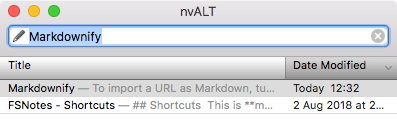
but as you mention there are some other things at play:
- search field has most recently viewed note title
- matching note is highlighted and shown for editing
- "most recently viewed" is not necessarily the top-most note
I think the keyboard UI in nvALT is still much better than FSNotes
gingerbeardman
on 11 Feb 2019
Wasn't this change made in closed issue #591 or is this a different issue?
peavine
on 11 Jun 2019
Good spot @peavine thanks
gingerbeardman
on 11 Jun 2019
Related issues
 volt4ire
·
4Comments
volt4ire
·
4Comments
 jakemkc
·
4Comments
jakemkc
·
4Comments
 sepich
·
3Comments
sepich
·
3Comments
 ulab
·
3Comments
ulab
·
3Comments
 yene
·
3Comments
yene
·
3Comments