Fsnotes: [REQ] Ability to delete the note you're currently editing
From: https://github.com/glushchenko/fsnotes/issues/315#issuecomment-409561580
Also see: https://github.com/glushchenko/fsnotes/issues/303
Cmd+Backspace should delete note being edited when note has focus.
Currently it is disabled.
 gingerbeardman
All 6 comments
The shortcut key to delete a note varies depending on whether the preference option "Focus in editor when select note" is enabled and whether the focus is in the notes list or editor. Thus:
1) Preference option "Focus in editor when select note" - enabled
Focus - notes list
Shortcut to delete note - Command-Option-Backspace
2) Preference option "Focus in editor when select note" - enabled
Focus - editor
Shortcut to delete note - Command-Option-Backspace
3) Preference option "Focus in editor when select note" - disabled
Focus - notes list
Shortcut to delete note - Command-Backspace
4) Preference option "Focus in editor when select note" - disabled
Focus - editor
Shortcut to delete note - None (instead first move focus to notes list then use Command-Backspace).
It makes sense that Command-Backspace should delete the note in situation 4 but that shortcut is already in use to delete from the cursor to the beginning of the line.
 peavine
on 1 Aug 2018
peavine
on 1 Aug 2018
I usually use Backspace rather than Delete. Are they interchangeable in these circumstances?
gingerbeardman
on 1 Aug 2018
It had been my understanding that Apple defines the backspace key as the delete key? The FSNotes shortcut readme appears to take this approach. I don't believe they are interchangeable.
peavine
on 1 Aug 2018
Interesting, it seems that at some point since my keyboard was new they unified backspace and delete.
My keyboard has both backspace and delete (which interestingly has the chunky arrow pointing the other way) and looks a bit like this:
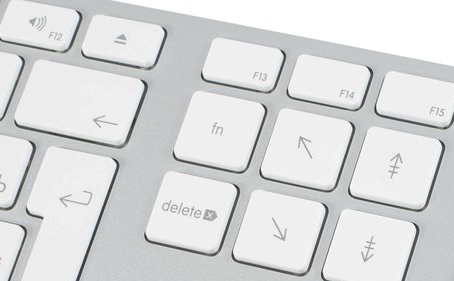
For a while they had the words delete on both keys.
But today they have a chunky backwards arrow, and a chunky forwards arrow:
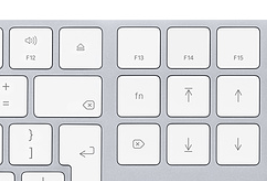
gingerbeardman
on 1 Aug 2018
It was always so simple in the PC world--there was a backspace key and a delete key and everyone knew which did what. Anyways, just to clarify, I'll change delete to backspace in what I wrote above.
peavine
on 1 Aug 2018
Indeed, "when I was young..."
gingerbeardman
on 2 Aug 2018
Related issues
 jakemkc
·
4Comments
jakemkc
·
4Comments
 floodfish
·
4Comments
floodfish
·
4Comments
 iandol
·
4Comments
iandol
·
4Comments
 dmattera
·
3Comments
dmattera
·
3Comments
 ebsmv
·
4Comments
ebsmv
·
4Comments
Most helpful comment
Indeed, "when I was young..."