Fsnotes: [REQ] add support for snapshot/versions
TextEdit does this well, and I often use it solely for this feature.
NSFileVersion
A snapshot of a file at a specific point in time.
https://developer.apple.com/documentation/foundation/nsfileversion
View and restore past versions of documents
https://support.apple.com/kb/PH25757
Many apps automatically save versions of documents as you work on them. At any time, you can browse through document versions and go back to an older version. You can also explicitly save a version.
A version is saved automatically every hour, or more frequently when you’re making many changes. A version is also saved when you open, save, duplicate, lock, rename, or revert a document.
Browse, restore, duplicate, and delete versions
Open the document, then choose File > Revert To > Browse All Versions.Click tick marks along the timeline to browse versions.
Display the version you want, then do one of the following:
To restore your document to this version, click Restore.
To duplicate this version in a new document, press and hold the Option key, then click Restore a Copy.
To delete this version, move the pointer to the top of the screen to show the menu bar, then choose File > Revert To > Delete This Version.
To leave your document as is, without changes, click Done.
Explicitly save a version
Open the document, then choose File > Save.To save the document using a different filename, location, or format, press and hold the Option key, then choose File > Save As.
Revert a document to the last opened version
Open the document, choose File > Revert To, then choose Last Opened, Last Saved, or Previous Save.
 gingerbeardman
All 24 comments
This would be a nice feature.
In the meantime, since we're just talking about text files, it's easy to use third-party tools to make snapshots of the data store. I use several tools that give me "snapshots" of my notes:
- daily: backup all note files to zip archive under
~/.backup/via cron script, pruning all backups older than 7 days. - hourly: cloud backup via Arq.
- every 15 mins: back to external drive (if it's connected) via Time Machine.
- every time I hit save in Textmate (my external editor): save a copy of the file to
~/.backup/with timestamp in filename. I also have a Textmate command that lists all snapshots of the current file. To do this natively in FSNotes, one could create a background service that uses something like fsmonitor to observe for file changes, then diff with the previously saved snapshot, and if the difference is more than X bytes, create a new snapshot.
 quinncomendant
on 21 Jan 2019
quinncomendant
on 21 Jan 2019
I agree it would be a nice feature. However I thought I'd add another option to @quinncomendant's list above; I use GIT to enable a full snapshot history of all my notes. I just had to make my notes folder a GIT repository and commit it to my git server periodically. Has been working beautifully.
 jeff-h
on 21 Jan 2019
jeff-h
on 21 Jan 2019
So, guys, I am almost implemented Git solution. This will be available in FSNotes 3.7.0
 glushchenko
on 8 Sep 2019
glushchenko
on 8 Sep 2019
Can you tell us more?
Really Git?
Will it be transparent to the user?
How granular for changes?
gingerbeardman
on 8 Sep 2019
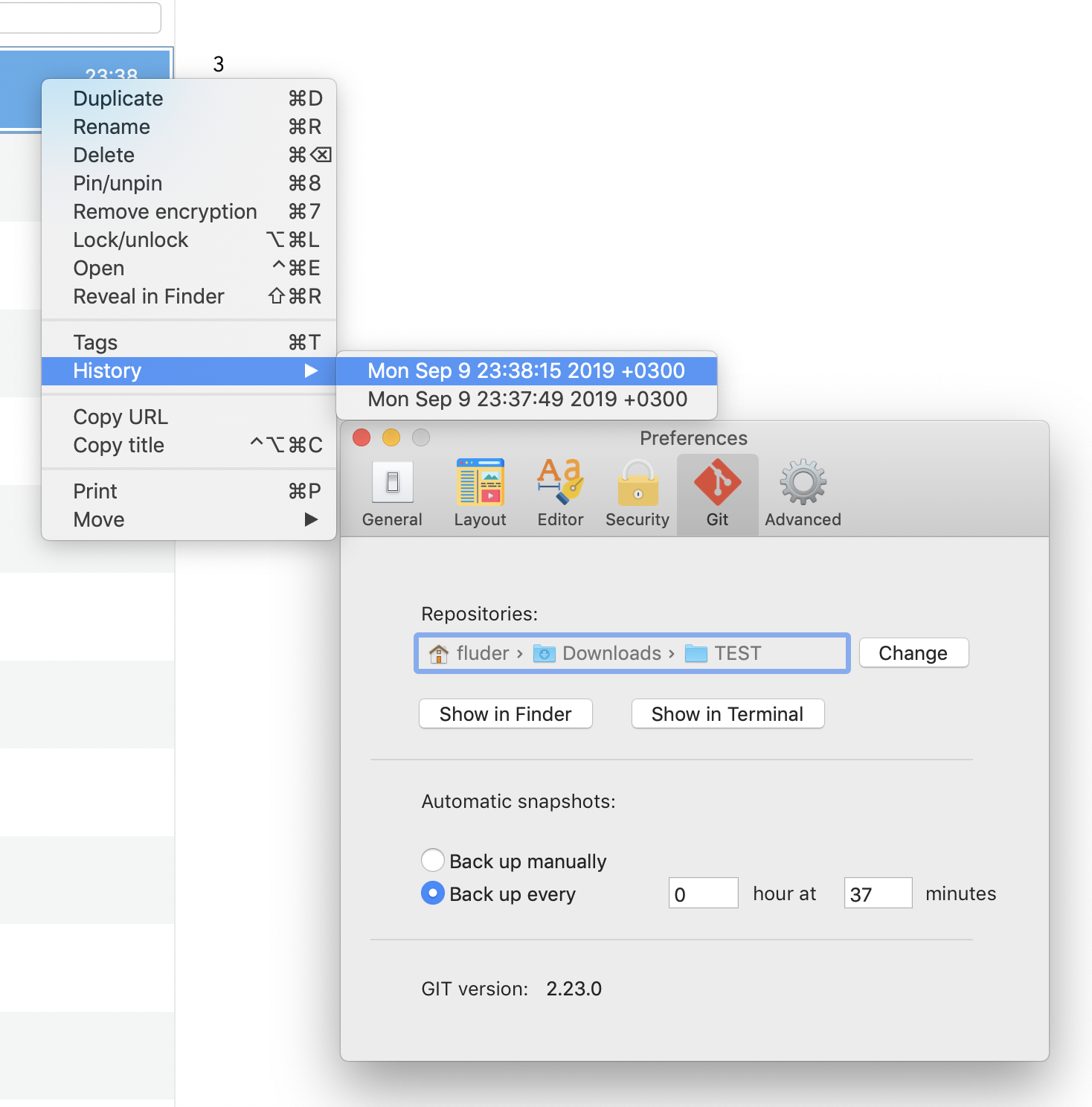
glushchenko
on 9 Sep 2019
You can save version for file at any time manually (⌘+s), or tune auto backup manually.
glushchenko
on 9 Sep 2019
You can save version for file at any time manually (⌘+s), or tune auto backup manually.
I did the following:
1) Install FSNotes 3.7.
2) Change "Git" preference in FSNotes preferences to "peavine > Working" and "Back up manually".
3) Selected the command-s keyboard shortcut.
After doing the above, a folder was created in my Working folder with the name "b3f8 - Notes.git" and this folder contained a lot of folders with names like hooks, logs, objects, and so on. Why did this happen?
 peavine
on 10 Sep 2019
peavine
on 10 Sep 2019
@peavine this is git repository ;)
Sent with GitHawk
glushchenko
on 10 Sep 2019
Could that folder be hidden?
Even though this is powered by Git, I think it should all be hidden away from the user.
gingerbeardman
on 10 Sep 2019
I have my own backup and file-versioning system and don't really need this feature (although I'm sure it's a great enhancement for other people). The issue is that if I inadvertently select command-s when FSNotes is open, the git repository folder is created and it's not hidden. Fortunately, an easy workaround was to remap the command-s keyboard shortcut to something I'd never select by accident.
peavine
on 10 Sep 2019
Repositories should not be created in the working directory. Seems like a bug. @gingerbeardman have your tried this feature?
Sent with GitHawk
glushchenko
on 11 Sep 2019
By default repositories storage here:
let applicationSupport = FileManager.default.urls(for: .applicationSupportDirectory, in: .userDomainMask).first!
let repositories = applicationSupport.appendingPathComponent("Repositories")
Just wondering if this new feature handles pre-existing git repositories, or will it try to create a new one?
Also, from my experience storing notes in git, my git seemed unable (or, hopefully, unconfigured) to tell when a note's creation & modified dates changed. At some point a bug in FSNotes caused all my notes to get the current time as their creation & modified dates, and it was only then that a) I realised that my GIT history was of no help and b) that this information is actually a valuable part of my notes library! Curious whether anyone else has noticed/tested this, and since you're bundling git now, whether there's a way to configure it in a way that's specifically fine-tuned for text notes.
jeff-h
on 11 Sep 2019
No, at first .git repositories should not stores in iCloudDrive (default FSNotes storage). At second, bad idea store all backups data in one place.
So default storage is Application Support dir, and this path configurable in preferences.
glushchenko
on 11 Sep 2019
I have not tried this. And I probably do not intend to try it, sorry.
I use Time Machine which takes care of this need for me. So, if FSNotes Mac used the macOS standard way of doing versions, I would be more inclined use that as it fits into my workflow.
gingerbeardman
on 11 Sep 2019
I spent a little additional time with this and it works as expected. I was a little confused that there is not a History entry in the top menu, but I guess there's a reason why it's only in the right-click menu. Anyways, I ran some tests and this new feature seems to work well.
BTW, I changed the repository to my ~/Working folder thinking the notes would be stored there in an accessible format. I'll change that back to the default directory. So, all is well. 👍
peavine
on 11 Sep 2019
@peavine oops, really, i missed it. History will be added in top menu with next release.
Sent with GitHawk
glushchenko
on 11 Sep 2019
I've already been using git (manually, via command line) to make snapshots of my notes folder. Is there a recommended process to convert an existing .git folder to the one used by fsnotes?
If I understand correctly, fsnotes is using git to create snapshots by using git add and git commit. Is there any plan to also allow automatic fetch + merge + push?
quinncomendant
on 11 Sep 2019
@quinncomendant you can open repositories storage and replace current *.git saving same name. History will be adopted
Sent with GitHawk
glushchenko
on 11 Sep 2019
@peavine History menu item added in top menu. You can re download last build.
glushchenko
on 11 Sep 2019
I installed the latest build of 3.7.0 and "File > History" works great. I didn't think I would use this much but it is a nice convenience. Thanks.
peavine
on 11 Sep 2019
@quinncomendant you can open repositories storage and replace current *.git saving same name. History will be adopted
@glushchenko, Do you mean I need to move my current git directory (~/Library/Mobile Documents/com~apple~CloudDocs/notes/.git) to the location of the one created by FSnotes (~/Library/Containers/co.fluder.FSNotes/Data/Library/Application Support/Repositories/93d3 - notes.git)?
quinncomendant
on 20 Sep 2019
I'm confused by the automatic back up option setting, Back up every _1_ hour at _30_ minutes. It could mean either:
- Back up every 60 minutes, at half-past the hour (00:30, 01:30, 02:30, etc).
- Back up every 90 minutes (00:00, 01:30, 03:00, etc).
Which is it?
I would like to suggest simplifying this option:
Back up every ___ [minutes ▿]
The [minutes ▿] is a select menu containing time units (seconds, hours, minutes, etc).
quinncomendant
on 20 Sep 2019
Is there any way to sync this git history amongst multiple desktop machines?
 dabeeeenster
on 21 Oct 2019
dabeeeenster
on 21 Oct 2019
Related issues
 erikrose
·
4Comments
erikrose
·
4Comments
 lowski
·
3Comments
lowski
·
3Comments
 iandol
·
4Comments
iandol
·
4Comments
 tewe
·
3Comments
tewe
·
3Comments
 volt4ire
·
4Comments
volt4ire
·
4Comments
Most helpful comment
You can save version for file at any time manually (⌘+s), or tune auto backup manually.