Fsnotes: Lists when code block highlighting enabled
Apologies if I am missing something obvious here, but is it currently not possible to have list items when code block highlighting is enabled?
For example
- Item 1
    - Item 2
OR
1. Item 1
    1. Item 2
In this example, Item 2 has has code block highlighting enabled on it. I'd expect standard markdown code blocks to only interpret the indent as a code block if the line above is either a blank line... or another line of the code block.
Let me know if I'm missing something sill, if not, I hope we can see this fixed sooner or later? I really love having the code highlighting, but this bug requires that I keep it disabled.
 BradyRosino
All 13 comments
Can you post a full sample document and screenshot of what you are seeing and what you expected to see (if possible)?
 gingerbeardman
on 15 Mar 2018
gingerbeardman
on 15 Mar 2018
Ah, I see what you mean. Here’s the problem:
https://daringfireball.net/projects/markdown/syntax#precode
To produce a code block in Markdown, simply indent every line of the block by at least 4 spaces or 1 tab.
So use less than 4 spaces, and do not use a tab, to indent your nested list.
gingerbeardman
on 15 Mar 2018
Reviewing the same spec from Gruber. 4 spaces or one tab is the only appropriate way to do a list item.
List items may consist of multiple paragraphs. Each subsequent paragraph in a list item must be indented by either 4 spaces or one tab:
Doing anything less will produce unpredictable results depending on the Markdown compiler.
BradyRosino
on 15 Mar 2018
Interesting! The markdown can mean two things. More on this:
Trying the below snippet in some markdown previewers I have to hand.
(4 space or tab indents)
1. List
1. Nested list
2. Second item
Code block
Test
Only one editor I have installed renders it as a code block:
- Sublime Text
All others render it as a part of the first list item:
- original daringfireball markdown dingus
- GitHub comment
- Visual Studio Code
- TextMate
- dillinger
- markdownlivepreview
- commonmark
For those that see it as a list item, the code block can sometimes be forced to be separate by adding an extra line break (dillinger) or a line break with just a space character on it (TextMate). But for some you need to put some actual text, a HTML comment will do, between the list and the code block (VSCode).
FSNotes on the other hand is a bit undecided about it, changing its mind depending on cursor position:
AGIF:
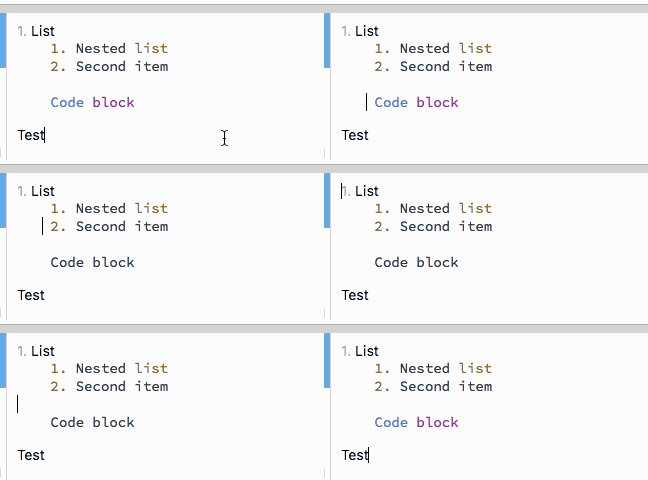
I’d guess this is a problem with the (largely abandoned) Highlight.js that is used by FSNotes?
It’s bundled in the Down markdown interpreter used by FSNotes so I’ll report it there.
gingerbeardman
on 15 Mar 2018
gingerbeardman
on 15 Mar 2018
Agreed that this is an issue in Down. Here is their specific issue. Down is based on CommonMark and in the spec:
http://spec.commonmark.org/0.28/#indented-code-blocks
4.4 An indented code block is composed of one or more indented chunks separated by blank lines.
They are specifically missing the requirement that to be interpreted as a code block, it must be fenced also by blank lines.
BradyRosino
on 15 Mar 2018
This would also make the image shared in this thread a valid code block, it is still however an issue without the blank line.
BradyRosino
on 15 Mar 2018
Happy to accept any pull requests into Down to address this, but unfortunately a bit booked up at the moment 👍 It's also worth noting that Down is just a Swift wrapper for cmark so feel free to try a newer version and see if it resolves your issue
 iwasrobbed
on 15 Mar 2018
iwasrobbed
on 15 Mar 2018
I think the issue is Highlighter.js that Down uses.
The example:
- Item 1
- Item 2
CommonMark generates:
<ul>
<li>Item 1
<ul>
<li>Item 2</li>
</ul>
</li>
</ul>
original daringfireball MarkDown dingus generates:
<ul>
<li>Item 1
<ul>
<li>Item 2</li>
</ul>
</li>
</ul>
They are the same.
So I would say that the syntax colouring is the thing that is missing the blank line requirement. Highlight.js that they use in Down is old and abandoned with hundreds of issues and many PR waiting on GitHub.
gingerbeardman
on 15 Mar 2018
@BradyRosino Where did you read about it needing blank lines to qualify as code block?
https://github.com/commonmark/CommonMark-site/issues/10#issuecomment-373480676
gingerbeardman
on 15 Mar 2018
EDITED after reading your link...
It looks like you already linked to the source I found (CommonMark Spec), though their example isn't really the same as this issue...
# Heading
    code
# Heading
vs
- List Item
    - not code
- List Item
Wouldn't the list items be considered a paragraph and the code block is interrupting... therefore it would need the blank lines? I'd think CommonMark would correctly handle this situation, but the Down interpreter does not observe the CommonMark requirement of blank lines fencing when breaking paragraphs (list items)
BradyRosino
on 15 Mar 2018
Can you post this on the common mark issue?
gingerbeardman
on 15 Mar 2018
I feel like this really needs addressed. Put most simply, "shift right", does not merely shift right. It either creates a new code block or imposes some extra funky behavior.
I take notes in a nesting fashion which helps me to impose structure on my notes quickly. nvALT supported this very well, allowing me to do the following:
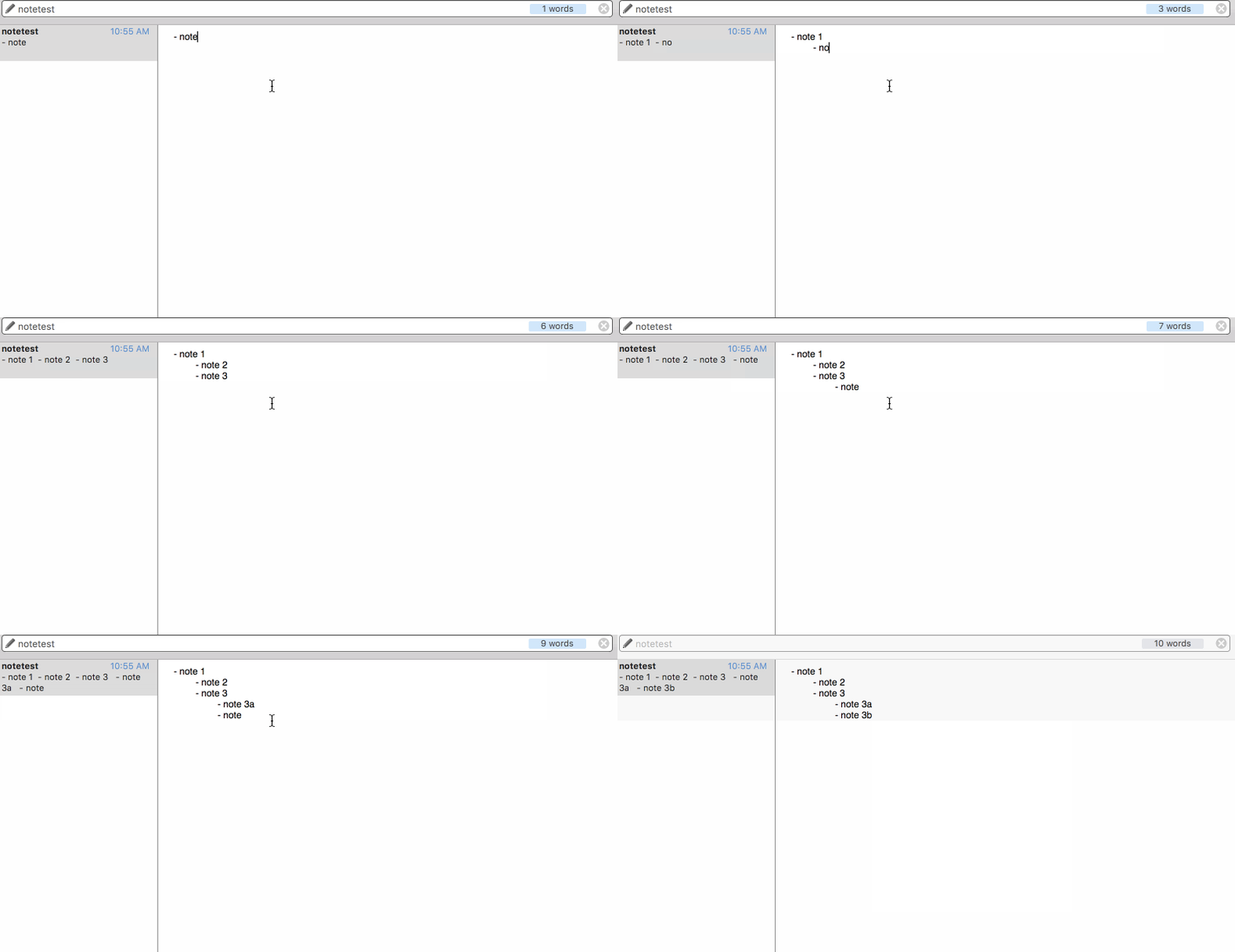
When I try it in FSNotes, even with code block highlighting turned off, I get the very-unsatisfying:
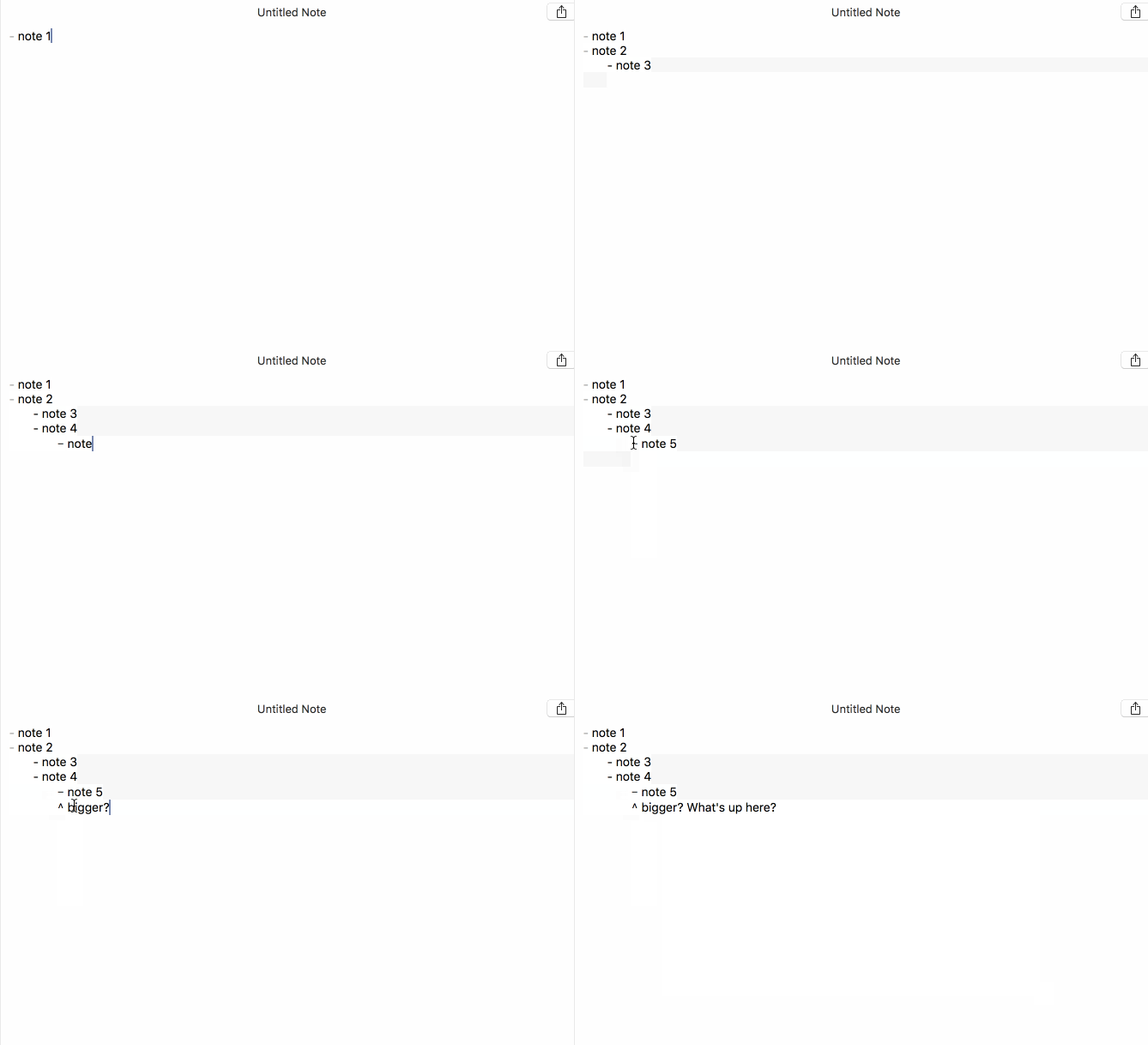
Highlighting is nice and all, but it's kind of ancillary to the task of taking notes, which is to quickly impose meaningful structure on text and then find it again. Here it's just kind of getting in the way.
 flowchartsman
on 12 Sep 2018
flowchartsman
on 12 Sep 2018
Related issues
 shurain
·
3Comments
shurain
·
3Comments
 sepich
·
3Comments
sepich
·
3Comments
 dmattera
·
3Comments
dmattera
·
3Comments
 jakemkc
·
3Comments
jakemkc
·
3Comments
 iandol
·
4Comments
iandol
·
4Comments
Most helpful comment
EDITED after reading your link...
It looks like you already linked to the source I found (CommonMark Spec), though their example isn't really the same as this issue...
vs
Wouldn't the list items be considered a paragraph and the code block is interrupting... therefore it would need the blank lines? I'd think CommonMark would correctly handle this situation, but the Down interpreter does not observe the CommonMark requirement of blank lines fencing when breaking paragraphs (list items)