Fsharp: F# editor pastes doubled line when equal sign is the last character in line
_This issue has been moved from a ticket on Developer Community._
Create F# console application. Open Program.fs. Move cursor to line:
let main argv =
Don't select anything, press only Ctrl+C then move cursor to empty line and press Ctrl+V. I get this:
let main argv =
let main argv =
Original Comments
Feedback Bot on 6/4/2020, 08:16 PM:
We have directed your feedback to the appropriate engineering team for further evaluation. The team will review the feedback and notify you about the next steps.
Feedback Bot on 7/9/2020, 11:23 PM:
I have detected that for the last 35 days, this issue didn't have much product team activity and a very small amount of new votes or comments. Based on this, its severity, and affected area, it’s my experience that this issue is very unlikely to be fixed.
Original Solutions
(no solutions)
 vsfeedback
All 7 comments
@cartermp do you repro this?
 dsyme
on 24 Aug 2020
dsyme
on 24 Aug 2020
Don't select anything, press only Ctrl+C then move cursor to empty line and press Ctrl+V. I get this:
@dsyme This has been _by design_ in Visual Studio since at least version 2010 (possibly further back, but I don't have these installed anymore). It is unrelated to F# (it works in C#, XML files, VB files, text files) and is considered a short-cut for copying a line. I believe in recent versions they made it an option, I can try find it.
Note that Ctrl-X cuts the current line, I've seen this reported here and there as a surprise behavior as well, but it's consistent with the Ctrl-C behavior.
Edit: nope, that option doesn't exist, only the related option to prevent this behavior from happening on blank lines:
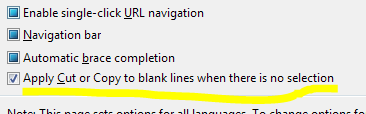
 abelbraaksma
on 24 Aug 2020
abelbraaksma
on 24 Aug 2020
I will try to make this thing more clear. The problem doesn't lay in possibility of copying line content without selection. The problem is that such line is pasted twice.
Before copy:
[<EntryPoint>]
let main argv =
    let message = from "F#" // Call the function
    printfn "Hello world %s" message
    0 // return an integer exit code
After copy:
let main argv =
let main argv =

[<EntryPoint>]
let main argv =
    let message = from "F#" // Call the function
    printfn "Hello world %s" message
    0 // return an integer exit code
I copied without selection this line:
let main argv =
and I pasted it at the top of the code.
Line has to end with '=' sign, lines without this character at the end are not affected.
I'm using VS 16.8.0 Preview 3.
@cartermp: could you reopen this issue - it is for sure not 'by design' :).
 daniel-wojcik
on 22 Sep 2020
daniel-wojcik
on 22 Sep 2020
Thanks for the clarification. Yes, this is a known problem that unfortunately lies upstream in Roslyn. I've personally noticed it when pasting in code that wouldn't compile.
 cartermp
on 22 Sep 2020
cartermp
on 22 Sep 2020
More specifically, you can repro this if you paste the following into a script file:
module M =
  module N =
     let xxxxx = 1

xxxxx
It will yield this stack trace:
System.NullReferenceException: Object reference not set to an instance of an object.
   at Microsoft.CodeAnalysis.Editor.Implementation.Formatting.FormatCommandHandler.ExecuteCommandWorker(PasteCommandArgs args, Action nextHandler, CancellationToken cancellationToken)
   at Microsoft.CodeAnalysis.Editor.Implementation.Formatting.FormatCommandHandler.ExecuteCommand(PasteCommandArgs args, Action nextHandler, CommandExecutionContext context)
   at Microsoft.VisualStudio.UI.Text.Commanding.Implementation.EditorCommandHandlerService.<>c__DisplayClass14_1`1.<ExecuteStartingAtIndex>b__0()
   at Microsoft.VisualStudio.Text.Utilities.GuardedOperations.CallExtensionPoint(Object errorSource, Action call, Predicate`1 exceptionFilter)
--- End of stack trace from previous location where exception was thrown ---
   at Microsoft.VisualStudio.Telemetry.WindowsErrorReporting.WatsonReport.GetClrWatsonExceptionInfo(Exception exceptionObject)
Which comes from this method: https://github.com/dotnet/roslyn/blob/a9481e4fed1c0ac4f5335b055fb2779e650f9ee1/src/EditorFeatures/Core/Implementation/Formatting/FormatCommandHandler.Paste.cs#L34-L79
So there needs to be some debugging to see if we're passing in the right data or not, and debugging Roslyn if it's unclear.
cartermp
on 23 Sep 2020
I have a fix. I think we are sending bad data to Roslyn and it's crashing there.
cartermp
on 23 Sep 2020
Nice work fixing this!
abelbraaksma
on 24 Sep 2020
Related issues
 randrag
·
3Comments
randrag
·
3Comments
 enricosada
·
3Comments
enricosada
·
3Comments
 ploeh
·
3Comments
ploeh
·
3Comments
 Tarmil
·
4Comments
Tarmil
·
4Comments
 drguildo
·
3Comments
drguildo
·
3Comments