Fsharp: Nuget #r references do not resolve assemblies referenced through the primary one
Nuget #r references, for example r# "nuget: FParsec" do not add the directory containing the primary assembly to the assembly search path. This means assemblies referenced thought the outer assembly will not be found by default.
Reviewing the RFC it is not clear to me if this directory should automatically be added. But the announcement here https://devblogs.microsoft.com/dotnet/announcing-f-5-preview-1/, indicates the features should work like a package reference in a project file.
This will download and install the latest JSON.NET package (if it’s not in your package cache), resolve all dependencies, and let you use the library as if it were in a fully-fledged project.
In the case of a package reference via a .fsproj file assemblies referenced thought the primary .dll are automatically found so it sees that should be the case for #r nuget: references as. well.
Repro steps
To demonstrate the issue save the below snipped as Test.fsx and run it with the F# 5.0 FSI using:
dotnet fsi --langversion:preview Script.fsx.
#r "nuget: Newtonsoft.Json"
#r "nuget: FParsec"


// #I "/Users/joergbeekmann/.nuget/packages/fparsec/1.1.1/lib/netstandard2.0"
// Without an #I directive which adds the appropriate director the search path addtional dll's r
// referenced through another can't be found. Instead the following error is generated:
//
// .../Test.fsx(25,11): error FS0074: The type referenced through 'FParsec.CharStream`1' is
// defined in an assembly that is not referenced. You must add a reference to assembly 'FParsecCS'.
//
// This is not neccessary when adding a package via a .fsproj file.

open Newtonsoft.Json
open FParsec


let o = {| X = 2; Y = "Hello" |}
printfn "%s" (JsonConvert.SerializeObject o)


let test p str =
    match run p str with
    | Success(result, _, _)   -> printfn "Success: %A" result
    | Failure(errorMsg, _, _) -> printfn "Failure: %s" errorMsg
test pfloat "1.234"
Expected behavior
The script should succeed with the following output:

Actual behavior
It will fail as follows:

Known workarounds
Add a #I directive that adds the directory containing the main .dll to the search path. In this case:
#I "/Users/joergbeekmann/.nuget/packages/fparsec/1.1.1/lib/netstandard2.0"
Related information
Provide any related information (optional):
- MacOs
- .NET 5.0.100-preview.3.20216.6
 jbeeko
All 13 comments
Minimal repro:
#r "nuget: FParsec"

open FParsec

let test p str =
    match run p str with
    | Success(result, _, _)   -> printfn "Success: %A" result
    | Failure(errorMsg, _, _) -> printfn "Failure: %s" errorMsg
test pfloat "1.234"
Confirmed this error in the .NET 5 preview 4 bits and latest master in jupyter notebooks.
 cartermp
on 18 May 2020
cartermp
on 18 May 2020
@KevinRansom this will be another one to make sure we get right by release
cartermp
on 18 May 2020
From FParsec's website. The order of dll references also matters here for whatever reason.
https://www.quanttec.com/fparsec/download-and-installation.html
"If you reference the DLLs in the F# Interactive console, you need to reference FParsecCS.dll before you reference FParsec.dll."
 zyzhu
on 18 May 2020
zyzhu
on 18 May 2020
@zyzhu Ahh !!!! ... I was just wondering about that, because, it looked like we were referencing it as expected, but there is an ordering issue. A thing that doesn't happen in an exe build.
 KevinRansom
on 18 May 2020
KevinRansom
on 18 May 2020
Yes ...
````
c:\kevinransom\fsharp>dotnet artifacts\bin\fsi\Debug\netcoreapp3.0\fsi.exe --langversion:preview
Microsoft (R) F# Interactive version 10.8.1.0 for F# 4.7
Copyright (c) Microsoft Corporation. All Rights Reserved.
For help type #help;;
r @"C:\Users\codec.nuget\packages\fparsec\1.1.1\lib\netstandard2.0\FParsecCS.dll"
- #r @"C:\Users\codec.nuget\packages\fparsec\1.1.1\lib\netstandard2.0\FParsec.dll"
- ;;
--> Referenced 'C:\Users\codec.nuget\packages\fparsec\1.1.1\lib\netstandard2.0\FParsecCS.dll' (file may be locked by F# Interactive process)
--> Referenced 'C:\Users\codec.nuget\packages\fparsec\1.1.1\lib\netstandard2.0\FParsec.dll' (file may be locked by F# Interactive process)
open FParsec
-
- let test p str =
- match run p str with
- | Success(result, _, _) -> printfn "Success: %A" result
- | Failure(errorMsg, _, _) -> printfn "Failure: %s" errorMsg
- test pfloat "1.234"
- ;;
Success: 1.234
val test : p:FParsec.Primitives.Parser<'a,unit> -> str:string -> unit
val it : unit = ()
>
Whereas:
c:\kevinransom\fsharp>dotnet artifacts\bin\fsi\Debug\netcoreapp3.0\fsi.exe --langversion:preview
Microsoft (R) F# Interactive version 10.8.1.0 for F# 4.7
Copyright (c) Microsoft Corporation. All Rights Reserved.
For help type #help;;
r @"C:\Users\codec.nuget\packages\fparsec\1.1.1\lib\netstandard2.0\FParsec.dll"
- #r @"C:\Users\codec.nuget\packages\fparsec\1.1.1\lib\netstandard2.0\FParsecCS.dll"
- ;;
--> Referenced 'C:\Users\codec.nuget\packages\fparsec\1.1.1\lib\netstandard2.0\FParsec.dll' (file may be locked by F# Interactive process)
--> Referenced 'C:\Users\codec.nuget\packages\fparsec\1.1.1\lib\netstandard2.0\FParsecCS.dll' (file may be locked by F# Interactive process)
open FParsec
-
- let test p str =
- match run p str with
- | Success(result, _, _) -> printfn "Success: %A" result
- | Failure(errorMsg, _, _) -> printfn "Failure: %s" errorMsg
- test pfloat "1.234"
- ;;
match run p str with
----------^^^^^^^^^
stdin(7,11): error FS0074: The type referenced through 'FParsec.CharStream`1' is defined in an assembly that is not referenced. You must add a reference to assembly 'FParsecCS'.
````
KevinRansom
on 18 May 2020
Since there is no way to infer the order that references need to be generated in, we should see if there is someway to make resolves less closed minded.
KevinRansom
on 18 May 2020
@KevinRansom Interestingly this sequence of directives works, it does not matter that the #I directive comes after the #r nuget one.
#r "nuget: FParsec"
#I "/Users/joergbeekmann/.nuget/packages/fparsec/1.1.1/lib/netstandard2.0"
This is not the case when referencing the an outer dll directly. In that case the #I directive has to come first. So this does not work.
#r "/Users/joergbeekmann/.nuget/packages/fparsec/1.1.1/lib/netstandard2.0/FParsec.dll"
#I "/Users/joergbeekmann/.nuget/packages/fparsec/1.1.1/lib/netstandard2.0"
But this does.
#I "/Users/joergbeekmann/.nuget/packages/fparsec/1.1.1/lib/netstandard2.0"
#r "/Users/joergbeekmann/.nuget/packages/fparsec/1.1.1/lib/netstandard2.0/FParsec.dll"
And as you would expect this does as well:
#I "/Users/joergbeekmann/.nuget/packages/fparsec/1.1.1/lib/netstandard2.0"
#r "FParsec.dll"
Is this related or another issue: https://gist.github.com/wallymathieu/290d3392e2cc68872080c53e63de0930 ?
 wallymathieu
on 24 May 2020
wallymathieu
on 24 May 2020
@wallymathieu It depends, if any of the binaries from these packages require a specific order in which to generate references then it's the same issue.
cartermp
on 24 May 2020
@jbeeko ,
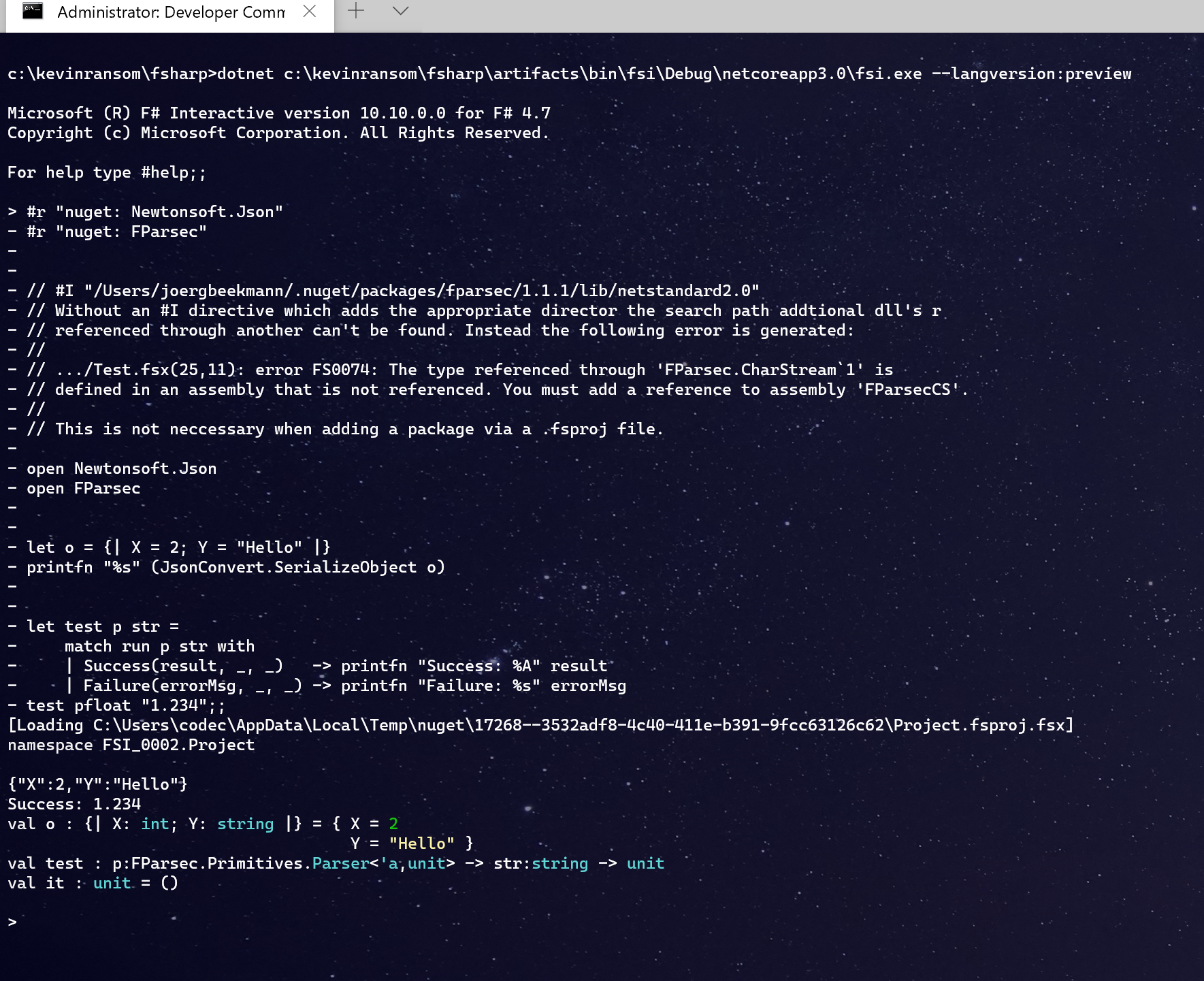
Thanks for the report, It was quite challenging to figure out a "not terrible" fix. But I have one, hopefully it's decent. What is happening, is that when we import types from assemblies, if we haven't yet read the assemblies in which referenced types live, we generate a thing aclled a ccuThunk, which allows us to fix up the reference later. In the compiler all of the referenced assemblies (except provided types) are read at startup and so fixups naturally happen, however, fsharp interactive is "iterative" and so, we don't get to do the fixing up, and so, FSI has always had this thing where assemblies need to be referenced in dependency order.
This fix, effectively stores the ccuthunks, until an assembly load can provide a backing assembly to reference. So effectively it removes the load ordering on which FSI was originally dependent.
Anyway here is a screenshot of your repro working:
The PR is a wip,
it needs:
- A test
- I have to consider whether to change some existing code
- I am going to see if it can also help with another issue we are having
other than that it is basically done.
KevinRansom
on 31 May 2020
@wallymathieu , yes, the fix I have also makes your gist work correctly, although I did have to add an open System to it.
See pelow
````
c:\kevinransom\fsharp>dotnet artifacts\bin\fsi\Debug\netcoreapp3.0\fsi.exe --langversion:preview
Microsoft (R) F# Interactive version 10.10.0.0 for F# 4.7
Copyright (c) Microsoft Corporation. All Rights Reserved.
For help type #help;;
r "nuget: Fleece.NewtonsoftJson, 0.8.0"
- #r "nuget: Newtonsoft.Json, 12.0.2"
- #r "nuget: FSharpPlus, 1.1.1"
-- open System
- open Newtonsoft.Json
- open Fleece
- open Fleece.Newtonsoft
- open Fleece.Newtonsoft.Helpers
- open Fleece.Newtonsoft.Operators
- open FSharpPlus
- open FSharpPlus.Data
-- type Gender =
- | Male = 1
- | Female = 2
-- type Person = {
- Name: string
- Age: int
- Gender: Gender
- DoB: DateTime
- Children: Person list
- }
-- type Person with
- static member Create name age dob gender children = { Person.Name = name; Age = age; DoB = dob; Gender = gender; Ch ildren = children }
-- static member OfJson json =
- match json with
- | JObject o ->
- monad {
- let! name = o .@ "name"
- let! age = o .@ "age"
- let! dob = o .@ "dob"
- let! gender = (o .@ "gender")
- let! children = o .@ "children"
- return Person.Create name age dob gender children
-- }
- | x -> Decode.Fail.objExpected x
-- static member ToJson (x: Person) =
- jobj [
- "name" .= x.Name
- "age" .= x.Age
- "gender" .= x.Gender
- "dob" .= x.DoB
- "children" .= x.Children
- ];;
[Loading C:\Users\codec\AppData\Local\Temp\nuget\32820--bddb14c9-fc3d-45ab-9712-221c25d61f59\Project.fsproj.fsx]
namespace FSI_0002.Project
Binding session to 'C:\Users\codec.nuget\packages\newtonsoft.json\12.0.2\lib\netstandard2.0\Newtonsoft.Json.dll'...
type Gender =
| Male = 1
| Female = 2
type Person =
{ Name: string
Age: int
Gender: Gender
DoB: System.DateTime
Children: Person list }
with
static member
Create : name:string ->
age:int ->
dob:System.DateTime ->
gender:Gender -> children:Person list -> Person
static member
OfJson : json:Fleece.Newtonsoft.JsonValue ->
Result
static member ToJson : x:Person -> Newtonsoft.Json.Linq.JToken
end
>
````
KevinRansom
on 1 Jun 2020
Sweet! Since it blew up kind of early the gist is sort of broken (I went with using a paket-bridge instead).
wallymathieu
on 1 Jun 2020
@KevinRansom Thank you for the explanation of the references work under the covers. I had naively thought that since this was working even before this fix/pr that simply adding the directory containing the first dll to the search path would be sufficient.
#r "nuget: FParsec"
#I "/Users/joergbeekmann/.nuget/packages/fparsec/1.1.1/lib/netstandard2.0"
Related issues
 randrag
·
3Comments
randrag
·
3Comments
 viktorvan
·
3Comments
viktorvan
·
3Comments
 Szer
·
3Comments
Szer
·
3Comments
 vasily-kirichenko
·
3Comments
vasily-kirichenko
·
3Comments
 abelbraaksma
·
3Comments
abelbraaksma
·
3Comments