Fsharp: The last Visual Studio 16.3.2 hangs by switching solution configuration
Solution contains c# and f# projects, netcore and netframework configurations. The switch from Debug to Release configuration cause endless operation with message box title “Microsoft Visual F# Tools” and with content “Updating solution configuration…”
- Operating System
Windows 10
- Editing Tools: Visual Studio 16.3.2
 AndreiDegtiarev
All 36 comments
Relevant routine is here: https://github.com/dotnet/fsharp/blob/f50d9c4f2131eac75738fd4c381a1f658cf12db6/vsintegration/src/FSharp.ProjectSystem.FSharp/Project.fs#L1702-L1724
We haven't touched the legacy F# project system in a very long time, so this isn't a new change on our end.
@panopticoncentral @tmeschter were there any changes in the VS base project system that could affect this?
 cartermp
on 3 Oct 2019
cartermp
on 3 Oct 2019
Unfortunately I don't know how the legacy F# project system relate to the C#/VB systems and their underlying pieces.
Is this a regression from 16.2?
 tmeschter
on 3 Oct 2019
tmeschter
on 3 Oct 2019
@AndreiDegtiarev would be good to know if this is indeed a regression from 16.0.
@tmeschter the legacy F# project system uses MPF underneath, but beyond that I don't know how it truly works with VS. There was an issue in the past where a VSLangProj change broke parallel builds - (possibly resurfaced in F# atop CPS in #7683) - but how that bubbles up to the F# legacy system is a bit of a mystery to me. @KevinRansom may know more.
cartermp
on 3 Oct 2019
Beginning from 16.3.2 (very last update) I’m not able any more to switch solution configuration from Debug to Release on two different machines. Cleaning, reboot don’t help. It is interesting that I have different debug and release configurations, the switch between debug configurations (netcore to framework) works without problems. In the previous Visual Studio updates there were already indications that something is going wrong but the reload of solution in previous versions did help
AndreiDegtiarev
on 3 Oct 2019
There's nothing that I know of that's happened in the servicing updates, but there are other possibilities. @AndreiDegtiarev do you have a repro scenario we could try out? Barring that, could you take a full process dump (using something like https://docs.microsoft.com/en-us/sysinternals/downloads/procdump) and attach it to a "Report a problem" in VS and then let us know?
 panopticoncentral
on 4 Oct 2019
panopticoncentral
on 4 Oct 2019
@panopticoncentral Unfortunately, I don’t have a repo which I can share. We could make Skype conference where I can demonstrate my problem
AndreiDegtiarev
on 5 Oct 2019
i also have the same problem
 jmecosta
on 5 Oct 2019
jmecosta
on 5 Oct 2019
Thank you jmecosta, now I feel much better about myself because I’m not alone in this world with my problem :-)
AndreiDegtiarev
on 5 Oct 2019
@AndreiDegtiarev @jmecosta Can you report a problem and then note it here? That will capture data we can use to start figuring out what's wrong.
panopticoncentral
on 7 Oct 2019
Problem was reported. https://developercommunity.visualstudio.com/content/problem/766725/the-last-visual-studio-1632-hangs-by-switching-sol.html
AndreiDegtiarev
on 8 Oct 2019
@panopticoncentral been there, done that
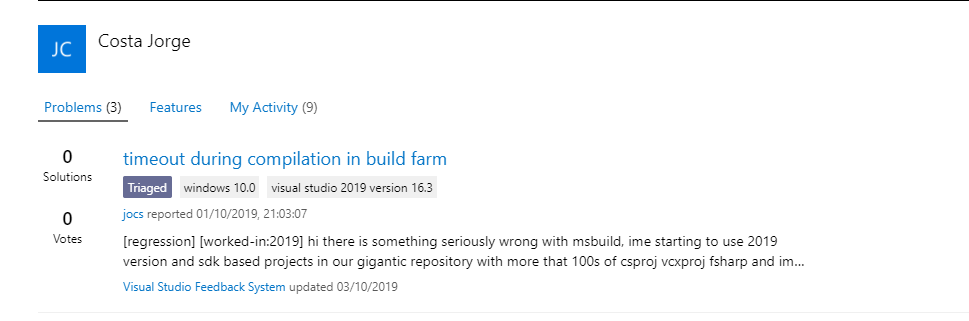
its still in "triage" whatever that means... meanwhile we get the pain
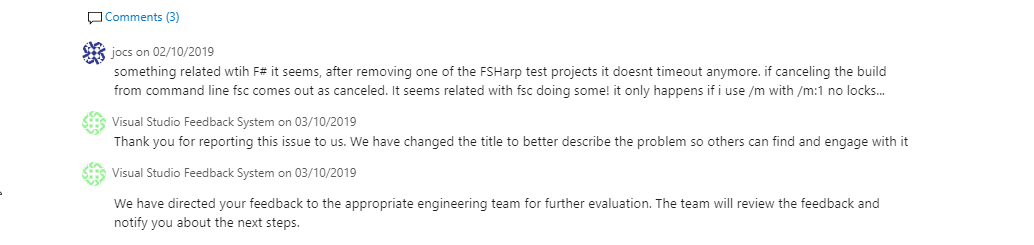
jmecosta
on 9 Oct 2019
@AndreiDegtiarev You can ignore the "Need more info" status of your problem, it looks like there were some crossed wired, I'm looking at the dump to see if I can figure out what's going wrong.
@jmecosta The "triage" status means that it's waiting for the team to look at it to determine its priority and who should look at it. I'll email the team and see if they can get it triaged soon.
panopticoncentral
on 9 Oct 2019
darn, i cant release my application because i cant change the configuration to release. as a workaround, manually modified sln file, deleted all AnyCpu, x86, Debug stuff. so now i have one solution file for debug and a solution for release! of course to jump between to two, need to delete .vs folder and start over
hopefully you guys can fix this
jmecosta
on 12 Oct 2019
Is this a regression from 16.2?
@AndreiDegtiarev, @tmeschter, I also have a very large configuration with 8 solution configurations, mixed F#, C# and C++, but in 16.3.1 I don't encounter this situation. I have not updated to 16.3.2 yet because of this report, but I did notice something else: NCrunch (an addin) hangs sometimes on switching configurations. Just to say: did you try it with a /SafeMode switch to be sure there's not extension in the way?
@jmecosta, as an alternative for the workaround you mention, you could try these to ease the pain a bit:
- Run
devenv your.sln /Build Debugor devenv your.sln /Build "Debug|x86", see [/Build`](https://docs.microsoft.com/en-us/visualstudio/ide/reference/build-devenv-exe?view=vs-2019) switch for more info. This will at least allow you to release - Alternatively, use MSBuild for building the solution
- Something that may or may not help with the issue, is upgrading all files, incl sln files, to the new Visual Studio version (though it's a long shot). You can do this automatically with
devenv /Upgrade - You can install multiple instances of Visual Studio, so you could install a new instance with a lower version. For the same reason I still have 15.9.x versions around if I get stuck, and both a 16.2.0 and a 16.3.1
Perhaps some things to try with your current situation:
- Try, before you switch solutions, to close all editors
- Try, before you switch solutions, to unload the prj files, this may lead to a specific project file that causes this behavior
- Perhaps there's a difference between switching from the toolbar (no popup) or switching from the configuration popup? Or doesn't the method matter and all ways lead to lockups?
Editing Tools: Visual Studio 16.3.2
There's a 16.3.4 out, you might also try upgrading.
 abelbraaksma
on 13 Oct 2019
abelbraaksma
on 13 Oct 2019
16.3.4 has the same problem (i did see the release notes, no mentions about locks).. im pretty sure this started in 16.3.2
not sure if this helps

the devenv.exe /Build works ok, thanks for the hint
my box, does not contain any added extensions besides what comes by default.
/SafeMode caused all projects to require migration. And F# projects fail to migrate entirely. So not touching that again :)
jmecosta
on 13 Oct 2019
I can confirm that the problem has started with 16.3.2 and 16.3.4 has the problem as well.
AndreiDegtiarev
on 13 Oct 2019
I get this problem switching configurations in VisualFSharp.sln
I'm using 16.3.0 Preview 4.0
 dsyme
on 15 Oct 2019
dsyme
on 15 Oct 2019
@panopticoncentral This is a severe problem I think. Makes VS unusable. I assume it only hits solutions containing legacy projects but still, that's a huge proportion of projects
dsyme
on 15 Oct 2019
@dsyme VisualFSharp.sln doesn't have any legacy projects as far as I saw, does it? Can you make a report and then send me a link? For both @dsyme and @AndreiDegtiarev, do you see any activity in MSBuild worker processes?
panopticoncentral
on 15 Oct 2019
I'm using 16.3.0 Preview 4.0
Interesting, as I'm using 16.3.1 (professional rtm, not preview) and don't have this problem on mixed legacy projects, which would put this bug earlier. @dsyme, how are you or others usually switching? Through config manager, or direct access drop down on toolbar (no popup)?
abelbraaksma
on 15 Oct 2019
@panopticoncentral I don't see any activities in MSBuild process, I closed all open documents, I killed all child VS processes, but nothing helped
AndreiDegtiarev
on 15 Oct 2019
This appears to be the issue addressed here. It is currently scheduled to be fixed in the next minor release (16.4) but we're looking at servicing it in the current minor release (16.3.x). You can follow it's progress there.
panopticoncentral
on 15 Oct 2019
@dsyme I'm not sure how to reproduce this with VisualFSharp.sln. I switched configurations from Debug to Release and VS doesn't have with the 16.3.5 update and latest master.
cartermp
on 15 Oct 2019
As per @panopticoncentral's comment I'll close this.
cartermp
on 15 Oct 2019
Unfortunately, version 16.3.5 didn’t solve my problem. I've waited for about 15 minutes but the result is the same: VS hangs
AndreiDegtiarev
on 15 Oct 2019
@AndreiDegtiarev As per the linked issue, the fix is scheduled for 16.4 and _may_ be serviced into the 16.3.x release.
cartermp
on 16 Oct 2019
For some reason the item I linked to says it is fixed in the current release, which is wrong. It's not going to be fixed until 16.4 at the moment. You can verify this in the current VS preview.
panopticoncentral
on 16 Oct 2019
@AndreiDegtiarev I'm not sure it's already in the current download, see @panopticoncentral comment of 44 min ago, at which moment it wasn't, which is hardly enough time to get it out. But I can be wrong ;)
Edit: as others said :)
abelbraaksma
on 16 Oct 2019
@panopticoncentral Thank you for the solution of this problem! One question more. VS 16.4 will be released together with .net core 3.1 and .net core 3.1 is planned for December 2019. So, the solution of actual problem will be not released earlier as in about two months, is this correct?
AndreiDegtiarev
on 16 Oct 2019
@AndreiDegtiarev, here's a quote from an earlier post, looks like they'll try to release it sooner:
but we're looking at servicing it in the current minor release
abelbraaksma
on 16 Oct 2019
Hmm, yesterday 16.3.6 came out and I hoped the fix would be part of this. While they updated the issue to the correct status (it is now _Solved - pending release_), it doesn't seem to have made it in this release...
abelbraaksma
on 23 Oct 2019
at least its consistent with release notes of 16.3.6, not release yet :(
jmecosta
on 23 Oct 2019
The last statement from @panopticoncentral was
It's not going to be fixed until 16.4 at the moment.
So it seems that before December we will not get solution, I hope that I'm wrong
AndreiDegtiarev
on 23 Oct 2019
Workaround suggested here: https://developercommunity.visualstudio.com/comments/794272/view.html by Nicholas Poh has solved my problem and the fix will be released in the next VS update v16.3.7
AndreiDegtiarev
on 25 Oct 2019

doesnt lock
jmecosta
on 27 Oct 2019
Fixed in latest 16.3 for me
jmecosta
on 3 Nov 2019
Related issues
 smoothdeveloper
·
3Comments
smoothdeveloper
·
3Comments
 viktorvan
·
3Comments
viktorvan
·
3Comments
 vasily-kirichenko
·
3Comments
vasily-kirichenko
·
3Comments
 Szer
·
3Comments
Szer
·
3Comments
 ploeh
·
3Comments
ploeh
·
3Comments
Most helpful comment
Fixed in latest 16.3 for me