Fsharp: User Studies report on getting started with F#
About two weeks ago, I ran 9 users studies to see what it was like getting started with F# if you don’t have any F# or functional programming experience. The study was pretty simple, with this as the prompt:
Write a console application in F# that accepts an array of strings as input. Reverse each of the strings in that array. There are no requirements around tools to use or what to search for. The only requirement is that you use F# to accomplish this task.
After prompting them, I just sat and watched as they attempted to complete the task.
Going in, I had a few hypotheses:
People with no F# or functional programming experience…
- …will not be able to complete the task in under an hour because the paradigm shift is too difficult to handle
- …will not be able to complete the task in under an hour because there is not ample information online to figure out how to solve the problem
- …will not be able to complete the task in under an hour because F#-specific rules are too difficult to understand and work with
- …will not be able to complete the task in under an hour because the tooling is too difficult to use or install
Summary
Here’s how it looked w.r.t. the hypotheses:
[Invalidated]…will not be able to complete the task in under an hour because the paradigm shift is too difficult to handle
[Invalidated]…will not be able to complete the task in under an hour because there is not ample information online to figure out how to solve the problem
[validated]…will not be able to complete the task in under an hour because F#-specific rules are too difficult to understand and work with
[validated for VSCode]…will not be able to complete the task in under an hour because the tooling is too difficult to use or install
I learned some more specific things about the experience that were not captured in the hypotheses:
- Between StackOverflow, docs.microsoft.com, dot.net tutorial, and F# for Fun and Profit, there are a significant amount of resources for people to learn how to do something with F#
- There is a separate hypothesis that there may be too much and that might confuse people, but I didn’t see that really transpire
- Tutorialspoint was used by most people at one point. It contains some outdated information and isn’t all that great compared to the previously-mentioned resources, but they must have good SEO because they popped up near the top of most searches people did
- VSCode was preferred by 4/9 participants, VS was preferred by 5/9
- The 5 who preferred VS were actively developing using VS for their job
- The 4 who preferred VSCode were not actively developing using VS for their job
- There were no issues creating new F# projects and “getting to code”
- Those who used VS were able to easily find F# in the New Project Dialog
- The “flow” of using a command-line -> invoking
dotnet new console -lang F#-> invokingcode .to open VSCode -> installing Ionide to get F# tooling was also painless - Scaffolding a new project with the Ionide plugin in VSCode was also painless
Additionally, 2/9 participants were able to accomplish the task in the allotted time. I expected nobody to do it, so that was a pleasant surprise!
F#-specific rules are too difficult to understand and work with
The most common struggle people had was understanding that functions need to be defined before they are used in F#. All 9/9 participants attempted to define a function after the main function in code, leading to a compile error that was difficult to diagnose. Some people never got past this point. Those who did struggled quite a bit, but eventually figured out that you need to define a function before it’s used by looking at a bunch of examples of F# code online.
Some F# error messages were too difficult for people to understand. For example, one participant could not move past an error that was actually an parsing ambiguity, but the error message merely said, “value is not a function and cannot be applied”. Not only was this jargon too difficult for the participant to handle, it was also being emitted in a somewhat unexpected place. The fix was to add a single whitespace character between a mathematical symbol and a numeric literal.
The good news is that community-driven compile error improvements did show up, and none of these improved error messages led to participants getting stuck. The hypothesis derived from this is that focusing on these error message improvements can help onboarding F# developers.
The tooling is too difficult to use or install
5/9 participants who chose Visual Studio did not have any issues with Visual Studio tooling in the study. They were able to find F# templates and focus primarily on coding the task at hand.
Out of the 4/9 participants who uses VSCode, one succeeded by ignoring the built-in project scaffolding that the Ionide project offers. The 3 participants who used the built-in scaffolding all ended up failing due to numerous problems:
- The artifacts scaffolded were too complex; a “all batteries included” template that included Paket and a FAKE build script proved too much for 1 participant to handle
- The projects scaffolded use .NET Framework, not .NET Core, but Ionide pops up a notification suggesting to analyze projects using the .NET Core-based language service
- This results in project parsing failures because the language service doesn’t understand .NET Framework projects
- These failures caused 1 participant to never move past the error message, as they attempted to chase that down for the remainder of the study session
- No tooling support pops up when projects fail to parse led to another participant to not write much code because the tooling was “broken”
The good news here is that the one participant who just used the .NET CLI to scaffold a project didn’t suffer any of the previously-mentioned tooling problems, needing only to struggle with F#-specific rules 🙃
What we can address
There are some concrete things learned that we could do to address some of the problems people experienced:
- Adjust all F# templates to define a function before the main function
- The hypothesis here is that users are more likely to define their own functions above the main function after seeing a function that is defined in this way
- Adjust the dot.net F# tutorial to show that functions need to be defined before use, asking users to define a new function in their code as such
- Change the Get Started with F# on VSCode tutorial to no longer show how to scaffold projects using the built-in tools, instead deferring to the .NET CLI for project creation
- Work with the Ionide maintainers to have Ionide focus more heavily on .NET Core
Would love to get opinions on this from others who are quite passionate about the getting started space: @isaacabraham @Krzysztof-Cieslak @forki @Rickasaurus @auduchinok @alfonsogarciacaro @ReedCopsey @matthid @Tarmil
Note that other alternative approaches to getting started (e.g., tryfsharp, bolero, etc.) were not explored.
 cartermp
All 28 comments
thanks for doing this and especially for making it public!
First thing that comes to mind: truth hurts. But yes acknowledging is the first step
 forki
on 20 May 2019
forki
on 20 May 2019
Very nice, thanks a lot!
The artifacts scaffolded were too complex; a “all batteries included” template that included Paket and a FAKE build script proved too much for 1 participant to handle
Yes completely agreed
Work with the Ionide maintainers to have Ionide focus more heavily on .NET Core
I'm not sure that analysis is correct. In my experience, .NET SDK based projects work much better. I assume that regular users are more used to stale error messages and build by hand or "trust" that their code is correct and the tooling is showing "ghost" errors. For new users, this is impossible to overcome. I had multiple situations in my team where I was called to ensure them that their code is correct and the tooling is failing on them.
Change the Get Started with F# on VSCode tutorial to no longer show how to scaffold projects using the built-in tools, instead deferring to the .NET CLI for project creation
Indeed, we should stop pointing people to our scaffolding projects and legacy projects still on full-framework. If nobody does the work of updating them, we should remove/hide them and point to the dotnet SDK command line.
Adjust the dot.net F# tutorial to show that functions need to be defined before use, asking users to define a new function in their code as such
Maybe we should consider rewording the error message as well if we can somehow recognize this situation.
I'm always interested in how to make the FAKE story better, but yes, the more tools, the more cognitive overhead for new users...
 matthid
on 20 May 2019
matthid
on 20 May 2019
So there is couple of points about Ionide here. Let me write short summary of what's the current status of Ionide vs Framework vs Core vs SDK vs fsproj as there seems to be bit of misunderstanding about those topics and what are our plans here.
Ionide requirements
Currently we list following requirements in the readme:
- F# (Winodws) - we suggest installation using VS Build Tools 2017
- F# (Linux/OSX) - we require
monoinstallation, and we link to FSSF webpage for installation instruction - https://fsharp.org/use/linux/ - .Net SDK - we link to the MSFT page - https://www.microsoft.com/net/core
- Omnisharp (optional) - debugging support
- MSBuild 2015 (Windows only, optional) - this is last version of MsBuild supported by FCS'
ProjectCrackerand it may currently be required in some cases.
FSAC Runtime and project cracking
FSAC traditionally has been Framework application - it required either Windows .Net Framework installation or mono (on Linux/OSX). Originally when Ionide was created it was only option - I've started Ionide before .Net Core was a thing. Nowadays FSAC is distributed in 2 versions - the Full Framework one, and .Net Core one - and Ionide is bundling both of them. Users can control which one they want to run using settings in VSCode. Ionide traditionally has been using Framework runtime by default, but we do suggest Core runtime with the popup that annoys everyone but me ;-)
Choosing one version or another is not directly connected with type of project you work with - both Framework and Core version of FSAC supports Framework and Core projects (both SDK and old format).
However choosing FSAC version impacts project cracking - depending on which runtime is used and what type of project we have we choose different utility for project cracking - either FCS' ProjectCracker or @enricosada's dotnet-proj-info:
| - | Pre-SDK Project | SDK project |
|-----------------------------|------------------|------------------|
| Full Framework FSAC runtime | Project Cracker | dotnet-proj-info |
| .Net Core FSAC runtime | dotnet-proj-info | dotnet-proj-info |
ProjectCracker depends on globally installed MsBuild version and is able to detect only MsBuild 14 or earlier - it doesn't support MsBuild installed with VS 2017/19. But it does have an advantage - it seems to be more robust for pretty complex project files - for example VF# / FCS solution (before porting to SDK) could be loaded only with ProjectCracker, and not with dotnet-proj-info
Ionide 4.0 roadmap
- Remove ProjectCracker dependency and "official" pre-SDK project support:
- Pre-SDK project seems to be less and less popular, and Ionide always attempted to be a tool that shapes how people use F# - the push for SDK project files and using
dotnetCLI is good anyway dotnet-proj-infosupports pre-SDK projects pretty well, but we won't be officially bug-fixing or focusing on it - however I expect that any fix to SDK project cracking will also help with pre-SDK projects- this doesn't have anything to do with Framework vs Core support - we'll still support projects targeting either runtime
- it will remove MsBuild 2015 from the list of requirements
- Pre-SDK project seems to be less and less popular, and Ionide always attempted to be a tool that shapes how people use F# - the push for SDK project files and using
- Use FSAC .Net Core runtime as default (and potentially as a only distributed version)
- this would remove the F#/Full Framework and mono from the requirements list - they still would be needed if someone wants to target full framework but it's user decision in such case, and should be a path that we suggest to users
- this is something we already do in DevContainer VSCode definition (F# container from MSFT, SAFE, MiniScaffold)
Project scaffolding and manipulation
Project scaffolding and manipulation in Ionide is provided by Forge.
- Forge is distributed as Framework application and as such requires mono/Framework installation
- Forge has its own set of templates using SDK projects but targeting full framework (usually
net46, I believe)
- Forge project manipulation capabilities (add file, move file up/down, add project references, etc) supports only SDK projects (mostly for sake of simplicity, theoretically old projects should also be supported - Forge was created before SDK was a thing)
- Forge scaffolds projects with Paket and FAKE.
Ionide 4.0 roadmap
- Use .Net Core distribution of Forge - Forge is already ported to .Net Core, it requires updates on Ionide side
- Replace Forge scaffolding engine with
dotnet new- either by making Forge work as a facade fordotnet newor usingdotnet newdirectly in Ionide
- Consider how to automatically extend
dotnet newtemplates with Paket and FAKE - while I'm all in for the making getting started experience as nice as possible, I don't believe into optimizing only for first time experience. Yes, Paket and FAKE may be bit overhead for a new users, but those are crucial part of the ecosystem, and are tools that should be promoted as much as possible. And I want to keep doing it. I'd rather have better getting started documentation explaining why Paket and FAKE are good, maybe some popups or links in thebuild.fsxfile andpaket.dependenciesfile to appropriate explanations
- Consider how to automatically extend
Build, run, debug project
VSCode provides it's own way of defining build and debug configurations using tasks.json and launch.json files. However Ionide attempts to transform VSCode into normal IDE - I don't belive that creating some json files with hardcoded paths to dlls is a good way of defining the debugging configuration in the IDE - and it's definitely not user experience expected by people coming from VS, IntelliJ, Eclipse etc background. Because of that we provide commands (both in command palette and right click on project file in solution explorer) to build, run or debug particular project.
Building and running seems to be working pretty well - we use data that we get from project cracking, based on project type and runtime we attempt to choose correct MsBuild version, build project and then run it with dotnet, mono or just .exe file. There are some bugs connected with different things here but it's nothing fundamentally broken - it just requires some more work.
Debugging is bit more complicated - debugging of Framework projects is supported on Windows, debugging of Core projects is supported on all platforms. However we don't own those part of stack - the debugging capabilities are provided by Omnisharp so we can't do anything here.
Ionide 4.0 roadmap
- Make sure that build/run support and all features are working correctly for all platforms and all project types
FSI
Currently we detect fsharpi/ fsi location based on typical location installation with mono or F# on Windows. However, as stated above one of our goals is to make Ionide dependent only on .Net SDK, and as such we need to provide good UX for FSI distributed with .Net SDK.
Ionide 4.0 roadmap
- Support and use as default FSI distributed with .Net SDK
- Add option to use Framework FSI
Summary
Our goal for next few weeks is to make Ionide 4.0 release that will by-default require only .Net SDK. We still will support Full Framework projects, and pre-SDK projects, however our main focus will be put on .Net Cor, SDK projects. Especially pre-SDK projects won't be officially supported any more.
Those changes should simplify getting started experience with Ionide - ideally users should be able to follow this simple instructions on any platform without any additional configuration changes, or running something from command line:
- Install .Net SDK - link to MSFT
- Install VSCode - link to MSFT
- Install Ionide by typing
F#in VSCode's extension browser Cmd+Shift+P->F#: Create new project->Console- Right click on project, and press debug
 Krzysztof-Cieslak
on 21 May 2019
Krzysztof-Cieslak
on 21 May 2019
Oh and general statement regarding the study - there is one more hypothesis that we confirm here:
Only people with C# background will use VS as their first F# IDE ;-)
Krzysztof-Cieslak
on 21 May 2019
Maybe a bit off topic, but regarding @Krzysztof-Cieslak's response. Naive me thinks we could have
- F#: New simple project (absolute beginner,
dotnet new) - F#: New project (Paket & FAKE)
Instead of:
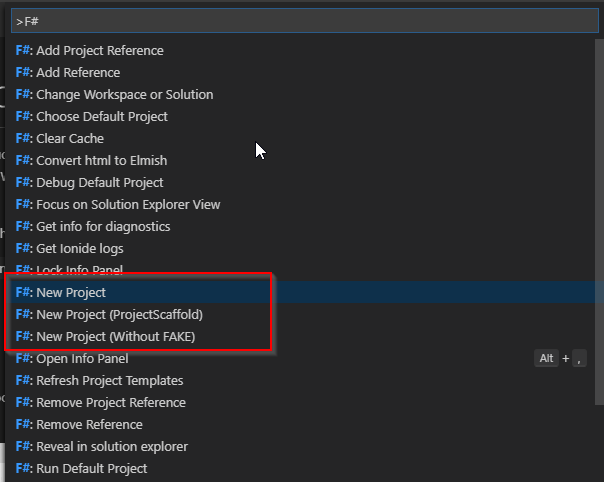
And/Or additionally
- F#: Add Fake Script (via
dotnet newtemplate from FAKE) - F#: Setup Paket (via
paket convert-from-nuget)
matthid
on 21 May 2019
thanks for the info @cartermp !
- F#: Add Fake Script (via dotnet new template from FAKE)
- F#: Setup Paket (via paket convert-from-nuget)
That's good, i think as a rule we should use dotnet new as base.
An convert after creation as a single step, until dotnet new is integrated with paket support.
As a note, we can also:
- add a final step
Want to use paket?in the template creation - optionally set that to true if the repo contains paket.
The projects scaffolded use .NET Framework, not .NET Core, but Ionide pops up a notification suggesting to analyze projects using the .NET Core-based language service
Yes, that need to go, it's really confusing. as @Krzysztof-Cieslak said, mostly because we haven't yet uniformed the project parsing.
After that, there are just minor differences between FSAC .net and .net core, i'll list these in a wiki and see how to address these.
If done, we can also bundle FSAC in ionide as native binary per OS based on .net core only. but need to be downloaded like omnisharp, so at first startup of extension.
So removing the .NET version
 enricosada
on 21 May 2019
enricosada
on 21 May 2019
If done, we can also bundle FSAC in ionide as native binary per OS based on .net core only. but need to be downloaded like omnisharp, so at first startup of extension.
I don't really think it's a necessary - you need to have SDK anyway to do anything - build, run, package your application, so the standalone deployment has little value here (IMO). Yes it'd remove dependency on globally installed SDK and we'd control version of runtime that we run FSAC against... but TBF, it sounds like a overkill.
Krzysztof-Cieslak
on 21 May 2019
Quick update: tutorial section that suggests to modify stuff by adding a function is now live: https://dotnet.microsoft.com/learn/languages/fsharp-hello-world-tutorial/modify
Since 1/9 participants landed on this tutorial it should help.
Note that we did attempt to remove bias as much as possible. All browsers installed, Bing wasn't the default search engine (aside from with Edge), cleared browser history/caches/cookies/etc. between each run, and so on. Not perfect, but hopefully when I say "x/9 participants" it's fairly inline with reality.
cartermp
on 22 May 2019
Likewise to the users in the study, I found the VS tooling more streamlined when we started our latest Fable-Elmish projects. We run VS with Whack-Whack Terminal extension for running npm/webpack console commands.
I tried it in VS Code with Ionide first, since we use VS Code for Elm. However, working with F# project files has significant rough edges in comparison with VS Solution Explorer. Plus VS templates setup everything you need to build/debug vs dealing with VS Code's json config. On the other hand, there are things I wish for in VS that Ionide does like the automatic function signature annotation.
We also don't use Paket (nor FSX files, nor FAKE). I've tried these and they seem fine. But in general, we had rather setup as few things as possible before being ready to code and run.
I by no means intend any disrespect to contributors of Ionide/Paket/FAKE. Awesome work in fact. I am just sharing our particular perspective. You've heard of the Framework vs Library approaches, right? In our code we prefer the library approach, but in our tooling we prefer the framework approach.
_We also dev F# for our back-end API in VS._
 kspeakman
on 22 May 2019
kspeakman
on 22 May 2019
@cartermp this is great (and more or less fits in with feedback I see - although I've never been cruel enough to leave someone on their own for an hour without resisting the temptation to unblock them!). Did you record the sessions - and is there any chance they could be made public (or somehow have the data shared e.g. what error messages were shown etc.)? The error messages one is obviously something I'm interested in - do you have a list of the errors, what the cause of them were and what they led the user to do?
 isaacabraham
on 22 May 2019
isaacabraham
on 22 May 2019
Great survey.
[validated for VSCode]…will not be able to complete the task in under an hour because the tooling is too difficult to use or install
[The] 5/9 participants who chose Visual Studio did not have any issues with Visual Studio tooling in the study. They were able to find F# templates and focus primarily on coding the task at hand.
Beginners are somehow ending up on VSCode even on Windows and getting an inferior experience. I don't see why that is because when I search for using F#, VS is listed first in all of the top 4 links (fsharp.org, microsoft get started with fsharp, fun and profit, and microsoft fsharp tools).
At any rate perhaps a warning is needed that creating new F# projects in VSCode is tricky at the moment.
 charlesroddie
on 23 May 2019
charlesroddie
on 23 May 2019
We also don't use Paket (nor FSX files, nor FAKE). I've tried these and they seem fine. But in general, we had rather setup as few things as possible before being ready to code and run.
I can't stress how important simplicity is. I've been using F# for the last two years on projects of varying complexity, ranging from simple console apps to very complex system emulators. I have never needed FAKE, Paket, Forge or any other F#-specific flavor of an already solved problem. Frankly, I'm getting a little tired of having these things shoved down my throat too, but that's besides the point.
The reason I'm commenting is that at the moment I'm trying to advocate for F# at work, to the point where my manager actually pulled down VSCode+Ionide to kick the tires. After what sounded like a grueling weekend he's now turned off to the whole thing, seeing it as too difficult when compared to something like C# that just works. For many people, this is the first and _only_ impression of F# they get. It is sad to me that these things could turn a person off to an otherwise great language.
The stack needs to be simple by default, allowing people to choose complexity as they need it. It seems to me like the exact opposite happens for people. If I had been exposed to what my manager was exposed to, I wouldn't be here writing this, I'd have justifiably left F# behind years ago.
 adam-becker
on 23 May 2019
adam-becker
on 23 May 2019
A few thoughts here:
Regarding @matthid's suggestion of these options for scaffolding in Ionide
- F#: New simple project (absolute beginner, dotnet new)
- F#: New project (Paket & FAKE)
And/or:
- F#: Add Fake Script (via dotnet new template from FAKE)
- F#: Setup Paket (via paket convert-from-nuget)
👍 👍 👍 👍 👍 👍 👍 👍 is my response!
I think the scaffolding part of Ionide _today_, ignoring .NET Core for a second, has defaults that are more tailored for F# experts. My opinion is that "F# new project", or should basically be the same as dotnet new console|lib -lang F#. This reduces the concept count for newcomers.
I don't want to throw the baby out with the bath water here: FAKE and Paket are wonderful tools, and we should ensure that people who prefer them have the option to include them for new projects via Ionide. If you're an F# dev and you want the "sports car" experience, you should still be able to get it with FAKE and Paket.
I think @Krzysztof-Cieslak is heading down the right path here with Ionide 4.0.0 (I'll comment over on the Ionide thread about my specific thoughts. All in all, 👍 👍 👍 👍 👍 👍 👍 👍
@isaacabraham The sessions are recorded, but it's all under NDA (as were the participants). Since there is personally identifiable information involved, I cannot disclose details along those lines.
The error messages they ran into were the following:
function is not a value and cannot be applied(#5476)Successive arguments must be parenthesized or tupled(#5475)- Missing
.for indexer (which caught a problem and they eventually triggered the Code Fixer!)
I think I really really want to corner @dsyme sometime this year and prioritize churning through the list you've accumulated so far.
@charlesroddie
At any rate perhaps a warning is needed that creating new F# projects in VSCode is tricky at the moment.
I think an interim suggestion here is to point to the documentation on using the .NET CLI and open the root folder in VSCode with Ionide. That should be sufficient for newcomers.
cartermp
on 23 May 2019
I have never needed FAKE, Paket, Forge or any other F#-specific flavor of an already solved problem
FAKE and Paket are not F# specific. We have way more C# users on those tools than F# users. Regarding Paket: you only need it for fable projects since NuGet can't create important information that fable needs.
forki
on 23 May 2019
Regarding the initial project: "dotnet new" is king. 👑
Converting to paket is trivial and can be done with ionide's paket addin.
For more real world projects we should point people to safe stack docs and its template.
So we would have one that just creates a console app and one which gives you all the fancy options.
We should probably have a third one - "create a naked fsx". Especially when dotnet fsi is ready.
forki
on 23 May 2019
Regarding the issue with forward declarations: unfortunately I don't see a trick like I did with the spelling suggestions. IIRC there is no dictionary that has this name available at this point in the compiler process. (@dsyme please correct me if I am wrong here. Then I'd volunteer to improve the error messages so that they tell the user about the name being defined later)
So the only options I see are: a) extract a hello world function in the dotnet new template and annotate with a comment that explains it. b) change the nameres errors to explain the problem. But this blows up the error message.
forki
on 23 May 2019
Btw I'll start with implementing #5476. We know that issue for so long and did nothing. It's a shame.
forki
on 23 May 2019
Regarding Paket: you only need it for fable projects since NuGet can't create important information that fable needs.
Is this for a specific Fable version? We are using Fable-Elmish 2.x with just Nuget.
kspeakman
on 23 May 2019
@kspeakman well it will probably work for many simple cases. Not sure how much it now tries to find out itself.
forki
on 23 May 2019
Fable doesn't depend on Paket since the 2.0 release so it can be used now with both Paket or plain Nuget :)
 alfonsogarciacaro
on 23 May 2019
alfonsogarciacaro
on 23 May 2019
@alfonsogarciacaro great! so it's now completely free choice. Nobody is forced to use it anymore.
forki
on 23 May 2019
@adam-becker out of curiosity, if coming from a C# background, how comes your boss didn't try out F# in Visual Studio, which is normally what most people coming from C# do?
isaacabraham
on 23 May 2019
FAKE and Paket are not F# specific. We have way more C# users on those tools than F# users.
@forki Apologies, I suppose I'm ignorant on the demographics of those tools. I spend a lot more time browsing F# code than C# these days, and I tend to see Paket/FAKE used quite a bit for even simple projects (Things that could just build with dotnet build or only get packages from nuget.org). Since they are F# projects, I made the assumption that they were used more by the F# community.
if coming from a C# background, how comes your boss didn't try out F# in Visual Studio, which is normally what most people coming from C# do?
@isaacabraham Is it alright if I e-mail you the details? It gets a little convoluted, and I don't want to distract from the topic.
adam-becker
on 24 May 2019
Yes you are right if you look at percentages. F# community has a higher ratio of using fake + paket vs not doing it. But since there are way more C# devs, we also have way more C# users. Even though their usage ratio is rather low.
The high rate of FAKE in F# is due to the fact that it is familiar syntax for F# people, but also since it's around like forever. Way longer than some of the popular C# based options (which are often inspired by FAKE). Since you talk about dotnet sdk. FAKE is in no way a substitute for the dotnet sdk. It's a tool to orchestrate multiple sdk calls and to do scripting around deployment.
Regarding Paket: the high usage ratio in F# is because for a very long time nuget.exe just did not work properly in F# projects that were slightly more complicated than hello world. Or let's say: you always had to do manual tricks to get around those things. Since those things weren't addressed in nuget for years (and it was made clear that PRs would not be accepted) we started to do our own. (btw the C# users came for the changed model and to get sane restore semantics. C# people only saw nuget.exe bugs around Newtonsoft.json. But they were already used to workarounds)
Fast forward to today: PackageReferences and lack of binding redirects in dotnet core make those issues way more uncommon. So it looks a bit weird why people "don't just use the default PackageReferences".
From a newcomer's perspective that is really an issue if you are already familiar with the defaults of the dotnet platform. FAKE looks like a complicated substitute for dotnet build and paket looks like an unnecessary way to get nuget packages. So yes I totally agree that we should not put them into the hello world kind of samples. But there are reason why they exist and why the ecosystem embraced them. Some of those reasons are not that important anymore since NuGet and dotnet sdk pushed in similar direction. But if you look at more complicated things like SAFE-Stack then you will see why they still exist.
forki
on 24 May 2019
@adam-becker absolutely, happy to learn more :-)
@cartermp on the subject of ionide (although this might be going slightly off-topic) - for the "basic" f# console scaffold, if it would come with debugging support as well (so the two vscode launch files), that would probably be beneficial as well to keep the "F5 debug" routine that people may already be familiar with. Lots of people don't realise that VSCode can debug F# code without much work at all. And I know that Ionide has an alternative way of doing this, but sticking to the VSCode way is IMHO preferable.
isaacabraham
on 24 May 2019
@isaacabraham I agree about debugging.
cartermp
on 29 May 2019
I wrote a lot of this stuff down when we started porting projects to .Net Core at work early last year. Before that we'd only been using F# on VS2015, which worked pretty well. VS2017 just didn't work, so we tried VS Code and Ionide. I took a while figuring out how to scaffold things, but this is the gist of it:
https://atlemann.github.io/fsharp/2018/02/28/fsharp-solutions-from-scratch.html
 atlemann
on 9 Jul 2019
atlemann
on 9 Jul 2019
Closing old discussion. Some concrete changes made from this:
- Additional compile error message improvements
- Microsoft guide on the .NET site for F# updated to include defining functions above the
mainfunction - Microsoft guide for Ionide updated
- Ionide itself updated and refocused on .NET Core
cartermp
on 11 Mar 2020
Related issues
 randrag
·
3Comments
randrag
·
3Comments
 abelbraaksma
·
3Comments
abelbraaksma
·
3Comments
 GennadyGS
·
3Comments
GennadyGS
·
3Comments
 Szer
·
3Comments
cartermp
·
3Comments
Szer
·
3Comments
cartermp
·
3Comments
Most helpful comment
I can't stress how important simplicity is. I've been using F# for the last two years on projects of varying complexity, ranging from simple console apps to very complex system emulators. I have never needed FAKE, Paket, Forge or any other F#-specific flavor of an already solved problem. Frankly, I'm getting a little tired of having these things shoved down my throat too, but that's besides the point.
The reason I'm commenting is that at the moment I'm trying to advocate for F# at work, to the point where my manager actually pulled down VSCode+Ionide to kick the tires. After what sounded like a grueling weekend he's now turned off to the whole thing, seeing it as too difficult when compared to something like C# that just works. For many people, this is the first and _only_ impression of F# they get. It is sad to me that these things could turn a person off to an otherwise great language.
The stack needs to be simple by default, allowing people to choose complexity as they need it. It seems to me like the exact opposite happens for people. If I had been exposed to what my manager was exposed to, I wouldn't be here writing this, I'd have justifiably left F# behind years ago.