Fsharp: Regression: FSI.EXE is no longer 32-bit
This is a significant regression. The FSI.EXE we now build in the master branch is no longer a prefer-32-bit exe.
> "C:\USERS\DSYME\APPDATA\LOCAL\MICROSOFT\VISUALSTUDIO\15.0_D5B059C1ROSLYNDEV\EXTENSIONS\MICROSOFT.VISUALFSHARPTOOLS\VISUAL F# TOOLS\42.42.42.42\fsi.exe"

> sizeof<nativeint>;;
val it : int = 8
Current produce behaviour:
> fsi.exe

> sizeof<nativeint>;;
val it : int = 4
 dsyme
dsyme
All 11 comments
@brettfo Here is the relevant line that was lost in the project file conversion: https://github.com/fsharp/fsharp/blob/master/src/fsharp/fsi/Fsi.fsproj#L17
Can we review that work again please to see if there are any other flags that we lost? thanks
dsyme
on 10 Feb 2019
@cartermp asked on Slack about .NET Core and compat for F# Interactive
We don't expect full compat. There are observable differences - one runs as a
netcoreapp2.1and the other as anet46- and many things can observe that difference.For 32-v-64-bit: The F# Interactive in the .NET Core tooling is 64-bit by default (i.e. it's AnuCPU). That's ok I think. I personally don't even think it's essential to have a 32-bit F# Interactive in the .NET Core tooling at all but people may want to chime in. Perhaps we should have both.
For VS integration: Currently the
fsi.exethat runs by default in VS (and from the VS command prompt) is the desktop one, 32-bit by default. We have an F# option in VSEnable 64-bit F# Interactivewhich runsfsi.exewhen false andfsiAnyCpu.exewhen true. (The bug above means that this option is not being respected - it's always 64-bit!)
Going forward into dev16 - especially when the VS integration is done for .NET Core F# Interactive - you will need to decide
VS command prompt - whether NET Core or .NET Desktop fsi.exe is default when running
fsifrom the VS dev command prompt.VS - whether NET Core or .NET Desktop fsi.exe is default when running
fsiinside VS, and is there a way to declare this in scriptsOptions - whether you support "F# Options" in Visual Studio to select Desktop FSI v. ,NET Core FSI and if so 32-bit/64-bit
Once the VS Integration is done I assume that .NET Core F# Interactive will eventually be the default on both the command prompt and from inside VS. That wlll sort of be a breaking change. But people can live with that if there's a way to run the old one.
Note you could consider changing the name of F# Interactive for .NET Core, e.g. fsci or something to get the .NET Core one, that might make some things clearer.
dsyme
on 10 Feb 2019
In summary - I think we should address most of this when we do the VS integration for .NET Core scripting.
At that point, it would make sense to just rethink how we really want F# scripting from inside VS to be. From package references to better visuals to debugging etc. etc.
I'd love to see the community being much more active at making F# data scripting in VS great as well.
dsyme
on 10 Feb 2019
@dsyme what sort of things do you have in mind regarding data scripting in VS?
 isaacabraham
on 10 Feb 2019
isaacabraham
on 10 Feb 2019
@isaacabraham If I had carte-blanche, I would say "make data scripting with F# in Visual Studio look and feel more like other data-centric environments such as R Studio, Julia or the Python equivalents".
Concretely this would be
package references in scripts
colorize the output of FSI
make the REPL window read-only so people no longer think it's a space to type into. If they try to type into it show a message saying "Send code to this window from F# scripts using Alt-Enter!". Or else implement intellisense in that window. One or the other (the former is much cheaper!)
a dedicated space (or set of tabs) for rich visual outputs coming from FSI.EXE (HTML surface area for tables, charts and any other visual data) and a specific standard way to get content to show there. The way used by most F# tooling is an fsi.AddHtmlPrinter method - if Visual Studio supported this we could make that a standard.
Have a parameters window somewhat like FsEye showing top-level bindings in scripts in a typical VS object-inspector way. Plus be able to modify these parameters in-situ
Have better interactions for things like load-a-script-until-the-place-where-the-cursor-is. i.e. make it much faster to get going again restarting a script
Nuget package name completion
Consider in-editing completion of path names
Basically anything that makes the act of cranking out data scripts better and faster.
dsyme
on 11 Feb 2019
Regarding the list:
- IntelliSense in FSI is completely possible without a terrible amount of work. We'd have to rewrite the VS integration to use the Roslyn InteractiveWorkspace, but that does give us a full workspace where colorization and IntelliSense would simply work once it's plugged into our providers in FSharp.Editor
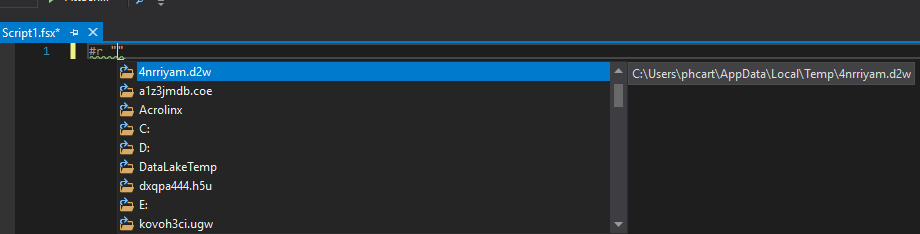
- Completion of path names exists with
#rtoday, are you referring to other contexts?
 cartermp
on 11 Feb 2019
cartermp
on 11 Feb 2019
- IntelliSense in FSI is completely possible ...
I'm not a great person to talk to about this :) I'd rather make the window read-only and use it as a chance to instruct people how to do the righteous thing and use send-to-interactive. Every time a user types into the REPL window in VS a puppy dies. (I've always had strong feelings about this - and always wanted F# to be document-focused - so just ignore my rants if you're going to keep it a console window :) )
- Completion of path names exists with
#rtoday, are you referring to other contexts?
Yes, I suppose opportunistically completing on @"c:..." or "/" would be examples. Perhaps there are others. Anything that makes it easier to get the names of data files right.
I've added a couple of other topics above
dsyme
on 11 Feb 2019
@dsyme whilst we're on the wish list - something like a playground / lighttable mode would be great, where you could see the results of expressions alongside them.
But yes agree with all of those that you've suggested.
isaacabraham
on 12 Feb 2019
I remember that there used to be some extension from some open source project that managed to get colorization and context help. Not sure what happened with that project or whether it'd be worthwhile researching if we can reuse that here.
My 2p on the read only suggestion, I use the repl a lot and apparently kill a lot of puppies. I find the send to interactive mostly useless, because it doesn't respect existing opens and as a result I can hardly ever use it in larger projects than the most trivial ones
 abelbraaksma
on 12 Feb 2019
abelbraaksma
on 12 Feb 2019
As for read-only REPL, I think we should take a look at IDE of other data focused languages. My experience in MATLAB, RStudio and Spyder all allow both sending script to REPL and type in code in REPL directly. However, REPL in the three IDEs I listed all supports intellisense. That gives researcher a choice to explore further after sending majority of script to REPL.
An extension like FsEye is a prerequisite if we ever want to expand use cases of F# in data related field. Researchers in Python, R and MATLAB are all used to working while monitoring the change of data. Sometimes just copy paste intermediate data frame into spreadsheet for presentation and plotting boost productivity dramatically.
 zyzhu
on 14 Feb 2019
zyzhu
on 14 Feb 2019
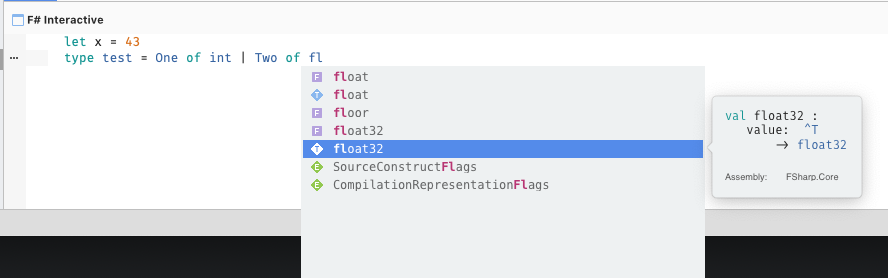
FSI in Visual Studio for Mac has colourisation and completion:
 7sharp9
on 15 Feb 2019
7sharp9
on 15 Feb 2019
Related issues
 GennadyGS
·
3Comments
GennadyGS
·
3Comments
 jackfoxy
·
4Comments
jackfoxy
·
4Comments
 viktorvan
·
3Comments
viktorvan
·
3Comments
 smoothdeveloper
·
3Comments
smoothdeveloper
·
3Comments
 randrag
·
3Comments
randrag
·
3Comments
Most helpful comment
@isaacabraham If I had carte-blanche, I would say "make data scripting with F# in Visual Studio look and feel more like other data-centric environments such as R Studio, Julia or the Python equivalents".
Concretely this would be
package references in scripts
colorize the output of FSI
make the REPL window read-only so people no longer think it's a space to type into. If they try to type into it show a message saying "Send code to this window from F# scripts using Alt-Enter!". Or else implement intellisense in that window. One or the other (the former is much cheaper!)
a dedicated space (or set of tabs) for rich visual outputs coming from FSI.EXE (HTML surface area for tables, charts and any other visual data) and a specific standard way to get content to show there. The way used by most F# tooling is an fsi.AddHtmlPrinter method - if Visual Studio supported this we could make that a standard.
Have a parameters window somewhat like FsEye showing top-level bindings in scripts in a typical VS object-inspector way. Plus be able to modify these parameters in-situ
Have better interactions for things like load-a-script-until-the-place-where-the-cursor-is. i.e. make it much faster to get going again restarting a script
Nuget package name completion
Consider in-editing completion of path names
Basically anything that makes the act of cranking out data scripts better and faster.