Edit by @cartermp:
This affects desktop F# usage on Windows with VS 15.8. .NET Core is unaffected.
Original issue:
I updated my home machine to dev15.8 community edition from 15.7 and noticed my compile times are way longer than usual, ex: instead of taking 1.3 seconds to compile, it's now taking 5 seconds on a project of mine.
I had a thought that it is not ngen'ed, so I went and ngen'ed fsc.exe manually, and now it's back to 1.3 seconds. I don't believe this is intentional.
Workaround
Manually run one of these (Depending on Community/Professional/Enterprise):
ngen "C:\Program Files (x86)\Microsoft Visual Studio\2017\Community\Common7\IDE\CommonExtensions\Microsoft\FSharp\fsc.exe"

ngen "C:\Program Files (x86)\Microsoft Visual Studio\2017\Professional\Common7\IDE\CommonExtensions\Microsoft\FSharp\fsc.exe"

ngen "C:\Program Files (x86)\Microsoft Visual Studio\2017\Enterprise\Common7\IDE\CommonExtensions\Microsoft\FSharp\fsc.exe"
 TIHan
TIHan
All 25 comments
How /where can we do this ourselves?
 isaacabraham
on 16 Aug 2018
isaacabraham
on 16 Aug 2018
Run Developer Command Prompt for VS 2017,
Then run this in the prompt (VS install will vary):
ngen "C:\Program Files (x86)\Microsoft Visual Studio\2017\Community\Common7\IDE\CommonExtensions\Microsoft\FSharp\fsc.exe"
I don't know if everyone is experiencing this, but it absolutely happened for me when I updated.
TIHan
on 16 Aug 2018
@TIHan thank you, I was wondering why compilation was taking so long. Running your command totally fixed that.
Rebuild solution with 18 projects before running ngen: ca 30s
Rebuild solution with 18 projects after running ngen: ca 9s
 nikonthethird
on 16 Aug 2018
nikonthethird
on 16 Aug 2018
Running ngen:
C:\Windows\System32>ngen "C:\Program Files (x86)\Microsoft Visual Studio\2017\Community\Common7\IDE\CommonExtensions\Microsoft\FSharp\fsc.exe"
Microsoft (R) CLR Native Image Generator - Version 4.7.3056.0
Copyright (c) Microsoft Corporation.  All rights reserved.
WARNING: This syntax is deprecated or you mis-typed your command.  Run "ngen /?" to display a list of the currently supported parameters.
1>    Compiling assembly FSharp.Core, Version=4.5.0.0, Culture=neutral, PublicKeyToken=b03f5f7f11d50a3a (CLR v4.0.30319) ...
1>    Compiling assembly FSharp.Compiler.Private, Version=10.2.3.0, Culture=neutral, PublicKeyToken=b03f5f7f11d50a3a (CLR v4.0.30319) ...
1>    Compiling assembly C:\Program Files (x86)\Microsoft Visual Studio\2017\Community\Common7\IDE\CommonExtensions\Microsoft\FSharp\fsc.exe (CLR v4.0.30319) ...
Just to be sure: After running ngen again, it does not show any output because the files have already been ngened, right?
C:\Windows\System32>ngen "C:\Program Files (x86)\Microsoft Visual Studio\2017\Community\Common7\IDE\CommonExtensions\Microsoft\FSharp\fsc.exe"
Microsoft (R) CLR Native Image Generator - Version 4.7.3056.0
Copyright (c) Microsoft Corporation.  All rights reserved.
WARNING: This syntax is deprecated or you mis-typed your command.  Run "ngen /?" to display a list of the currently supported parameters.
I can confirm the same as @nikonthethird here.
isaacabraham
on 16 Aug 2018
What about people who only updated the .NET SDK to 2.1.400 and not Visual Studio for Mac?
 dustinmoris
on 16 Aug 2018
dustinmoris
on 16 Aug 2018
Do you even ngen on Mac?
Dustin Moris Gorski notifications@github.com schrieb am Do., 16. Aug.
2018, 12:32:
What about people who only updated the .NET SDK to 2.1.400 and not Visual
Studio for Mac?—
You are receiving this because you are subscribed to this thread.
Reply to this email directly, view it on GitHub
https://github.com/Microsoft/visualfsharp/issues/5518#issuecomment-413499900,
or mute the thread
https://github.com/notifications/unsubscribe-auth/AADgNF_BLWL3lOv64Gyg5ZbNyA9lWc0Mks5uRUongaJpZM4V_TmI
.
 forki
on 16 Aug 2018
forki
on 16 Aug 2018
@dustinmoris @forki .NET Core uses cross-gen, not ngen, which happens in the build lab for .NET Core. So F# on .NET Core shouldn't be affected.
 cartermp
on 16 Aug 2018
cartermp
on 16 Aug 2018
Good to hear. I'm only doing core anyway these days...
Phillip Carter notifications@github.com schrieb am Do., 16. Aug. 2018,
17:41:
@dustinmoris https://github.com/dustinmoris @forki
https://github.com/forki .NET Core uses cross-gen, not ngen, which
happens in the build lab for .NET Core. So F# on .NET Core shouldn't be
affected.—
You are receiving this because you were mentioned.
Reply to this email directly, view it on GitHub
https://github.com/Microsoft/visualfsharp/issues/5518#issuecomment-413590156,
or mute the thread
https://github.com/notifications/unsubscribe-auth/AADgNBGrh2OVhU14DUgyiJMSP1jcfQgAks5uRZKygaJpZM4V_TmI
.
forki
on 16 Aug 2018
Note: this will still affect Visual Studio users who are targeting .NET Core, but if you're not using VS and using dotnet build/etc, then there's no regression.
cartermp
on 16 Aug 2018
FSC should be ngened. Historically when VS installs the ngen activity is queued and run when ngen get's around to it. Typically this is within 24 hours.
We have changed the way we deploy the compiler, however, I wouldn't have expected it to change this aspect of the install.
I will investigate to see if there is an issue, however, I don't expect there to be.
The dotnet cli deployment of F# is native compiled using crossgen.
 KevinRansom
on 16 Aug 2018
KevinRansom
on 16 Aug 2018
The ngen flag for the deployed files are I believe correctly set here : https://github.com/Microsoft/visualfsharp/blob/master/setup/Swix/Microsoft.FSharp.Compiler/Files.swr
But my deployment on my main desktop also appeared to not be ngened. More digging is required.
KevinRansom
on 16 Aug 2018
Yes it looks to me like we are not ngening The FSharp bits on install.
KevinRansom
on 16 Aug 2018
Could it possibly be that it's not just F# that's not ngened? The Nuget pages in VS also seem much slower than usual and take way longer to install/update a package.
nikonthethird
on 16 Aug 2018
@nikonthethird After a new VS installation it takes time for NGEN to run for everything in VS, so it may be that some slowness you're observing is due to that
cartermp
on 17 Aug 2018
This is fixed in #5525. Next steps are to get a signed build and plumb it through the pipes to try and get into a servicing release. I'll report back with more details when we have them.
cartermp
on 17 Aug 2018
@cartermp … Not fixed yet … the process is long, I merged it into a new branch so that we can get a validation build of VS.
KevinRansom
on 17 Aug 2018
Compiling assembly FSharp.Core, Version=4.5.0.0
Does this mean that every project using the nuget-package should be ngened to compile the FSharp.Core because FSharp.Core itself in the nuget package is not ngened? And does this decrease the performance of typeproviders?
 Thorium
on 20 Aug 2018
Thorium
on 20 Aug 2018
@Thorium, This bug indicates that when Visual Studio ships the Visual FSharp Tools, it does not ngen the compiler or the tools. In fact FSharp.Core is ngened, because a different VS deployment mechanism handles that.
This change just ensures that the compiler and FSI and tools are submitted to NGEN on installation. It will improve the performance of compilation and FSI, it may also improve the IDE experience. Type provider performance is really independent of this change. Although in reality they are not a big part of the compile time.
Kevin
KevinRansom
on 21 Aug 2018
I have the impression the performance of VS IDE tooling is also affected. apart form fsc.exe and fsi.exe are thet any other assemblies that i need to ngen to fix this on my PC ?
 goswinr
on 24 Aug 2018
goswinr
on 24 Aug 2018
@goswinr You can look here for a full set, though I believe it should also NGEN the relevant dependencies (e.g., FSharp.Compiler.Private), which is used by the editor.
cartermp
on 24 Aug 2018
The fix for this is in VS 15.8.5, which is now shipped.
cartermp
on 20 Sep 2018
The dotnet cli deployment of F# is native compiled using crossgen.
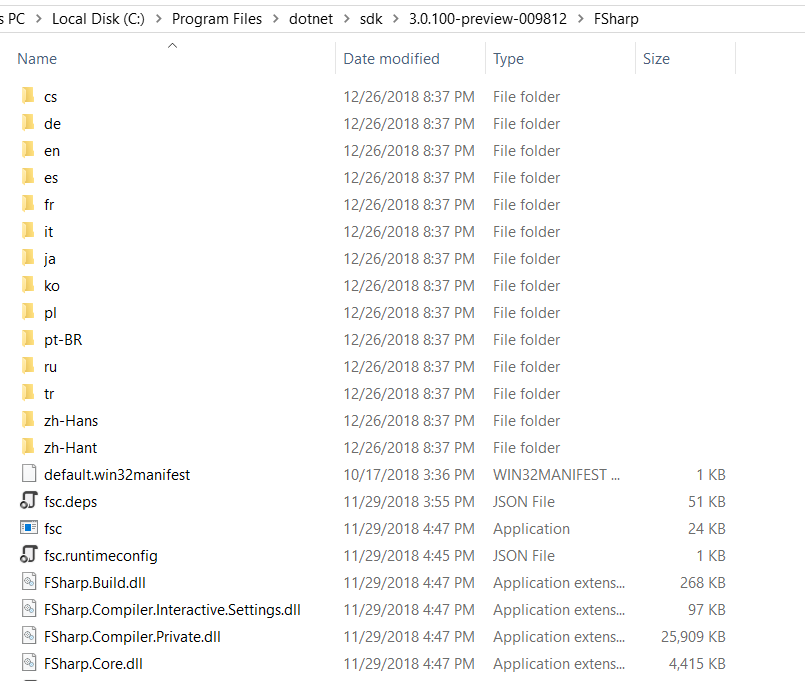
Q: Is core sdk ngened now by default?
If so , why does the fsc.exe is not ended with .ni.exe as doc metioned
 humhei
on 26 Dec 2018
humhei
on 26 Dec 2018
@humhei
we do not ship the .msil images merely the native images, so we get to use the good name :-)
We do the bold bit:
Running CrossGen on an assembly creates a "native image" file, with the extension of .ni.dll or .ni.exe. You should include the native images in your app, either by replacing the original MSIL assemblies with the native images or by putting the native images next to the MSIL assemblies. When the native images are present, the CoreCLR runtime will automatically use it instead of the original MSIL assemblies.
Kevin
KevinRansom
on 28 Dec 2018
Related issues
 Tarmil
·
4Comments
Tarmil
·
4Comments
 abelbraaksma
·
3Comments
abelbraaksma
·
3Comments
 drguildo
·
3Comments
drguildo
·
3Comments
 ploeh
·
3Comments
ploeh
·
3Comments
 Szer
·
3Comments
Szer
·
3Comments
Most helpful comment
Run Developer Command Prompt for VS 2017,
Then run this in the prompt (VS install will vary):