Fsharp: The new signature comments popup everywhere, over existing members or comments
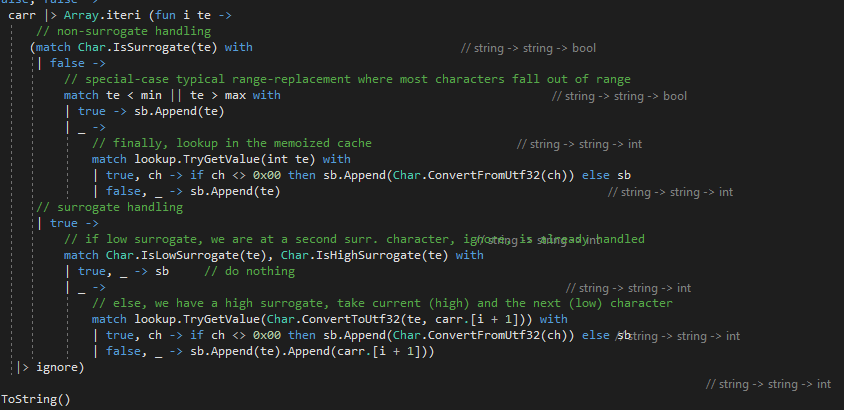
I really like the 15.8 addition of the signature comments (not sure if that's the name for it), but they often obscure existing code, or comments and make both unreadable. Or they just appear where there isn't any signature or let binding at all.
Not sure this is a VS feature or an F# feature or both, I'll be happy to post the bug to the VS team instead.
In non-compiled (#if false) code, in places where there is no signature at all:
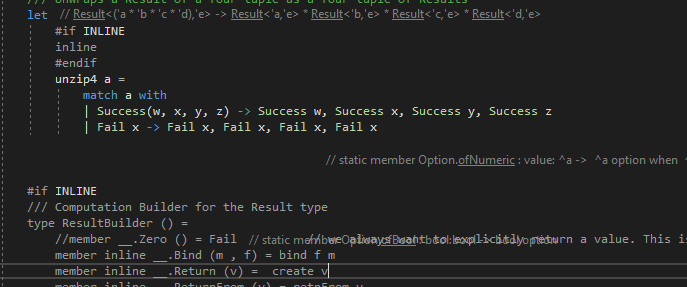
Over the signature itself:

There are no signatures at all here:
Repro steps
Seems to happen basically always when a file is significantly large or when you do some edits back and forth.
Expected behavior
The comments should not obscure existing text and should appear next to the members or let bindings.
Actual behavior
They popup everywhere.
Known workarounds
Switching it off (though I haven't found the setting yet, if it is in Editor > F# > Advanced, then it is currently inaccessible as that crashes VS).
Related information
Seen in Visual Studio 15.8.0 Preview 2
 abelbraaksma
All 9 comments
Hey Sorry for any problems with the line lens.
I've already opened a PR which should at least solve caching problems. It doesn't fix all problems yet and I plan to investigate what happens that the line lens aren't invalidated correctly.
 realvictorprm
on 9 Jun 2018
realvictorprm
on 9 Jun 2018
You can reproduce this problem by fast jumping around in the code. The code lens should actually disappear (be set to invisible).
realvictorprm
on 9 Jun 2018
Hey Sorry for any problems with the line lens.
@realvictorprm No problem, I'm using the Preview, so things are bound to happen ;).
So this is called the Line Lens? Is there a way I can refresh it or disable it for certain (complex) files? It is very helpful, I really like it, but not so much when it covers existing code or comments...
I've already opened a PR
Can we link there?
abelbraaksma
on 9 Jun 2018
To my knowledge with the next preview it's possible again to disable them.
Refreshing them should easily work through closing and reopening the file.
realvictorprm
on 9 Jun 2018
Yes, in the forthcoming preview 3 of 15.8, they are toggle-able and off by default for now.
 cartermp
on 9 Jun 2018
cartermp
on 9 Jun 2018
jesus christ I found the bug. A single field access is wrong 🤣. I'm so sorry fellow F# coders.
@cartermp bugfix incoming.
realvictorprm
on 9 Jun 2018
@abelbraaksma this is now fixed too with #5145
realvictorprm
on 9 Jun 2018
@realvictorprm, I can confirm that in VS 2017 15.8 P3 this mostly works now, I can scroll wildly and it remains mostly stable. However, when the option "appear above signature" is on, the refreshing goes wrong sometimes:
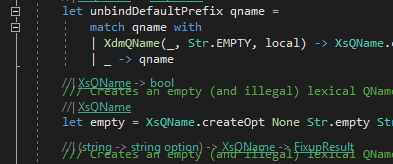
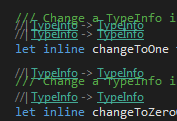
Tempo of scrolling doesn't seem to matter. The way it happens for me is when you scroll quickly to a "crowded" place and then halt, that the signature-comments overlap.
Though after it happens, scrolling back and forth a bit restores it again, so the impact of this redraw issue is minor in comparison.
Should I leave this bug open, or would you like me to close & open a new one?
abelbraaksma
on 28 Jun 2018
Closing old issue
 dsyme
on 26 Aug 2020
dsyme
on 26 Aug 2020
Related issues
 drguildo
·
3Comments
drguildo
·
3Comments
 GennadyGS
·
3Comments
GennadyGS
·
3Comments
 vasily-kirichenko
·
3Comments
vasily-kirichenko
·
3Comments
 TysonMN
·
3Comments
TysonMN
·
3Comments
 viktorvan
·
3Comments
viktorvan
·
3Comments