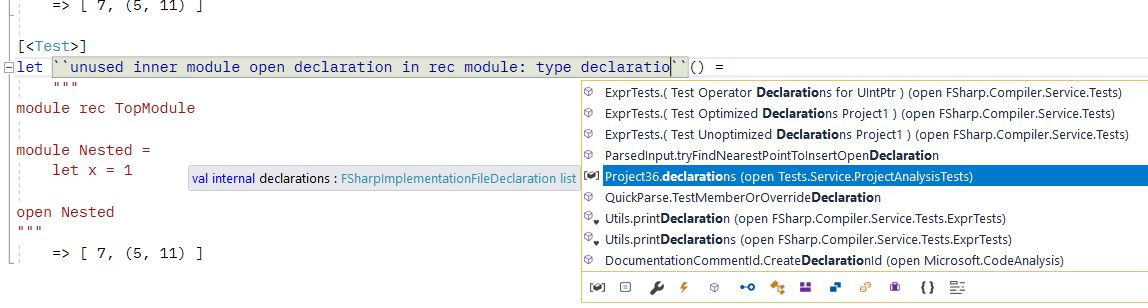
Fsharp: Completion inside double quoted function name at declaration site
 vasily-kirichenko
All 8 comments
This doesn't happen only on declaration site. Whenever backticks are involved auto completion behaves erratic. It often adds extra backticks too, see #4602
But on declarations it shouldn't pop up at all
 abelbraaksma
on 25 May 2018
abelbraaksma
on 25 May 2018
But on declarations it shouldn't pop up at all
Looks like declarations always show completion. I don't think that makes sense. In fact:
Completion should not fire for declarations of members or let-bindings
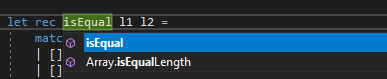
It should not fire when typing argument names
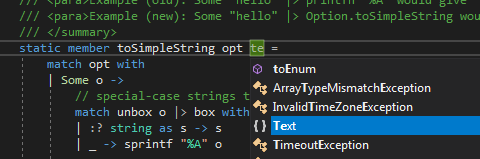
It shouldn't fire when declaring generic type arguments
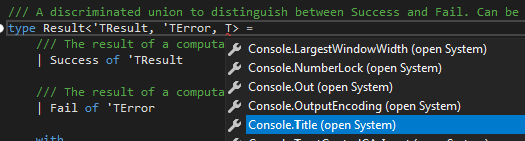
It shouldn't fire when typing compiler directives (it doesn't)
- It shouldn't fire when typing namespace, module or type declarations
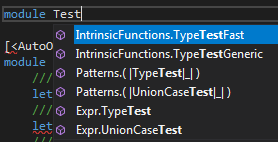
Other improvements are:
- don't double-fire like in this OP, that is, in backticked names, it presently fires on individual words within the name, which, if you aren't careful, often leads to accidentally inserted auto-completion remnants.
- if it finds a correct backticked name, don't double the backticks (#4602)
- don't list the internal names of active patterns (see one of the screenshots above), they are hardly ever useful (this was reported somewhere but I can't find it back)
Nice-to-have would be some sense of context. If the completion "knows" it is in a type-specification location, don't list anything but types, if it is in a match expression, don't show keywords or variables etc etc.
At the moment I find myself more often than not hitting Esc. Auto-completion is a wonderful thing, but it should work with you, not against you ;).
abelbraaksma
on 26 May 2018
don't list the internal names of active patterns (see one of the screenshots above), they are hardly ever useful (this was reported somewhere but I can't find it back)
APs are valid to call as functions, so their presence in the completion list is valid. However, they should be put to the very end of the list.
vasily-kirichenko
on 11 Jun 2018
Nice-to-have would be some sense of context.
There _is_ such a thing as completion context. For example, at attribute application site the list contains only attributes, modules and namespaces.
vasily-kirichenko
on 11 Jun 2018
Completion should not fire for declarations of members or let-bindings
Fixed in master.
It should not fire when typing argument names
Fixed in master.
It shouldn't fire when declaring generic type arguments
On your screenshot you miss ' before T, hence the completion. There is no completion on 'T.
It shouldn't fire when typing namespace, module or type declarations
Cannot reproduce on master.
vasily-kirichenko
on 11 Jun 2018
I've removed active pattern (as values) from completion https://github.com/Microsoft/visualfsharp/pull/4831#issuecomment-396376630
vasily-kirichenko
on 11 Jun 2018
Great work! Did you also get a chance to look at the quoted names? It's your original issue. Also, when you have a quoted name with special characters like dash, dot, comma, colon, space etc, you currently automatically select the first name from the dropdown list. I think it's best that for quoted names it doesn't fire at all our takes the whole quoted name into consideration (as opposed to only the last part)
abelbraaksma
on 11 Jun 2018
Can't reproduce the issue in the OP anymore with VS 2019 GA:
- with
``and typing - with
``foo``(typing out a known identifier with double ticks enclosing the whole decl - with auto completion
- with forced completion (ctrl+space)
 cartermp
on 6 Apr 2019
cartermp
on 6 Apr 2019
Related issues
cartermp
·
3Comments
 jackfoxy
·
4Comments
jackfoxy
·
4Comments
 Tarmil
·
4Comments
Tarmil
·
4Comments
 kbattocchi
·
4Comments
kbattocchi
·
4Comments
 mrakgr
·
3Comments
mrakgr
·
3Comments
Most helpful comment
Can't reproduce the issue in the OP anymore with VS 2019 GA:
``and typing``foo``(typing out a known identifier with double ticks enclosing the whole decl