Fsharp: Slow solution load times for massive solutions
This is a continuation and up to date version of #2107.
There are two project systems used, depending on what you target:
- .NET SDK (Framework or Core or Standard) ---> CPS via the .NET Project system
- .NET Framework (big project files) ---> Legacy F# project system
The latter is used by most solutions in the wild today, but many people are migrating to the .NET SDK for a number of reasons. Both suffer solution load time woes.
SDK style project behavior
From @saul on SDK projects:
I could see that the projects were moving around/refreshing in the Solution Explorer (some projects had 'Dependencies' nodes, some didn't). After about 5 seconds, the UI completely locked up and 5 minutes later I still can't use it (it's 'Not Responding').
The following are upon testing huge/Dense.sln
Legacy project behavior
From @saul for Legacy projects:
Opening Huge/Dense.sln in VS 2015 Update 3 takes 02:00 minutes to get to a fully working editor. After the "Preparing Solution" progress dialog closes, it's basically ready to use.
In Visual Studio 15.7.1 with the nightly tools - same machine, same solution:
00:36 minutes in, the Solution Explorer appears (and is populated). The 'Preparing Solution' dialog stays open.
08:16 minutes in, the 'Preparing Solution' dialog closes so I can now edit the source files. The UI is semi-responsive, syntax colourisation is not updating.
08:53 minutes in, the colourisation is updating in real-time as you'd expect.
I've got a feeling that we've regressed on the 'compute sources and flags' again, and that we're calling this too often on load again.
This is on an 8 core, 32GB RAM server with SSD - I dread to think what this is like on my dual core laptop.
 cartermp
All 25 comments
Where are the flamegraphs to see when and what and where it happens during the project loading and/or editing? Take a look at this issue report as an inspiration example: https://github.com/dotnet/coreclr/issues/18465
 zpodlovics
on 27 Jul 2018
zpodlovics
on 27 Jul 2018
As far as the SDK project-system is concerned, we have the same problem with C# SDK style projects.
For legacy, it is odd for it to be slower.
 TIHan
on 29 Aug 2018
TIHan
on 29 Aug 2018
Just as an update, with VS 2019, solution load times for large .NET SDK-style projects will be significantly improved due to the Roslyn workspace being changed to free-threaded initialization.
cartermp
on 31 Oct 2018
Looking forward for this fix on 16.1, as 16.0 seems to be even slower than VS2017.
 effyteva
on 5 Apr 2019
effyteva
on 5 Apr 2019
@effyteva Can you share some more details? By our own measurements solution load times for solutions using the .NET SDK are dramatically better. It's made my own usage of VisualFSharp.sln much more sane. If you're not using the .NET SDK, the old project system is effectively frozen - any performance characteristics you observed in VS 2017 would be the same in VS 2019 (but perhaps better due to platform-level memory and CPU usage reductions).
cartermp
on 6 Apr 2019
@cartermp
Sorry, you're actually right - solution load time is better (.NET SDK - .NET Core projects).
I'm a bit frustrated from VS2019 (first version since the initial VS2002 release), VS2017 become much slower than VS2015, and now VS2019 feels even slower.
Compilation and publish times became much longer, I believe this happens mostly due the 32 bit architecture and some old memory leaks which still exists.
I've already restarted VS2019 4 times today (1 time it restarted itself due to low memory), as VS2019 doesn't benefit enough from the current hardware (my development machine is i7-7800X, 32GB RAM, Samsung PRO SSD).
I'm using one solution with ~70 .NET core projects (mostly class libraries), wish there were any improvement on that end...
effyteva
on 6 Apr 2019
Compilation/publish can feel slower for a relatively short while due to delayed NGEN - NGEN runs asynchronously and will get to things when it gets to them. Typically within a few hours everything should be fully NGEN'd, but it could be longer. Memory leaks _could_ be at play here, but we'd need diagnostic information to tell. #6420 fixes an issue if you are changing solutions with VS open, but the characteristic you'd observe here is an OOM rather than slow compile times. 32-bit is a red herring here. Unless you're regularly reaching 3GB in your working set (or OOMing), then VS being a 32-bit process is unrelated. Additionally, builds shell out to MSBuild, which compiles in its own process.
cartermp
on 6 Apr 2019
Using VS 2019 Community on my work machine with stats:
- Intel Xeon E5-1650 v4, 3.6 GHz
- 32GB RAM
Cold load
Cold load means all caching that VS does are cleared out before any attempt to load a solution. This is to simulate the first time you load a solution on your machine, or if the cache was wiped out for some reason.
Timing for cold load Dense.sln (legacy projects):
- <00:01 until Shell is loaded
- 01:18 until "Preparing Solution" dialog (sometimes it doesn't appear...)
- 01:31 until solution explorer is populated with all projects
- 01:49 until FSharpTest1 has semantic colorization
- 02:00 until FSharpTest10 has semantic colorization
Timing for Dense.sln (.NET Standard):
- <00:01 until shell loaded
- 00:10 until solution explorer populated with solution
- 00:25 until FSharpTest1 has semantic colorization
- 00:30 until FSharpTest10 has semantic colorization
- 00:50 seconds until NuGet restore is completed for all projects
Warm load
In this case, the solution is loaded with a cache in the .vs folder at the solution level. This cache was built by each project system when I did the cold load.
Dense.sln (Legacy) timings:
- <00:01 until Shell is loaded
- 01:17 until "Preparing Solution" dialog (sometimes it doesn't appear...)
- 01:31 until solution explorer is populated with all projects
- 01:37 until FSharpTest1 has semantic colorization
- 01:41 until FSharpTest10 has semantic colorization
Dense.sln (.NET Standard) timings:
- <00:01 until shell loaded
- 00:08 until solution explorer populated with solution
- 00:17 until FSharpTest1 has semantic colorization
- 00:20 until FSharpTest10 has semantic colorization
- 00:46 seconds until NuGet restore is completed for all projects
Projects from FSharpTest30 or higher
I did not bother to get timings for when semantic colorization appears for files in FSharpTest30 or higher. I don't think that slowness is related to solution load; it's likely the F# compiler / compiler service simply being slow when it has to crawl that many references and build up all of the data.
Interpretation
These solutions represent an extreme layout where each project has a reference to each one that preceded it. By the time you get up to 30, there's a _lot_ of P2P references going on, since each subsequent project also references the ones before it. This pattern basically took VS 2017 to its knees, to the tune of many minutes before anything is ready, or in the case of .NET SDK projects, just freezing indefinitely.
Now with VS 2019, I'm seeing a 4x reduction in "Time to Semantic Colorization" for legacy projects. For .NET SDK style projects, I'm seeing this go from permanently freezing the UI to a 28x reduction in "Time to Semantic Colorization" when compared with Legacy projects in VS 2017.
This does not necessarily mean that people will see similar reductions in this metric for their work solutions, because this stress test hammers on one specific shape of a solution. That being said, I think this is tremendous progress and I'll close the issue.
@saul, if you have the time, it would be great to see if you noticed an improvement in your work solution. Not necessarily exact timings, just a general feeling if things improved. If not, let's file a new issue and dig into it from there.
cartermp
on 8 Apr 2019
Definitely - those numbers are extremely positive. Once we have VS 2019 final in the office, and our users have slowly transitioned, I’ll be able to feed back.
In other news we’re also migrating the entire company to SDK-style projects, and I was hoping it would improve loading perf. Sounds like it does :)
 saul
on 8 Apr 2019
saul
on 8 Apr 2019
@cartermp I have results in a solution containing 313 projects (mix of C#/F#). As you suggested, SDK style projects result in a significant performance improvement in both build time (2x minimum) and solution load time (>4x).
This was just an experiment I've been trying over the past day, we'll be polishing the migrated projects and getting it rolled out asap. Thanks for all the good work.
See below for full details
Old-style projects
Incremental build times
Builder | Time
---|---
Rider 2019.1 (MSBuild 16) | cancelled, extremely slow
Rider 2019.1 (MSBuild 15) | 4:21 min
MSBuild 16 (command line) | 5:50 min
MSBuild 15 (command line) | 3:16 min
VS 2019 | 6:30 min
VS 2017 | 4:30 min
Solution load times
IDE | Solution Explorer ready
---|---
Rider 2019.1 | 0:12 min
VS 2019 | 5:12 min
VS 2017 | 4:30 min
SDK-style projects
These are the results after converting the solution to SDK-style projects
Incremental build times
Builder | Time
---|---
Rider 2019.1 (MSBuild 16) | 4:22 min
MSBuild 16 (command line) | 1:44 min
VS 2019 | 3:23 min
Solution load times
IDE | Solution Explorer ready | All features usable
---|---|---
Rider 2019.1 | 0:12 min | 5:25 min
VS 2019 | 1:00 min | 7:15 min
saul
on 29 May 2019
Thanks @saul, good to know. Note that "Solution ready" for Rider is a bit different - Rider unblocks the UI _during_ evaluation of projects, whereas VS does not. This has some benefits because if you want to open files in a specific project, you only need to wait for that to finish evaluation rather than the whole think like you do in VS. This will be ameliorated in the 16.2 release when we move to full out of process evaluation, but I don't think it'll quite reach the 12 second figure.
I am interested in how "All features usable" was measured. Can you provide some more details? Theoretically it should be pretty much the same due to Rider using the same language service as us.
cartermp
on 29 May 2019
Sure - "All features usable" is when all features are usable at a _responsive_ level (e.g., Go To Definition, symbol highlighting, unused opens complete, etc). This is on a fresh VS 2019 install with no extensions. Worth noting that we're on 16.0, not 16.1 - should we expect further performance improvements?
saul
on 29 May 2019
There are certainly improvements in 16.1, but they're mostly related to memory usage when many projects are involved and memory usage when type providers are involved. IIRC there are a few improvements to solution load times as well, but not as notable as the 15.9 -> 16.0 leap.
cartermp
on 29 May 2019
@saul When you refer to "incremental" build times? Can you describe the exact change? Are you making a change the root of the solution and building?
 davkean
on 29 May 2019
davkean
on 29 May 2019
@davkean, here incremental build is a build when _nothing_ has changed. It’s worth noting that MSBuild doesn’t seem to notice this and still does lots of work (compilation etc) - it’s the next thing I need to dig into but I’m not too sure how.
saul
on 30 May 2019
In that case, I would expect incremental to be almost instant for SDK-based projects. Can you Tools -> Options -> Project and Solutions -> .NET Core -> Logging Level -> Verbose and build one of the projects twice, then grab the results of the Output and paste here (removing any personal/business info you want to keep hidden). This will help track down why we're continually shelling out to MSBuild.
davkean
on 30 May 2019
Sure - I’ll give that a shot today. Shall I create an issue on another repo to track this? If so, which one?
saul
on 30 May 2019
I have a suspicion that F# tools aren't unrelated to this here - @TIHan has been peeling more and more away from the onion in our language service and there's _a lot_ to improve. I think this repo is fine for now; it's trivial to move to another dotnet repo now that we're in the same GitHub org.
cartermp
on 30 May 2019
To avoid losing track of the incremental issue, you can just open an issue over on http://github.com/dotnet/project-system.
davkean
on 30 May 2019
@davkean the binlog is 450MB - the verbose log is >600MB, which raises a couple of problems:
- I'd never get this cleared to leave our corporate network
- It's a huge file to upload/for others to download
What can do on my end to help investigate?
saul
on 31 May 2019
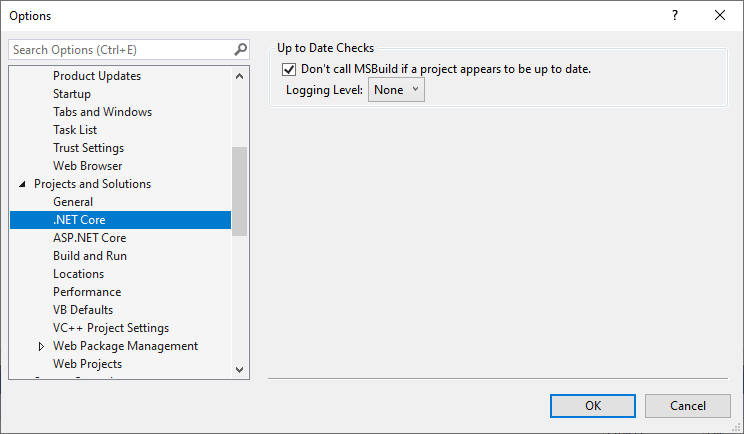
I don't want the binlog - the fact that we're hitting MSBuild means something is already wrong, we need the logs before that. Turn down the verbosity of the output via Project and Solutions -> Build and Run -> Output verbosity -> Quiet.
Also change Tools -> Options -> Project and Solutions -> .NET Core -> Logging Level -> Info (I said Verbose above but turn it down to reduce the amount of date) and build (just) a single project twice. This should produce something like the following in the output window:
1>FastUpToDate: Input 'E:\project-system2\src\Microsoft.VisualStudio.ProjectSystem.Managed\ProjectSystem\Build\BuildProperty.cs' is newer (5/31/2019 10:17:01 PM) than earliest output 'E:\project-system2\artifacts\Debug\obj\Microsoft.VisualStudio.ProjectSystem.Managed\Microsoft.VisualStudio.ProjectSystem.Managed.xml' (5/31/2019 10:12:45 PM), not up to date. (Microsoft.VisualStudio.ProjectSystem.Managed)
1>------ Build started: Project: Microsoft.VisualStudio.ProjectSystem.Managed, Configuration: Debug Any CPU ------
========== Build: 0 succeeded, 0 failed, 1 up-to-date, 0 skipped ==========
This will tell you why we considered the project "out of date" and called MSBuild. Above you can see in this case we built this project because the date of BaseProperty.cs was later than one of the outputs we produced (in this case, the XML, but might the dll or pdb), but there might be other reasons.
davkean
on 31 May 2019
So I don't see any "FastUpToDate" messages - it just starts a build. I've set the output log verbosity to "Detailed" (Verbose or Info don't exist on my machine).
saul
on 31 May 2019
Please make sure you are using this page:
davkean
on 31 May 2019
Ah okay I misread :) Here's an example (there are many - names redacted obviously):
5>FastUpToDate: Adding UpToDateCheckBuilt outputs: (ABCD.EFG.TeamName.MyProject)
5>FastUpToDate:     'E:\TybSDK\CodeFolder\libs\TeamName\ABCD.EFG.TeamName.MyProject\obj\Debug\net461\ABCD.EFG.TeamName.MyProject.pdb' (ABCD.EFG.TeamName.MyProject)
5>FastUpToDate:     'E:\TybSDK\CodeFolder\libs\TeamName\ABCD.EFG.TeamName.MyProject\obj\Debug\net461\ABCD.EFG.TeamName.MyProject.dll' (ABCD.EFG.TeamName.MyProject)
5>FastUpToDate:     'E:\TybSDK\CodeFolder\libs\TeamName\ABCD.EFG.TeamName.MyProject\bin\Debug\net461\ABCD.EFG.TeamName.MyProject.dll' (ABCD.EFG.TeamName.MyProject)
5>FastUpToDate:     'E:\TybSDK\CodeFolder\libs\TeamName\ABCD.EFG.TeamName.MyProject\bin\Debug\net461\ABCD.EFG.TeamName.MyProject.pdb' (ABCD.EFG.TeamName.MyProject)
5>FastUpToDate: Adding project file inputs: (ABCD.EFG.TeamName.MyProject)
5>FastUpToDate:     'E:\TybSDK\CodeFolder\libs\TeamName\ABCD.EFG.TeamName.MyProject\ABCD.EFG.TeamName.MyProject.csproj' (ABCD.EFG.TeamName.MyProject)
5>FastUpToDate: Adding newest import input: (ABCD.EFG.TeamName.MyProject)
5>FastUpToDate:     'E:\TybSDK\CodeFolder\libs\TeamName\ABCD.EFG.TeamName.MyProject\obj\ABCD.EFG.TeamName.MyProject.csproj.nuget.g.props' (ABCD.EFG.TeamName.MyProject)
5>FastUpToDate: Adding Compile inputs: (ABCD.EFG.TeamName.MyProject)
5>FastUpToDate:     'E:\TybSDK\CodeFolder\libs\TeamName\ABCD.EFG.TeamName.MyProject\InterDay.cs' (ABCD.EFG.TeamName.MyProject)
5>FastUpToDate: Adding ResolvedCompilationReference inputs: (ABCD.EFG.TeamName.MyProject)
5>FastUpToDate:     'C:\Program Files (x86)\Reference Assemblies\Microsoft\Framework\.NETFramework\v4.6.1\Facades\System.Linq.Expressions.dll' (ABCD.EFG.TeamName.MyProject)
5>FastUpToDate:     'C:\Program Files (x86)\Reference Assemblies\Microsoft\Framework\.NETFramework\v4.6.1\Facades\System.Xml.XDocument.dll' (ABCD.EFG.TeamName.MyProject)
5>FastUpToDate:     'C:\Program Files (x86)\Reference Assemblies\Microsoft\Framework\.NETFramework\v4.6.1\Facades\System.ComponentModel.dll' (ABCD.EFG.TeamName.MyProject)
5>FastUpToDate:     'C:\Program Files (x86)\Reference Assemblies\Microsoft\Framework\.NETFramework\v4.6.1\Facades\System.ObjectModel.dll' (ABCD.EFG.TeamName.MyProject)
5>FastUpToDate:     'C:\Program Files (x86)\Reference Assemblies\Microsoft\Framework\.NETFramework\v4.6.1\System.Numerics.dll' (ABCD.EFG.TeamName.MyProject)
5>FastUpToDate:     'C:\Program Files (x86)\Reference Assemblies\Microsoft\Framework\.NETFramework\v4.6.1\Facades\System.ComponentModel.EventBasedAsync.dll' (ABCD.EFG.TeamName.MyProject)
5>FastUpToDate:     'C:\Program Files (x86)\Reference Assemblies\Microsoft\Framework\.NETFramework\v4.6.1\Facades\System.ComponentModel.Annotations.dll' (ABCD.EFG.TeamName.MyProject)
5>FastUpToDate:     'C:\Program Files (x86)\Reference Assemblies\Microsoft\Framework\.NETFramework\v4.6.1\System.Runtime.Serialization.dll' (ABCD.EFG.TeamName.MyProject)
5>FastUpToDate:     'C:\Users\saulr\.nuget\packages\system.security.cryptography.encoding\4.3.0\ref\net46\System.Security.Cryptography.Encoding.dll' (ABCD.EFG.TeamName.MyProject)
5>FastUpToDate:     'C:\Users\saulr\.nuget\packages\system.security.cryptography.x509certificates\4.3.0\ref\net461\System.Security.Cryptography.X509Certificates.dll' (ABCD.EFG.TeamName.MyProject)
5>FastUpToDate:     'C:\Program Files (x86)\Reference Assemblies\Microsoft\Framework\.NETFramework\v4.6.1\System.dll' (ABCD.EFG.TeamName.MyProject)
5>FastUpToDate:     'C:\Program Files (x86)\Reference Assemblies\Microsoft\Framework\.NETFramework\v4.6.1\Facades\System.Dynamic.Runtime.dll' (ABCD.EFG.TeamName.MyProject)
5>FastUpToDate:     'C:\Program Files (x86)\Reference Assemblies\Microsoft\Framework\.NETFramework\v4.6.1\Facades\System.Security.Principal.dll' (ABCD.EFG.TeamName.MyProject)
5>FastUpToDate:     'C:\Program Files (x86)\Reference Assemblies\Microsoft\Framework\.NETFramework\v4.6.1\mscorlib.dll' (ABCD.EFG.TeamName.MyProject)
5>FastUpToDate:     'C:\Program Files (x86)\Reference Assemblies\Microsoft\Framework\.NETFramework\v4.6.1\Facades\System.Net.NetworkInformation.dll' (ABCD.EFG.TeamName.MyProject)
5>FastUpToDate:     'E:\TybSDK\EFG\hbs_dependencies\Foo\Bar_40_0\bin\ABCD.EFG.Utils.dll' (ABCD.EFG.TeamName.MyProject)
5>FastUpToDate:     'C:\Program Files (x86)\Reference Assemblies\Microsoft\Framework\.NETFramework\v4.6.1\Facades\System.Runtime.InteropServices.WindowsRuntime.dll' (ABCD.EFG.TeamName.MyProject)
5>FastUpToDate:     'C:\Program Files (x86)\Reference Assemblies\Microsoft\Framework\.NETFramework\v4.6.1\Facades\System.Threading.Tasks.dll' (ABCD.EFG.TeamName.MyProject)
5>FastUpToDate:     'C:\Program Files (x86)\Reference Assemblies\Microsoft\Framework\.NETFramework\v4.6.1\Facades\System.Diagnostics.Debug.dll' (ABCD.EFG.TeamName.MyProject)
5>FastUpToDate:     'C:\Program Files (x86)\Reference Assemblies\Microsoft\Framework\.NETFramework\v4.6.1\Facades\System.Collections.Concurrent.dll' (ABCD.EFG.TeamName.MyProject)
5>FastUpToDate:     'C:\Users\saulr\.nuget\packages\system.security.cryptography.primitives\4.3.0\ref\net46\System.Security.Cryptography.Primitives.dll' (ABCD.EFG.TeamName.MyProject)
5>FastUpToDate:     'C:\Program Files (x86)\Reference Assemblies\Microsoft\Framework\.NETFramework\v4.6.1\Facades\System.Runtime.Serialization.Xml.dll' (ABCD.EFG.TeamName.MyProject)
5>FastUpToDate:     'C:\Program Files (x86)\Reference Assemblies\Microsoft\Framework\.NETFramework\v4.6.1\Facades\System.Xml.ReaderWriter.dll' (ABCD.EFG.TeamName.MyProject)
5>FastUpToDate:     'C:\Program Files (x86)\Reference Assemblies\Microsoft\Framework\.NETFramework\v4.6.1\Facades\System.Net.Primitives.dll' (ABCD.EFG.TeamName.MyProject)
5>FastUpToDate:     'C:\Program Files (x86)\Reference Assemblies\Microsoft\Framework\.NETFramework\v4.6.1\Facades\System.ServiceModel.NetTcp.dll' (ABCD.EFG.TeamName.MyProject)
5>FastUpToDate:     'C:\Program Files (x86)\Reference Assemblies\Microsoft\Framework\.NETFramework\v4.6.1\Facades\System.Resources.ResourceManager.dll' (ABCD.EFG.TeamName.MyProject)
5>FastUpToDate:     'C:\Users\saulr\.nuget\packages\system.net.http\4.3.3\ref\net46\System.Net.Http.dll' (ABCD.EFG.TeamName.MyProject)
5>FastUpToDate:     'C:\Program Files (x86)\Reference Assemblies\Microsoft\Framework\.NETFramework\v4.6.1\System.Data.dll' (ABCD.EFG.TeamName.MyProject)
5>FastUpToDate:     'C:\Program Files (x86)\Reference Assemblies\Microsoft\Framework\.NETFramework\v4.6.1\Facades\System.Reflection.dll' (ABCD.EFG.TeamName.MyProject)
5>FastUpToDate:     'C:\Program Files (x86)\Reference Assemblies\Microsoft\Framework\.NETFramework\v4.6.1\Facades\System.Reflection.Primitives.dll' (ABCD.EFG.TeamName.MyProject)
5>FastUpToDate:     'C:\Program Files (x86)\Reference Assemblies\Microsoft\Framework\.NETFramework\v4.6.1\System.Drawing.dll' (ABCD.EFG.TeamName.MyProject)
5>FastUpToDate:     'C:\Program Files (x86)\Reference Assemblies\Microsoft\Framework\.NETFramework\v4.6.1\System.Xml.Linq.dll' (ABCD.EFG.TeamName.MyProject)
5>FastUpToDate:     'C:\Program Files (x86)\Reference Assemblies\Microsoft\Framework\.NETFramework\v4.6.1\Facades\System.Net.WebHeaderCollection.dll' (ABCD.EFG.TeamName.MyProject)
5>FastUpToDate:     'C:\Program Files (x86)\Reference Assemblies\Microsoft\Framework\.NETFramework\v4.6.1\Facades\System.Threading.Tasks.Parallel.dll' (ABCD.EFG.TeamName.MyProject)
5>FastUpToDate:     'C:\Program Files (x86)\Reference Assemblies\Microsoft\Framework\.NETFramework\v4.6.1\Facades\System.Diagnostics.Tracing.dll' (ABCD.EFG.TeamName.MyProject)
5>FastUpToDate:     'C:\Program Files (x86)\Reference Assemblies\Microsoft\Framework\.NETFramework\v4.6.1\Facades\System.Reflection.Emit.dll' (ABCD.EFG.TeamName.MyProject)
5>FastUpToDate:     'C:\Program Files (x86)\Reference Assemblies\Microsoft\Framework\.NETFramework\v4.6.1\Facades\System.Diagnostics.Contracts.dll' (ABCD.EFG.TeamName.MyProject)
5>FastUpToDate:     'C:\Program Files (x86)\Reference Assemblies\Microsoft\Framework\.NETFramework\v4.6.1\Facades\System.Runtime.dll' (ABCD.EFG.TeamName.MyProject)
5>FastUpToDate:     'C:\Program Files (x86)\Reference Assemblies\Microsoft\Framework\.NETFramework\v4.6.1\Facades\System.Threading.dll' (ABCD.EFG.TeamName.MyProject)
5>FastUpToDate:     'C:\Program Files (x86)\Reference Assemblies\Microsoft\Framework\.NETFramework\v4.6.1\Facades\System.Reflection.Emit.ILGeneration.dll' (ABCD.EFG.TeamName.MyProject)
5>FastUpToDate:     'C:\Program Files (x86)\Reference Assemblies\Microsoft\Framework\.NETFramework\v4.6.1\Facades\System.Linq.Parallel.dll' (ABCD.EFG.TeamName.MyProject)
5>FastUpToDate:     'C:\Program Files (x86)\Reference Assemblies\Microsoft\Framework\.NETFramework\v4.6.1\Facades\System.Diagnostics.Tools.dll' (ABCD.EFG.TeamName.MyProject)
5>FastUpToDate:     'C:\Program Files (x86)\Reference Assemblies\Microsoft\Framework\.NETFramework\v4.6.1\System.IO.Compression.FileSystem.dll' (ABCD.EFG.TeamName.MyProject)
5>FastUpToDate:     'C:\Program Files (x86)\Reference Assemblies\Microsoft\Framework\.NETFramework\v4.6.1\Facades\System.Threading.Timer.dll' (ABCD.EFG.TeamName.MyProject)
5>FastUpToDate:     'C:\Program Files (x86)\Reference Assemblies\Microsoft\Framework\.NETFramework\v4.6.1\Facades\System.Reflection.Extensions.dll' (ABCD.EFG.TeamName.MyProject)
5>FastUpToDate:     'C:\Program Files (x86)\Reference Assemblies\Microsoft\Framework\.NETFramework\v4.6.1\Facades\System.Runtime.InteropServices.dll' (ABCD.EFG.TeamName.MyProject)
5>FastUpToDate:     'C:\Program Files (x86)\Reference Assemblies\Microsoft\Framework\.NETFramework\v4.6.1\Facades\System.ServiceModel.Security.dll' (ABCD.EFG.TeamName.MyProject)
5>FastUpToDate:     'C:\Program Files (x86)\Reference Assemblies\Microsoft\Framework\.NETFramework\v4.6.1\Facades\System.Linq.Queryable.dll' (ABCD.EFG.TeamName.MyProject)
5>FastUpToDate:     'C:\Program Files (x86)\Reference Assemblies\Microsoft\Framework\.NETFramework\v4.6.1\Facades\System.Runtime.Serialization.Primitives.dll' (ABCD.EFG.TeamName.MyProject)
5>FastUpToDate:     'C:\Program Files (x86)\Reference Assemblies\Microsoft\Framework\.NETFramework\v4.6.1\Facades\System.Runtime.Serialization.Json.dll' (ABCD.EFG.TeamName.MyProject)
5>FastUpToDate:     'C:\Users\saulr\.nuget\packages\system.security.cryptography.algorithms\4.3.0\ref\net461\System.Security.Cryptography.Algorithms.dll' (ABCD.EFG.TeamName.MyProject)
5>FastUpToDate:     'C:\Program Files (x86)\Reference Assemblies\Microsoft\Framework\.NETFramework\v4.6.1\Facades\System.ServiceModel.Duplex.dll' (ABCD.EFG.TeamName.MyProject)
5>FastUpToDate:     'C:\Program Files (x86)\Reference Assemblies\Microsoft\Framework\.NETFramework\v4.6.1\Facades\System.Xml.XmlSerializer.dll' (ABCD.EFG.TeamName.MyProject)
5>FastUpToDate:     'C:\Program Files (x86)\Reference Assemblies\Microsoft\Framework\.NETFramework\v4.6.1\Facades\System.Text.RegularExpressions.dll' (ABCD.EFG.TeamName.MyProject)
5>FastUpToDate:     'C:\Program Files (x86)\Reference Assemblies\Microsoft\Framework\.NETFramework\v4.6.1\Facades\System.Runtime.Numerics.dll' (ABCD.EFG.TeamName.MyProject)
5>FastUpToDate:     'C:\Program Files (x86)\Reference Assemblies\Microsoft\Framework\.NETFramework\v4.6.1\Facades\System.Collections.dll' (ABCD.EFG.TeamName.MyProject)
5>FastUpToDate:     'C:\Program Files (x86)\Reference Assemblies\Microsoft\Framework\.NETFramework\v4.6.1\Facades\System.Text.Encoding.Extensions.dll' (ABCD.EFG.TeamName.MyProject)
5>FastUpToDate:     'C:\Program Files (x86)\Reference Assemblies\Microsoft\Framework\.NETFramework\v4.6.1\Facades\System.Runtime.Extensions.dll' (ABCD.EFG.TeamName.MyProject)
5>FastUpToDate:     'C:\Program Files (x86)\Reference Assemblies\Microsoft\Framework\.NETFramework\v4.6.1\Facades\System.ServiceModel.Primitives.dll' (ABCD.EFG.TeamName.MyProject)
5>FastUpToDate:     'C:\Program Files (x86)\Reference Assemblies\Microsoft\Framework\.NETFramework\v4.6.1\System.Xml.dll' (ABCD.EFG.TeamName.MyProject)
5>FastUpToDate:     'C:\Program Files (x86)\Reference Assemblies\Microsoft\Framework\.NETFramework\v4.6.1\System.Core.dll' (ABCD.EFG.TeamName.MyProject)
5>FastUpToDate:     'C:\Program Files (x86)\Reference Assemblies\Microsoft\Framework\.NETFramework\v4.6.1\Facades\System.Text.Encoding.dll' (ABCD.EFG.TeamName.MyProject)
5>FastUpToDate:     'C:\Program Files (x86)\Reference Assemblies\Microsoft\Framework\.NETFramework\v4.6.1\Facades\System.ServiceModel.Http.dll' (ABCD.EFG.TeamName.MyProject)
5>FastUpToDate:     'C:\Program Files (x86)\Reference Assemblies\Microsoft\Framework\.NETFramework\v4.6.1\Facades\System.Net.Requests.dll' (ABCD.EFG.TeamName.MyProject)
5>FastUpToDate:     'C:\Program Files (x86)\Reference Assemblies\Microsoft\Framework\.NETFramework\v4.6.1\Facades\System.Globalization.dll' (ABCD.EFG.TeamName.MyProject)
5>FastUpToDate:     'C:\Program Files (x86)\Reference Assemblies\Microsoft\Framework\.NETFramework\v4.6.1\Facades\System.Linq.dll' (ABCD.EFG.TeamName.MyProject)
5>FastUpToDate:     'C:\Program Files (x86)\Reference Assemblies\Microsoft\Framework\.NETFramework\v4.6.1\Facades\System.Reflection.Emit.Lightweight.dll' (ABCD.EFG.TeamName.MyProject)
5>FastUpToDate:     'C:\Program Files (x86)\Reference Assemblies\Microsoft\Framework\.NETFramework\v4.6.1\Facades\System.IO.dll' (ABCD.EFG.TeamName.MyProject)
5>FastUpToDate:     'C:\Program Files (x86)\Reference Assemblies\Microsoft\Framework\.NETFramework\v4.6.1\Facades\System.Runtime.Handles.dll' (ABCD.EFG.TeamName.MyProject)
5>FastUpToDate: Adding UpToDateCheckInput inputs: (ABCD.EFG.TeamName.MyProject)
5>FastUpToDate:     'E:\TybSDK\CodeFolder\libs\TeamName\ABCD.EFG.TeamName.MyProject\obj\Debug\net461\ABCD.EFG.TeamName.MyProject.csproj.CoreCompileInputs.cache' (ABCD.EFG.TeamName.MyProject)
5>FastUpToDate: Input 'E:\TybSDK\CodeFolder\libs\TeamName\ABCD.EFG.TeamName.MyProject\obj\Debug\net461\ABCD.EFG.TeamName.MyProject.csproj.CoreCompileInputs.cache' has been modified since the last up-to-date check, not up to date. (ABCD.EFG.TeamName.MyProject)
5>FastUpToDate: Up to date check completed in 20.7 ms (ABCD.EFG.TeamName.MyProject)
I did what you suggested - I built the top-level project, then built it again. Even though I did nothing in between builds, it looks like lots of things have been "modified since the last up-to-date check".
Edit: This looks like an example of https://github.com/dotnet/project-system/issues/4736
saul
on 31 May 2019
@saul Agreed it looks the same.
davkean
on 1 Jun 2019
Related issues
 kbattocchi
·
4Comments
kbattocchi
·
4Comments
 Tarmil
·
4Comments
Tarmil
·
4Comments
 mrakgr
·
3Comments
mrakgr
·
3Comments
 randrag
·
3Comments
randrag
·
3Comments
 drguildo
·
3Comments
drguildo
·
3Comments
Most helpful comment
@cartermp I have results in a solution containing 313 projects (mix of C#/F#). As you suggested, SDK style projects result in a significant performance improvement in both build time (2x minimum) and solution load time (>4x).
This was just an experiment I've been trying over the past day, we'll be polishing the migrated projects and getting it rolled out asap. Thanks for all the good work.
See below for full details
Old-style projects
Incremental build times
Builder | Time
---|---
Rider 2019.1 (MSBuild 16) | cancelled, extremely slow
Rider 2019.1 (MSBuild 15) | 4:21 min
MSBuild 16 (command line) | 5:50 min
MSBuild 15 (command line) | 3:16 min
VS 2019 | 6:30 min
VS 2017 | 4:30 min
Solution load times
IDE | Solution Explorer ready
---|---
Rider 2019.1 | 0:12 min
VS 2019 | 5:12 min
VS 2017 | 4:30 min
SDK-style projects
These are the results after converting the solution to SDK-style projects
Incremental build times
Builder | Time
---|---
Rider 2019.1 (MSBuild 16) | 4:22 min
MSBuild 16 (command line) | 1:44 min
VS 2019 | 3:23 min
Solution load times
IDE | Solution Explorer ready | All features usable
---|---|---
Rider 2019.1 | 0:12 min | 5:25 min
VS 2019 | 1:00 min | 7:15 min