Fsharp: Completion list takes far too long even after an initial list is generated
_edits by @cartermp_
Current issue:
Thanks to @buybackoff for the repro:
- Download Spreads.
- Build the solution (
build.cmd) - Open the solution and the
SortedMap.fsfile. - Add a new line after line
125, and typethis.
Expected: completion list appears reasonably fast, at least certainly after the first try.
Actual: completion appears many seconds after the . every time.
Old issue:
Recently started playing around with VsVim on 15.6 preview 2 and noticed that Intellisense is extremely slow. At first I thought it was broken but eventually found it's just taking ~6-8 seconds to display. This reproduces consistently.
- Clone https://github.com/jaredpar/VsVim
- Switch to branch repro/fsharp-intellisense-perf
- Open VsVim.sln
- Open Modes_Visual_VisualMode.fs
- Wait for semantic colorizing to take place (ensure initial binding pass is done).
- Navigate to line 223. Will have text
_selectionTracker.UpdateSelection() - Open a line above and type
_selectionTracker.
I would expect Intellisense to popup rather quickly here. Instead it takes ~8 seconds to popup. You can delete the . and retype and see the effect over and over again.
Of possible interest here is this F# project is on the new SDK.
 jaredpar
All 49 comments
That certainly sounds like either
- the FCS caching is not taking effect for new-style projects, or
- there are a lot of options being recomputed for new-style projects
 dsyme
on 18 Jan 2018
dsyme
on 18 Jan 2018
Checked and I'm seeing the same behavior on 15.5.4 as well. Changed title to reflect that it's not specific to the preview.
jaredpar
on 18 Jan 2018
FYI: updated the repro instructions. The perf is bad enough that I need to move back to the classic SDK for now. Saved the current state though in repro/fsharp-intellisense-perf branch
jaredpar
on 19 Jan 2018
Yeah, stuff seems to be needlessly recomputed here and it's not just the delay in the editor:

Note that successive . gives a spike in CPU usage even though nowhere near enough memory is being used to force things out of caches.
Also noticed a bug where SelectionTracker is being favored over _selectionTracker in completion, but that's unrelated to this.
 cartermp
on 19 Jan 2018
cartermp
on 19 Jan 2018
Once I moved back to the old SDK the issue went away. Only been a few minutes but everything seems to be behaving as I would expect.
jaredpar
on 19 Jan 2018
I can repro. old sdk fast - new sdk branch slow
 forki
on 19 Jan 2018
forki
on 19 Jan 2018
Labeling as Now since this is clearly a blocker for anyone who has a similar situation as @jaredpar
cartermp
on 20 Jan 2018
I thought that I fixed this with #4121 - is that change included in VS 15.6 preview 2?
 dhwed
on 24 Jan 2018
dhwed
on 24 Jan 2018
Your change isn’t in preview 2, no. It should be in preview 3, which
will ship soon.
On Wed, Jan 24, 2018, at 11:14, David Wedelich wrote:
I thought that I fixed this with #4121[1] - is that change included in
VS 15.6 preview 2?> — You are receiving this because you commented. Reply to this email
directly, view it on GitHub[2], or mute the thread[3].>
Links:
cartermp
on 24 Jan 2018
@cartermp is the fix already checked into VS? I can check latest internal build of preview3 to see if it's fixed there for my case.
jaredpar
on 24 Jan 2018
Yep, insertion should be complete soon
cartermp
on 24 Jan 2018
What build should have it? Happy to try and validate this fixed it if I know what build to look for.
jaredpar
on 25 Jan 2018
Candidate build was d15.6/27323.02 - @brettfo is that still accurate?
cartermp
on 25 Jan 2018
I just tested out VsVim on new SDK in 27319.1.d15.6. The perf problem appears to be fixed there. Intellisense has the performance I would expect.
jaredpar
on 25 Jan 2018
That sounds promising. Very nice
Am 25.01.2018 19:15 schrieb "Jared Parsons" notifications@github.com:
I just tested out VsVim on new SDK in 27319.1.d15.6. The perf problem
appears to be fixed there. Intellisense has the performance I would expect.—
You are receiving this because you commented.
Reply to this email directly, view it on GitHub
https://github.com/Microsoft/visualfsharp/issues/4209#issuecomment-360552655,
or mute the thread
https://github.com/notifications/unsubscribe-auth/AADgNKy99c_GDt-iyzyPmQsWVubbFg9kks5tOMS1gaJpZM4Rh9_8
.
forki
on 25 Jan 2018
Excellent! Glad to see that @dhwed's changes here seem to have done the trick. Closing for now.
cartermp
on 25 Jan 2018
My favourite phrase ever "has the performance I would expect.". Accurate, without giving away any details. :-)
 KevinRansom
on 25 Jan 2018
KevinRansom
on 25 Jan 2018
Is there any way I can test/use this fix?. Or an ETA when it will be accessible?. I've tried the nightly VSIX in 15.5.6 and performance is still slow for me ( though I get a worse performance than ~8 seconds)
 btrepp
on 31 Jan 2018
btrepp
on 31 Jan 2018
@btrepp Are you referring specifically to IntelliSense? 15.6 Preview 3 is the one that has the fix that addresses this specific issue.
cartermp
on 31 Jan 2018
Unfortunately preview 3 the IDE crashes on load of my solution :(.
4300
btrepp
on 2 Feb 2018
Is your solution something I could take a look at?
KevinRansom
on 2 Feb 2018
I have experienced the same issue (completion taking ~10 seconds) with 15.7.0 Preview 1.0:
This is a new SDK project which includes the TypeProvider SDK:
1) clone https://gitlab.com/0x53A/Area51.git
2) In the project Area51, open Library.fs
3) Type S and press CTRL+SPACE to trigger completion.
Wait.
Select System and press DOT.
Wait.
Select Array and press DOT.
Wait.
On my machine this wait time takes between 1 and 10 seconds.
Note that in the second project, Area51.Tests, completion is okay.
 0x53A
on 14 Mar 2018
0x53A
on 14 Mar 2018
On 15.6 it's better now. But not nearly as good as non SDK projects were.
btrepp
on 15 Mar 2018
On a brand new Win10 machine with i7-8700 (12 cores)/16Gb with a brand new install of VS15.7 it still takes 8 seconds to show a simple autocomplete (code from here)
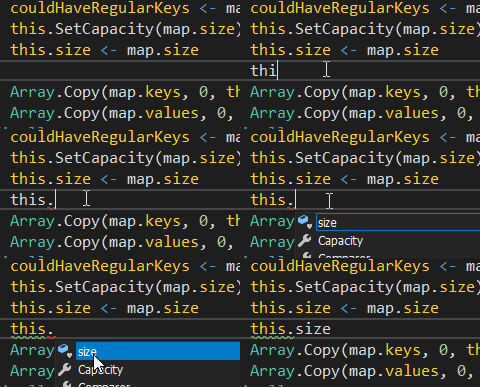
Do I really need 32 cores/64 Gb or what I'm still doing wrong so that F# is still basically unusable from VS? Only one core is busy during these 8 secs so a powerful box doesn't help, however.
 buybackoff
on 8 May 2018
buybackoff
on 8 May 2018
@buybackoff without diving into a debug session and/or trace (thanks for the repro BTW), there's no telling what the issue is. The original issue was due to a missing check to see if data already existed before recomputing. Either that's not getting hit here (unlikely), or there's something else at work. I'll re-open and make this case the issue.
cartermp
on 8 May 2018
@cartermp how I can help diagnose what's wrong? Should I try nightly build?
buybackoff
on 8 May 2018
It's doubtful that a nightly has fixed this, but it's worth a shot. I think we'll just need to debug it and see what's going on, possibly running a trace. I can consistently reproduce your issue (every time I hit ., CPU spikes up to 60% and it takes multiple seconds to see completion). No inkling what the root cause is right now. Are there other places where completion consistently takes 8+ seconds, or is this the only one you've noticed so far with 15.7?
cartermp
on 8 May 2018
Everywhere in the project where I'm trying so far. Removing netstandard2.0 target doesn't help. I could see by coloring that some heavy calcs are going one in background, even the gif above shows that this is white for 5-6 secs then it turns yellow and only after that the intellisense window is shown.
buybackoff
on 8 May 2018
Hey folks, sorry you are running into issues. Can I ask you do something?
- Open a new instance of Visual Studio
- Send Help > Feedback -> Report a Problem -> Report new Problem
- Enter title/description saying you running into perf issues
- Click Next, under Attachments choose Record and choose the other instance
- Click Start recording
- Go back to the other insatnce, and repro the problem
- Click Stop Recording
- Send on the Report and link the developer community item when it gets sent via email
This will give us traces that help us figure out the root cause.
 davkean
on 10 May 2018
davkean
on 10 May 2018
Nevermind, strike that - I missed we had a 100% repro on our side. If you are hitting other performance issues in the future in other areas, follow the above steps.
davkean
on 10 May 2018
Just as an update, with Spreads under the microscope, we identified a hot spot where things are being needlessly recomputed deep in the language service causing a 5-8+ second delay every time. When we profile Spreads converted back to old-style SDK, that hot spot is instant, and completion performance is what we would expect.
Clearly, something is not being wired up at a top level, but we're not sure what it is yet. More digging is underway...
cartermp
on 11 May 2018
I believe this should resolve it: https://github.com/Microsoft/visualfsharp/pull/4889
This solves the issues in Area51 and Spreads that I managed to reproduce.
 TIHan
on 12 May 2018
TIHan
on 12 May 2018
Cool, thanks for looking into this so deeply! When it will be available at
least in the nightly build?
On Sat, May 12, 2018, 5:01 AM Will Smith notifications@github.com wrote:
I believe this should resolve it: #4889
https://github.com/Microsoft/visualfsharp/pull/4889This solves the issues in Area51 and Spreads that I managed to reproduce.
—
You are receiving this because you were mentioned.
Reply to this email directly, view it on GitHub
https://github.com/Microsoft/visualfsharp/issues/4209#issuecomment-388522563,
or mute the thread
https://github.com/notifications/unsubscribe-auth/AAd5fL8m_UrLIAj9yafNAhFfDECC-Lbpks5txkKCgaJpZM4Rh9_8
.
buybackoff
on 12 May 2018
This should be available in nightlies once merged, yes.
cartermp
on 12 May 2018
@0x53A @buybackoff
I have to be a little more accurate here. I think when we get this fix out it should fix a lot of problems and you will see better results.
However, both of your projects still have a problem: multi-targeting. I did some testing today and multi-targeted projects will cause invalidation and rebuild chunks of the world. I don't know how complicated it is to fix, but I have a good understanding now of what's happening in our tooling to probably start trying to fix it.
From your projects, when using the fix here: https://github.com/Microsoft/visualfsharp/pull/4889, completions and intellisense tend to be faster on immediate use. When you start using a bit more, you will notice it will take longer sometimes; that's due to invalidation from multi-targeting.
Removing multi-targeting and just doing one target, you shouldn't have any issues once the fix is in place.
TIHan
on 14 May 2018
@TIHan I could live with only .NET Standard 2.0 and have started to remove full .NET Framework target in an active branch. .NET 4.6.1, which supports standard 2.0, is old enough, and I have had needless pain with supporting 4.5.x. So if you have to choose between an ideal solution vs quick fix then please ship it ASAP for a single target.
buybackoff
on 14 May 2018
Latest nightly works approximately as fast as Rider for autocomplete. Thanks!
buybackoff
on 15 May 2018
@buybackoff Thanks for the followup!
davkean
on 15 May 2018
I'll close this out and open a separate issue about perf for multitargeting, so that there isn't a multi-page issue to find out the current state of things.
cartermp
on 15 May 2018
Modified milestone to reflect that we're attempting to get this into a servicing branch.
cartermp
on 15 May 2018
Just FYI, IntelliSense was dead completely in nightly (May 24 latest update at least, found y'day after rebooting and closing VS the first time after in started working) and VS 15.7.2 (or probably after updating VS). It was like Notepad.exe - just text. With May 25 nightly syntax coloring, tooltips and red squiggles work, but no autocomplete (at all, tested many minutes). Rider works. Same project, same file.
buybackoff
on 25 May 2018
@buybackoff Not sure how this is on your machine, but with latest master of Spreads the solution won't compile, and I noticed that anything involving this in SortedMap will fail due to its inherited type (ContainerSeries<'K, 'V, SortedMapCursor<'K, 'V>>) being defined in a project which doesn't compile. Various other things seem to not work due to this.
Example of what's unresolved:

I do get IntelliSense, just not for things which are defined elsewhere (and failing to build):

This is with the May 25th nightlies atop 15.7.2. Is this consistent with what you're noticing?
cartermp
on 26 May 2018
On master in Spreads only 4 projects should complile (the head one is
Spreads.Core.Tests, others are WIP). I try to push only what complies and
am reworking everything else. Yet I could run tests from R# in the project
..Tests.Core (the only one alive S..Tests.Core), everything compiles. But
IDE is broken again.
Did the working one make into 15.7.2? Maybe I should just not use nightly.
On Sat, May 26, 2018, 2:18 AM Phillip Carter notifications@github.com
wrote:
@buybackoff https://github.com/buybackoff Not sure how this is on your
machine, but with latest master of Spreads the solution won't compile, and
I noticed that anything involving this in SortedMap will fail due to its
inherited type (ContainerSeries<'K, 'V, SortedMapCursor<'K, 'V>>) being
defined in a project which doesn't compile. Various other things seem to
not work due to this.Example of what's unresolved:
[image: image]
https://user-images.githubusercontent.com/6309070/40569303-5592b4de-6035-11e8-9922-4b7ecf28ebd7.pngI do get IntelliSense, just not for things which are defined elsewhere
(and failing to build):[image: image]
https://user-images.githubusercontent.com/6309070/40569517-18d38814-6037-11e8-9a5c-325f92b8a347.pngThis is with the May 25th nightlies atop 15.7.2. Is this consistent with
what you're noticing?—
You are receiving this because you were mentioned.
Reply to this email directly, view it on GitHub
https://github.com/Microsoft/visualfsharp/issues/4209#issuecomment-392211492,
or mute the thread
https://github.com/notifications/unsubscribe-auth/AAd5fCnRTU2Eh3BL4GGanZXY07mtOKCoks5t2JEugaJpZM4Rh9_8
.
buybackoff
on 26 May 2018
@buybackoff I believe 15.7.2 contains one of the fixes, but not the multitargeting one. Since Spreads.sln is still using multitargeting, it's likely to be slow. If you can afford to retarget only to netstandard2.0, then things should remain fast enough such that the typechecker is the bottleneck again.
That said, the experience noted above is venturing into undefined behavior. Completion on this when the inheriting from something that isn't resolved currently doesn't exist as far as I can tell. It's arguable that failing to resolve at an inheritance context shouldn't affect other areas (e.g., the dictionary parameter to the default constructor of SortedMap being seen as unused), but I believe this has more to do with the compiler than with IDE tooling. I could be wrong, but there are various places where error recovery of the compiler prevents the tools from doing the right thing, and this looks like one of them.
The only true solution to that is to rewrite the parser to focus on error recovery (like the Roslyn team did for C#), but this is a large undertaking that is currently not as important as other performance issues, such as high memory usage and paying off years of technical debt w.r.t GC pause times under various scenarios. We get bit by it as well and want to do this, but the current work list of things we must do w.r.t performance and technical debt is quite large.
cartermp
on 26 May 2018
How to easily install a concrete nightly version that worked several days ago? I have retargeted F# to only netstandard2.0 and everything worked very well with the nightly after the first fix (without multitargeting), but stopped working after restarting VS and new nightly automatically installed. This definitely not related to Spreads, a standalone Deedle (that targets .NET 4.0) doesn't have autocompletion even on List members.
The only change I did in additional to VS restart (and the reason to restart) is updating R# to 2018.1.1. But suspending it doesn't change anything in F#.
buybackoff
on 26 May 2018
(On mobile, hence brief reply)
Instructions here:
https://blogs.msdn.microsoft.com/dotnet/2017/03/14/announcing-nightly-releases-for-the-visual-f-tools/
On Sat, May 26, 2018, at 10:35, Victor Baybekov wrote:
How to easily install a concrete nightly version that worked several
days ago? I have retargeted F# to only netstandard2.0 and everything
worked very well with the nightly after the first fix (without
multitargeting), but stopped working after restarting VS and new
nightly automatically installed. This definitely not related to
Spreads, a standalone Deedle (that targets .NET 4.0) doesn't have
autocompletion even on List members.> The only change I did in additional to VS restart (and the reason to
restart) is updating R# to 2018.1.1. But suspending it doesn't change
anything in F#.> — You are receiving this because you modified the open/close state.
Reply to this email directly, view it on GitHub[1], or mute the
thread[2].
Links:
cartermp
on 26 May 2018
@buybackoff Do you have a repro for what you mentioned here?
This definitely not related to Spreads, a standalone Deedle (that targets .NET 4.0) doesn't have autocompletion even on List members.
Various files seem fine for me with Deedle.sln:


This is with the may 25th nightlies installed into 15.7.2.
cartermp
on 27 May 2018
@cartermp that's weird but now I have it working even in Spreads and seems like understand the reason: my copy of Deedle was not built and I disabled the automatic build of Spreads's F# project (Collections) while testing its dependency (Core) to save time on build while making many small changes in the Core project. If I clean the F# project in Spreads I could reproduce that there is no autocomplete.
Yet definitely I was running tests that used the F#-produced dll, but it was not rebuilt while it dependency was changing. When I delete obj folder I could run tests with the F#-produced dll and at the same time IDE for F# is not working. It starts working after rebuilding the F# project. So maybe at some point the content of the obj folder in F# project became incompatible with it's dependency and autocomplete failed. Or something else.
buybackoff
on 27 May 2018
There are some known issues around /obj in the new project system that have to be worked through. So if deleting that folder made things better, then it sounds like you ran into one of those. They're difficult to reproduce, unfortunately, so I don't know of a repro off-hand that you can observe on any machine.
cartermp
on 27 May 2018
Related issues
 Szer
·
3Comments
Szer
·
3Comments
 vasily-kirichenko
·
3Comments
vasily-kirichenko
·
3Comments
 viktorvan
·
3Comments
viktorvan
·
3Comments
 enricosada
·
3Comments
enricosada
·
3Comments
 drguildo
·
3Comments
drguildo
·
3Comments
Most helpful comment
Hey folks, sorry you are running into issues. Can I ask you do something?
This will give us traces that help us figure out the root cause.