Fsharp: [Obsolete] How to enable type providers with new-style .NET SDK project files, dotnet build, .NET Standard and .NET Core programming
This issue documents how to enable the use of type providers when using a .NET SDK 2.0 "new style" project file.
This also allows the use of cross-targeting type providers as part of .NET Core 2.0 app programming or .NET Standard 2.0 library programming.
If you don't follow one of the workarounds below you may get a silent failure or RunFsc.cmd failed from the F# compiler when executing dotnet build or "StackOverflowException", if your project references a type provider.
What you need to do
Install an F# Compiler that runs on .NET Framework or Mono, see Linux, Windows, OSX. It is likely you already have one installed.
Add the file
fsc.propsto the root of your project and import it into each of your project files that reference a type provider using something along the lines of:<Import Project="fsc.props" />,
The F# compiler will then run using .NET Framework and/or Mono.
Alternative Workaround
On Windows:
- Install Visual Studio 2017 15.3 or later
- Use "msbuild.exe" from a Visual Studio 2017 command line prompt to build the project instead of "dotnet build"
On Linux/OSX/Xamarin/Mono:
- Install Mono 5.0 or later
- Use "msbuild" to build the project instead of "dotnet build"
Explanation: when you compile your project using msbuild.exe the F# support in the .NET SDK will assume .NET Framework execution of the F# compiler is required. This workaround is also compatible with using an fsc.props file as mentioned above.
Examples where the problem occurs
Example 1 (building a .NET 4.6.1 application that uses FSharp.Data)
dotnet new console -o -lang F# --target-framework-override net461 app3
cd app3
dotnet add package FSharp.Data
dotnet restore
dotnet build
Example 2 (building a .NET Core 2.0 application that uses FSharp.Data)
dotnet new console -o -lang F# app4
cd app4
dotnet add package FSharp.Data
dotnet restore
dotnet build
Expected behaviour is compilation success, or at least nice error point to workaround. Actual behavior is a silent compilation failure, and dotnet build /v:d shows l Process is terminating due to StackOverflowException. Done executing task "Fsc" -- FAILED.
Explanation
As explained in this issue, type providers are not yet supported when the F# compiler runs using .NET Core. By default, the .NET SDK tooling runs the F# compiler using .NET Core.
The workaround is to have the .NET SDK tooling use an F# Compiler running on the .NET Framework or Mono, regardless of which version of .NET you're targeting. By doing this, the type provider is hosted and executed using the .NET Framework. This technique applies even if you are doing .NET Core programming (for cross-targeting type providers), or building a .NET Standard 2.0 library. The F# Compiler cross-generates code for the correct target regardless of how it executes.
Although this workaround may seem "wrong" if targeting .NET Core, it has advantages:
- the use of .NET Framework/Mono is only at compile-time
- the technique stress-tests the cross-targeting capabilities of the type provider
- the technique unblocks TP authors to test and adjust TPs to be cross-targeting
In the future, the plan of record is to allow .NET Standard 2.0 type providers to be used when the F# compiler is running on .NET Core. This is an interim workaround for those who wish to unblock the testing and use of type providers for .NET SDK project files and .NET Core/.NET Standard 2.0 programming.
 dsyme
dsyme
All 89 comments
Note, I think we can have a better setting for FscToolPath which works on both Windows and Mono, though it needs a conditional to determine the right location
dsyme
on 4 Jul 2017
Thanks @dsyme!
The FscToolPath/FscToolExe workaround seems to work just fine even with SDK 1.0.4.
 larjo
on 4 Jul 2017
larjo
on 4 Jul 2017
@cartermp @KevinRansom As I've now documented in the issue description, it is possible to use the above technique to enable type providers for .NET Core programming, as long as the type providers have been written as a cross targeting type provider. The main cross-targeting type provider is FSharp.Data.
Here are the steps I used to verify that this can be used with .NET Core 2.0 programming:
- dotnet new console -o -lang F# tpapp2
- cd tpapp2
- dotnet add package FSharp.Data
- dotnet restore
- edit the .fs to contain
open System
open FSharp.Data

type NugetStats = HtmlProvider<"https://www.nuget.org/packages/FSharp.Data">

let rawStats = NugetStats().Tables.``Version History``

rawStats.Rows |> Seq.iter (printfn "row = %A")
- edit the tpapp2.fsproj to contain
    <FscToolPath>C:\Program Files (x86)\Microsoft SDKs\F#\4.1\Framework\v4.0</FscToolPath>
    <FscToolExe>fsc.exe</FscToolExe>
- dotnet build
- dotnet run
output:
row = ("F# Data 2.3.3 (this version)", 22954M, 10/04/2017 00:00:00)
...
row = ("FSharp.Data 1.0.2", 234M, 14/12/2012 00:00:00)
row = ("FSharp.Data 1.0.1", 187M, 14/12/2012 00:00:00)
row = ("FSharp.Data 1.0.0", 469M, 13/12/2012 00:00:00)
🎉🎉🎉🎉 we have used type providers for .NET Core programming for the first time :)
Notes:
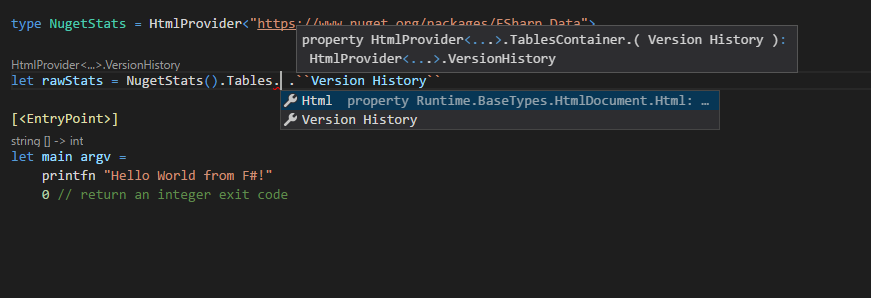
- When using VSCode/Ionide you also get full intellisense:
The above technique also works for .NET Standard 2.0 programming (
dotnet new lib -lang F# tplib1). However at the time of writing you need an F# compiler that includes this fix, e.g. use Visual Studio 2017 preview 3, or use an F# compiler built from source. I tested with<FscToolPath>C:\GitHub\dsyme\visualfsharp\release\net40\bin</FscToolPath>You get some warnings because FSharp.Data for .NET 4.x is being used. However it should be possible to produce a fully compliant .NET Standard 2.0 version of FSharp.Data, that is TBD, and until then the .NET Framework version is not that likely to cause major problems since the surface area of FSharp.Dataa is relatively low
dsyme
on 5 Jul 2017
@dsyme you are the freaking man! If I'm ever at a conference you're speaking at dinner one night is on me...
So I journeyed into the matrix to get my application running inside a Docker container on Linux despite it's heavy JSON Type Provider usage due to your workaround and I'm happy to report it works like a champion!
Pros:
This workaround is elegant, nice, and awesome
Runs in Docker on Linux!!!!!
Only developer IDEs and build servers need Windows which is perfectly livable until type providers compile on Core
I can still write all my build scripts for the build servers to be dotnet cli compliant
Cons:
There were 3 things that came up and I've attached a screenshot for all of them to see if I'm doing something wrong..
- FSC was complaining about netstandard2.0 but it works when I put in netcoreapp2.0

NuGet shows no packages installed for F#

My Intellisense is broken but I'm pretty certain this probably has something to do with item 2

The only other con was dotnet build, run, restore, publish all throw errors when I include the docker-compose.dcproj file in the .sln file. I have read that is because the SDK hasn't been open sourced which is a requirement to be included in the tool chain. This is not a concern as I can simply script the commands to all run against the top level project file rather than the solution.
I have a feeling my cons are entirely a PEBCAK and I've thought up workarounds in the event they are not. I'm still way happier about actually being able to build out my services against dockerswarm on Linux and still being able to use the Type Providers.
Regards,
Brian
 buvinghausen
on 7 Jul 2017
buvinghausen
on 7 Jul 2017
The PEBCAK is that I couldn't read.... vscode/ionide I will leave the items up here just in case we want the VS team to see they are very close.
buvinghausen
on 7 Jul 2017
Not sure about (2), but (3) is due to an issue in the language service. #3260 is tracking that issue, and @KevinRansom is currently working on it. This is wonderful to hear, though, @buvinghausen! Happy to hear that it's working for you in Docker/Linux.
 cartermp
on 7 Jul 2017
cartermp
on 7 Jul 2017
Only developer IDEs and build servers need Windows which is perfectly livable until type providers compile on Core
Atm will work also on non windows, using mono. two big ways:
use mono on dev on non win. same workaround
-
builda mono docker image for build, build there => get outputrunrun the build output in another container with just .net core
pro of 2 is that with multi stage, the image size contains only netcore (use official dotnet core docker image) and is slimmer
maybe i should gist the dockerfile i use for that. is a good setup, also for ci who are docker based (we use jenkins).
 enricosada
on 7 Jul 2017
enricosada
on 7 Jul 2017
@dsyme as a note, dotnet new lib -lang F# works the same of classlib, and is less wierd 😄
enricosada
on 7 Jul 2017
@cartermp thanks for the clarification I'm actually working on getting VS Code launch & debug into the Docker container like I can from VS 2017 then I may just cut the cord on VS full I've been looking for an excuse to do that as I have been using VS Code exclusively for TypeScript development.
@enricosada Those are some excellent points but for now I'm totally happy with simply making my CI server run on Windows and letting the FE developers run everything in Node but talking to our integration services on the back end. That should give me enough runway to let all the frameworks and tooling catch up such that I can then tell them they have to install .NET Core & OmniSharp and learn the dotnet cli. As an aside I think today is the day that I'm going to see how feasible it is to run the React Redux template in Docker. I know when you create the project they have the docker option disabled. Should be fun.
I really appreciate all the work you guys are putting into this platform I cannot stress that enough it really is amazing to think what the future holds.
buvinghausen
on 7 Jul 2017
Thx for the workaround but I encountered another issue:
error FS3033: The type provider 'FSharp.Data.TypeProviders.DesignTime.DataProviders' reported an error: The .NET SDK 4.0 or 4.5 tools could not be found
Source code tells the truth: SDK paths are fixed. On my relatively new machine (or on VSTS agent) there're no such registry keys. I added new ones (which existed on my machine):
@"Software\Microsoft\Microsoft SDKs\NETFXSDK\4.6.1\WinSDK-NetFx40Tools"
@"Software\Microsoft\Microsoft SDKs\NETFXSDK\4.6.2\WinSDK-NetFx40Tools"
and now it works. Are you interested in pull request for that change?
 orient-man
on 18 Jul 2017
orient-man
on 18 Jul 2017
My solution currently to finding the proper fsc.exe on macOS/Linux is to use a small helper script under my ./tools dir called fsharpc.exe
#!/bin/sh
fsharpc "$@"
or if you want more control over your fsc.exe version by using nuget/paket
#!/bin/sh
mono $(git rev-parse --show-toplevel)/packages/build/FSharp.Compiler.Tools/tools/fsc.exe --exename:$(basename "$0") "$@"
Then my project file
<PropertyGroup>
<OutputType>Exe</OutputType>
<TargetFramework>net462</TargetFramework>
</PropertyGroup>
<PropertyGroup Condition="$(OS)=='Unix'">
<FscToolPath>../../tools</FscToolPath>
<FscToolExe>fsharpc.exe</FscToolExe>
</PropertyGroup>
All it does it delegate to fsharpc, another shell script usually installed my mono and put on the path. For some reason the tooling is looking for an .exe at the end and won't execute the script without it. I saw it once somewhere but I can't remember where it was doing the check.
This seems to work with:
$ mono -V
Mono JIT compiler version 4.8.1 (mono-4.8.0-branch/22a39d7 Fri Apr 7 12:00:08 EDT 2017)
Copyright (C) 2002-2014 Novell, Inc, Xamarin Inc and Contributors. www.mono-project.com
TLS: normal
SIGSEGV: altstack
Notification: kqueue
Architecture: x86
Disabled: none
Misc: softdebug
LLVM: yes(3.6.0svn-mono-master/8b1520c)
GC: sgen
$ dotnet --info
.NET Command Line Tools (1.0.1)
Product Information:
Version: 1.0.1
Commit SHA-1 hash: 005db40cd1
Runtime Environment:
OS Name: Mac OS X
OS Version: 10.11
OS Platform: Darwin
RID: osx.10.11-x64
Base Path: /usr/local/share/dotnet/sdk/1.0.1
Libs I've tested so far:
FSharp.Data
FSharp.Configuration
FSharp.Management
Additional note: mdb doesn't seem to get copied over so I have to add this target to copy mdbs
<Target Name="Copy MDBs"
Condition="$(OS)=='Unix'"
AfterTargets="Build">
<Copy SourceFiles="$(IntermediateOutputPath)/$(AssemblyName).exe.mdb" DestinationFolder="$(OutputPath)" ContinueOnError="true" />
</Target>
 TheAngryByrd
on 19 Jul 2017
TheAngryByrd
on 19 Jul 2017
@TheAngryByrd Thanks for that info
Additional note: mdb doesn't seem to get copied over so I have to add this target to copy mdbs...
@KevinRansom It seems this should be part of standard F# targets?
dsyme
on 19 Jul 2017
Repo with instructions to enable the workaround : https://github.com/rfrerebe/TypeProviderDotNetCorePreview2
 rfrerebe
on 20 Jul 2017
rfrerebe
on 20 Jul 2017
One thing I've also noticed is I don't get incremental build support using that macos/linux workaround. Is there something else I need to set or is it just not supported?
i.e. normal .net core builds
Skipping target "CoreCompile" because all output files are up-to-date with respect to the input files.
Seems like the fsc.exe shipped with mono 4.8 is still 4.4.0.0
monodis --assembly /Library/Frameworks/Mono.framework/Versions/4.8.1/lib/mono/fsharp/fsc.exe
Assembly Table
Name: fsc
Hash Algoritm: 0x00008004
Version: 4.4.0.0
Flags: 0x00008001
PublicKey: BlobPtr (0x000000ea)
Even though it reports it's the compiler for 4.1
mono /Library/Frameworks/Mono.framework/Versions/4.8.1/lib/mono/fsharp/fsc.exe
F# Compiler for F# 4.1
Either using mono 5.0.1's version or downloading the latest FSharp.Compiler.Tools from nuget doesn't have the project rebuild every single time.
TheAngryByrd
on 24 Jul 2017
I need to do something specific to running on SDK 1.0.4 and targetting netcoreapp1.1? Trying target to net462 give me a issue on dotnet run:
❯ dotnet run
/opt/dotnet/sdk/1.0.4/Microsoft.Common.CurrentVersion.targets(1111,5): error MSB3644: The reference assemblies for framework ".NETFramework,Version=v4.6.2" were not found. To resolve this, install the SDK or Targeting Pack for this framework version or retarget your application to a version of the framework for which you have the SDK or Targeting Pack installed. Note that assemblies will be resolved from the Global Assembly Cache (GAC) and will be used in place of reference assemblies. Therefore your assembly may not be correctly targeted for the framework you intend. [/home/lerax/Desktop/dchart/backend/backend.fsproj]
The build failed. Please fix the build errors and run again.
I should able to compile and running with mono, but is not working when I try running with .NET Core. My setup is .NET Core SDK 1.0.4 and .NET Core runtime 1.1.2 on Linux.
 ryukinix
on 9 Aug 2017
ryukinix
on 9 Aug 2017
Alternatively, fsc can be obtained from FSharp.Compiler.Tools nuget. With Paket:
paket.dependencies:
nuget FSharp.Compiler.Tools
.fsproj:
<PropertyGroup>
<FscToolPath>../packages/FSharp.Compiler.Tools/tools</FscToolPath>
<FscToolExe>fsc.exe</FscToolExe>
</PropertyGroup>
Tested on Windows 7, but it should work cross-platform (?)
 jindraivanek
on 10 Aug 2017
jindraivanek
on 10 Aug 2017
@jindraivanek you are targetting to which framework? (I just want know)
ryukinix
on 10 Aug 2017
@ryukinix net46
jindraivanek
on 11 Aug 2017
@dsyme Does cross-targeting type providers now work with generative providers?
I was also wondering if an elaborate bait and swich could be used, like targeting 4.6.1 in consuming a type provider then using a net core facade assembly to redirect to the consumer dll?
 7sharp9
on 23 Aug 2017
7sharp9
on 23 Aug 2017
Does anyone know how to make this workaround work on Linux (or microsoft/dotnet:sdk Docker image)? We successfully use workaround @jindraivanek mentioned (using fsc.exe from FSharp.Compiler.Tools) on Windows, but anytime we want to build our project on Linux, Travis CI (based on Linux) or Docker, we got:
error MSB6006: "fsc.exe" exited with code 8.
FAKE script build.sh Publish neither dotnet publish, none of them work. We also tried to change paths in fsproj to try /usr/share/dotnet/sdk/2.0.0/FSharp/fsc.exe instead of Compiler Tools one. Do we need to use different fsc.exe? Any help would be great!
 Dzoukr
on 27 Aug 2017
Dzoukr
on 27 Aug 2017
We resolve it now (it is combination of @TheAngryByrd and @jindraivanek approach), so here is the description, maybe someone finds it useful:
On windows, everything is the same - we use fsc.exe directly from FSharp.Compiler.Tools. To have it working on Linux, we did this:
- Created file
tools/fsc.exewith content:
#!/bin/sh
chmod +x ../../packages/FSharp.Compiler.Tools/tools/fsc.exe
mono ../../packages/FSharp.Compiler.Tools/tools/fsc.exe "$@"
- Changed
fsprojto have property groups like this:
<PropertyGroup Condition="$(OS)=='Unix'">
<FscToolPath>../../tools</FscToolPath>
<FscToolExe>fsc.exe</FscToolExe>
</PropertyGroup>
<PropertyGroup Condition="$(OS)=='Windows_NT'">
<FscToolPath>../../packages/FSharp.Compiler.Tools/tools</FscToolPath>
<FscToolExe>fsc.exe</FscToolExe>
</PropertyGroup>
- Set env variable
OSto haveUnixvalue inbuild.shscript file. - Profit! 😄
_Please note: We use [root]/src/AppName folder structure, so if you do it differently, change paths in script file and fsproj._
Dzoukr
on 28 Aug 2017
... to have it working on Linux, we did this:... Created file tools/fsc.exe with content...
We should include the fsharpc and fsharpi scripts in packages/FSharp.Compiler.Tools/tools as part of the FSharp.Compiler.Tools package
dsyme
on 29 Aug 2017
I'm trying to build an erasing type provider on .Net core and my problem is:
FSC : error FS3031: The type provider 'myProvider.dll' reported an error: Assembly
attribute 'TypeProviderAssemblyAttribute' refers to a designer assembly 'myProvider' which cannot
be loaded or doesn't exist. Could not load file or assembly 'System.Runtime, Version=4.2.0.0,
Culture=neutral, PublicKeyToken=b03f5f7f11d50a3a' or one of its dependencies. The system cannot find
the file specified. [C:\tests\myTests.fsproj]
If I target to netstandard2.0 I fail compiling the typeprovider, and if I target to netcoreapp2.0 everything goes ok, until I try to build my test project: when compilation of the test project is done, the compiler executes some code related to TypeProviderAssemblyAttribute which somehow refers a non-core-version of System.Runtime.
_edit:_
I think that the problems are inheriting from FieldInfo:
type ProvidedField(fieldName:string,fieldType:Type) =
inherit System.Reflection.FieldInfo()
Fieldinfo contains a member GetValueDirect taking TypedReference as a parameter.
FSharp.TypeProviders.StarterPack\src\ProvidedTypes.fs(1597,6): error FS1109: A reference to the type 'System.TypedReference' in assembly 'System.Runtime' was found, but the type could not be found in that assembly
 Thorium
on 16 Sep 2017
Thorium
on 16 Sep 2017
I'm trying to build an erasing type provider on .Net core ....
@Thorium This is not yet supported, see #2406
dsyme
on 20 Sep 2017
Yet another solution to get fsc.exe working on any platform combining the ones above and https://github.com/Microsoft/msbuild/issues/539#issuecomment-289930591 (no need of $(OS) environment variable).
Please, note that YMMV for <FscToolPath>.
Maybe we can get the ultimate solution combining @Dzoukr solution using tools from FSharp.Compiler.Tools with scripts add-ons proposed by @dsyme.
<PropertyGroup>
<IsWindows Condition="'$(OS)' == 'Windows_NT'">true</IsWindows>
</PropertyGroup>
<PropertyGroup Condition="'$(MSBuildRuntimeType)' == 'Core'">
<IsOSX Condition="'$([System.Runtime.InteropServices.RuntimeInformation]::IsOSPlatform($([System.Runtime.InteropServices.OSPlatform]::OSX)))' == 'true'">true</IsOSX>
<IsLinux Condition="'$([System.Runtime.InteropServices.RuntimeInformation]::IsOSPlatform($([System.Runtime.InteropServices.OSPlatform]::Linux)))' == 'true'">true</IsLinux>
</PropertyGroup>
<PropertyGroup Condition="'$(IsWindows)' == 'true'">
    <FscToolPath>C:\Program Files (x86)\Microsoft SDKs\F#\4.1\Framework\v4.0</FscToolPath>
    <FscToolExe>fsc.exe</FscToolExe>
</PropertyGroup>
<PropertyGroup Condition="'$(IsOSX)' == 'true'">
<FscToolPath>/Library/Frameworks/Mono.framework/Versions/Current/Commands</FscToolPath>
<FscToolExe>fsharpc</FscToolExe>
</PropertyGroup>
<PropertyGroup Condition="'$(IsLinux)' == 'true'">
<FscToolPath>/usr/bin</FscToolPath>
<FscToolExe>fsharpc</FscToolExe>
</PropertyGroup>
 manchoz
on 22 Sep 2017
manchoz
on 22 Sep 2017
@manchoz Thanks for that workaround - I've added it above. I removed the Condition="'$(MSBuildRuntimeType)' == 'Core'" - I don't think it's needed or correct when using Mono? Could you check please? Thanks
dsyme
on 24 Sep 2017
@dsyme yes, it works. Thanks!
manchoz
on 25 Sep 2017
I included netstandard.dll, System.Console.dll, System.IO.dll, System.Reflection.dll, System.Runtime.dll from the .NET Standard SDK to the type provider NuGet package and now it seems to work... I don't know if there will be problems but I'll probably find out soon...
Thorium
on 27 Sep 2017
Would this trick working on FSharp.Compiler.Service like fable? I'm trying using FSharp.Data.GraphQL client TP in fable, I update TP in FSharp.Data.GraphQL follow the cross target tutorial, and build successfully in dotnet build, but keeps throwing error for cannot find the provided type in Fable.
 zaaack
on 2 Oct 2017
zaaack
on 2 Oct 2017
Has anyone been able to get this to work with FSharp.Data.TypeProviders to connect to a SQL Server database yet?
 Disco-Dave
on 8 Oct 2017
Disco-Dave
on 8 Oct 2017
I've updated the description of what to do to be clearer, specifically adding this text:
Add the file
fsc.propsto the root of your project and import it into each of your project files that reference a type provider
dsyme
on 25 Oct 2017
@Disco-Dave FSharp.Data.TypeProviders is not a cross-targeting type provider at this stage. If doing .NET Framework programming you should be able to use it with a .NET SDK 2.0 style project file targeting net45 or net461 though I haven't checked
If you would like a SQL type provider to use with .NET Standard 2.0 programming, see https://github.com/fsprojects/SQLProvider, also @Thorium may have latest details on that.
dsyme
on 25 Oct 2017
@zaaack Re your question above - I'm not quite sure what you're asking? If it involves Fable it may be better to ask via a Fable issue
dsyme
on 25 Oct 2017
@manchoz If you could check the fsc.props file mentioned above, and if possible use it, that would be great
dsyme
on 25 Oct 2017
Hi, @dsyme. Sorry for the bother, I want to know does FSharp.Compiler.Service work on .netcoreapp2.0 with non-generative type providers with this configuration? Because I tried this in fable and cannot get the tp working(cannot find the type from type provider), if FCS works, then must be fable's issue. I find this issue https://github.com/fsharp/FSharp.Compiler.Service/issues/568 and wondering whether this still work when targeting .netcoreapp2.0..
zaaack
on 25 Oct 2017
SQLProvider status:
- You will need some configuration to your project files. There are some example projects to show those.
- you need a path to fsc as described above.
- you need your database driver and dependency dlls to resolutionPath-folder. (Because I haven't found a reliable way to TypeProvider to load NuGet-package-hierarchies via reflection on compilation.)
- The old support for both .NET 4.5.1 and Mono is there still for all the databases there have been.
- Besides that the new .Net Coreapp 2.0 example projects are tested to build and run on:
                     | Win10 | Mac  | Ubuntu
Microsoft SQL Server | [x]   | [x]  | [x]
Postgres             | [x]   | [x]  | [x]
MySQL                | [x]   | [x]  | [x]
SQLite               | [x]   |      |
I know you probably have your favourite database type provider, and I'm looking forward to see the others to support .Net Core also. Having multiple options for tools is a good thing.
Thorium
on 25 Oct 2017
@zaaack Thanks, I see. It is not yet under test to load type providers into FCS running in .netcoreapp 2.0. It might work after recent fixes by @KevinRansom in this repo, but it's possible FCS needs to be republished. But as I said, it's not yet under test even if it works
dsyme
on 25 Oct 2017
@dsyme, thanks a lot!
zaaack
on 25 Oct 2017
Just a "heads up"...
The second link in
- Add the file fsc.props to the root of your project and import it into each of your project files that reference a type provider
points to an incorrect example.
The correct syntax for importing the fsc.props file is something along the lines of: <Import Project="fsc.props" />.
Took me quite a while (and help from @enricosada) to figure this out.
 pblasucci
on 15 Nov 2017
pblasucci
on 15 Nov 2017
@pblasucci Thanks for pointing that out, I fixed it
dsyme
on 27 Nov 2017
@dsyme I have a type provider which is built as Combo NET Standard TPDTC. Works fine with NET Core on Windows with any tooling VS/Rider/VSCode. Deployed on Linux works at run-time too.
On Mac and Linux at design/build time throws
"Could not resolve field token 0x0400055b"
Any suggestions?
I use the latest Provided Types SDK.
Tooling redirection applied as suggested
https://github.com/Microsoft/visualfsharp/issues/3303#issuecomment-331426983
Thanks
 dmitry-a-morozov
on 21 Dec 2017
dmitry-a-morozov
on 21 Dec 2017
@dsyme I got it. It's same as
https://github.com/npgsql/npgsql/issues/1603#issuecomment-338495817
https://github.com/npgsql/npgsql/issues/1633#issuecomment-338495347
What's the best way to solve it?
Because the way it's done in SQLProvider is not really acceptable.
dmitry-a-morozov
on 21 Dec 2017
@dmitry-a-morozov we accept PRs to SQLProvider if you find any better solution.
Thorium
on 21 Dec 2017
@Thorium Unfortunately I don't have better solution.
I was surprised to see you guys ship mix of NetStandard and NET461 components in netstandard2.0 folder.
dmitry-a-morozov
on 21 Dec 2017
@dmitry-a-morozov @Thorium Just to say sorry for not getting back to this earlier. I'm getting back from vacation now and will start looking into these TPSDK bugs
dsyme
on 5 Jan 2018
@dmitry-a-morozov With regard to this:
@dsyme I have a type provider which is built as Combo NET Standard TPDTC. Works fine with NET Core on Windows with any tooling VS/Rider/VSCode. Deployed on Linux works at run-time too. On Mac and Linux at design/build time throws
Could not resolve field token 0x0400055b
I haven't seen this bug previously, it must be a difference in reflection on Mono. We will need a detailed repro for this. Could you submit as much information a possible to the TPSDK repo please?
dsyme
on 11 Jan 2018
@dsyme Sorry for delayed response. I'm on vacation with limited access to internet.
I believe this issue was resolved by installing the latest Mono.
dmitry-a-morozov
on 12 Jan 2018
I just wanted to say thank you to all the contributors on this thread! We've got the build agent docker images retrofitted with Mono and are using the fsc.props file that @dsyme has in the updated suggestions and everything works marvelously. This saved me some major headaches as one of my vendors has a not fun XML solution in place that I was able to make sane via the XML type provider. The only heads up I have to offer is if you do run your build commands against the Solution File make sure your pathing has the *nix forward slashes in them. Windows seems just fine with the forward slash as it is the back slash the only caveat is any time you add a project to it VS will re-write all the slashes to back slashes...
buvinghausen
on 15 Jan 2018
I'm pretty sure that I followed the workaround from above: https://github.com/Microsoft/visualfsharp/issues/3303#issuecomment-312966306.
I get 'FS2024: Static linking may not be used on an assembly referencing mscorlib' when building the netcoreapp that uses WsdlService.
I have a repo demonstrating my attempt and screenshots in the README.
https://github.com/gfritz/tp-apps
Can anyone identify how the WsdlService type provider needs to change to fix that, or if that is the problem? I can't figure out what in WsdlService makes that happen, but I'd be happy to try fixing it.
 gfritz
on 15 Feb 2018
gfritz
on 15 Feb 2018
@zaaack @dsyme FYI, I just tried a project with a "Hello World" erased type provider and F# compiler on netcore seems to recognize it (typing dotnet run yields the correct result), but when parsing it with latest FCS (20.0.1) the provided type is not recognized :/
 alfonsogarciacaro
on 1 Mar 2018
alfonsogarciacaro
on 1 Mar 2018
@zaaack @dsyme FYI, I just tried a project with a "Hello World" erased type provider and F# compiler on netcore seems to recognize it (typing dotnet run yields the correct result), but when parsing it with latest FCS (20.0.1) the provided type is not recognized :/
Could you create a repro ZIP please? AFAIK this should work, but we need more details on the TP package layout, and whether FCS is running on .NET Core or .NET Framework.
dsyme
on 2 Mar 2018
@dsyme I've created a test repo and listed the steps to reproduce in the README. FCS 20.0.1 didn't recognize the erased member when parsing the project, but the good news is... FCS 21.0.1 does! :tada:
alfonsogarciacaro
on 4 Mar 2018
@alfonsogarciacaro That's great, thanks
dsyme
on 12 Mar 2018
Are FscToolPath and FscToolExe properties still needed?
<FscToolPath>C:\Program Files (x86)\Microsoft SDKs\F#\4.1\Framework\v4.0</FscToolPath>
seems to have changed. There would be this:
<FscToolPath>C:\Program Files (x86)\Microsoft SDKs\F#\10.1\Framework\v4.0</FscToolPath>
Is it compatible?
Do I have to update all the project files and all the documentations?
Thorium
on 26 Mar 2018
There are changes coming to F# and the dotnet sdk which makes the integration of TypeProviders much easier. However, all of the stars have not yet aligned. TP’s will need updating to a newer nuget package layout, to take advange or this.
Here you can find the FSharpTypeProviders sdk, with example TP packaging: https://github.com/fsprojects/FSharp.TypeProviders.SDK
The paths you have pointed out are merely due to a versioning change for the F# SDK from 4.1 to 10.1. However, they do both use different versions of FSharpCore.dll. And they identify the location of the desktop fsharp compiler fsc.exe.
I know that this was a frustratingly fact-free mail, bear with us while we work through the details
Kevin
From: Tuomas Hietanen notifications@github.com
Sent: Monday, March 26, 2018 3:19 AM
To: Microsoft/visualfsharp visualfsharp@noreply.github.com
Cc: Kevin Ransom Kevin.Ransom@microsoft.com; Mention mention@noreply.github.com
Subject: Re: [Microsoft/visualfsharp] How to enable type providers with new-style .NET SDK project files, dotnet build, .NET Standard and .NET Core programming (#3303)
Are FscToolPath and FscToolExe properties still needed?
seems to have changed. There would be this:
Is it compatible?
Do I have to update all the project files and all the documentations?
—
You are receiving this because you were mentioned.
Reply to this email directly, view it on GitHubhttps://na01.safelinks.protection.outlook.com/?url=https%3A%2F%2Fgithub.com%2FMicrosoft%2Fvisualfsharp%2Fissues%2F3303%23issuecomment-376117927&data=02%7C01%7CKevin.Ransom%40microsoft.com%7Cb5b7f63b5f334879223008d593030ffe%7C72f988bf86f141af91ab2d7cd011db47%7C1%7C0%7C636576563722273148&sdata=1pJTFJ9dp5kHn2zhf775HBqSfk5YY4WaHuVxOIXFUOg%3D&reserved=0, or mute the threadhttps://na01.safelinks.protection.outlook.com/?url=https%3A%2F%2Fgithub.com%2Fnotifications%2Funsubscribe-auth%2FAE76Fj6AiicEQ0znFHQe8FcjMSPCV_Okks5tiMCwgaJpZM4ONPFJ&data=02%7C01%7CKevin.Ransom%40microsoft.com%7Cb5b7f63b5f334879223008d593030ffe%7C72f988bf86f141af91ab2d7cd011db47%7C1%7C0%7C636576563722273148&sdata=YMd%2BpTKN9g48TKhefXvB1wFJYDjRb2bvF5iBbbBdFJY%3D&reserved=0.
 KevinRansom
on 26 Mar 2018
KevinRansom
on 26 Mar 2018
@dsyme I'm happy to report that @tpetricek released the 3.0 beta two days ago which supports .netstandard2 out of the box. We have already upgraded our applications to use the 3.0 beta and removed the fsc.props and everything is still going green. I think you can safely close this topic and say go get it here NuGet FSharp.Data
buvinghausen
on 6 Apr 2018
I don't deserve any credit here :-) all the fantastic work on F# Data has been done by @ovatsus and @dsyme !
 tpetricek
on 6 Apr 2018
tpetricek
on 6 Apr 2018
Actually it was @dsyme and @baronfel, I just basically clicked the merge button :)
 ovatsus
on 6 Apr 2018
ovatsus
on 6 Apr 2018
Well cheers to all! Fantastic work
buvinghausen
on 7 Apr 2018
I have the Fsharp.Data 3.0 beta and I still have this issue: :-\
Here is my travis log for the failed build: https://travis-ci.org/NullVoxPopuli/CryptoExchangeClient/builds/366058602 (just trying to get linux support working, the master branch works on windows)
I searched the paket.lock, and all occurrences of FSharp.Data are the latest beta.
Locally, I get this:
$ ./run test
# scripted-alias for:
# (cd tests/Test.CryptoExchangeClient && dotnet test Test.CryptoExchangeClient.fsproj)

Build started, please wait...
/usr/share/dotnet/sdk/2.0.0/FSharp/Microsoft.FSharp.Targets(224,9): error MSB6006: "RunFsc.sh" exited with code 134.
[/home/me/Development/NullVoxPopuli/CryptoExchangeClient/src/CryptoExchangeClient.fsproj]
On Travis I get this:
Build started, please wait...
/usr/share/dotnet/sdk/2.0.0/FSharp/Microsoft.FSharp.Targets(224,9): error MSB6006: "RunFsc.sh" exited with code 134.
 [/home/travis/build/NullVoxPopuli/CryptoExchangeClient/src/CryptoExchangeClient.fsproj]
 NullVoxPopuli
on 13 Apr 2018
NullVoxPopuli
on 13 Apr 2018
Thank you very much! Get it to work in my stuff. Great job :)
 psfinaki
on 26 Apr 2018
psfinaki
on 26 Apr 2018
Is the Fsc.prop fix still required when using dotnet SDK 2.1.300 but using netcoreapp2.0 packages?
 nojaf
on 5 Jun 2018
nojaf
on 5 Jun 2018
Is the Fsc.prop fix still required when using dotnet SDK 2.1.300 but using netcoreapp2.0 packages?
No, it shouldn't be needed
dsyme
on 5 Jun 2018
We've been using FSharp.Data 3.0 beta with every SDK 2.1.300 release from preview1, preview2, rc1, and rtm all without issue it's been awesome. That's with devs using both OSX and WIndows along with our build server & deployment servers all running in Docker on Linux. We're using it for both XML & JSON provider scenarios extensively.
buvinghausen
on 5 Jun 2018
Closing this, as Type Providers are now supported as .NET Standard components
cartermp
on 29 Jul 2018
@cartermp I think you claimed victory too early
https://github.com/fsprojects/FSharp.TypeProviders.SDK/issues/244
Hopefully it will get fixed soon.
dmitry-a-morozov
on 1 Aug 2018
@dmitry-a-morozov
Here is an example of using the dotnet sdk to create and consume a Type Provider nuget package.
https://github.com/Microsoft/visualfsharp/tree/master/tests/EndToEndBuildTests/BasicProvider
Let me know if this helps.
Kevin
KevinRansom
on 1 Aug 2018
@KevinRansom This is no helpful because it's essentially same as https://github.com/fsprojects/FSharp.TypeProviders.SDK/tree/master/examples and doesn't have any external dependencies.
I need an example with TPDTC dependency on external assembly (ideally a nuget package).
dmitry-a-morozov
on 1 Aug 2018
@dmitry-a-morozov
So your goal is for the DesignTime guy to resolve types from a separate nuget package. I don't believe that is a supported scenario. If I remember correctly, the design requires the tools to be fully specified, I.e. all of their dep[endencies reachable from the tools directory or tp directory of the nuget package.
I am working on a compilertools switch which should allow tool dependencies like type providers and their dependencies to be specified. I am not sure whether that will address this though.
Kevin
KevinRansom
on 1 Aug 2018
@KevinRansom Not exactly. My design time component has dependencies like Npgsql
https://github.com/demetrixbio/FSharp.Data.Npgsql/blob/master/src/DesignTime/DesignTime.fsproj#L36
But by using <CopyLocalLockFileAssemblies>true</CopyLocalLockFileAssemblies> in build file I copy all required binaries to the same folder as TPDTC.
Current version of F# compiler has breaking change. It doesn't know to load assemblies co-located with TPDTC. I applied workaround suggested by @dsyme
https://twitter.com/dsyme/status/1024420744250515456
But I'm stuck with
error FS1108: The type 'Void' is required here and is unavailable. You must add a reference to assembly 'System.Private.CoreLib, Version=4.0.0.0, Culture=neutral, PublicKeyToken=7cec85d7bea7798e'.
I described it all in
https://github.com/fsprojects/FSharp.TypeProviders.SDK/issues/244
dmitry-a-morozov
on 1 Aug 2018
I guess we should take a look then.
Do you have a branch of your repro, without the workaround? I will see what needs to be done in the compiler to make it work.
From: Dmitry Morozov notifications@github.com
Sent: Wednesday, August 1, 2018 1:19 PM
To: Microsoft/visualfsharp visualfsharp@noreply.github.com
Cc: Kevin Ransom Kevin.Ransom@microsoft.com; Mention mention@noreply.github.com
Subject: Re: [Microsoft/visualfsharp] How to enable type providers with new-style .NET SDK project files, dotnet build, .NET Standard and .NET Core programming (#3303)
@KevinRansomhttps://na01.safelinks.protection.outlook.com/?url=https%3A%2F%2Fgithub.com%2FKevinRansom&data=02%7C01%7CKevin.Ransom%40microsoft.com%7C6f6143039a3440a4b9f508d5f7ec0dd5%7C72f988bf86f141af91ab2d7cd011db47%7C1%7C0%7C636687515569580454&sdata=diHOMT3stS%2F3s%2BF0NV5z%2BDOqvl9BMEWweGNxpyTiNp8%3D&reserved=0 Not exactly. My design time component has dependencies like Npgsql
https://github.com/demetrixbio/FSharp.Data.Npgsql/blob/master/src/DesignTime/DesignTime.fsproj#L36https://na01.safelinks.protection.outlook.com/?url=https%3A%2F%2Fgithub.com%2Fdemetrixbio%2FFSharp.Data.Npgsql%2Fblob%2Fmaster%2Fsrc%2FDesignTime%2FDesignTime.fsproj%23L36&data=02%7C01%7CKevin.Ransom%40microsoft.com%7C6f6143039a3440a4b9f508d5f7ec0dd5%7C72f988bf86f141af91ab2d7cd011db47%7C1%7C0%7C636687515569590462&sdata=CXX2oWmp3ACesKT4S4xoqnWqCTgYtkcG39QyhfxdPfQ%3D&reserved=0
But by using
Current version of F# compiler has breaking change. It doesn't know to load assemblies co-located with TPDTC. I applied workaround suggested by @dsymehttps://na01.safelinks.protection.outlook.com/?url=https%3A%2F%2Fgithub.com%2Fdsyme&data=02%7C01%7CKevin.Ransom%40microsoft.com%7C6f6143039a3440a4b9f508d5f7ec0dd5%7C72f988bf86f141af91ab2d7cd011db47%7C1%7C0%7C636687515569600475&sdata=57N6I6RHvDY0%2F8K%2B%2BXy7firJrGNNvHTkd4NhPVSlbLY%3D&reserved=0
https://twitter.com/dsyme/status/1024420744250515456https://na01.safelinks.protection.outlook.com/?url=https%3A%2F%2Ftwitter.com%2Fdsyme%2Fstatus%2F1024420744250515456&data=02%7C01%7CKevin.Ransom%40microsoft.com%7C6f6143039a3440a4b9f508d5f7ec0dd5%7C72f988bf86f141af91ab2d7cd011db47%7C1%7C0%7C636687515569600475&sdata=BQzoh5MZ%2BZxZGH1%2F9IpKbYAfUR3Tk5hEi013xonZ4fQ%3D&reserved=0
But I'm stuck with
error FS1108: The type 'Void' is required here and is unavailable. You must add a reference to assembly 'System.Private.CoreLib, Version=4.0.0.0, Culture=neutral, PublicKeyToken=7cec85d7bea7798e'.
I described it all in
fsprojects/FSharp.TypeProviders.SDK#244https://na01.safelinks.protection.outlook.com/?url=https%3A%2F%2Fgithub.com%2Ffsprojects%2FFSharp.TypeProviders.SDK%2Fissues%2F244&data=02%7C01%7CKevin.Ransom%40microsoft.com%7C6f6143039a3440a4b9f508d5f7ec0dd5%7C72f988bf86f141af91ab2d7cd011db47%7C1%7C0%7C636687515569610479&sdata=FdwnMIb4YLpIKeaPii7t%2FIt0KS9N5P1pELnVjw%2FSuWQ%3D&reserved=0
—
You are receiving this because you were mentioned.
Reply to this email directly, view it on GitHubhttps://na01.safelinks.protection.outlook.com/?url=https%3A%2F%2Fgithub.com%2FMicrosoft%2Fvisualfsharp%2Fissues%2F3303%23issuecomment-409708328&data=02%7C01%7CKevin.Ransom%40microsoft.com%7C6f6143039a3440a4b9f508d5f7ec0dd5%7C72f988bf86f141af91ab2d7cd011db47%7C1%7C0%7C636687515569610479&sdata=ZWmUD3X3ovF%2Fpg%2BKMSNYvHS4fHT6jAo9n4JIgpruFR0%3D&reserved=0, or mute the threadhttps://na01.safelinks.protection.outlook.com/?url=https%3A%2F%2Fgithub.com%2Fnotifications%2Funsubscribe-auth%2FAE76FuDnwGZseIGuuOBlvoJ76G69BrpRks5uMg1DgaJpZM4ONPFJ&data=02%7C01%7CKevin.Ransom%40microsoft.com%7C6f6143039a3440a4b9f508d5f7ec0dd5%7C72f988bf86f141af91ab2d7cd011db47%7C1%7C0%7C636687515569620487&sdata=KXJh5YrPhpyDTWKcFAe4h%2FswFMIwdHCz3vSA%2Fuim%2BP0%3D&reserved=0.
KevinRansom
on 1 Aug 2018
Latest commit de10d57 has workaround commented out
https://github.com/demetrixbio/FSharp.Data.Npgsql/blob/de10d5749dbdf3d8dfb9292bcaaa245f8da9629b/tests/Tests.fsproj#L10
So it compiles from VS but fails from command line.
I actually wanted to take it step father and place TPDTC in
...\typeproviders\fsharp41\netstandard2.0\FSharp.Data.Npgsql.DesignTime.dll relative to runtime component but legacy location (design time co-located to run-time) doesn't work either.
Follow instructions to run tests.
Honestly I think it's better to extend BasicProvider example to have dependency because it will useful for community as example of managing dependencies. But I'll leave it to your judgement.
dmitry-a-morozov
on 1 Aug 2018
@KevinRansom I made some changes to unit test suite so it should run on your machine.
Use this commit
https://github.com/demetrixbio/FSharp.Data.Npgsql/commit/b44df12e87eb66b374814208245e82ce65e69d35
Thanks
dmitry-a-morozov
on 1 Aug 2018
@buvinghausen Thanks for the tip on FSharp.Data beta, it also fixed my issue.
Still a brave new world this Dotnet core. :)
 boeremak
on 8 Aug 2018
boeremak
on 8 Aug 2018
@KevinRansom
Congrats on 15.8 VS release ! Great work.
Do you have any updates on discussion above and https://github.com/fsprojects/FSharp.TypeProviders.SDK/issues/244?
Thanks
//cc @dsyme @cartermp
dmitry-a-morozov
on 17 Aug 2018
@dmitry-a-morozov It's on my list of things to resolve. I'm afraid I have no details about when :-(
KevinRansom
on 17 Aug 2018
@KevinRansom I understand. Keep me posted.
dmitry-a-morozov
on 17 Aug 2018
I so confused on what I need to do to get the OpenAPITypeProvider to work. It is build for netstandard2.0. https://github.com/fsprojects/OpenAPITypeProvider/issues/6
 ctaggart
on 11 Oct 2018
ctaggart
on 11 Oct 2018
Recording a link to my reply here: https://github.com/fsprojects/OpenAPITypeProvider/issues/6#issuecomment-428900442
dsyme
on 12 Oct 2018
I'm trying to use FSharp.Configuration in my project. On my TeamCity build environment (Linux), I have installed the fsharp compiler and imported fsc.props, but the build breaks with the error message
"fsharpc" exited with code 1.
For now, I'm not sure where to go, as it's not clear how to get a detailed error description from fsharpc.
 SpiegelSoft
on 2 Feb 2019
SpiegelSoft
on 2 Feb 2019
The fsc.props workaround stopped working in version 2.2.203 of the SDK.
I posted a workaround in fsprojects/FSharp.TypeProviders.SDK/issues/244
larjo
on 23 Apr 2019
Why would you still be using the fsc.props workaround? The 3.0 beta (and all subsequent 3.x releases) has been working without the workaround for over a year now...
buvinghausen
on 6 May 2019
After the latest caching improvements I started to get this error FS3033(0,0): The design-time type 'System.String' utilized by a type provider was not found in the target reference assembly set '[ ...(list of assemblies)... ]'. You may be referencing a profile which contains fewer types than those needed by the type provider you are using. also in the .NET Framework full.
ProvidedTypes.fs commit 18459e8b23b44b389dc8f2b8fe444fedf2b47a8c did work, but after commit b08fe13625b2ffc08529cb9350db8f86c6b3c537 there are problems.
Thorium
on 29 May 2019
It's fixed in 3.0? With dotnet-sdk-3.0.100-preview5-011568-linux-x64.tar.gz I still get the same error, after invoking "dotnet build" on a F# project:
error FS3053 : The type provider 'FSharp.Configuration.ConfigTypeProvider+FSharpConfigurationProvider' reported an error : The type provider constructor has thrown an exception: Exception has been thrown by the target of an invocation.
Will it be fixed properly, if so when is a fix planned to appear approximately? Can a out-of-the-box solution that does not demand manual workarounds with path hacks be expected in the future?
 patham9
on 7 Jun 2019
patham9
on 7 Jun 2019
@patham9 it’s highly unlikely that this issue is the right place to report that error, as the mechanism to allow type providers to work on .NET Core has been shipped and stable for quite some time. I suspect your issue lies in the library, not this type provider mechanism.
cartermp
on 7 Jun 2019
I agree with @cartermp. My initial porting of the FSharp.Configuration TP was incomplete and it hasn't been fully updated with a .netstandard version, which would be required for seamless usage. There's an issue on the repo for this I believe, but someone needs to do/finish the work. It's on my list to do, but like many others I have many competing priorities.
 baronfel
on 7 Jun 2019
baronfel
on 7 Jun 2019
@Thorium Did you ever figure out a workaround or fix? Having this same problem...
After the latest caching improvements I started to get this
error FS3033(0,0): The design-time type 'System.String' utilized by a type provider was not found in the target reference assembly set '[ ...(list of assemblies)... ]'. You may be referencing a profile which contains fewer types than those needed by the type provider you are using.also in the .NET Framework full.
 jfrank-summit
on 28 Jun 2019
jfrank-summit
on 28 Jun 2019
Yes, I figured out what happened.
FSharp.TypeProviders.SDK has the file ProvidedTypes.fs which is loading types from netstandard.dll which contains the base types of .NET Standard.
If you follow the tutorial, LemonadeProvider, and open the file
src\LemonadeProvider.DesignTime\LemonadeProvider.DesignTime.fsproj you will notice the dependency:
    <None Include="..\..\packages\NETStandard.Library.NETFramework\build\net461\lib\netstandard.dll" Condition="'$(TargetFramework)' == 'net45'">
        <CopyToOutputDirectory>PreserveNewest</CopyToOutputDirectory>
    </None>
So the typeprovider loads the netstandard.dll from this NuGet package:
https://www.nuget.org/packages/NETStandard.Library.NETFramework/2.0.0-preview2-25405-01
But the netstandard.dll there is an old version, and if you a later use netstandard.dll in your machine (you have the latest .NET Core installed) there will be version conflict between the loaded netstandard.dll and the used netstandard.dll. That might also lead the type-provider to reflection-loading-loop between the two dlls, causing stackoverflow, or just not to find the core types. Using only the old-one works.
I went the simplest fix which was uninstall VS2019 and take VS2017 back, and everything worked correctly.
:-P
Edit: Also, the ProvidedTypes.fs I'm using is the commit 18459e8b23b44b389dc8f2b8fe444fedf2b47a8c
Thorium
on 29 Jun 2019
Related issues
 ploeh
·
3Comments
ploeh
·
3Comments
 jackfoxy
·
4Comments
enricosada
·
3Comments
jackfoxy
·
4Comments
enricosada
·
3Comments
 AaronEshbach
·
3Comments
AaronEshbach
·
3Comments
 drguildo
·
3Comments
drguildo
·
3Comments
Most helpful comment
@cartermp @KevinRansom As I've now documented in the issue description, it is possible to use the above technique to enable type providers for .NET Core programming, as long as the type providers have been written as a cross targeting type provider. The main cross-targeting type provider is FSharp.Data.
Here are the steps I used to verify that this can be used with .NET Core 2.0 programming:
output:
🎉🎉🎉🎉 we have used type providers for .NET Core programming for the first time :)
Notes:
The above technique also works for .NET Standard 2.0 programming (
dotnet new lib -lang F# tplib1). However at the time of writing you need an F# compiler that includes this fix, e.g. use Visual Studio 2017 preview 3, or use an F# compiler built from source. I tested with<FscToolPath>C:\GitHub\dsyme\visualfsharp\release\net40\bin</FscToolPath>You get some warnings because FSharp.Data for .NET 4.x is being used. However it should be possible to produce a fully compliant .NET Standard 2.0 version of FSharp.Data, that is TBD, and until then the .NET Framework version is not that likely to cause major problems since the surface area of FSharp.Dataa is relatively low