Fsharp: Arrow keys and backspace stopped working
In build 15.3 with *62604 of F# Tools the arrow keys and backspace don't work.
Related:
Delete button works
In C# projects all keys work as expected.
Windows 10 with English display language and Swedish Qwerty keyboard.
 magnushammar
All 75 comments
what? I can perfectly find delete code
 forki
on 27 Jun 2017
forki
on 27 Jun 2017
@magnushammar I've occasionally noticed something odd with keybindings. As a workaround I've found that closing/opening the editor tab fixes things. I assume it is a general VS bug but maybe F# brings it out
 dsyme
on 27 Jun 2017
dsyme
on 27 Jun 2017
@magnushammar I've noticed the same thing, @dsyme work around fixes the issue for me.
 TWith2Sugars
on 27 Jun 2017
TWith2Sugars
on 27 Jun 2017
Thank you @dsyme that worked... It only happens on one file in the project I opened. It is clear though that the navigation keys work, its just that the text editor does not "get" the navigation keys but they instead move focus on the chrome surrounding the editor (Codelens, drop down boxes etc...)
- I did -> git clone https://github.com/Prolucid/Elmish.WPF.git
- Open Elmish.Counter -> Program.fs
magnushammar
on 27 Jun 2017
We've seen this a few times, usually when the editor and shell are confused about where the focus is. Maybe something about the clickable quickinfo triggers it?
@olegtk do you have any ideas about how to diagnose?
 Pilchie
on 27 Jun 2017
Pilchie
on 27 Jun 2017
@Pilchie If it helps, it is always on startup, or at least always on "document open".
dsyme
on 27 Jun 2017
I've experienced this starting in build 17062301 of the Visual F# Tools in a project in which it happens every time at startup of VS. As an experiment I switched back and forth between 2301 and 2201 three times and it reproduced in 2301 every time, and never in 2201.
 chadunit
on 28 Jun 2017
chadunit
on 28 Jun 2017
I am also seeing this, very frequently starting with 17062301 (on a large solution, one in every 3-4 file opening operations). I did experience the issue before 17062301, but very infrequently (e.g. maybe once a week, and without an accompanying error dialog - see below)
What I am seeing:
- Visual Studio pops up an error dialog upon opening the file in the editor, with the rather unhelpful message: "An item with the same key has already been added."
- EDIT: might be a red herring, I have just reproduced the issue without the dialog popping up,
- The arrow keys, enter and backspace do not work in the newly opened editor tab
- The newly opened file tab does not display the top navigation bar (namespaces/modules/classes/members).
- Closing and re-opening the file seems to always result in a working editor tab
Hope this helps - I am running VS 15.2(26430.14) and F# tools 17062705
 cata
on 28 Jun 2017
cata
on 28 Jun 2017
@cata. I can also get the error message with my example project depending on in what order I open files.
Focus bug only
- Load Solution
- Open Elmish.WPF -> Viewmodel.fs
- Open Elmish.Counter -> Program.fs
- Focus bug in Program.fs (Not Viewmodel.fs) and Error message: An item with the same key has already been added.
Focus bug and error message
- Load Solution
- Open Elmish.Counter -> Program.fs
- No error message. But still the focus bug in Program.fs. Now I can open Viewmodel.fs also but no error message.
magnushammar
on 28 Jun 2017
I suspect this line https://github.com/Microsoft/visualfsharp/commit/bac1458936940aa36ef32d1930fab5faa327c6a0#diff-cdf0a4fbb7615b8029d78133924259c3R451
dsyme
on 28 Jun 2017
@magnushammar I can repro both of those cases, thank you for submitting this
dsyme
on 28 Jun 2017
@magnushammar @cata @chadunit @TWith2Sugars This appears to fix it: https://github.com/Microsoft/visualfsharp/pull/3270
If someone else could verify that would be great.
dsyme
on 28 Jun 2017
@dsyme The fix works for me running from source, I can repro with master and your PR fixes it.
chadunit
on 28 Jun 2017
Incidentally how can I tell what changes are in the nightly VSIX packages and how they are triggered? For example since June 25 there are 10 new builds on https://dotnet.myget.org/feed/fsharp/package/vsix/VisualFSharp and I don't know how they map to activity in this repo.
chadunit
on 28 Jun 2017
@chadunit There's no way to track it. The VSIXs are the output of an automated signed build done internally. Generally speaking, if there's a commit to master done today, a VSIX tomorrow will have that commit.
 cartermp
on 28 Jun 2017
cartermp
on 28 Jun 2017
I think it would help a lot if the addin would show last merged master
commit hash somewhere in the settings.
Am 28.06.2017 5:45 nachm. schrieb "Phillip Carter" <[email protected]
:
@chadunit https://github.com/chadunit There's no way to track it. The
VSIXs are the output of an automated signed build done internally.
Generally speaking, if there's a commit to master done today, a VSIX
tomorrow will have that commit.—
You are receiving this because you commented.
Reply to this email directly, view it on GitHub
https://github.com/Microsoft/visualfsharp/issues/3267#issuecomment-311701258,
or mute the thread
https://github.com/notifications/unsubscribe-auth/AADgNMAlFzyLFQm657b7FDyOf6tLIOOnks5sInUEgaJpZM4OGiCF
.
forki
on 28 Jun 2017
Not really sure if there's even a way to do that. Perhaps with some trickery it could be embedded into the version number, but that would be really confusing. The extensions infrastructure doesn't support this sort of thing.
cartermp
on 28 Jun 2017
We often do that in release builds by putting commit hash into a static property in some class in a pre-compile step. Then the settings page is just displaying it. It's no magic needed.
forki
on 28 Jun 2017
@forki I think the problem may be that the internal build uses a different added hash (e.g. after localization is added or whatever)
dsyme
on 28 Jun 2017
Yes depend on if there submodules or how it's done technically.
forki
on 28 Jun 2017
Well, either way this is a very low priority for us right now. Perhaps when .NET Core cools down and we can address other infrastructure issues we can take a look.
cartermp
on 28 Jun 2017
@brettfo @cartermp If this fix can make it into 15.3 alongside https://github.com/Microsoft/visualfsharp/pull/3238 that would be great
dsyme
on 28 Jun 2017
Re: stamping commit hash - roslyn recently started doing that (though its loc story is currently different), but we should work to consolidate that. Let's file a separate issue to track that though. And, as @cartermp says - we'll work on it once some of the .NET Core pieces are a little more put together :)
Pilchie
on 28 Jun 2017
I'll just mention #2921. Possibly related.
 majocha
on 28 Jun 2017
majocha
on 28 Jun 2017
@dsyme We should be able to get it in as a bug fix after @brettfo gets master as of this week merged in during Ask Mode.
cartermp
on 28 Jun 2017
A bit late to the party. The master branch https://github.com/Microsoft/visualfsharp/commit/a2ef90a2783a4a62e2b342b197e6dd87b324cb63 is working as expected for me now. Awesome!
magnushammar
on 29 Jun 2017
I can also confirm that #3270 fixes the issue. Thank you @dsyme!
cata
on 29 Jun 2017
Annoyingly I'm seeing this problem again on master. It repros reliably
- open VisualFSharp.sln (with no windows open)
- open srcfsharp\TastOps.fs
dsyme
on 29 Jun 2017
@brettfo and I reliably noticed this yesterday when verifying a build for insertion. Clearly, there's something wrong here. I have no idea if it's an F# thing or Editor thing.
cartermp
on 29 Jun 2017
@cartermp It must be related to errors or other mishaps happening in the F# project setup code. #3270 definitely fixed the problem in the original repro cases.
dsyme
on 29 Jun 2017
Ah, I forgot - our build for verification did not take this fix. Closing for now until we can verify atop that build of 15.3 that your fix does the trick.
cartermp
on 29 Jun 2017
I'll reopen since I'm definitely seeing the problem when using FSharp.sln
dsyme
on 29 Jun 2017
I can reproduce it too. Focus related keys are "being captured" by navigation bar or codelens instead of the editor.
If there are more than one pre-opened editors it affects only one of them, even when they belong to different projects.
majocha
on 29 Jun 2017
I noticed this today after updating nightlies (I've jumped about 4 weeks) - I never had this problem before and I hit it about 3 times in the space of an hour this afternoon. It looks like clicking files in "Find Results" or in ReSharper unit test stack traces was triggering it (although not reliably - if I closed the file then clicked the link again, it was fine).
 saul
on 29 Jun 2017
saul
on 29 Jun 2017
I've just reproduced this by clicking on an error in the ReSharper error list window. It opened a file (highlighting/analyzers working fine) that has no navigation bar, and Go To Line shows a "Please open a text file first to go to a line." error).
saul
on 30 Jun 2017
That's very strange @saul. Just as a note, @brettfo just inserted bits that brought in all work since early this week. I'm not aware of this specific issue has been addressed there, but it's the baseline of what will ship, so we can diagnose that build to see what's going on.
cartermp
on 30 Jun 2017
I am able to reproduce this by double-clicking a file in the solution explorer.
When things go wrong (about 1 in 10 file open attempts):
- A VS error dialog pops-up: _"Object reference not set to an instance of an object"_.
- navigation keys do not work
- there is no navigation bar
- if there are other files opened in VS:
Go To Lineswitches to another editor paneGo To Linenavigates within the editor pane VS switched toEndswitches to the same editor paneGo to Linedoes - andhome,end,arrows, etc. work within that editor pane
- interestingly, using either
Homeor the arrow keys in the faulty editor pane does not cause editor pane switching.
- interestingly, using either
- I was unable to infer a rule regarding which editor pane VS will switch to upon using
go to Page/End
Running VS 15.2(26430.14) and F# tools 17063002
cata
on 1 Jul 2017
@Pilchie @KevinRansom @brettfo Would definitely like to investigate this and get a fix for Escrow.
 MattGertz
on 3 Jul 2017
MattGertz
on 3 Jul 2017
FYI (since it's been more than a week since the last activity) - this is still being investigated in partnership with the VS editor team.
cartermp
on 15 Jul 2017
I have this problem with most F# files that are auto-opened when VS starts and I open the solution via the Start Page (haven't experimented with anything else), so now I think I will just have to get into the habit of closing all files after opening VS and the solution. I can very easily reproduce the problem, but only with my somewhat large solution. Sometimes I can't edit at all, and sometimes it's home/end/bs/arrows that doesn't work, while del and characters work - it's either one or the other for all affected files it looks like. Home and End wrongly focuses first and last file tab respectively, and arrow up sends focus to the first dropdown above the editor. It seems to be particular F# files that are affected, and it's more than half I think. Problem now in 15.3 preview 4 and 15.2 (26430.16), both have Visual F# Nightly 15.4.1.17071401. I have seen this for a few weeks I suspect.
 BentTranberg
on 17 Jul 2017
BentTranberg
on 17 Jul 2017
Internal investigation with the editor and shell team seem to indicate that https://github.com/Microsoft/visualfsharp/blob/9bcaa30fd6597decc0280e95cb5dc3a04a1138da/vsintegration/src/FSharp.ProjectSystem.Base/Project/TextViewCreationListener.cs#L69 is problematic. F# should be setting this initially in it's EditorFactory.
Pilchie
on 17 Jul 2017
I'll start looking at this now, using @Pilchie's suggestion as a jumping off point.
 brettfo
on 18 Jul 2017
brettfo
on 18 Jul 2017
It's not just keybindings that are broken though - there's no nav bar and I'm pretty sure no squigglies.
saul
on 18 Jul 2017
no nav bar and I'm pretty sure no squigglies
I haven't seen that at all. Got nav bar and squigglies while the editing problem is there, on my screen now.
edit: Just FYI, not drawing conclusions. Leave that to you guys.
BentTranberg
on 18 Jul 2017
See also:
- https://github.com/Microsoft/visualfsharp/pull/2606
- https://github.com/Microsoft/visualfsharp/pull/2029
May have introduced this.
Pilchie
on 18 Jul 2017
I have this problem with most F# files that are auto-opened when VS starts and I open the solution via the Start Page (haven't experimented with anything else)
@BentTranberg: exactly that behavior, and on top of your post, I can confirm it happens with the latest VS2017 Preview 6 (as mentioned in the linked duplicate issue). I can also confirm your other findings, especially that they always happen when you reopen a project that had tabs open the last time your closed it.
The matter in which you reopen it, doesn't seem to matter. I have seen this happen consistently with all my F# projects, though sometimes editing works for a few minutes and it kicks in later.
Maybe interesting to add: other tab that are open work fine. But if I close the offending tab, the odd key-behavior is propagated to the next open tab in the list.
The best workaround that I've come to use is the same @dsyme mentioned: just close all tabs, then all's fine.
 abelbraaksma
on 28 Jul 2017
abelbraaksma
on 28 Jul 2017
"Just close all tabs" - that's hardly a workaround ;-)
Unfortunately VS has a new "feature" that it opens new tabs during build and switches over to them automatically. This makes things even worse. I wasn't able to properly understand when and why it happens but it sometimes does up to 5 tab switches after press F5.
forki
on 28 Jul 2017
"Just close all tabs" - that's hardly a workaround ;-)
It's not a good workaround, but it is a workaround. Window->Close All Documents (Alt+W, L) might help a bit.
Unfortunately VS has a new "feature" that it opens new tabs during build and switches over to them automatically.
That sounds like a different issue - if you can repro it, can you file a separate issue? Is there anything in common about the files that get opened (for example, are they the files that have breakpoints or something)?
Pilchie
on 28 Jul 2017
Two more things to add to the focus- and key-binding issues (though chances are this gets lost in the comments over time):
- When searching in VS2017 P6, click on Find and Replace in Files, type a search item, hit Enter. The enter does not start searching but inserts a blank line in the current file. Doesn't happen always though, not sure how to create a consistent repro.
- After close-all-tabs, and working for a while, the lockup / keybinding issue can reappear over time. So to add to @forki's comment, if you have to use this workaround not only when you open a project, but several times over the course of editing, it starts becoming rather annoying. But it's still a workaround.
abelbraaksma
on 29 Jul 2017
Ok we have different definitions of a workaround then ;-)
I just hope everything in Redmond is stopped until this is fixed. Otherwise vs2017 becomes that old joke where you have an editor that can't edit.
forki
on 29 Jul 2017
Ok we have different definitions of a workaround then ;-)
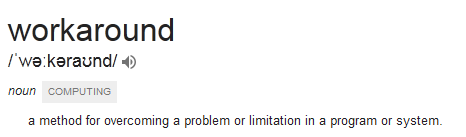
It doesn't exclude introducing a new problem ;).
If a workaround is that you should run two marathons before compiling can succeed, or otherwise it fails and burns down your house, I think it is still a workaround. It _works around_ the problem, and/or lifts the problem. Though I wholeheartedly agree with your comment: this should be treated with highest priority, even though we'd have 10 somewhat workable workarounds.
But it starts to feel a bit like:
let rec workaround f = workaround f
At this point we should let Microsoft alone with their beautiful IDE. There are better alternatives.
 vasily-kirichenko
on 29 Jul 2017
vasily-kirichenko
on 29 Jul 2017
With #3405, I cannot repro the issue anymore. The biggest repro (close solution with documents open, re-open solution, observe keys don't work) is fixed. But there is still work to be done, so this is open. Dropping the urgency level just because the editor is now usable with #3405 in place.
cartermp
on 3 Aug 2017
Does anyone (@cartermp, @KevinRansom) know whether #3405 will be part of the next public Visual Studio 2017 Preview? (I think that will be Preview 8?)
abelbraaksma
on 4 Aug 2017
We've actually made #3419 be the fix - rationale is in the PR.
Unfortunately, no, this will not be in any public preview. The last number of previews you've been seeing were specifically dealing with known causes of crashes.
We're spinning up a build (known as a validation build) to test internally. Although the experience is clearly better for F#, we need to ensure that:
(a) We are thorough in making sure it addresses the issue beyond the reliable repro we know of.
(b) We can validate that this fix doesn't break or degrade the experience any other product area.
This fix will be in the nightlies once VS 2017 Update 3, and we're going to explore other ways to get it to people outside of the nightly channel when we've verified that it addresses the issue and doesn't affect other product areas.
cartermp
on 4 Aug 2017
I am seeing this too now, but I'm still on Update 2. I didn't observe it before nightly build 2017081001.
 TeaDrivenDev
on 13 Aug 2017
TeaDrivenDev
on 13 Aug 2017
My guess is that the build corresponding to that is for Update 3, though it's awfully strange that you'd see this with 15.2. @brettfo? Since there's probably nothing of note between that and the previous build, I'd back off that build and use the previous one. The nightly feed will have the fix here for 15.3, and nightlies from that point onward will be for 15.3.
cartermp
on 13 Aug 2017
It's still occurring with the previous build (17072801), so the change that broke it for Update 2 as well is apparently older.
TeaDrivenDev
on 13 Aug 2017
It's #3238 which caused this, so this nightly or earlier should not have the issue. @dsyme has a change in master, which makes this far less severe, that is already present in nightlies. I know that it repros reliably if you open a solution with documents which are already open, but it's unreliable once they are closed and re-opened. Is this with already-open documents after a solution load, or can you reliably reproduce it after closing/re-opening?
cartermp
on 13 Aug 2017
I've only seen it with already-open documents so far; newly opened ones appear to be fine.
TeaDrivenDev
on 14 Aug 2017
This should now be fixed with the following nightly: https://dotnet.myget.org/feed/fsharp/package/vsix/VisualFSharp/15.4.1.17081601
Additionally, the fix will be in a servicing release for 15.3.
I've tested against:
- Basic, "File new" projects
- VisualFSharp
- Paket
- YamlParser
- Elmish.WPF
Closing for now, but please report back if you see this again with the above nightly (or higher).
cartermp
on 16 Aug 2017
@cartermp For reference and completeness, could you link to the change that fixes this for 15.3 branch please? Thanks!
dsyme
on 16 Aug 2017
The direct link to the nightly VSIX with the fix is https://dotnet.myget.org/F/fsharp/vsix/VisualFSharp-15.4.1.17081601.vsix
@cartermp am I correct that you can jkust download and install that VSIX directly? Or do you need to subscribe to the nightlies feed?
dsyme
on 16 Aug 2017
You can just download it right now, but subscribing is likely better for future updates.
cartermp
on 16 Aug 2017
3419 is the full fix (linked above).
cartermp
on 16 Aug 2017
@cartermp @KevinRansom @brettfo @Pilchie Can we do a bit more root cause analysis here please?
From what you've said, the problem was introduced by my adding this line a couple of months ago
From your analysis, this line was raising internal exceptions and causing the incomplete registration of the file in the editor.
I presumably hadn't tested if the editor was working correctly after loading,
I had stated in the PR that this line was a fix for #2107 and that this fix gave certain performance results linked there. However I can't recall whether that one line gave those performance results, or the PR as a whole. I don't know.
However given the revert, it is now questionable whether the performance issue #2107 is indeed fully fixed in master. Perhaps the solutions were loading more quickly because internal exceptions were causing the load process to not fully complete. I'm not sure. But we should at least reopen that issue and redo the performance tests.
Ideally we should learn a lesson about code reviewing - perhaps someone could have called out "what is this line doing and is it really necessary?". I thought I knew what I was doing here as the specific change seemed to make a major difference to performance, but I may have just made a mistake in methodology. That said, looking at the PR I can see that the one line looked innocuous and plausibly correct, so I can understand why code reviewer didn't ask the question "are you sure this doesn't stop the editor keys working?". But I think we need very experienced Roslyn eyes on every commit in LanguageService.fs that calls into the Roslyn APIs from now on?
It feels like there must be other lessons to learn here - thoughts?
dsyme
on 16 Aug 2017
From your analysis, this line was raising internal exceptions and causing the incomplete registration of the file in the editor.
Note: not exceptions - overwriting project registration. I think @KevinRansom is more qualified to talk about _why_ that is a problem here (my guess is that some information the project system had was last as a result of this), but the result is that when debugging the editor itself, the portion that handles key inputs (known as a command handler) was receiving garbage values for F# when the keys were no longer responsive.
cartermp
on 16 Aug 2017
Note: not exceptions - overwriting project registration.
Ah, ok, thank you. That also explains why I never saw any internal exceptions when looking into this issue initially. It also gives me more hope that #2107 is still fixed.
dsyme
on 16 Aug 2017
@cartermp It seems to me that #2107 is not fixed in 15.3 (now the call to add the file to the project tracker has been removed) https://github.com/Microsoft/visualfsharp/issues/2107#issuecomment-310244542
dsyme
on 16 Aug 2017
@dsyme IWorkspaceProjectContextFactory always creates CPSProject, which adds itself to the tracker in it's constructor http://source.roslyn.io/#Microsoft.VisualStudio.LanguageServices.Implementation/ProjectSystem/CPS/CPSProject.cs,36
Pilchie
on 16 Aug 2017
@pilchie #2107 is performance issue which seemed to be improved by the addition to the tracker. So some side effect of that additional increased the solution load time. We need to investigate that.
 KevinRansom
on 17 Aug 2017
KevinRansom
on 17 Aug 2017
still experience isues with broken keys in VS 15.3.1 and nightly 15.4.1.17082101
sigh
forki
on 21 Aug 2017
@forki Do you have a reproduction? We can't observe this since the fix, and we haven't seen any feedback about this coming in from people using 15.3.1 either.
cartermp
on 21 Aug 2017
@cartermp, @forki, here's some feedback: I use 15.3.1.0 and had the original problem, but it seems to have disappeared since that version came out three days ago.
abelbraaksma
on 21 Aug 2017
It was definitely still there with these versions on visualfsharp solution.
Came after couple of minutes. Just as I reported earlier. Now I have
updated to latest nightly and it's gone for the moment.
Am 21.08.2017 17:34 schrieb "Abel Braaksma" notifications@github.com:
@cartermp https://github.com/cartermp, @forki https://github.com/forki,
here's some feedback: I use 15.3.1.0 and had the original problem, but it
seems to have disappeared since that version came out three days ago.—
You are receiving this because you were mentioned.
Reply to this email directly, view it on GitHub
https://github.com/Microsoft/visualfsharp/issues/3267#issuecomment-323777110,
or mute the thread
https://github.com/notifications/unsubscribe-auth/AADgNEprCzwWGUg35jCRd4F-qVVnYLFFks5saaOegaJpZM4OGiCF
.
forki
on 21 Aug 2017
Related issues
cartermp
·
3Comments
 mrakgr
·
3Comments
mrakgr
·
3Comments
 jackfoxy
·
4Comments
jackfoxy
·
4Comments
 dhwed
·
3Comments
abelbraaksma
·
3Comments
dhwed
·
3Comments
abelbraaksma
·
3Comments
Most helpful comment
With #3405, I cannot repro the issue anymore. The biggest repro (close solution with documents open, re-open solution, observe keys don't work) is fixed. But there is still work to be done, so this is open. Dropping the urgency level just because the editor is now usable with #3405 in place.