Fsharp: Missing language service features for some projects in a solution if the project is up-to-date
ref https://github.com/Microsoft/visualfsharp/issues/3054#issuecomment-302085371
In some projects nothing works at all (colors, completion, ...):

This occurs reliably in a large solution with ~60 projects, but is not reproducible when reduced.
The issue happens in multiple projects, the lowest project is one with 5 dependencies.
If I remove everything except these six projects from the solution, the error stops occurring, even though there should be no change from the view of these projects, so it is impossible for me to provide a reduced reproduction.
For me it looks like something completely unrelated in the solution fucks VS up.
This seems to be related to the up-to-date check:
- If I modify a file and restart VS, stuff works.
- If I build the solution and restart VS, stuff stops working. (Note that before the restart, stuff continues to work even after the build.)
maybe related: https://github.com/Microsoft/visualfsharp/issues/3221
Note: Build always works fine, this is _just_ tooling
 0x53A
0x53A
All 83 comments
@0x53A I know you've said you can't make a public repro for this, but we'll really need one to make progress on it, unless we get lucky and find the bug by some other means (which is likely sooner or later)
(Also is this using latest nightly? thx)
 dsyme
on 19 Jun 2017
dsyme
on 19 Jun 2017
Edit: This was a red-herring.
So, I experimented a bit more.
Remember I said above that it works after a clean, and fails after a build?
I was able to reduce it to one dll with one large embedded resource (15MB). Something else in the VS stack seems to choke on that and then poisons something so that VF# fails.
* If I delete the dll and restart VS, everything works.
* If I keep the dll, but remove the embedded resources (using dnspy), then restart VS, everything works.
0x53A
on 19 Jun 2017
@0x53A Interesting, thanks. Can you share that repro?
dsyme
on 19 Jun 2017
No, because when I remove all other projects, the error stops happening.
The error still only happens in the large, 60 project solution.
The solution contains WinForms projects, WPF projects, WIX projects, C++/CLI projects, it must be one of these.
0x53A
on 19 Jun 2017
@0x53A Thanks. Nasty bug, we should protect the Visual F# IDE tools (and Roslyn) from whatever is happening
dsyme
on 19 Jun 2017
Only F# is affected, C# does not have any issues.
0x53A
on 19 Jun 2017
Yikes, that sounds bad. cc @Pilchie this sounds troubling
 cartermp
on 19 Jun 2017
cartermp
on 19 Jun 2017
@cartermp We really need a standalone repro to make progress on this - if the bug is as described it could come from any of those project flavours
dsyme
on 19 Jun 2017
Agreed. However, in the essence of narrowing the problem down...
@0x53A Is this using VS 2017 Update 2, or Update 3? About when would you say this issue started happening?
cartermp
on 19 Jun 2017
@cartermp VS 2017 Update 2. I have the latest nightly, but have also seen this issue with a colleague, who does not have the nightly.
I'm not sure when it started, at first it was only an unimportant project, so I didn't bother.
That it's now worse is probably related to something changed in our solution (added projects, added references, whatever).
I can try to check old versions from source control, but there are many external references, and some of them are not checked-in, so it may not be trivial to build a version from half a year ago.
0x53A
on 19 Jun 2017
Argh. Sorry to hear that. Maybe there's a way for someone at MS to look at your solution under an NDA or something? I honestly don't know how that process works if it exists. @Pilchie probably would know, though.
cartermp
on 19 Jun 2017
The easiest way (for me :D) would be if you could look at it on my computer through TeamViewer or something like that.
Sending it out may also be possible, but I would probably need to ask my bosses' boss.
It's interesting that we seem to be the only ones hitting this issue, either no-one uses VS2017, or this is really one specific corner case.
0x53A
on 19 Jun 2017
...or this is really one specific corner case.
It feels quite specific. But I do think people often have an option to go back to VS2015 or switch to another editor these days. Which is good...
dsyme
on 19 Jun 2017
But I do think people often have an option to go back to VS2015 ...
Not if you want intellisense for C# / F# vLatest, and C#7 >>> C#6 :\
... or switch to another editor these days ...
Rider works well. =)
I will see how hard it is to get rid of the embedded resource, maybe that will "fix" the issue.
0x53A
on 19 Jun 2017
We could either set up a OneDrive for Business link for you to upload to, or sure, we can try to get someone to remote into the machine.
 Pilchie
on 19 Jun 2017
Pilchie
on 19 Jun 2017
It is definitely related to that one project, but it seems like it is not the embedded resource. :-\
I removed all embedded resources from the project, but the issue still occurs. Maybe what "fixed" it when I modified the dll using dnSpy was just the updated timestamp?

Maybe I can find out more tomorrow ...
Edit: Or it is not related to that project, the same happens if I remove any other reference. I just need to cause a reload, then it works.
0x53A
on 19 Jun 2017
So it doesn't seem to be related to anything specific:
- If the project is up-to-date, nothing works.
- If the project is not up-to-date, everything works.
- If I do any change that causes a reload (remove/add reference for example), then colorization kicks in.
So modifying the dll with dnSpy just updated the timestamp, which caused to project to NOT be up-to-date, and "fixed" the issue, but it is not related to the embedded resource.
0x53A
on 19 Jun 2017
If the project is up-to-date, nothing works.
What this says to me is that the underlying problem is something like
- the initial computation of the SourcesAndFlags for the project failed
- the initial computation of the SourcesAndFlags produced a bad set of options which caused something else to fail
- another error occurred which meant Roslyn decided no to list the file for analysis
or something like that. We can definitely fix this if we have a repro (a private ZIP would be enough)
dsyme
on 20 Jun 2017
@dsyme Currently I don't have any spare time to continue with this. Rider works mostly, so I'm using that, and we only have a few F# projects anyway, atm most of my time is in C#.
In a few days I will try again to a) reduce it, and b) send either the original, or the reduced solution to you.
Just to clarify for your title edit, really nothing works, it's not just colorization that's missing. And it's also not time based, if a file got into this state when it was initially loaded, then you can keep it open for hours and colorization (and other features) never appears. The only fix is to force a reload, e.g. by adding/removing a reference.
0x53A
on 22 Jun 2017
@0x53A Thanks, I totally understand. Reducing repros from problems that occur in large private solutions is super important. But also super time consuming.
If you send me the original solution privately with repro steps then I can deal with that
thanks again
dsyme
on 22 Jun 2017
@0x53A just for being sure, are there any errors shown?
 realvictorprm
on 27 Jun 2017
realvictorprm
on 27 Jun 2017
@dsyme I tested it again with master+https://github.com/Microsoft/visualfsharp/pull/3328, but that did not change much.
~Where can I send you a repro? I was able to reduce it a little bit.~
Can you please test https://1drv.ms/u/s!AszsyODn72JQjOV8KHr1iWtGRUXjLg ?
1) open solution
2) open AssemblyInfo.fs and notice that everything works.
3) build project
4) close vs
5) reopen solution
6) open AssemblyInfo.fs and notice that nothing works.
0x53A
on 14 Jul 2017
@0x53A Thanks for the repro!
dsyme
on 14 Jul 2017
@0x53A Thanks for the ZIP, it also repros for me.
It's a very odd bug. In LanguageService.fs it seems we are now getting the list of filenames too early, and ComputeSourcesAndFlags has not yet been successfully called for the project. Then, because the project is up-to-date, it is never updated later.
This portion of code is hard - not because it is doing interesting but because it has always been fragile with lots of underlying mutable state. I'm also sure the corresponding code in the "new" project system (https://github.com/dotnet/project-system) won't have this bug.
dsyme
on 14 Jul 2017
it also repros for me.
Great!
I'm also sure the corresponding code in the "new" project system (dotnet/project-system) won't have this bug.
Even better!
Normally I would say to not waste too much time on fixing this bug, since the old project system will be obsolete soon anyway, but from what I've read, support for old-style fsproj will only come in VS.next.
( @cartermp ) ?
So if you have any hints what is so special about this project, and whether there is a workaround, that would be great.
Thank you!
0x53A
on 14 Jul 2017
We currently don't have a timeline for loading older projects in the new project system, unfortunately. Next version of VS is a target, but we don't know when that will be or what all of the work will entail (e.g., is there a one-time upgrade process? What would that look like?).
Once the new project system work is in a good enough place for us to recommend its usage officially, it may be worthwhile to manually port over the repro project. There will still be some issues (file ordering in the tree view), but I'm hopeful that these sorts of bugs will either be gone or more easily fixed.
cartermp
on 14 Jul 2017
e.g., is there a one-time upgrade process? What would that look like?
IF the new project system works well, then any one-time conversion is not an issue (at least for me). That would just be "work".
0x53A
on 14 Jul 2017
Yeah, we need to fix this baby in the old project system
dsyme
on 14 Jul 2017
@cartermp @dsyme Please note that I now also hit this issue with other solutions, for example paket.
Not sure whether that's because the issue got worse in VS15.3, or because of some recent change in the project files.
Judging from slack, @forki also hit this ;-)
0x53A
on 27 Jul 2017
@0x53A Yes I also have this on Paket.Core in the Paket solution. It is really annoying as hell.
 matthid
on 2 Sep 2017
matthid
on 2 Sep 2017
I am seeing this too (in 15.3.5) and it is very frustrating.
The issue definitely got worse in 15.3 - I don't recall having so much trouble before.
 cata
on 25 Sep 2017
cata
on 25 Sep 2017
I've actually seen this happen on small projects too. I thought it was almost random, but reading this thread gives me some hints. FWIW, I'm using 15.4 preview 2 currently, so recent changes in VS did not change this behaviour. @dsyme, did you find anything useful when you analysed this? Can we help? It's rather frustrating, so even a partial fix would be really welcome!
 abelbraaksma
on 25 Sep 2017
abelbraaksma
on 25 Sep 2017
@abelbraaksma Part of the problem is that this isn't easily (or for that matter, reliably) reproducible. So it's going to involve figuring out a way to get a repro every time for debugging, then spelunking through the old project system to see where things are going wrong. Any number of the changes there, since 15.0, could be causing this.
cartermp
on 11 Oct 2017
Yes of course it's hard. But I think it's one of the most important things
that it works reliably.
Am 11.10.2017 18:14 schrieb "Phillip Carter" notifications@github.com:
@abelbraaksma https://github.com/abelbraaksma Part of the problem is
that this isn't easily (or for that matter, reliably) reproducible. So it's
going to involve figuring out a way to get a repro every time for
debugging, then spelunking through the old project system to see where
things are going wrong. Any number of the changes there, since 15.0, could
be causing this.—
You are receiving this because you were mentioned.
Reply to this email directly, view it on GitHub
https://github.com/Microsoft/visualfsharp/issues/3222#issuecomment-335863627,
or mute the thread
https://github.com/notifications/unsubscribe-auth/AADgNCpONNss1q9v5yswa5n4JDzmKOyFks5srOlIgaJpZM4N-pdy
.
 forki
on 11 Oct 2017
forki
on 11 Oct 2017
@cartermp Even if we cannot figure out what the cause of this is and we do not want to invest the time into debugging the root cause (because it is the old project system). It would be nice to have some kind of workaround that resets this state. The reason why this is so frustrating for users is because when you encounter this situation Visual Studio is as useless as notepad and you cannot do anything (like reloading projects/re-opening files or even restarting VS) this obviously leads to quite a bit of frustration. At least that was my experience with that issue.
Should people hit the feedback button in this situation to at least figure out a workaround when this happens? Will that provide useful insights?
matthid
on 11 Oct 2017
that this isn't easily (or for that matter, reliably) reproducible
I can 100% reproduce it with the solution I attached above:
https://1drv.ms/u/s!AszsyODn72JQjOV8KHr1iWtGRUXjLg
1) open solution
2) open AssemblyInfo.fs and notice that everything works.
3) build project
4) close vs
5) reopen solution
6) open AssemblyInfo.fs and notice that nothing works.
Otherwise this is (with the same steps) also reproducible with the paket solution (and others).
0x53A
on 11 Oct 2017
I can reproduce it. It's likely that the file is opened faster than F# package (or whatever) is loaded.
 vasily-kirichenko
on 11 Oct 2017
vasily-kirichenko
on 11 Oct 2017
This is an interesting bug:
- Close the solution.
- Open another simple one.
- Everything works (!)
- Close it, reopen the problematic one.
- _Nothing works_ again (!!)
vasily-kirichenko
on 11 Oct 2017
OK, for this project `IProjectSite.SourceFilesOnDisk() returns empty array:
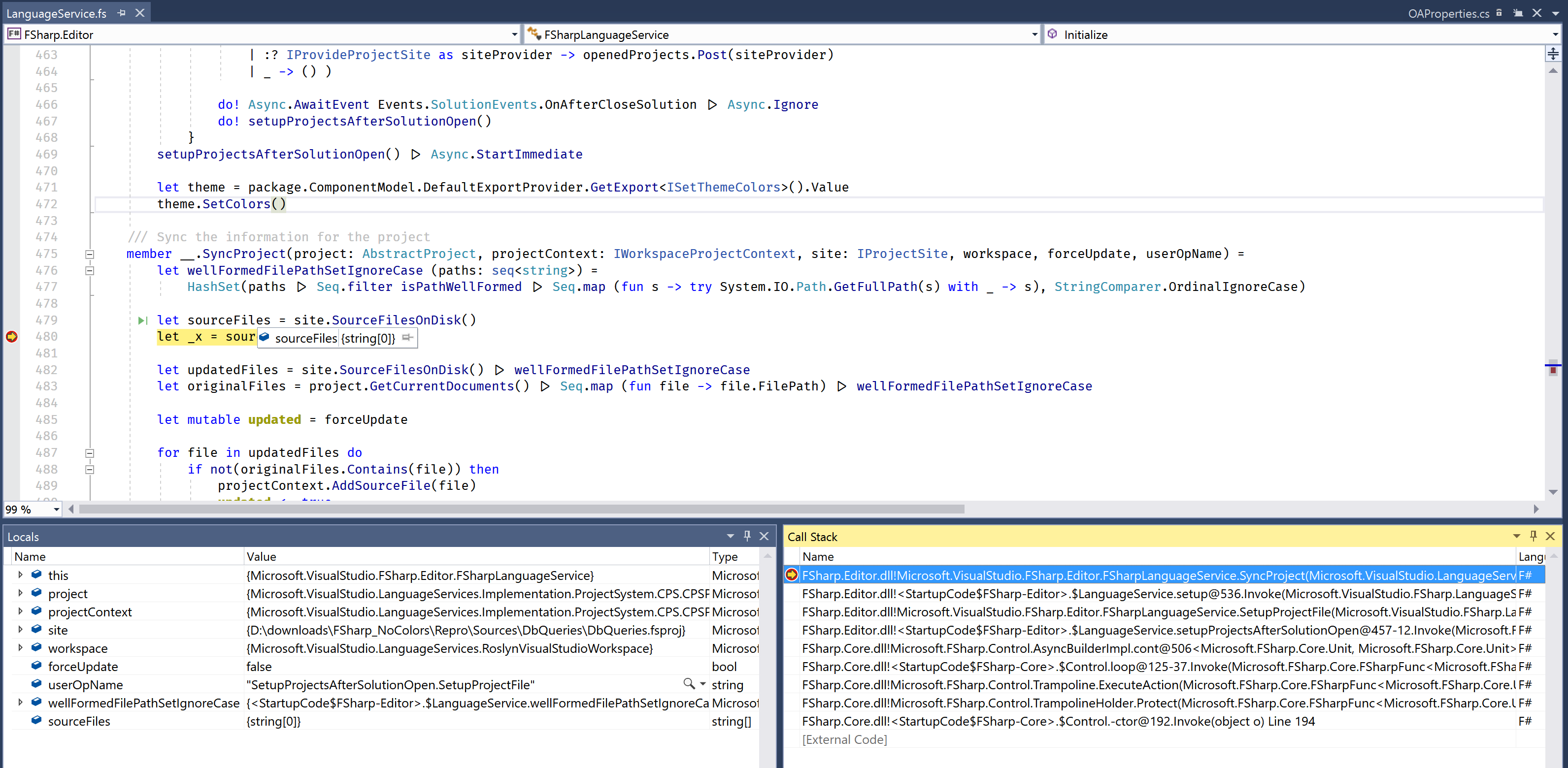
while for a "good" project it returns all source files.
FSharpProjectNode.AllChildren contains the source files:
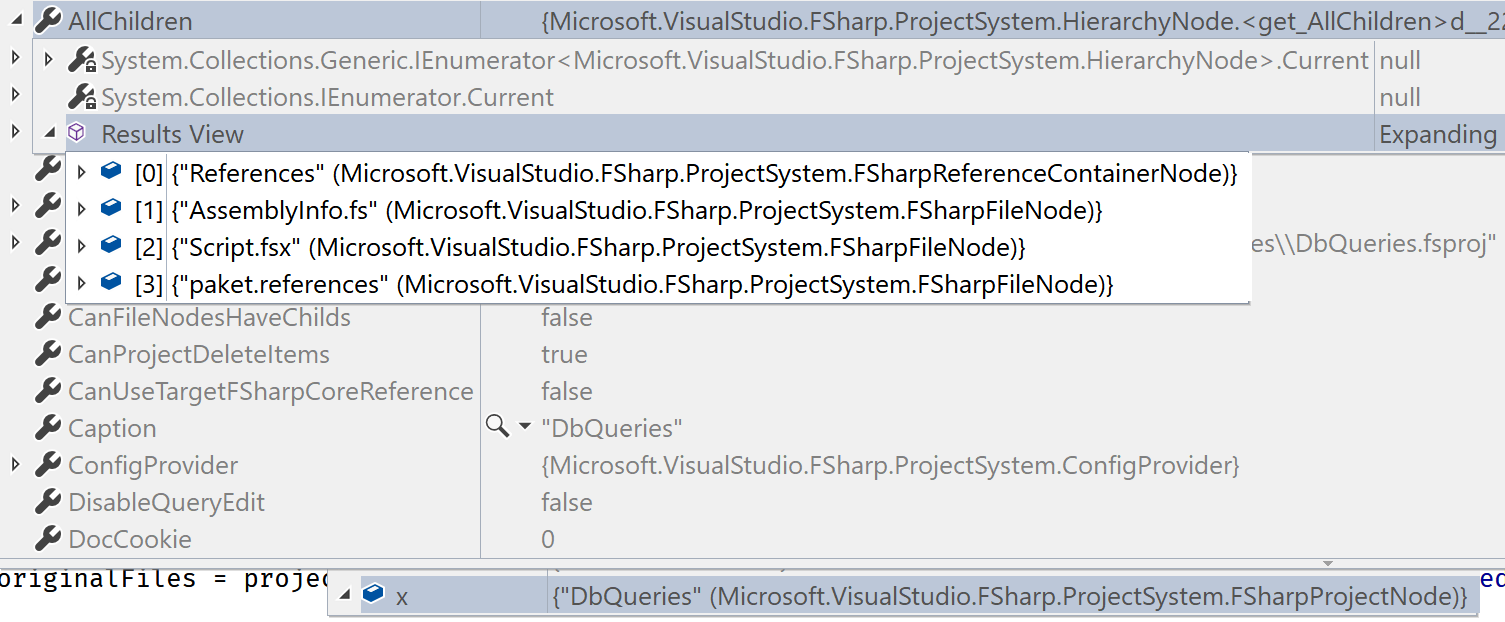
vasily-kirichenko
on 11 Oct 2017
Here
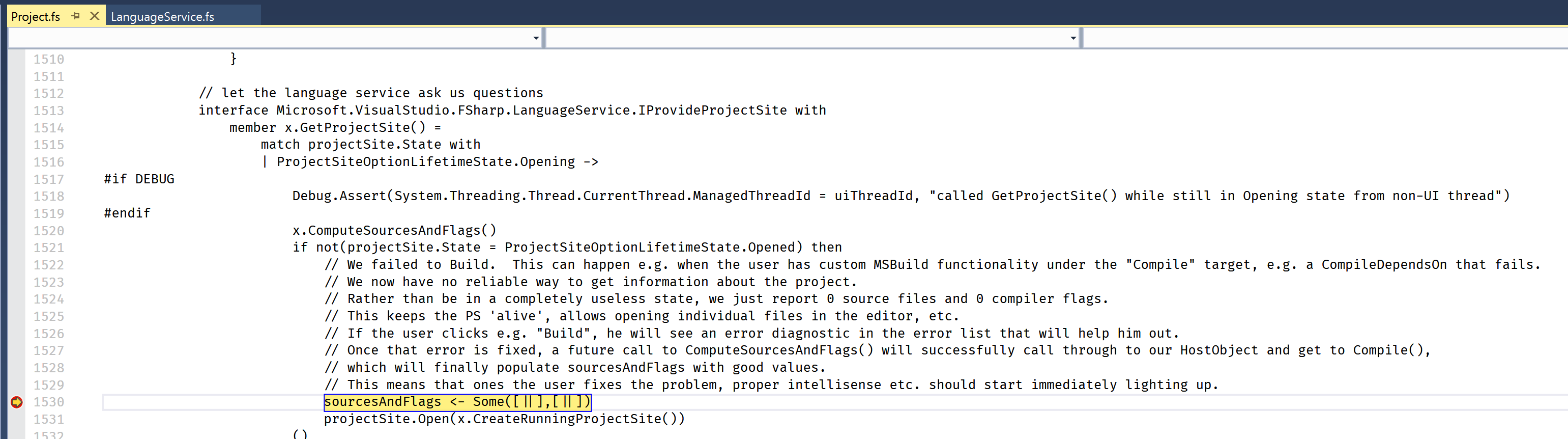
vasily-kirichenko
on 11 Oct 2017
Oh wow. They talk about build - but not background build
forki
on 11 Oct 2017
projectSite.State = Opening
vasily-kirichenko
on 11 Oct 2017
From the comment it should better be a pattern match and only select the not building case
forki
on 11 Oct 2017
OK, this line is called for both bad and good projects:
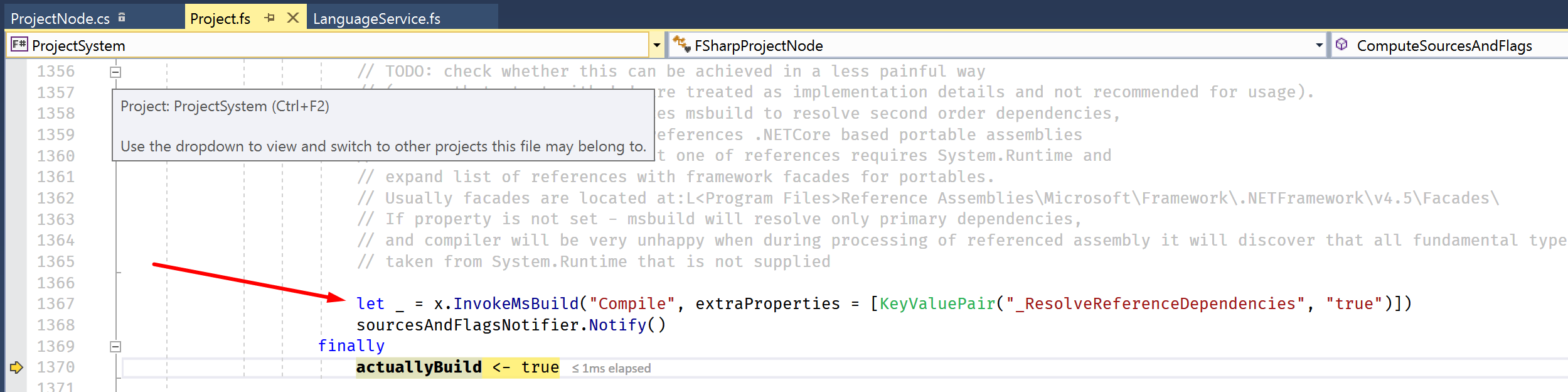
But for the good one it results with calling this method:
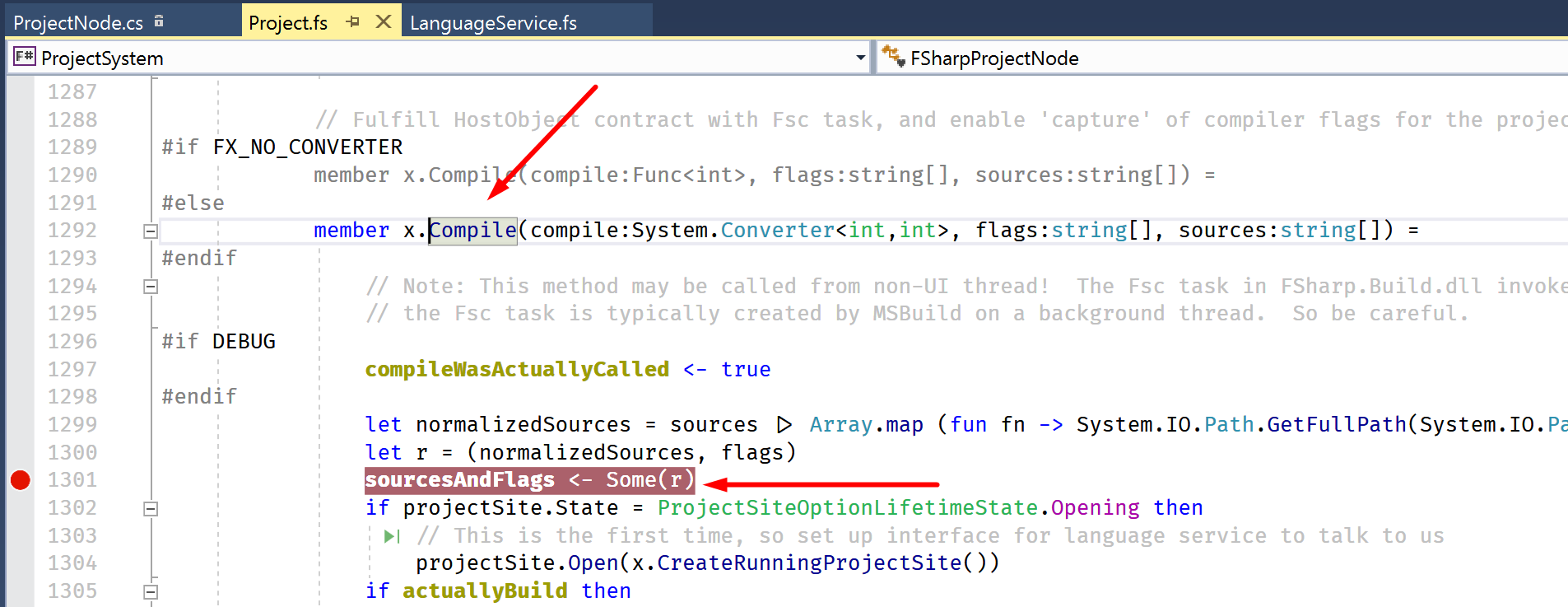
which fills source files list and everything, for the bad project it's not called.
Ideas?
vasily-kirichenko
on 11 Oct 2017
Commenting one line solves the problem:
<?xml version="1.0" encoding="utf-8"?>
<Project ToolsVersion="15.0" DefaultTargets="Build" xmlns="http://schemas.microsoft.com/developer/msbuild/2003">
  <!-- <Import Project="..\..\packages\FSharp.Compiler.Tools\build\FSharp.Compiler.Tools.props" Condition="Exists('..\..\packages\FSharp.Compiler.Tools\build\FSharp.Compiler.Tools.props')" Label="Paket" /> -->
  <Import Project="$(MSBuildExtensionsPath)\$(MSBuildToolsVersion)\Microsoft.Common.props" Condition="Exists('$(MSBuildExtensionsPath)\$(MSBuildToolsVersion)\Microsoft.Common.props')" />
  <Import Project="..\..\Other\Build\TimCSDefaultSettings.proj" />
  <Import Project="..\..\Other\Build\TimCSLibDefaultSettings.proj" />
  <PropertyGroup>
    <Configuration Condition=" '$(Configuration)' == '' ">Debug</Configuration>
    <Platform Condition=" '$(Platform)' == '' ">AnyCPU</Platform>
    <SchemaVersion>2.0</SchemaVersion>
    <ProjectGuid>a7cdff79-0ec3-40d1-8281-7aeae67a5678</ProjectGuid>
    <OutputType>Library</OutputType>
    <RootNamespace>DbQueries</RootNamespace>
...
Any ideas?
@dsyme
vasily-kirichenko
on 11 Oct 2017
Simpler repro steps:
- Create a new console project targeting .net 4.6.1.
- Build it, everything is good, all features work.
- Add FSharp.Compiler.Tools package via VS nuget UI.
- Build the project, everything is still good.
- Close the solution, open it again.
- Boom! Nothing works, all black source code.
vasily-kirichenko
on 11 Oct 2017
Wow, good progress thanks! /cc @enricosada
matthid
on 11 Oct 2017
Is it possible to get to the Visual Studio internal msbuild (or whatever they use internally) error? (The one which seems to happen according to the long code-comment above).
I suspect that they might not support $(MSBuildThisFileDirectory) or something funny like that. Or they expect some property to be set.
Boom! Nothing works, all black source code.
But you can still build the project successfully, correct?
matthid
on 11 Oct 2017
Yes, it compiles successfully.
vasily-kirichenko
on 11 Oct 2017
I just tried @0x53A's zip to repro. and it reproduces 100% on VS 15.5 preview1.
That said: if you clear the /obj before you start VS then everything works again. It the case of the repo the obj is custom and lies in root/BuildTemp. so you need to clear that dir.
Further testing reveals: you only need to nuke the BuildTemp\Debug\DbQueries\Debug\DbQueries.fsproj.CoreCompileInputs.cache before VS start.
Any ideas what that things does?
forki
on 12 Oct 2017
so that file only contains an hash. if you nuke it and rebuild the new file contains the same hash.
forki
on 12 Oct 2017
https://github.com/Microsoft/visualfsharp/issues/3739#issuecomment-336110300 shows that exactly the same bug is happening with new SDK projects
forki
on 12 Oct 2017
@davkean is this https://github.com/Microsoft/msbuild/issues/1577 related?
forki
on 12 Oct 2017
ping
0x53A
on 13 Dec 2017
This should have been fixed in 15.5 RTM are you still experiencing this @0x53A?
 davkean
on 13 Dec 2017
davkean
on 13 Dec 2017
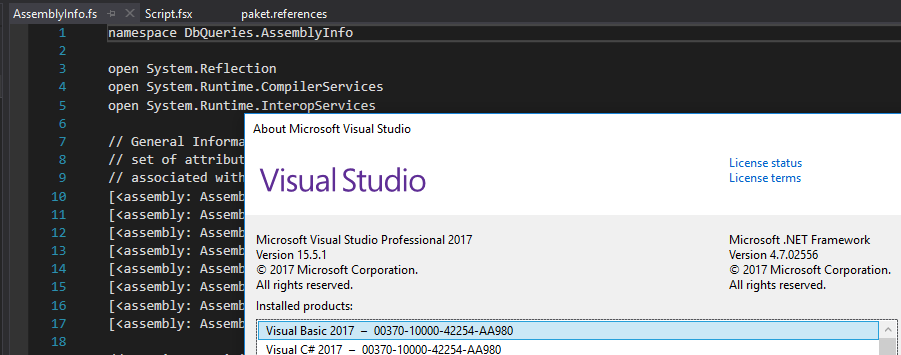 0x53A
on 13 Dec 2017
0x53A
on 13 Dec 2017
@KevinRansom Can you take a look?
@0x53A As a workaround, remove and then add a new file.
davkean
on 13 Dec 2017
cc @TIHan
cartermp
on 13 Dec 2017
I'll need to do more digging, but I noticed this when using @auduchinok 's sample from here: https://github.com/Microsoft/visualfsharp/issues/4104
Sometimes it will work, but when it doesn't I see there are ton of exceptions being thrown when trying to open a namespace/module, in ResolveLongIndentAsModuleOrNamespace. The exception says "Exception thrown: 'UndefinedName' in FSharp.Compiler.Private.dll'.
 TIHan
on 13 Dec 2017
TIHan
on 13 Dec 2017
Having just run into this on VS 15.6 Preview 1. Here are my repro steps.
- Download and unzip this: https://github.com/Microsoft/visualfsharp/files/1545698/WebApplication1.zip
- Open solution
Observe no colorization or any language service light-up.
- Delete
/.vs,/bin, and/objfolders. - Close and re-open project.
Observe that nothing works, and no NuGet restore has been kicked off.
- Build the solution.
Observe that a NuGet restore is finally kicked off, types are resolved, and features all work as expected.
@davkean The lack of restore being kicked off threw me off.
cartermp
on 13 Dec 2017
@TIHan @cartermp This is likely us not kicking off CoreCompile because it thinks we're up-to-date. @KevinRansom implemented a workaround, but it looks like said workaround isn't working?
The real fix if the cause is that CoreCompile isn't running is to fix https://github.com/Microsoft/msbuild/issues/2442 by only running this target in full builds.
davkean
on 13 Dec 2017
@davkean 15.5.3 has still the same issue.
forki
on 17 Jan 2018
ping.
most annoying issue ever! Complete deal breaker for me to use VS
forki
on 15 Feb 2018
@cartermp @KevinRansom @davkean What's the story with this please?
dsyme
on 21 Feb 2018
@KevinRansom Didn't you add a workaround for this for F#?
davkean
on 21 Feb 2018
Next thing on my list to look at, but yes I did.
 KevinRansom
on 21 Feb 2018
KevinRansom
on 21 Feb 2018
Okay running through these repros:
- The original repro from @0x53A is based on a desktop F# project file, and so the issue is likely not related.
- @cartermp 's repro used netsdk, however, it is not repro with 15.6 preview 6.
- @vasily-kirichenko 's repro is similarly based on a desktop F# file, and includes the community FSharp.Compiler Tools nuget package.
So ...
@davkean this is probably not on you.
Kevin
KevinRansom
on 22 Feb 2018
Okay .... the project file is at fault.
The F# targets are imported twice.
To get it working I:
deleted from the top of the project file.
  <Import Project="..\..\packages\FSharp.Compiler.Tools\build\FSharp.Compiler.Tools.props" Condition="Exists('..\..\packages\FSharp.Compiler.Tools\build\FSharp.Compiler.Tools.props')" Label="Paket" />
`````
Midway through the project file I then replaced this:
with
````
Project load looks like:

Probably, the guidance to how to modify project files in order to successfully use the FSharp.Compiler.Tools nuget package should be updated.
Kevin
KevinRansom
on 22 Feb 2018
I propose that we start maintaining this package in this repo, similarly to how we maintain the FSharp.Core nuget package. And perhaps update the template, or add a template that creates a correctly specified project file.
Kevin
KevinRansom
on 22 Feb 2018
@kevinransom I can reproduce the same bug with https://github.com/fsprojects/Paket/blob/master/src/Paket.Core/Paket.Core.fsproj - but that project file looks ok, right?
forki
on 22 Feb 2018
And as described in https://github.com/Microsoft/visualfsharp/issues/3222#issuecomment-336101362 only deletion of obj folder solves it (temporarily)
forki
on 22 Feb 2018
@KevinRansom can you please check (with your modified project file):
1) start VS and build project
2) close VS
3) start VS and open project again
4) does it work?
Also, the choose block you quoted doesn't import anything, if I follow your instructions, I end up with
  <PropertyGroup>
    <MinimumVisualStudioVersion Condition="'$(MinimumVisualStudioVersion)' == ''">11</MinimumVisualStudioVersion>
  </PropertyGroup>
  <Import Project="..\..\packages\FSharp.Compiler.Tools\build\FSharp.Compiler.Tools.props" Condition="Exists('..\..\packages\FSharp.Compiler.Tools\build\FSharp.Compiler.Tools.props')" Label="Paket" />
  <Import Project="$(FSharpTargetsPath)" />
  <ItemGroup>
    <Compile Include="AssemblyInfo.fs" />
    <None Include="Script.fsx" />
    <Content Include="paket.references" />
  </ItemGroup>
Is that correct?
0x53A
on 22 Feb 2018
@0x53A
Hmm Bugger!!! the reload still seems to be an issue
For the repro supplied the project file becomes:
This allows msbuild to set the FSharp build targets to load to :
````
FSharpTargetsPath = C:temp\New folder (2)\Repro\packages\FSharp.Compiler.Tools\build../tools/Microsoft.FSharp.Targets
`````
<?xml version="1.0" encoding="utf-8"?>
<Project ToolsVersion="15.0" DefaultTargets="Build" xmlns="http://schemas.microsoft.com/developer/msbuild/2003">
  <Import Project="$(MSBuildExtensionsPath)\$(MSBuildToolsVersion)\Microsoft.Common.props" Condition="Exists('$(MSBuildExtensionsPath)\$(MSBuildToolsVersion)\Microsoft.Common.props')" />
  <Import Project="..\..\Other\Build\TimCSDefaultSettings.proj" />
  <Import Project="..\..\Other\Build\TimCSLibDefaultSettings.proj" />
  <PropertyGroup>
    <Configuration Condition=" '$(Configuration)' == '' ">Debug</Configuration>
    <Platform Condition=" '$(Platform)' == '' ">AnyCPU</Platform>
    <SchemaVersion>2.0</SchemaVersion>
    <ProjectGuid>a7cdff79-0ec3-40d1-8281-7aeae67a5678</ProjectGuid>
    <OutputType>Library</OutputType>
    <RootNamespace>DbQueries</RootNamespace>
    <AssemblyName>Precast.DbQueries</AssemblyName>
    <Name>DbQueries</Name>
    <DocumentationFile>$(OutputPath)$(AssemblyName).XML</DocumentationFile>
  </PropertyGroup>
  <PropertyGroup Condition=" '$(Configuration)|$(Platform)' == 'Debug|AnyCPU' ">
    <DebugSymbols>true</DebugSymbols>
    <DebugType>full</DebugType>
    <Optimize>false</Optimize>
    <Tailcalls>false</Tailcalls>
    <DefineConstants>DEBUG;TRACE</DefineConstants>
    <WarningLevel>3</WarningLevel>
  </PropertyGroup>
  <PropertyGroup Condition=" '$(Configuration)|$(Platform)' == 'Release|AnyCPU' ">
    <DebugType>pdbonly</DebugType>
    <Optimize>true</Optimize>
    <Tailcalls>true</Tailcalls>
    <DefineConstants>TRACE</DefineConstants>
    <WarningLevel>3</WarningLevel>
  </PropertyGroup>
  <PropertyGroup>
    <MinimumVisualStudioVersion Condition="'$(MinimumVisualStudioVersion)' == ''">11</MinimumVisualStudioVersion>
  </PropertyGroup>
  <Import Project="..\..\packages\FSharp.Compiler.Tools\build\FSharp.Compiler.Tools.props" Condition="Exists('..\..\packages\FSharp.Compiler.Tools\build\FSharp.Compiler.Tools.props')" Label="Paket" />
  <Import Project="$(FSharpTargetsPath)" />
  <ItemGroup>
    <Compile Include="AssemblyInfo.fs" />
    <None Include="Script.fsx" />
    <Content Include="paket.references" />
  </ItemGroup>
  <ItemGroup>
    <Reference Include="mscorlib" />
    <Reference Include="System" />
    <Reference Include="System.Core" />
    <Reference Include="System.Data" />
    <Reference Include="System.Numerics" />
    <Reference Include="System.Transactions" />
    <Reference Include="System.Xml" />
  </ItemGroup>
  <!-- To modify your build process, add your task inside one of the targets below and uncomment it.
       Other similar extension points exist, see Microsoft.Common.targets.
  <Target Name="BeforeBuild">
  </Target>
  <Target Name="AfterBuild">
  </Target>
  -->
  <Import Project="..\..\.paket\paket.targets" />
  <Choose>
    <When Condition="$(TargetFrameworkIdentifier) == '.NETFramework' And $(TargetFrameworkVersion) == 'v4.6.1'">
      <ItemGroup>
        <Reference Include="FSharp.Core">
          <HintPath>..\..\packages\FSharp.Core\lib\net40\FSharp.Core.dll</HintPath>
          <Private>True</Private>
          <Paket>True</Paket>
        </Reference>
      </ItemGroup>
    </When>
  </Choose>
  <Choose>
    <When Condition="$(TargetFrameworkIdentifier) == '.NETFramework' And $(TargetFrameworkVersion) == 'v4.6.1'" />
  </Choose>
  <Choose>
    <When Condition="$(TargetFrameworkIdentifier) == '.NETFramework' And $(TargetFrameworkVersion) == 'v4.6.1'">
      <ItemGroup>
        <Reference Include="System.ValueTuple">
          <HintPath>..\..\packages\System.ValueTuple\lib\netstandard1.0\System.ValueTuple.dll</HintPath>
          <Private>True</Private>
          <Paket>True</Paket>
        </Reference>
      </ItemGroup>
    </When>
  </Choose>
</Project>
KevinRansom
on 22 Feb 2018
@0x53A This repro uses Tools 4.1.7. That doesn't have the fix. When I copied the latest fsharp compiler and targets to the package directory for the compiler it worked.
I note that someone has published 10.0.1 as a nugget package. That set of tools should have the correct fix. Would you like to try with a more recent compiler?
KevinRansom
on 22 Feb 2018
@0x53A what I mean is, try the project when using the 10.0.1 nuget package for F#.
https://www.nuget.org/packages/FSharp.Compiler.Tools/
It has a targets file with the fix:
KevinRansom
on 23 Feb 2018
Just to say that I remember seeing this bug with bin/obj folders. I'm pretty certain it was anything to do with FCT though since I recall it in much smaller projects that didn't use FCT. @forki also said in private DM that he thought it was nothing to do with FCT - it was happening all the time for him - and he stopped using VS on those projects as a result.
But that's just all anecdotal. We need a repro. I haven't been doing these kind of projects in VS for a while though either.
dsyme
on 23 Feb 2018
The reliable repro on this issue involves FCT, so it sounds like the issue is resolved as far as that is concerned.
@forki's issues and what you have seen are likely orthagonal issues with /bin and /obj as it relates to the new project system's up to date checker. @KevinRansom has since submitted a fix for that, but it's likely that issues unrelated to FCT lie there and not here.
cartermp
on 23 Feb 2018
I can still reproduce it with FCT 10.0.1.
But there was one change, now VS crashes hard ;D
Edit:
1) Update VS to latest preview

2) Create a new F# old-sdk project

3) Install the latest FCT nuget

4) Build project
5) Close VS
6) Reopen VS and reload project

For completeness sake, I have uploaded the project (https://github.com/0x53A/FCT_Test), but I hope you can reproduce it with these few steps as well.
Manually modifying the project file didn't change anything, @KevinRansom, did I do it correctly? Please see commit https://github.com/0x53A/FCT_Test/commit/7823e86bf3cac874ca23969a43bd3ca006da0c07
(the hard crash wasn't reproducible)
0x53A
on 23 Feb 2018
I still see the isue in 15.6.3 - sigh
forki
on 27 Mar 2018
@forki, quoting @KevinRansom :
It won't make it into 15.6, but should first appear in a 15.7 preview when they come on stream.
0x53A
on 5 May 2018
Just saw it again with 15.7.4 on paket solution
forki
on 21 Jun 2018
Steffen, you know better than to comment on old bugs. File a new bug with either clear repro steps or at least a snapshot of the project folder in the broken state.
davkean
on 21 Jun 2018
It's same repro as always. But sure I can open yet another issue later this
week.
David Kean notifications@github.com schrieb am Do., 21. Juni 2018, 11:09:
Steffen, you know better than to comment on old bugs. File a new bug with
either clear repro steps or at least a snapshot of the project folder in
the broken state.—
You are receiving this because you were mentioned.
Reply to this email directly, view it on GitHub
https://github.com/Microsoft/visualfsharp/issues/3222#issuecomment-399031946,
or mute the thread
https://github.com/notifications/unsubscribe-auth/AADgNCD9l5BZPLw_De29xFTCPsqBDiP5ks5t-2K9gaJpZM4N-pdy
.
forki
on 21 Jun 2018
Related issues
 AaronEshbach
·
3Comments
abelbraaksma
·
3Comments
AaronEshbach
·
3Comments
abelbraaksma
·
3Comments
 ploeh
·
3Comments
cartermp
·
3Comments
ploeh
·
3Comments
cartermp
·
3Comments
 enricosada
·
3Comments
enricosada
·
3Comments
Most helpful comment
Yeah, we need to fix this baby in the old project system