Fsharp: FSI 4.1 won't start; fails to load System.Runtime 4.1.0.0 (and a bunch of other stuff)
I've installed F# 4.1 through the Visual Studio 2017 installer, and FSI won't start. Instead, it shows the following message and crashes:
PS C:\Program Files (x86)\Microsoft SDKs\F#\4.1\Framework\v4.0> ./fsi
Unhandled Exception: System.IO.FileNotFoundException: Could not load file or assembly
'System.Runtime, Version=4.1.0.0, Culture=neutral, PublicKeyToken=b03f5f7f11d50a3a' or one of its
dependencies. The system cannot find the file specified.
   at Microsoft.FSharp.Compiler.Interactive.Shell.MainMain(String[] argv)
Repro steps
Provide the steps required to reproduce the problem
Install the "F# Language Support" component through the Visual Studio 2017 installer. (I'm using VS 2017 Enterprise, no idea if it matters)
Open PowerShell and go to the installation directory for F#.
Run
./fsi
Expected behavior
F# Interactive shows a welcome message and a prompt.
Actual behavior
The executable crashes.
Related information
I've made a dump of the fusion logs here: https://drive.google.com/open?id=0B-EzQ3qbRJtvUXlDay04WXBiX3c
There are a number of failed assembly bindings there:
System.Console, Version=4.0.0.0, Culture=neutral, PublicKeyToken=b03f5f7f11d50a3aSystem.IO, Version=4.1.0.0, Culture=neutral, PublicKeyToken=b03f5f7f11d50a3aSystem.Linq, Version=4.1.0.0, Culture=neutral, PublicKeyToken=b03f5f7f11d50a3aSystem.Linq.Expressions, Version=4.1.0.0, Culture=neutral, PublicKeyToken=b03f5f7f11d50a3aSystem.Reflection, Version=4.1.0.0, Culture=neutral, PublicKeyToken=b03f5f7f11d50a3aSystem.Runtime, Version=4.1.0.0, Culture=neutral, PublicKeyToken=b03f5f7f11d50a3aSystem.Runtime.Extensions, Version=4.1.0.0, Culture=neutral, PublicKeyToken=b03f5f7f11d50a3aSystem.Text.RegularExpressions, Version=4.1.0.0, Culture=neutral, PublicKeyToken=b03f5f7f11d50a3aSystem.Threading.Thread, Version=4.0.0.0, Culture=neutral, PublicKeyToken=b03f5f7f11d50a3aSystem.Threading.ThreadPool, Version=4.0.10.0, Culture=neutral, PublicKeyToken=b03f5f7f11d50a3a
Other troubleshooting attempts that have not led anywhere:
- I uninstalled F# from the VS installer, made sure the directory was gone, and re-installed. No difference in behavior.
- I had an installation of F# 4.0, where FSI started as expected. Removing that did not help making F# 4.1 start.
- I uninstalled all .NET Core versions, to no avail.
For reference, here's the SO question where I was recommended to file an issue here: https://stackoverflow.com/questions/44332029
Operating system: Windows 10 Pro, with Creators Update
 tomasaschan
All 23 comments
This is odd as this works just fine for me.
@KevinRansom The Binding to System.Runtime doesn't necessarily mean this is the .NET Core version of fsi.exe - that can still be a .NET Framework component using the facade assemblies. I don't think.NET Core is actually relevant here
I wonder if the correct version of .NET Framework support is not properly installed on this machine. Is Visual Studio running correctly?
 dsyme
on 6 Jun 2017
dsyme
on 6 Jun 2017
I am pretty certain this is a set of coreclr binaries. If it was the desktop FSI then it would try and succeed in loading mscorlib.dll. Not System.Runtime.dll.
Kevin
 KevinRansom
on 6 Jun 2017
KevinRansom
on 6 Jun 2017
@tlycken
Hi, I guess we need to grab some more information.
- What happens if you run at the dos prompt, I.e. not from powershell.
What does where fsi.exe show.

what is the size and file version of the fsi.exe and fsharp.core that you execute
you can see file version of the details page on properties using file explorer
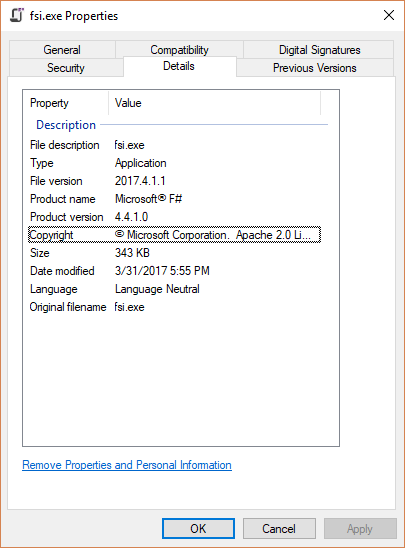
Thanks
Kevin
KevinRansom
on 7 Jun 2017
@KevinRansom Thanks for looking into this. CMD session:
C:\Users\tomas>where fsi.exe
INFO: Could not find files for the given pattern(s).

C:\Users\tomas>cd "c:\Program Files (x86)\Microsoft SDKs\F#\4.1\Framework\v4.0"

c:\Program Files (x86)\Microsoft SDKs\F#\4.1\Framework\v4.0>where fsi.exe
c:\Program Files (x86)\Microsoft SDKs\F#\4.1\Framework\v4.0\fsi.exe

c:\Program Files (x86)\Microsoft SDKs\F#\4.1\Framework\v4.0>fsi.exe
Unhandled Exception: System.IO.FileNotFoundException: Could not load file or assembly 'System.Runtime, Version=4.1.0.0, Culture=neutral, PublicKeyToken=b03f5f7f11d50a3a' or one of its dependencies. The system cannot find the file specified.
   at Microsoft.FSharp.Compiler.Interactive.Shell.MainMain(String[] argv)
I seem to have a later file version than yours:
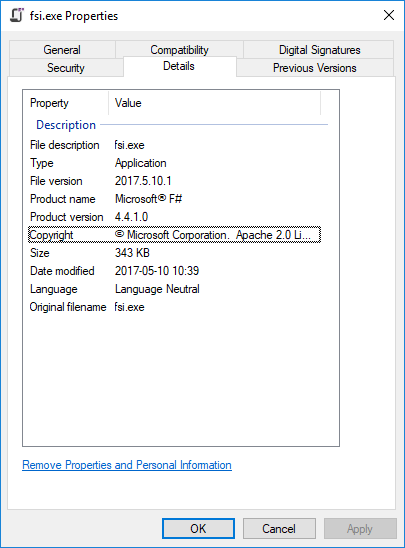
I see this behavior with and without .NET Core installed.
And no, Visual Studio doesn't seem to work either; trying to create a new F# project, I got the following error about the FSharpProjectPackage failing to load, and then was taken back to the start page.
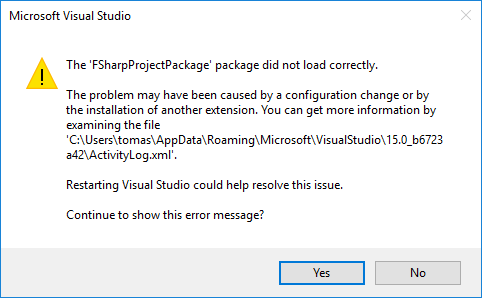
At the bottom of the indicated log file, is this:
<entry>
<record>498</record>
<time>2017/06/07 06:52:44.138</time>
<type>Error</type>
<source>VisualStudio</source>
<description>CreateInstance failed for package [FSharpProjectPackage]Source: 'mscorlib' Description: Exception has been thrown by the target of an invocation.
System.Reflection.TargetInvocationException: Exception has been thrown by the target of an invocation. ---> System.IO.FileNotFoundException: Could not load file or assembly 'System.Runtime, Version=4.1.0.0, Culture=neutral, PublicKeyToken=b03f5f7f11d50a3a' or one of its dependencies. The system cannot find the file specified.
 at Microsoft.VisualStudio.FSharp.ProjectSystem.FSharpProjectPackage..ctor()
 --- End of inner exception stack trace ---
 at System.RuntimeTypeHandle.CreateInstance(RuntimeType type, Boolean publicOnly, Boolean noCheck, Boolean& canBeCached, RuntimeMethodHandleInternal& ctor, Boolean& bNeedSecurityCheck)
 at System.RuntimeType.CreateInstanceSlow(Boolean publicOnly, Boolean skipCheckThis, Boolean fillCache, StackCrawlMark& stackMark)
 at System.RuntimeType.CreateInstanceDefaultCtor(Boolean publicOnly, Boolean skipCheckThis, Boolean fillCache, StackCrawlMark& stackMark)
 at System.Activator.CreateInstance(Type type, Boolean nonPublic)
 at System.RuntimeType.CreateInstanceImpl(BindingFlags bindingAttr, Binder binder, Object[] args, CultureInfo culture, Object[] activationAttributes, StackCrawlMark& stackMark)
 at System.Activator.CreateInstance(Type type, BindingFlags bindingAttr, Binder binder, Object[] args, CultureInfo culture, Object[] activationAttributes)
 at System.Activator.CreateInstanceFromInternal(String assemblyFile, String typeName, Boolean ignoreCase, BindingFlags bindingAttr, Binder binder, Object[] args, CultureInfo culture, Object[] activationAttributes, Evidence securityInfo)
 at System.AppDomain.CreateInstanceFrom(String assemblyFile, String typeName)System.IO.FileNotFoundException: Could not load file or assembly 'System.Runtime, Version=4.1.0.0, Culture=neutral, PublicKeyToken=b03f5f7f11d50a3a' or one of its dependencies. The system cannot find the file specified.
File name: 'System.Runtime, Version=4.1.0.0, Culture=neutral, PublicKeyToken=b03f5f7f11d50a3a'
 at Microsoft.VisualStudio.FSharp.ProjectSystem.FSharpProjectPackage..ctor()

Assembly manager loaded from: C:\Windows\Microsoft.NET\Framework\v4.0.30319\clr.dll
Running under executable C:\Program Files (x86)\Microsoft Visual Studio\2017\Enterprise\Common7\IDE\devenv.exe
--- A detailed error log follows. 

=== Pre-bind state information ===
LOG: DisplayName = System.Runtime, Version=4.1.0.0, Culture=neutral, PublicKeyToken=b03f5f7f11d50a3a
 (Fully-specified)
LOG: Appbase = file:///C:/Program Files (x86)/Microsoft Visual Studio/2017/Enterprise/common7/ide/
LOG: Initial PrivatePath = NULL
Calling assembly : FSharp.Core, Version=4.4.1.0, Culture=neutral, PublicKeyToken=b03f5f7f11d50a3a.
===
LOG: This bind starts in default load context.
LOG: Using application configuration file: C:\Users\tomas\AppData\Local\Microsoft\VisualStudio\15.0_b6723a42\devenv.exe.config
LOG: Using host configuration file: 
LOG: Using machine configuration file from C:\Windows\Microsoft.NET\Framework\v4.0.30319\config\machine.config.
LOG: The same bind was seen before, and was failed with hr = 0x80070002.
</description>
<guid>{91A04A73-4F2C-4E7C-AD38-C1A68E7DA05C}</guid>
<hr>80004005 - E_FAIL</hr>
<errorinfo></errorinfo>
</entry>
Quite a mouthful, but it boils down to the same FileNotFoundException for System.Runtime 4.1.0.0.
If there's anything else I can help with, please let me know.
tomasaschan
on 7 Jun 2017
I am pretty certain this is a set of coreclr binaries. If it was the desktop FSI then it would try and succeed in loading mscorlib.dll. Not System.Runtime.dll.
But how one would even get the CoreCLR compiler binaries through the Visual Studio installer? My understanding is that they aren't even used in the installation as yet.
dsyme
on 7 Jun 2017
@tlycken I really don't understand this one :)
Have you ever built http://github.com/Microsoft/visualfsharp on this machine?
Have you previously installed any versions of ,NET Core on this machine, and could there be some relic from that involved?
I took a look at the fusion logs and the attempts to bind to System.Runtime 4.1.0.0 look wrong. But the size and ILDASM of fsi,exe look like they are the .NET Framework version of that component.
dsyme
on 7 Jun 2017
@dsyme That makes (at least) two of us :)
Have you ever built http://github.com/Microsoft/visualfsharp on this machine?
No.
Have you previously installed any versions of ,NET Core on this machine, and could there be some relic from that involved?
Yes; uninstalling them were part of my troubleshooting here, but of course there could have been some relics left behind still screwing up the results. I have now re-installed the version that comes with Visual Studio 2017, since uninstalling did not change anything.
tomasaschan
on 7 Jun 2017
@tlycken Could you try building this repo "build net40" then running "releasenet40binfsi,exe" please? That might give us an indication if it is the state of your machine or the F# bits.
dsyme
on 7 Jun 2017
Just a thought. I really have no idea. Your F# bits look fine
dsyme
on 7 Jun 2017
Sigh!!! I hate install issues.
So ... it's probably best to blow everything away.
1: Uninstall Visual Studio
2: Delete: C:Program Files (x86)Microsoft SDKsF#
3: Delete: C:Program Files (x86)Reference AssembliesMicrosoftFSharp
4: C:Users
5: Edit the Path environment variable to remove anything pointing at F#
I doubt if removing the registry stuff is necessary.
Reboot ... because ... "why not"
Install VS --- select FSharp tools for Visual Studio.
KevinRansom
on 7 Jun 2017
@KevinRansom Haha, at least you didn't ask me to wipe to a clean installation of Windows ;)
I'll try that (and, in addition, remove all F# related extensions from VS Code, just to be safe). If it doesn't work, I'll try building from source as @dsyme suggested, too - but as you say, it seems more likely that this is an issue with my system specifically than that there's something wrong with the F# bits, since none of you can reproduce.
tomasaschan
on 8 Jun 2017
@KevinRansom Resetting everything you suggested did not make a difference 😢
@dsyme Actually, the build fails - still failing to find System.Runtime 4.1.0.0. I ran ./build net40 from an administrative PowerShell prompt, and got the attached output.
tomasaschan
on 8 Jun 2017
@tlycken Can you build from a non-Powershell VS2017 developer prompt?
dsyme
on 8 Jun 2017
That's a strange log. Could you also check "gacutil /l FSharp.Core" please?
It feels like you have some strange machine-wide problem, perhaps a machine-wide binding redirect installed or something. Very odd
dsyme
on 8 Jun 2017
@dsyme Gacutil seems to show something suspicious:
C:\Program Files (x86)\Microsoft Visual Studio\2017\Enterprise>gacutil /l FSharp.Core
Microsoft (R) .NET Global Assembly Cache Utility.  Version 4.0.30319.0
Copyright (c) Microsoft Corporation.  All rights reserved.

The Global Assembly Cache contains the following assemblies:
  FSharp.Core, Version=2.3.0.0, Culture=neutral, PublicKeyToken=b03f5f7f11d50a3a, processorArchitecture=MSIL
  FSharp.Core, Version=4.4.0.0, Culture=neutral, PublicKeyToken=b03f5f7f11d50a3a, processorArchitecture=MSIL
  FSharp.Core, Version=4.4.1.0, Culture=neutral, PublicKeyToken=b03f5f7f11d50a3a, processorArchitecture=MSIL

Number of items = 3
Here's a build log from the VS2017 dev cmd prompt: build-log.txt
Where should I look for a machine-wide binding-redirect?
tomasaschan
on 8 Jun 2017
@tlycken Yes, I think that 4.4.1.0 FSharp.Core entry in the GAC is wrong. It would be very nice to find out how it got there!
If you're game, try
gacutil /uf "FSharp.Core, Version=4.4.1.0, Culture=neutral, PublicKeyToken=b03f5f7f11d50a3a, processorArchitecture=MSIL"
Here is the listing on my machine with VS2017 installed:
C:\GitHub\dsyme>gacutil /l FSHarp.Core
Microsoft (R) .NET Global Assembly Cache Utility.  Version 4.0.30319.0
Copyright (c) Microsoft Corporation.  All rights reserved.

The Global Assembly Cache contains the following assemblies:
  FSHarp.Core, Version=2.3.0.0, Culture=neutral, PublicKeyToken=b03f5f7f11d50a3a, processorArchitecture=MSIL
  FSHarp.Core, Version=4.4.0.0, Culture=neutral, PublicKeyToken=b03f5f7f11d50a3a, processorArchitecture=MSIL

Number of items = 2
@dsyme Thanks a lot - cleaning up the GAC was the solution!
I can now run FSI with F# 4.1, as well as create new F# projects with dotnet new and Visual Studio (though the latter required a repair and reboot before it worked...).
No idea how F# 4.1.0.0 ended up in the GAC, and I guess we'll never know. Either way, thanks to both of you for helping me fix this!
tomasaschan
on 8 Jun 2017
I'm having the same issue with C:\Program Files (x86)\Microsoft SDKs\F#\10.1\Framework\v4.0.
I've installed F# via Visual Studio 2017 Build tools only installer.
C:\Program Files (x86)\Microsoft SDKs\F#\10.1\Framework\v4.0>fsi

Unhandled Exception: System.IO.FileNotFoundException: Could not load file or ass
embly 'System.Runtime, Version=4.1.0.0, Culture=neutral, PublicKeyToken=b03f5f7f
11d50a3a' or one of its dependencies. The system cannot find the file specified.

   at Sample.Microsoft.FSharp.Compiler.Interactive.Main.MainMain(String[] argv)

C:\Program Files (x86)\Microsoft SDKs\F#\10.1\Framework\v4.0>
C:\Program Files (x86)\Microsoft Visual Studio\2017\BuildTools>gacutil /l FSharp
.Core
Microsoft (R) .NET Global Assembly Cache Utility.  Version 4.0.30319.0
Copyright (c) Microsoft Corporation.  All rights reserved.

The Global Assembly Cache contains the following assemblies:
  FSharp.Core, Version=2.0.0.0, Culture=neutral, PublicKeyToken=b03f5f7f11d50a3a
, processorArchitecture=MSIL
  FSharp.Core, Version=2.3.0.0, Culture=neutral, PublicKeyToken=b03f5f7f11d50a3a
, processorArchitecture=MSIL
  FSharp.Core, Version=4.0.0.0, Culture=neutral, PublicKeyToken=b03f5f7f11d50a3a
, processorArchitecture=MSIL
  FSharp.Core, Version=4.3.1.0, Culture=neutral, PublicKeyToken=b03f5f7f11d50a3a
, processorArchitecture=MSIL
  FSharp.Core, Version=4.4.0.0, Culture=neutral, PublicKeyToken=b03f5f7f11d50a3a
, processorArchitecture=MSIL

Number of items = 5
 nojaf
on 7 Mar 2018
nojaf
on 7 Mar 2018
I believe FSharp.Compiler.Private is the culprit in this case.
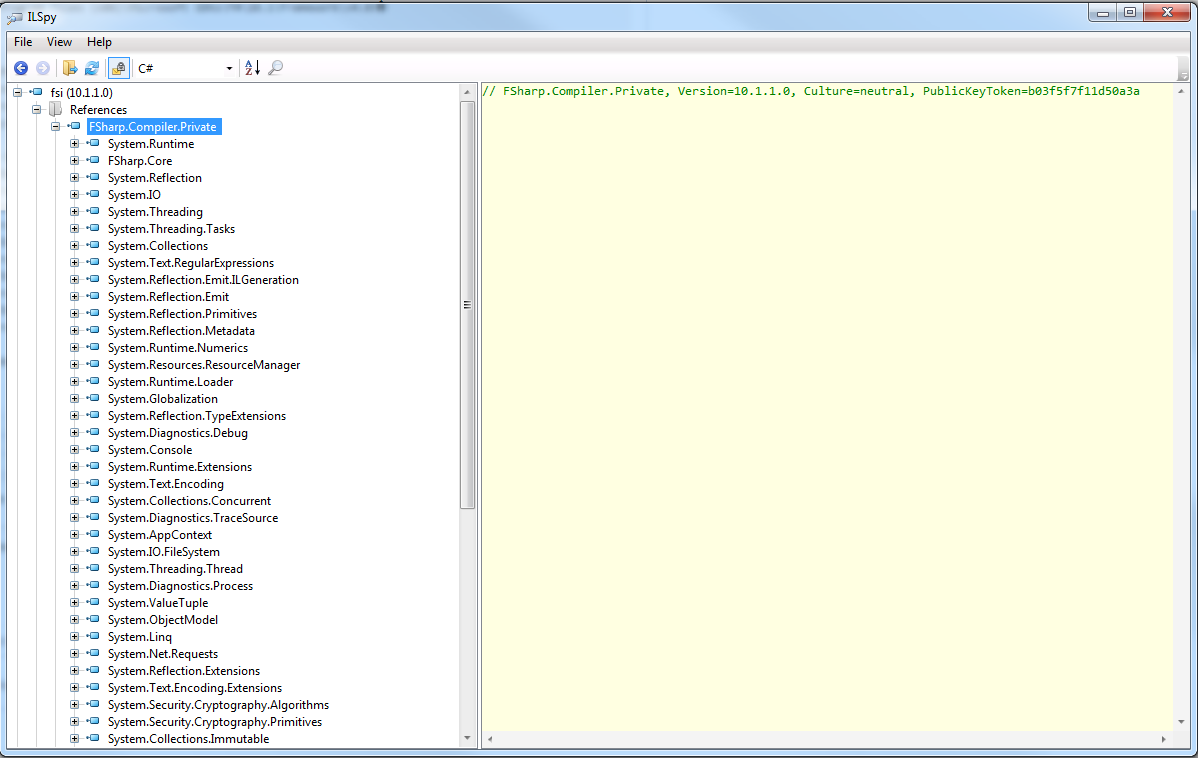
So turned out I added FSharp.Compiler.Private to my GAC for some strange reason. This was most likely my own doing. The fsi work again.
nojaf
on 9 Mar 2018
@nojaf Glad to hear it!
 cartermp
on 9 Mar 2018
cartermp
on 9 Mar 2018
@nojaf ,
Can you write the steps you took to solve the problem? I have the same error but know nothing about GAC or .NET or ILSpy or anything. I uninstalled vs2015 and now vscode and fsi is giving me the exact same error you showed.
 red-swan
on 26 Mar 2018
red-swan
on 26 Mar 2018
I solved the issue by
1) uninstalling all F# features from vs2017
2) deleting (and all subfolders) C:Program Files (x86)Microsoft SDKsF#
3) restarting the computer
4) installing the f# features of vs2017
Thank you all for your work on this thread.
red-swan
on 27 Mar 2018
Related issues
 abelbraaksma
·
3Comments
abelbraaksma
·
3Comments
 vasily-kirichenko
·
3Comments
vasily-kirichenko
·
3Comments
 dhwed
·
3Comments
dhwed
·
3Comments
 drguildo
·
3Comments
drguildo
·
3Comments
 viktorvan
·
3Comments
viktorvan
·
3Comments