Fsharp: Generate F# assemblyinfo in new fsproj
new fsproj should generate assemblyinfo attributes from props.
ref https://github.com/dotnet/netcorecli-fsc/issues/93
- in
dotnet/sdkis done in the language agnostic target Microsoft.NET.GenerateAssemblyInfo.targets#L93-L96 using theWriteCodeFragmenttask - atm the F# language is not implemented, so doesnt generate the file with attributes
- the
WriteCodeFragmentis defined inside Microsoft/msbuild and contains a version with CodeDom and another for coreclr (just doing stringbuilder), and support both c# and vb
As a note i tried to add the F# in the same way as C#/VB, but atm PR was stopped for a design decision
https://github.com/Microsoft/msbuild/pull/2132#issuecomment-303890438 /cc @KevinRansom @cartermp
 enricosada
All 66 comments
@enricosada
To do this for the SDK we can override in our targets file and sdk apps will work fine.
But we should also send a PR to the dotnet sdk refactoring the current implementation a bit.
@nguerrera said he would welcome a PR that improved this :-)
The bit where the attributes are generated should be moved to a new target: __GetAssemblyAttributes__ or some such name.
And then : __CoreGenerateAssemblyInfo__ just handles the write.
We can override __CoreGenerateAssemblyInfo__ to write the attributes with a build task added to the Microsoft.FSharp.Build library ... or something.
Does that make sense?
Enrico,
thanks for pushing on this, it's really great that you take the time to dive into all of the stuff.
Kevin
 KevinRansom
on 25 May 2017
KevinRansom
on 25 May 2017
Does that make sense?
Yes, didnt know a refactoring effort was needed or ongoing, but is getting better. love to override only what's needed 👍
Let's wait a bit for new @dasMulli PR ( from https://github.com/Microsoft/msbuild/pull/2132#issuecomment-303930961 ) seems that refactoring is in progress already
There's already dotnet/sdk#1007 which splits the target into _CalculateAssemblyAttributes and CoreGenerateAssemblyInfo but it probably won't land in its current form (see PR discussion. I'll be sending out a PR today for an alternative implementation)
Meanwhile i'll prepare a task to write the file to be added in Microsoft.FSharp.Build because attrs need escape checks anyway.
Cannot be done with msbuild target alone afaik, sigh why msbuild property functions are so limited, when i need just a string -> string and some % transformation).
So as your said we'll need to just override CoreGenerateAssemblyInfo later, i'll PR soon, meanwhile copying the current CoreGenerateAssemblyInfo from sdk to check is everything working ok end2end
enricosada
on 25 May 2017
Actually I was referring to the dotnet sdk rather than an msbuild refactoring. And it’s only a tiny refactor just enough to get the attributes separate from what we need to implement in an override.
KevinRansom
on 25 May 2017
@KevinRansom yes @dasMulli is doing that with https://github.com/dotnet/sdk/pull/1255
_CalculateAssemblyAttributeswhich creates all AssemblyAttribute items._CreateGeneratedAssemblyInfoInputsCacheFilecreates an obj/tfm/projectname.AssemblyInfoInputs.cache file containing the hash of all AssemblyAttribute items. This filename is available as $(GeneratedAssemblyInfoInputsCacheFile). The target uses msbuild 15's WriteOnlyWhenDifferent="True" feature for WriteLinesToFile so the file doesn't change unnecessarily.CoreGenerateAssemblyInfowhich generates the projectname.AssemblyInfo.cs file, using the cache file as input for incremental build.
The _CreateGeneratedAssemblyInfoInputsCacheFile is transparent for us
we will override just CoreGenerateAssemblyInfo to generate the file from AssemblyAttribute items.
i'll send a PR for that, you can assign this to me
enricosada
on 25 May 2017
<Target Name="CoreGenerateAssemblyInfo"
        DependsOnTargets="CreateGeneratedAssemblyInfoInputsCacheFile"
        Inputs="$(GeneratedAssemblyInfoInputsCacheFile)"
        Outputs="$(GeneratedAssemblyInfoFile)">
Should now do the trick, the $(GeneratedAssemblyInfoInputsCacheFile) input is only to trigger the target on incremental builds if any attribute changes but the file's contents can be ignored.
 dasMulli
on 26 May 2017
dasMulli
on 26 May 2017
@enricosada @KevinRansom Where are we with this - does it have to be done for the SDK work to count as feature complete? thx
 dsyme
on 19 Jun 2017
dsyme
on 19 Jun 2017
@enricosada @KevinRansom ping... (I'm trying to clarify the status of all the "Urgency Now" bugs)
dsyme
on 21 Jun 2017
@dsyme i half finished it, i hope one or two days
enricosada
on 21 Jun 2017
I recently found https://github.com/SuaveIO/suave/issues/635 (assembly version should be 2.1.1.0 but is coming out as 0.0.0.0 when built with the dotnet core CLI tools -- when built with the .Net Framework tools or the Mono tools the assembly version is correct). At first I thought that was caused by an incorrect build step in the Suave project. But could that bug possibly be getting caused by this one? If the project is specifying the assembly version, but it's not making it into the DLL because of this bug, that would also explain the symptoms I'm seeing.
I'm completely lost when it comes to the .NET Core build system at the moment -- too many changes that I haven't been able to find documentation for -- so it's entirely possible that I'm barking up the wrong tree. But the fact that this bug is still open does make me wonder...
 rmunn
on 7 Aug 2017
rmunn
on 7 Aug 2017
@enricosada @KevinRansom ping... (I'm trying to clarify the status of all the "Urgency Now" bugs)
dsyme
on 18 Aug 2017
@dsyme @enricosada @KevinRansom Thank you guys for working on this one! happy to that I'm not the only one who have spotted it 😉
I'd say that this is very important (or even critical) issue as it breaks unification between C# and F#. Our solution contains both csproj and fsproj projects and currently I need to handle all fsproj files separately in the build scripts and patch their assembly info files manually.
Is there any chance that this issue will be resolved in the nearby future, so build scripts could be much simplified?
 zvirja
on 22 Aug 2017
zvirja
on 22 Aug 2017
@zvirja yeah ... sorry about this ... it slipped through the cracks.
KevinRansom
on 22 Aug 2017
@enricosada, let me know if you want me to take care of this.
Also, If you want to push a WIP PR I can push it the last 100 yards.
KevinRansom
on 22 Aug 2017
In a .NET Core 2.0 console app, I've set the assembly version in the project properties, but when building with VS, the version is always missing (0.0.0.0). Is this caused by the issue described here?
I'm currently working around this by explicitly adding
f#
[<assembly: System.Reflection.AssemblyVersionAttribute("2.0.0.0")>]
 cmeeren
on 16 Dec 2017
cmeeren
on 16 Dec 2017
@cmeeren Yep, that's because of this issue.
@dsyme @KevinRansom Do you know if it will be fixed somewhere soon? The VS 2017 update 5 did a great step towards the unification, while this issue still makes us to feel the difference between different SDKs.. :confused:
zvirja
on 17 Dec 2017
I have been struggling with this issue for days not getting the assembly info attributes in my compiled .dlls for F# projects. Will this be fixed? I'm running dotnet cli 2.1.3. Guess I'll have to do it the F# ProjectScaffold style for now.
 atlemann
on 9 Jan 2018
atlemann
on 9 Jan 2018
I'm doing this in my build script for now
printf "\n[<System.Reflection.AssemblyVersion \"$ASSEMBLYVERSION\">] do()" >> ./src/Config.fs
 JonCanning
on 9 Jan 2018
JonCanning
on 9 Jan 2018
Hmm..seems that using the ProjectScaffold FAKE script's AssemblyInfo step does not work when building F# projects with dotnet CLI either.
atlemann
on 10 Jan 2018
Registering my interest here, too, from https://github.com/Microsoft/visualfsharp/issues/3549#issuecomment-327223990
 haf
on 14 Jan 2018
haf
on 14 Jan 2018
I am unable to set the assembly version in my compiled dlls, even with the following AssemblyInfo.fs file next to the .fsproj file:
// Auto-Generated by FAKE; do not edit
namespace System
open System.Reflection
open System.Runtime.InteropServices


[<assembly: AssemblyVersionAttribute("1.0.0")>]
[<assembly: AssemblyFileVersionAttribute("1.0.0")>]
do ()

module internal AssemblyVersionInformation =
    let [<Literal>] AssemblyVersion = "1.0.0"
    let [<Literal>] AssemblyFileVersion = "1.0.0"
    let [<Literal>] ComVisible = false
I'm about to create a bunch of NuGet projects and it would be nice to be able to set assembly info on my .dlls.
atlemann
on 15 Jan 2018
@KevinRansom @cartermp Do we have a status on this one? It seems like a few people are tripping over it?
dsyme
on 15 Jan 2018
Unless @KevinRansom did something over the weekend, I don't think there's an updated status to report. I agree that it's worth doing, but the question is if we have the bandwidth to do so in the .NET Core 2.1(*) release timeline or not.
(*) Note: this is .NET Core 2.1, not the .NET Core SDK 2.1. The latter has already shipped. The versioning for .NET Core and its SDK is confusing.
 cartermp
on 15 Jan 2018
cartermp
on 15 Jan 2018
Like 99 percent of Microsoft versioning ;-)
And we fsharp.core contributors should not make too much of that...
 forki
on 15 Jan 2018
forki
on 15 Jan 2018
Got bitten by this today. If someone could point me in the rough direction I can have a go at fixing this.
 colinbull
on 28 Feb 2018
colinbull
on 28 Feb 2018
yep just bumped into this one with a team converting from c# and nodejs to f# - they enjoy the language but this kind of disparity dents confidence - and complicates ci/cd pipeline in vsts
Happy to help test any proposed solutions
 richardjharding
on 2 Mar 2018
richardjharding
on 2 Mar 2018
From F# Slack channel:
@atlemann so you’re right that I don’t get dll info when I goto Properties -> Details but I do still get the version if using reflection to access the assembly https://github.com/TheAngryByrd/MiniScaffold/pull/57 or using monodis
 monodis --assembly MyLib.Tests.exe
Assembly Table
Name:          MyLib.Tests
Hash Algoritm: 0x00008004
Version:       0.1.0.0
Flags:         0x00008000
PublicKey:     BlobPtr (0x00000000)
    Zero sized public key
Culture:
Aah, I see it's already referenced... My bad
atlemann
on 2 Mar 2018
@KevinRansom any updates on where folks could fix this?
cartermp
on 2 Mar 2018
@cartermp This should be easily fixable via some targets changes. I added <WriteCodeFragment /> in #3702 and we use that here to add assembly info to our shipping F# projects; we just need to use the user-specified values instead of the hard-coded ones we currently use.
Edit: I think <WriteCodeFragment /> first appeared in the dotnet CLI 2.0.3.
 brettfo
on 2 Mar 2018
brettfo
on 2 Mar 2018
🎉
cartermp
on 15 Mar 2018
@cartermp This requires a netsdk change. So we need two integrations until they get together and actually work.
KevinRansom
on 15 Mar 2018
Could someone comment here once the fix is out?
 et1975
on 20 Mar 2018
et1975
on 20 Mar 2018
I thought I saw this was fixed recently, but my .NET Core 2.1 app's entry point DLL is still missing a version (it's blank) in Properties -> Details. Should this work now?
cmeeren
on 28 Jun 2018
having same problems targeting net462 and netstandard2.0. C# assemblies are correctly created. Had to return my assemblyinfo.fs fro earlier. but its a pain to keep version in fsproj and assemblyinfo.fs. Using Visual studio 2017 18.5.5
 jmecosta
on 28 Oct 2018
jmecosta
on 28 Oct 2018
This finally got fixed for me in VS 15.9.
cmeeren
on 15 Nov 2018
You apparently need at least sdk 2.2.100
 matthid
on 6 Dec 2018
matthid
on 6 Dec 2018
Worked for me with 2.1.x and VS 15.9
cmeeren
on 6 Dec 2018
Well I tried with 2.1.402 and 2.1.500 and both had this issue (I have run Version=1.1.0.0 dotnet build)
matthid
on 6 Dec 2018
That's what I've got:
dotnet --version: 2.2.100
msbuild /version: 15.9.20.62856
| Project | Command | Product Version | File Version |
|---------|---------------------------------|-----------------|--------------|
| F# SDK | dotnet build /p:Version=1.2.3 | - | - |
| F# SDK | msbuild /p:Version=1.2.3 | 1.2.3.0 | 1.2.3.0 |
| C# SDK | dotnet build /p:Version=1.2.3 | 1.2.3 | 1.2.3.0 |
| C# SDK | msbuild /p:Version=1.2.3 | 1.2.3 | 1.2.3.0 |
 shivinsky
on 6 Dec 2018
shivinsky
on 6 Dec 2018
Is this actually fixed? is Rightclick Properties -> Details showing the information for someone. It seems to be missing for us.
matthid
on 7 Dec 2018
Is this actually fixed? is Rightclick Properties -> Details showing the information for someone. It seems to be missing for us.
That works fine for me, when compiling an .fsproj with <Version> tags.
cmeeren
on 7 Dec 2018
What am I doing wrong? I do not see version info in the result assembly. See attached project.
_181207_185409_fs_version.zip
 nightroman
on 7 Dec 2018
nightroman
on 7 Dec 2018
@nightroman,
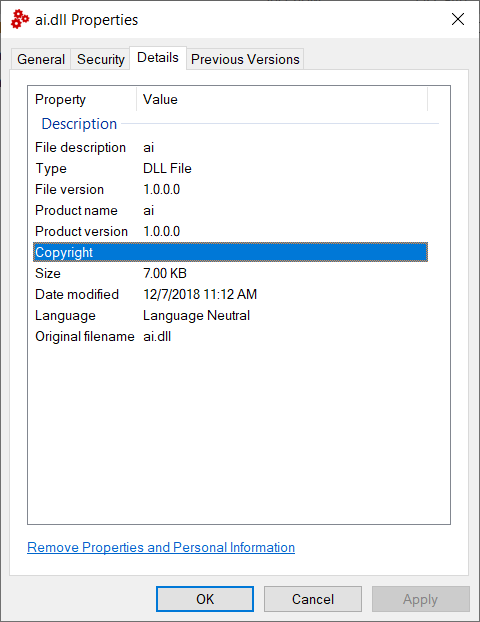
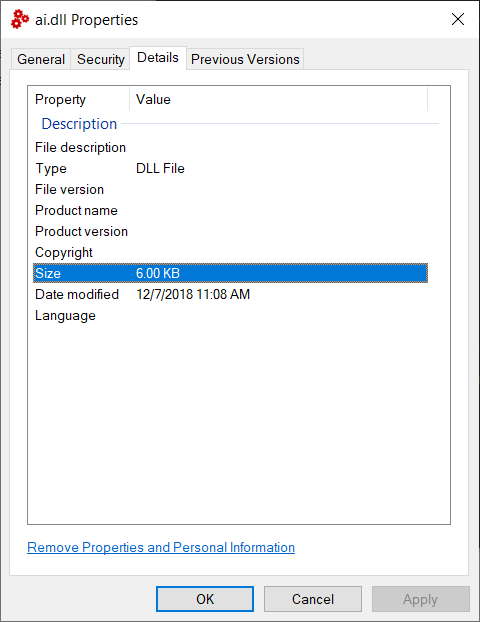
I think you are likely doing nothing wrong. I believe this is a bug in the coreclr compiler. If you build with the desktop compiler the attributes are generated and written as a native resource for explorer to display,. if you build using the coreclr compiler the attributes are generated but the native resource is not written.
I expect why this has been so confusing to people, some use VS to build and get the desktop compiler and so see the attributes, others use dotnet cli to build and see blank for those fields.
Please note this is not a regression, the coreclr compiler has likely never done this correctly.
With Desktop compiler:
With Coreclr compiler:
KevinRansom
on 7 Dec 2018
I get the same results: Works using VS, but not using dotnet build.
cmeeren
on 7 Dec 2018
@KevinRansom Thank you very much for the explanation and the workaround, in fact!
Yes, when I use MSBuild I get version info.
nightroman
on 7 Dec 2018
Thank you very much for the explanation and the workaround
What is the workaround? If you are using .net sdk it is not working and there is no workaround right?
matthid
on 7 Dec 2018
The "workaround" is using MSBuild and not using dotnet.exe for building. This is suitable for my scenarios, it's a workaround for me in a particular case.
nightroman
on 7 Dec 2018
@matthid
msbuild MyProj.fsproj will use the desktop compiler if VS is installed.
We will likely get it fixed in a preview pretty sharpish.
Kevin
KevinRansom
on 7 Dec 2018
What if i'm building on linux?
atlemann
on 10 Dec 2018
@atlemann I believe that is why @KevinRansom has re-opened the issue 🙂
cartermp
on 10 Dec 2018
@atlemann.
This is actually trickier than it seems. The desktop F# compiler and the old C# compiler call cvtres.exe a tool originally shipped with the Microsoft C++ compiler to format the native resources correctly. Obviously that tool does not execute, and is not deployed to anything other than Windows. When I did the port to the coreclr of the compiler, I skipped native resources in favour of other higher priority items. The C# team, have implemented the important parts of that tool in their compiler, and so are able to generate native resources, this work we have not yet done. I looked at it over the weekend and made a start, but it is going to be a while yet before we have this working cross platform.
Sorry, it has been on my todo list for an absolute age, but getting to it is tough.
Kevin
KevinRansom
on 10 Dec 2018
@kevinransom maybe someone can help and send a pr, would that help/be accepted?
What are the relevant places of the c# compiler and where to integrate into the f# one?
matthid
on 10 Dec 2018
Absolutely
KevinRansom
on 10 Dec 2018
This seems to be fixed in VS 2019.
 edud69
on 16 May 2019
edud69
on 16 May 2019
Fixed as in _a file is generated with new projects_ or fixed as in _the contents of the Assemblyinfo file (version, icon, etc) are properly handled_?
 lfr
on 20 May 2019
lfr
on 20 May 2019
VS2017 on the left, VS2019 on the right

atlemann
on 20 May 2019
@atlemann It was reported above that building within Visual Studio fixes the problem.
Issue is building with the SDK on the command line. Can you clarify that this is what you have tried?
The problem only happens in the dotnet-core runtime based compiler. Visual Studio runs the full-framework based one. (At least that was the state in VS2017)
matthid
on 20 May 2019
@matthid You're right.
.NET Core SDK: 2.2.204
Using dotnet build from CLI:

Building the same project using VS2019:

atlemann
on 20 May 2019
@ there is an issue with the coreclr compiler, that it generates the attributes fine, however, it doesn't embed them as a resource in the resource fork. This is a known limitation of the F# compiler for coreclr, it is a fair sized amount of work to make it work and so it will be addressed when priorities allow.
Kevin
KevinRansom
on 20 May 2019
@atlemann can you try a 3.0 preview CLI (even when building for < 3.0)? The new build tasks in the CLI copy over resources from the dll file to the apphost executable when building on windows machines.
dasMulli
on 24 May 2019
@dasMulli I believe the issue is that the dll won't have the resources in the first place when compiled with the F# compiler running on .NET Core.
 nguerrera
on 24 May 2019
nguerrera
on 24 May 2019
@dasMulli I still see this issue in 3.0.100-preview6-012264 using dotnet publish/dotnet build.
Building from VS does work.
I also wanted to note that passing in version as a property does not work either: dotnet build /p:FileVersion=1.1.0
 rojepp
on 20 Jun 2019
rojepp
on 20 Jun 2019
I've sent a PR for this, so I hope we can finally get this sorted out. I understand this has low priority but it disturbs me every time I see it and makes it harder for people - especially for newcomers - to figure out version related issues... I have seen this several times
matthid
on 21 Jun 2019
So the FileVersion thingy still needs to be fixed if I understand correctly?
 realvictorprm
on 11 Aug 2019
realvictorprm
on 11 Aug 2019
I commented on the PR: https://github.com/dotnet/fsharp/pull/7024#issuecomment-520262110
It seems there's a misunderstanding about work for managed resources becoming useful for this problem when they are actually separate.
nguerrera
on 11 Aug 2019
This might be affecting #7220
cartermp
on 22 Aug 2019
Related issues
 abelbraaksma
·
3Comments
abelbraaksma
·
3Comments
 ctaggart
·
3Comments
ctaggart
·
3Comments
 Szer
·
3Comments
Szer
·
3Comments
 jackfoxy
·
4Comments
jackfoxy
·
4Comments
 smoothdeveloper
·
3Comments
smoothdeveloper
·
3Comments
Most helpful comment
Could someone comment here once the fix is out?