Fsharp: With ReSharper active, type info is hidden from tooltips when unused values or errors are present
Update from @cartermp
3547 is the same issue, except for an error rather than the unused value analyzer.
Repro steps
- Create a
letbinding in F# code, leave the value unused - Hover over the name with the mouse pointer
Expected behavior
The Tooltip displays type information for the value.

Actual behavior
The tooltip only says "The value is unused - Show potential fixes".

Known workarounds
Set the caret on the name, press Ctrl-K, Ctrl-I
Related information
VFT version 15.4.1.17051503
 TeaDrivenDev
All 83 comments
@majocha it seems tooltips are broken even in master :( @TeaDrivenDev can you say in what version you saw this bug first time?
 vasily-kirichenko
on 16 May 2017
vasily-kirichenko
on 16 May 2017
I can't reproduce this on master :|
I'm downloading 1503 and will try.
 majocha
on 16 May 2017
majocha
on 16 May 2017
Can't reproduce on 1503 either. @TeaDrivenDev is this occurring randomly?
majocha
on 16 May 2017
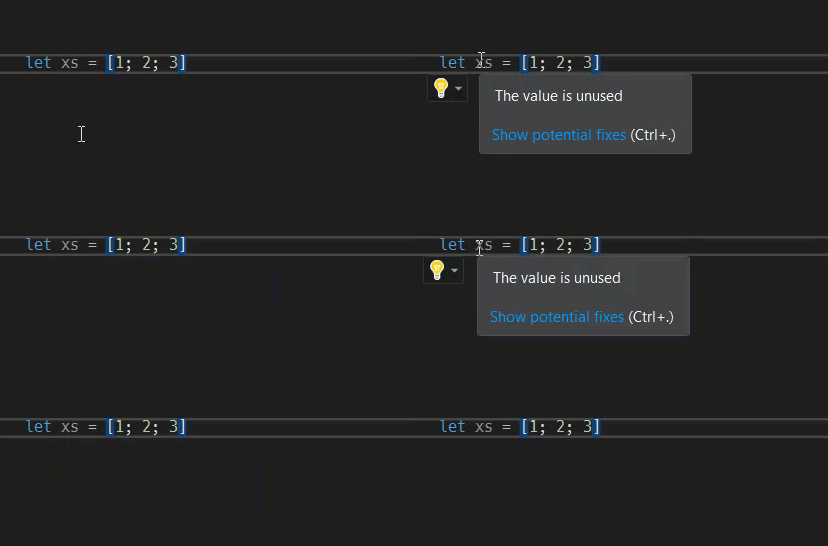
Current master:

As can be seen, Visual Studio puts the tooltip together from various sources asynchronously. Various parts show up independently and shouldn't interfere.
If for example getTooltipFromRange fails or GetItemAsync is very late, the displayed result could be exactly as in this issue. Just speculation until I can repro this.
majocha
on 16 May 2017
@majocha No, it's consistent. I don't remember ever seeing it work as in your screenshot. The type information never shows up, even on small self-contained scripts.
TeaDrivenDev
on 16 May 2017
I just checked on my other machine, and it appears to work fine there (VS 2017 Community with 17051401). It doesn't work at all on this one (VS 2017 Professional); I also suspended ReSharper (just to be sure), but that didn't change anything.
TeaDrivenDev
on 16 May 2017
@TeaDrivenDev thanks for the follow-up. This is mysterious. I can't think of anything that would break this between 514 and 515.
majocha
on 16 May 2017
@majocha It doesn't seem to be related to the versions; it still works fine on the other machine with 1604. So there appears to be something on that one system that prevents the tooltip from being updated.
TeaDrivenDev
on 16 May 2017
@TeaDrivenDev this bug happens on a particular configuration, and only when triggered with the mouse, not the keyboard, and only when there is also a "unused value" hint?
majocha
on 16 May 2017
@majocha Yes, exactly. The system in question has now updated to 1604 as well and still shows that behavior.
TeaDrivenDev
on 16 May 2017
Thanks, this gives me some ideas about what to look into.
majocha
on 17 May 2017
@TeaDrivenDev Can you still reproduce this?
 cartermp
on 5 Aug 2017
cartermp
on 5 Aug 2017
@cartermp Yes, consistently on one machine, never on the other.
TeaDrivenDev
on 5 Aug 2017
Hmmm. Strange, because I haven't been able to reproduce this. One guess is that the VS install on the machine it repros on is bad. Have you reinstalled or repaired on that machine since seeing this?
cartermp
on 5 Aug 2017
I don't think I have with VS. I have likely un- and reinstalled the F# Tools several times in that time, though.
TeaDrivenDev
on 5 Aug 2017
If you could try reinstalling VS on that machine, that would be great. Because this is only consistent on that machine and the F# tools have been uninstalled/reinstalled there, I suspect that something went funky on the install of VS itself.
cartermp
on 5 Aug 2017
Potentially a MEF ordering issue where one thing is shown on top of the other because the order is indeterminate, and usually we get lucky?
 Pilchie
on 7 Aug 2017
Pilchie
on 7 Aug 2017
If there's anything I can do give you any kind of additional diagnostic information as "patient zero", let me know.
TeaDrivenDev
on 8 Aug 2017
I have the same issue originally reported by @TeaDrivenDev, but the workaround does not work for me because Ctrl+K+I also shows the unused value warning too. I can't find a way to make the type information show. I'm running the nightly. I've included the version information and the full VS info below.

Full VS Version Details
Microsoft Visual Studio Professional 2017
Version 15.4.2
VisualStudio.15.Release/15.4.2+27004.2006
Microsoft .NET Framework
Version 4.6.01590
Installed Version: Professional
Visual Basic 2017 00369-60000-00001-AA768
Microsoft Visual Basic 2017
Visual C# 2017 00369-60000-00001-AA768
Microsoft Visual C# 2017
Visual F# 4.1 00369-60000-00001-AA768
Microsoft Visual F# 4.1
Application Insights Tools for Visual Studio Package 8.9.00809.2
Application Insights Tools for Visual Studio
ASP.NET and Web Tools 2017 15.0.30925.0
ASP.NET and Web Tools 2017
ASP.NET Core Razor Language Services 1.0
Provides languages services for ASP.NET Core Razor.
ASP.NET Web Frameworks and Tools 2017 5.2.50921.0
For additional information, visit https://www.asp.net/
Azure App Service Tools v3.0.0 15.0.30915.0
Azure App Service Tools v3.0.0
Common Azure Tools 1.10
Provides common services for use by Azure Mobile Services and Microsoft Azure Tools.
GhostDoc 5.4.16325.0
GhostDoc automatically generates XML documentation comments.
JavaScript Language Service 2.0
JavaScript Language Service
JavaScript Project System 2.0
JavaScript Project System
JetBrains ReSharper Ultimate 2017.1.2 Build 108.0.20170428.75743
JetBrains ReSharper Ultimate package for Microsoft Visual Studio. For more information about ReSharper Ultimate, visit http://www.jetbrains.com/resharper. Copyright © 2017 JetBrains, Inc.
Microsoft Continuous Delivery Tools for Visual Studio 0.3
Simplifying the configuration of continuous build integration and continuous build delivery from within the Visual Studio IDE.
Microsoft JVM Debugger 1.0
Provides support for connecting the Visual Studio debugger to JDWP compatible Java Virtual Machines
Microsoft MI-Based Debugger 1.0
Provides support for connecting Visual Studio to MI compatible debuggers
Node.js Tools 1.4.10918.1
Adds support for developing and debugging Node.js apps in Visual Studio
NuGet Package Manager 4.4.0
NuGet Package Manager in Visual Studio. For more information about NuGet, visit http://docs.nuget.org/.
SQL Server Data Tools 15.1.61707.200
Microsoft SQL Server Data Tools
TestDriven.Net 4.0-beta3
Zero friction testing for Visual Studio
TypeScript 2.3.5.0
TypeScript tools for Visual Studio
Visual Studio Code Debug Adapter Host Package 1.0
Interop layer for hosting Visual Studio Code debug adapters in Visual Studio
VsVim 2.4.1.0
VsVim is a Vim emulator for Visual Studio
 bentayloruk
on 1 Nov 2017
bentayloruk
on 1 Nov 2017
Yes, I can reproduce it every time. It's super annoying.
vasily-kirichenko
on 1 Nov 2017
It is. I don't have any F# templates either for some reason. I'm going to try a VS repair and then a re-install if the repair does not work. I'll update with any change.
bentayloruk
on 1 Nov 2017
The tooltip and templates are now working for me. I fixed it by downloading the VS2017 installer from MSDN, running it and selecting the repair option. I then added back VsVim and the F# nightly config, updated to the latest nightly and all was working. It also worked before going back to the nightly.
bentayloruk
on 1 Nov 2017
I spoke to soon. VS was very unstable after doing the repair and the F# nightly configuration. This specific issue was fixed, but VS started crashing when I tried to rename C# type members. Therefore, I re-installed Visual Studio and configured nightlies again. I now have the original issue back. I only see The value is unused when hovering or doing Ctrl+K Ctrl+I. In addition, VS still crashes when I try and rename a C# member. So I've swapped one issue for two! If anyone can advise me as to what I can do to help diagnose this, please let me know.
bentayloruk
on 2 Nov 2017
cc @Pilchie @jinujoseph for the issue with VS crashing with Inline Rename on C# members. That definitely doesn't seem right, and the F# nightly shouldn't be messing with that.
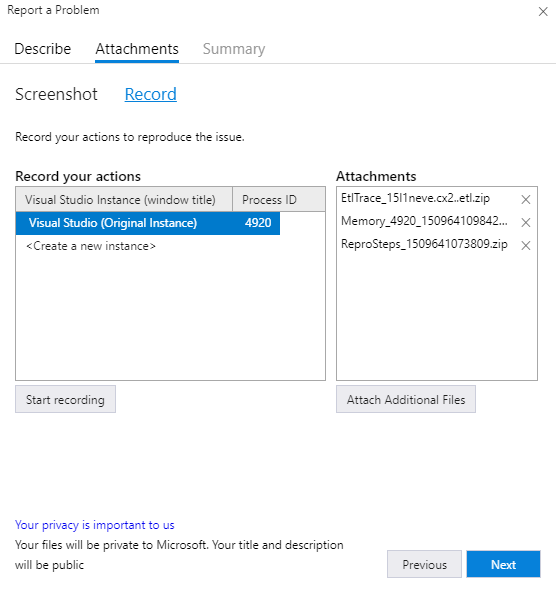
@bentayloruk If you go to VS and click the "Report a Problem" icon in the top-right and create a new issue, the Attachments tab will have an option called "record". This will record an ETL trace that you can send with the feedback tool, which will allow people to see what's going on.
cartermp
on 2 Nov 2017
Unfortunately, I still can't reproduce the original issue :(
Using 15.5 Preview 2.
cartermp
on 2 Nov 2017
@cartermp I forget when I saw both signature and "value is unused" on the same tooltip.
vasily-kirichenko
on 2 Nov 2017
@cartermp thanks for the guidance. I've never used that feature before!
It turns out that I don't even have to try and rename the member. I literally just have to click on the name of it and it causes a NullReferenceException in Microsoft.CodeAnalysis.Workspaces. I've recorded the steps and submitted it over here.
Is there any easy way to flip between the nightly and the latest "official" version of F# for VS? I could try that and confirm if the issue is present when not on the nightly.
bentayloruk
on 2 Nov 2017
@bentayloruk Unfortunately, there's no way to toggle the version of the tools. If you run VSIXInstaller.exe /u:VisualFSharp from the Visual Studio Developer Command Prompt (admin mode not required, but I do it as admin anyways) then it will uninstall the nightly release.
cartermp
on 2 Nov 2017
@cartermp The uninstall is easy enough, thanks. I uninstalled and the crash when clicking the C# member no longer happens. The R# dialog box pops up as expected. I'm not sure if this confirms it's anything to do with VFT or not...
bentayloruk
on 2 Nov 2017
It definitely _shouldn't_, and I'd be shocked if it did. Regardless, @brettfo you may want to take a look at this as well...
cartermp
on 2 Nov 2017
I'm pretty late on this but regarding the original issue, I found that suspending Resharper didn't help, however disabling Resharper fully (and restarting VS) sorted it.
 RinsibleElk
on 7 Nov 2017
RinsibleElk
on 7 Nov 2017
@RinsibleElk how have you managed to disable R#? I have it installed as part of R# Ultimate.
vasily-kirichenko
on 7 Nov 2017
Thanks for the comment @RinsibleElk. I've just disabled ReSharper and the original issue was resolved for me too (I can see the value is unused AND the type information for the value). However, the crash on the C# member still happens.
@vasily-kirichenko I disabled ReSharper via Tools > Extensions and Updates > Installed > All > Resharper, then click Disable and restart.
bentayloruk
on 7 Nov 2017
Just to make sure we're isolating variables here: does the issue go away if you restart VS _and_ have ReSharper active?
cartermp
on 7 Nov 2017
@cartermp not for me. The issue remains if I restart VS and have R# active.
bentayloruk
on 7 Nov 2017
Thanks! @auduchinok - anyone on the JB side who might be able to see what's going on here?
cartermp
on 7 Nov 2017
@cartermp Thanks for letting me know!
I've discussed the issue with a R# team member who is responsible for tooltips integration, we'll try to sort it out.
 auduchinok
on 8 Nov 2017
auduchinok
on 8 Nov 2017
Even though it happens when ReSharper is active only, it looks like the bug is not caused by ReSharper itself but rather by just its presence in the Visual Studio component container.
ReSharper exports a class implementing IQuickInfoSourceProvider that does nothing breaking for F# files in its AugmentQuickInfoSession.
It looks like the actual problem is caused by QuickInfoCommandHandlerAndSourceProvider+QuickInfoSource that doesn't ask other providers when tooltip evaluation session already has any element (decompiled method).
How is it related? There's a sorted list of exported providers to invoke. When the ReSharper provider isn't exported QuickInfoSource goes before SquiggleQuickInfoSource in the list. When the provider is exported the order of these two is changed. Due to this the error/warning squiggle is being added before the type tooltip and then QuickInfoSource doesn't call any other providers (so the type tooltip is never added).
Adding the Order attribute to these two types in VS/Roslyn code should fix the issue.
auduchinok
on 10 Nov 2017
@cartermp Could someone on MS side check whether adding these attributes fixes the issue?
auduchinok
on 14 Nov 2017
Whoops, missed this. Thanks for getting this looked into, @auduchinok.
@Pilchie would you know more about this?
cartermp
on 14 Nov 2017
Tagging @Jinujoseph. @Rchande probably has the most context on QuickInfo, but isn't directly working on that right now.
@brettfo has also done some stuff in the Roslyn QuickInfoProvider.
Pilchie
on 14 Nov 2017
I too experience the same error when R# is enabled (even if suspended). Disabling the R# plugin and restarting VS fixes the issue. See #3518.
 cmeeren
on 20 Nov 2017
cmeeren
on 20 Nov 2017
FYI someone has added the crash that I mention above and reported via VS, in the Roslyn repos https://github.com/dotnet/roslyn/issues/23279.
bentayloruk
on 20 Nov 2017
@bentayloruk looks like it was migrated over from our feedback tool, since active development for Roslyn is on GitHub.
cartermp
on 20 Nov 2017
@cartermp yes. I don't the issue on new VM with latest VS release and F# nightly, so hopefully it's sorted. Going to try and confirm by updating VS on my broken VM.
bentayloruk
on 20 Nov 2017
VS 2017 with Resharper.
"The value is unused" but no type info.
Resharper disabled, no change at all.
Having no type info available for variables stops me from using VS2017.
Can I disable the whole Roslyn code fix feature from F#?
 urbanhop
on 7 Dec 2017
urbanhop
on 7 Dec 2017
@urbanhop Are you sure you _disabled_ R#, not suspended?
You cannot disable the fix.
vasily-kirichenko
on 7 Dec 2017
I see that a few comments up, @bentayloruk reports not seeing "the issue". I don't know what that specific issue is, but just to be clear, I still experience missing tooltips when R# is enabled or suspended on VS15.5 and latest nightly.
cmeeren
on 7 Dec 2017
@vasily-kirichenko you got me. I suspended it. Checking...
urbanhop
on 7 Dec 2017
@urbanhop In Tools -> Extensions and updates. Remember to restart VS after disabling.
cmeeren
on 7 Dec 2017
@urbanhop go to Tools -> Extensions and updates -> ReSharper, and disable it.
vasily-kirichenko
on 7 Dec 2017
@urbanhop Just to be sure that R# is disabled, open Tools -> Options and search for ReSharper. There should be no results.
cmeeren
on 7 Dec 2017
VS2017. Resharper disabled. Another restart of VS. Type info is there.
urbanhop
on 7 Dec 2017
Filed a bug report to Jetbrains/Resharper, citing this thread.
urbanhop
on 7 Dec 2017
@urbanhop Could you post the link?
cmeeren
on 7 Dec 2017
@cmeeren, Jetbrains replied to me that @auduchinok replied here above already.
urbanhop
on 7 Dec 2017
See here: https://github.com/Microsoft/visualfsharp/issues/3056#issuecomment-344376832
This is likely an issue "further down the stack" than F# or R#. @Pilchie suspected as much here.
@urbanhop You say this:
Having no type info available for variables stops me from using VS2017.
Just to clarify, is this _only_ when the value is unused?
cartermp
on 7 Dec 2017
Just to clarify, is this only when the value is unused
I'll let @urbanhop answer for themselves but I seem to experience this when there's any kind of warning or error. Simply put, if there's a squiggle (or unused), then only the error is shown and nothing else unless I completely disable R# (which is a drag in a mixed F#/C# solution).
cmeeren
on 7 Dec 2017
I suspect that is some lower-level issue, then. @jinujoseph is this something your team can look into?
In the meantime, #4074 should make the issue with unused names a bit easier to deal with. I think it's good to have the configuration either way.
cartermp
on 7 Dec 2017
@cartermp : Yes the problem occurs only when the value really is unused. This is a big problem as I use VS to write fresh code (partly joking here) and fresh code very very frequently involves unused values. A fresh function with its signature just written certainly does not yet use the values passed in. So as long as you do not use the args you are not able to examine their type. But before using them I want to check which type they have. Not possible due to this issue.
The option toggle you suggested above would be etremely helpful to me. Allowing me to use VS2017.
urbanhop
on 9 Dec 2017
The stuff still does not work, no matter what I tried according to descriptions above!!! The stupid workaround is to "agree" to prefix unused value with the underscore and then, voila!, R# miracle happens and it is possible to see the type.
 kkkmail
on 18 Jan 2018
kkkmail
on 18 Jan 2018
Any update on this? I still have to completely disable ReSharper in order for the problem to disappear, which is a bit of a letdown to be honest, because R# it's great for my C# code (I have mixed C#/F# solutions).
cmeeren
on 1 Feb 2018
No update, as this is external to the F# tools. 15.6 will have the ability to turn off the analyzer as a workaround.
cartermp
on 1 Feb 2018
Is there an issue/report anywhere else I could track?
cmeeren
on 1 Feb 2018
Not at the moment, no. When we have the time, we can debug the editor to determine the root cause and route to the right team (or muck about with MEF ourselves if need be). But this is not a critical issue in our eyes, so there is no timeline for when that will happen.
Tagging: bumped down from soon to later due to the fact that there are multiple workarounds. Removed bug label because it's not confirmed that this is indeed a bug in the VF# tools.
cartermp
on 1 Feb 2018
Just wanted to report back that with
VS2017 15.5.6
Visual F# 4.1 00369-60000-00001-AA903
unused variables are not reported as being unused, making the problem disappear on my side (Being able to inspect types during coding is more important to me than reminding me about unused vars). thx
urbanhop
on 1 Feb 2018
@cartermp can we get someone from MS to take a look at this? If the Order attribute fixes this then it's a one line fix. None of the open source contributors have access to the code in question so we have our hands tied here...
 saul
on 3 Feb 2018
saul
on 3 Feb 2018
Any update on this? Especially considering the above comment by @saul that this could perhaps be a one line fix from MS if someone could just pull that string.
cmeeren
on 9 May 2018
Pinging too, reshaped is quite much used so far I understood so possible bugs connected to it should be resolved.
 realvictorprm
on 10 May 2018
realvictorprm
on 10 May 2018
No update at this time. QuickInfo is now fully in the editor layer, so perhaps @olegtk would know more about this: https://github.com/Microsoft/visualfsharp/issues/3056#issuecomment-343449101
cartermp
on 10 May 2018
That sounds like something @gundermanc fixed recently (only one content item in QuickInfo).
 olegtk
on 10 May 2018
olegtk
on 10 May 2018
The issue I fixed was with multiple errors. It's possible this is an IDE bug but what I suspect is happening is that you're encountering weirdness from Roslyn's 15.7 and earlier use of the quick info APIs. If this is the case, there should be no repro in the newest F# bits because IIRC you've already switched over to the new async quick info.
Roslyn's quick info has generally required a couple of dozen milliseconds to compute and the previous generation of quick info APIs were synchronous, so to avoid UI delays, they built a state machine inside an IQuickInfoSource which is ordered to come before all the IDE ones.
This state machine waits for the API to request items and if there are _exactly zero_ items in the tip, it cancels the quick info session, and queues a background compute task, which retriggers quick info at the same spot when the task completes.
Based on this line if another provider ends up before Roslyn's, Roslyn's content will not be added to quick info because the tips content is non-empty. FWIW, this is the same behavior I have observed when using my async quick info test extension with Roslyn languages.
If this diagnosis is correct, this bug should already be fixed for 15.8 because both Roslyn and F# have moved to async quick info.
 gundermanc
on 10 May 2018
gundermanc
on 10 May 2018
@cmeeren Can you check it please with the preview 15.8?
realvictorprm
on 10 May 2018
Unfortunately it's not fixed in 15.8.
cmeeren
on 10 May 2018
@gundermanc Have you tried adding Order attributes to provider types as suggested in https://github.com/Microsoft/visualfsharp/issues/3056#issuecomment-343449101 so the providers order is stable?
auduchinok
on 10 May 2018
Unfortunately it's not fixed in 15.8.
@cartermp has your switch over to the async quick info made it into @cmeeren's preview build?
@gundermanc Have you tried adding Order attributes to provider types as suggested in #3056 (comment) so the providers order is stable?
I own the API, so there isn't much I can do from the IDE side. If this is indeed a side-affect of the Roslyn issue mentioned above then either Roslyn or R# could avoid it by adding Order attributes though it's possible my guess is wrong.
I'm not very familiar with F#, does someone have a repro they can share?
gundermanc
on 10 May 2018
I'm not very familiar with F#, does someone have a repro they can share?
cmeeren
on 10 May 2018
Took a look at the bits in the various preview builds on my box and they don't seem to contain the change to the new quick info API yet (they still use IQuickInfoProvider instead of IAsyncQuickInfoProvider):
namespace Microsoft.VisualStudio.FSharp.Editor
{
    [ExportQuickInfoProvider("Semantic Quick Info Provider", "F#"), CompilationMapping(SourceConstructFlags.ObjectType)]
    [Serializable]
    internal class FSharpQuickInfoProvider : IQuickInfoProvider
    {
        }
}
@brettfo can you confirm whether or not this change has made it into any of the VS previews? I'm fairly certain it should fix this bug (see my comment above).
gundermanc
on 10 May 2018
@gundermanc as far as I'm aware, the DLLs for the tools have the commit hash in their assembly info. You can figure out whether the DLLs you're using include that commit or not that way:
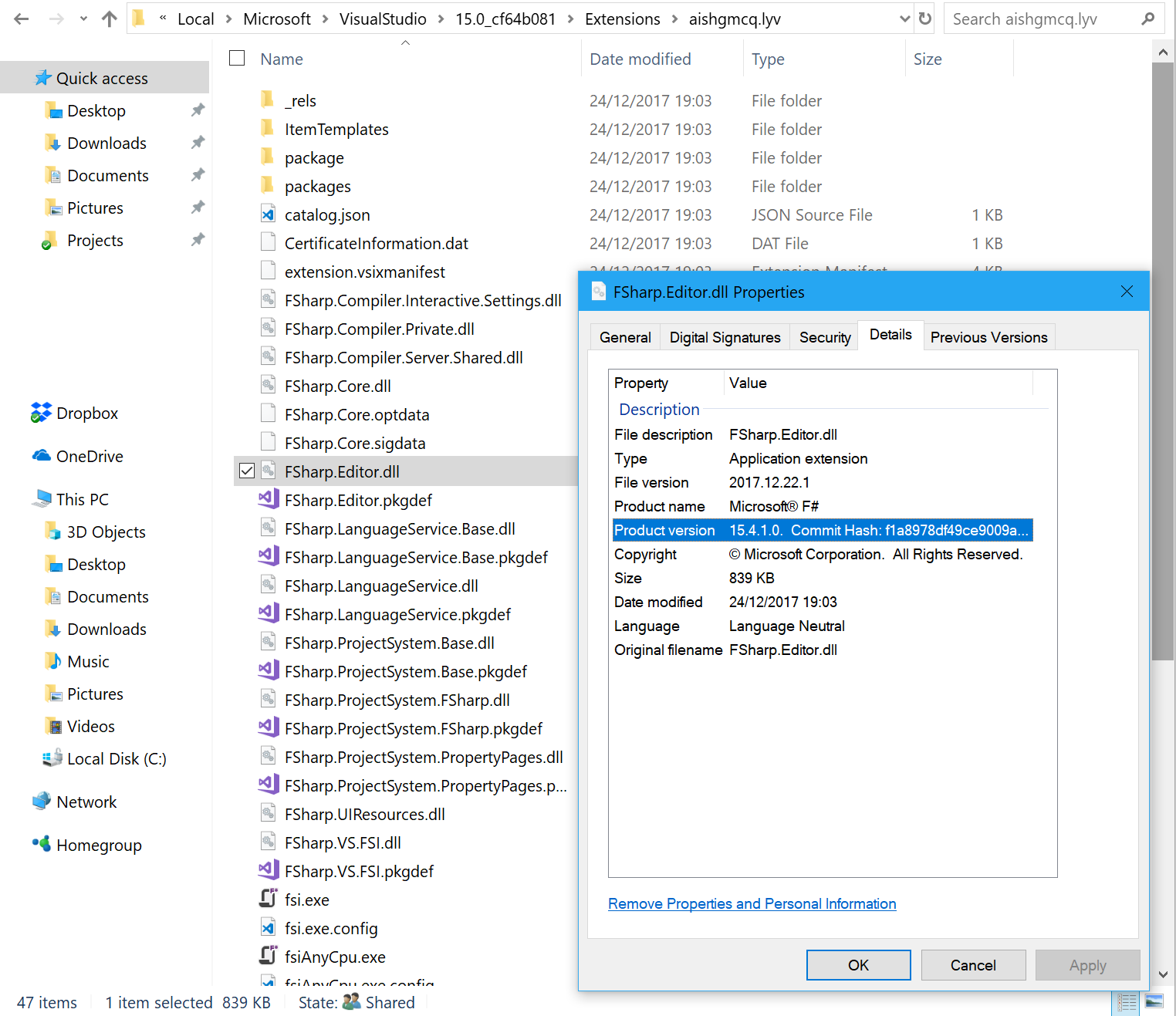
If you're using the nightlies, then obviously it will already contain that commit.
If you're using one of the previews, navigate to: C:\Program Files (x86)\Microsoft Visual Studio\2017\Community\Common7\IDE\CommonExtensions\Microsoft\FSharp
saul
on 10 May 2018
I checked on my Int Preview build via ILSpy and the change wasn't present, so I'm fairly certain the change isn't present. I tagged in @brettfo because he probably has a better idea of the timeline.
gundermanc
on 11 May 2018
@gundermanc The async quick info changes will first appear in VS 15.8 preview 2. If you want to use them now you can consume the nightly packages which are built from master (which has this change).
 brettfo
on 11 May 2018
brettfo
on 11 May 2018
15.8 preview with R#:
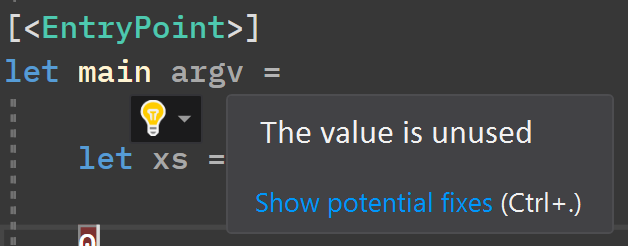
15.8 preview with R# + VFT nightly:
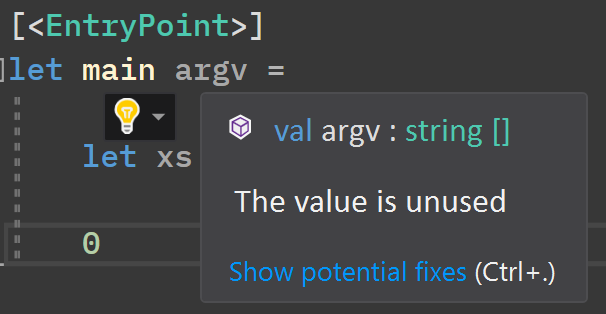
So, the issue has been solved 🔥
vasily-kirichenko
on 11 May 2018
Fantastic!
cmeeren
on 11 May 2018
Related issues
 GennadyGS
·
3Comments
GennadyGS
·
3Comments
 abelbraaksma
·
3Comments
abelbraaksma
·
3Comments
 enricosada
·
3Comments
enricosada
·
3Comments
 mrakgr
·
3Comments
mrakgr
·
3Comments
 ctaggart
·
3Comments
ctaggart
·
3Comments
Most helpful comment
15.8 preview with R#:
15.8 preview with R# + VFT nightly:
So, the issue has been solved 🔥