Fsharp: Intellisense and Quick Info do not show F# documentation in FSX files
Version: VS 2017 Visual F# Tools v15.4.1.17042501
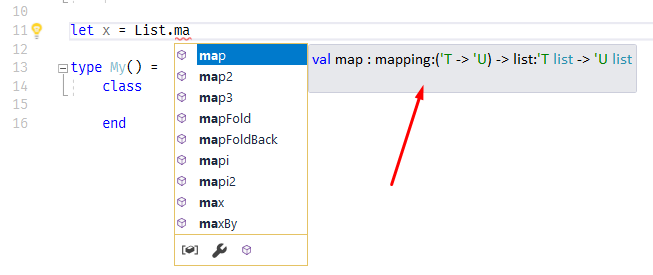
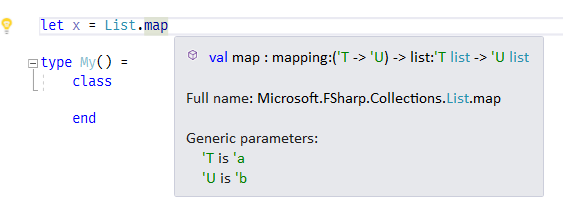
In FSX files only, Intellisense and Quick Info (hover tip) pop-ups show the type signature but not the summary documentation strings for F# core classes, modules and functions. However, the summary docs are displayed correctly for symbols defined by the user in F#, from F# libs and other .NET symbols.
Repro steps
Open an FSX file and type List.ma, or type List.map and hover over the map part.


You should see the doc string: "Builds a new collection whose elements...", but it's missing.
 theprash
All 21 comments
Thanks @theprash
I consider this the next thing I should try :smile:
 realvictorprm
on 26 Apr 2017
realvictorprm
on 26 Apr 2017
I believe this is because the default FSharp.Core reference used is the one on
C:\Program Files (x86)\Microsoft SDKs\F#\4.1\Framework\v4.0
which does not have FSharp.Core.xml alongside. I think we should just install the XML alongside this, that is simplest. The default reference text used is a fully qualified assembly name "FSharp.Core, Version=4.4.1.0..." computed by "GetFSharpCoreReferenceUsedByCompiler". Prior to VS2017 (?) there was no FSharp.Core in the above directory and went to reference assemblies instead.
It's arguable we shouldn't be searching the above directory when resolving FSharp.Core, but that's hard because we have to include the directory in the assembly resolution search paths in order to resolve #r "FSharp.Compiler.Interactive.Settings.dll among others.
 dsyme
on 28 Apr 2017
dsyme
on 28 Apr 2017
Proposed fix is here https://github.com/Microsoft/visualfsharp/pull/2941
dsyme
on 28 Apr 2017
Fix has been merged
dsyme
on 9 May 2017
Thank you!
theprash
on 9 May 2017
@dsyme I'm on the latest VF# nightly and the problem remains. I don't have FSharp.Core.xml in the directory you mentioned. What should it take to fix this without manually copying the file?
theprash
on 15 May 2017
@theprash Just copy the file. The VF# nightly doesn't install the file
dsyme
on 17 May 2017
@dsyme I can do that but I am thinking about fixing existing installations. Just to be clear, would this only be fixed in the next major VS update? Or only after a fresh VS install?
theprash
on 18 May 2017
@dsyme would this be fixed in the next major VS update?
Yes I believe so
dsyme
on 18 May 2017
@dsyme This problem still remains for me in 15.3. I couldn't fix it with your suggested workaround either.
theprash
on 16 Aug 2017
I confirm the bug is not fixed in 15.3 + today's nightly:
 vasily-kirichenko
on 16 Aug 2017
vasily-kirichenko
on 16 Aug 2017
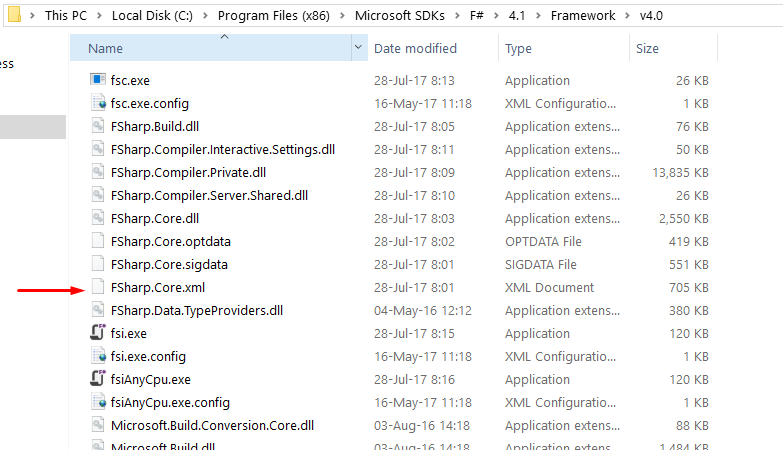
@theprash @vasily-kirichenko Could you check if C:\Program Files (x86)\Microsoft SDKs\F#\4.1\Framework\v4.0 has FSharp.Core.xml in your installation? Thanks
dsyme
on 16 Aug 2017
vasily-kirichenko
on 16 Aug 2017
I have the file there too (with the same modified date, so it's not one that I left there trying the workaround).
theprash
on 16 Aug 2017
@theprash @vasily-kirichenko OK, thanks.
dsyme
on 16 Aug 2017
Here's the status of seeing docs from FSHarp.Core.xml in projects and scripts
16.4.5:
FSPROJ: YES
FSX: NO

16.4.5 with master installed into RoslynDev:
FSPROJ: NO
FSX: NO

16.5.0:
FSPROJ: YES
FSX: NO
@cartermp I'm going over all issues and we really need to fix this one.
Currently people doing scripting in F# in Visual Studio just aren't seeing any documentation for FSharp.Core. Of course experienced people don't notice this but beginners do.
I know this has been regressed a long time but it is a very basic part of the experience, otherwise there's no point in providing any XML docs at all.
On the whole we just have to make sure we don't regress this sort of thing, and if we do we fix it.
dsyme
on 26 Aug 2020
Likely a setup thing, since FSharp.Core is a nuget package something needs to get updated to know to look there
 cartermp
on 26 Aug 2020
cartermp
on 26 Aug 2020
Updated workaround: copy FSharp.Core.xml into here:
C:\Program Files (x86)\Microsoft Visual Studio\2019\Preview\Common7\IDE\CommonExtensions\Microsoft\FSharp
cartermp
on 14 Sep 2020
Re-opening - something has regressed and it's no longer deployed, even though we explicitly deploy this now in our setup file.
cartermp
on 7 Dec 2020
Okay, this appears as if it wasn't actually fixed - this apparently also needs ad adjustment: https://github.com/dotnet/fsharp/blob/release/dev16.8/vsintegration/Vsix/VisualFSharpFull/VisualFSharpFull.csproj#L28-L33
cartermp
on 7 Dec 2020
Related issues
 kbattocchi
·
4Comments
kbattocchi
·
4Comments
 TysonMN
·
3Comments
TysonMN
·
3Comments
 mrakgr
·
3Comments
mrakgr
·
3Comments
mrakgr
·
3Comments
mrakgr
·
3Comments
 ploeh
·
3Comments
ploeh
·
3Comments