Fsharp: Deploy F# Compiler SDK to Microsoft Download Center
This is the F# 4.1 compiler.
This contains the compilers, build tasks and targets for F# 4. for use on build servers.
The Nuget package: FSharp.Compiler.Tools works well too:
http://www.nuget.org/packages/FSharp.Compiler.Tools/
 KevinRansom
All 23 comments
FYI - I'll have this done next week.
 cartermp
on 12 Mar 2017
cartermp
on 12 Mar 2017
How often will we see updates over there? Will people get notifications in VS?
 forki
on 12 Mar 2017
forki
on 12 Mar 2017
I imagine we'll have an update once the bugs in multicase struct unions are addressed, but probably not after then until F# 4.2 is released. I'm not aware of any notification VS could send to indicate that there's a new download in MS Download Center. Two very different systems.
cartermp
on 12 Mar 2017
Sigh. I hoped it could work like updates in VS code. I thought you guys
changed the VS installer with that in mind.
Am 12.03.2017 5:12 nachm. schrieb "Phillip Carter" <[email protected]
:
I imagine we'll have an update once the bugs in multicase struct unions are
addressed, but probably not after then until F# 4.2 is released. I'm not
aware of any notification VS could send to indicate that there's a new
download in MS Download Center. Two very different systems.
—
You are receiving this because you commented.
Reply to this email directly, view it on GitHub
https://github.com/Microsoft/visualfsharp/issues/2553#issuecomment-285954907,
or mute the thread
https://github.com/notifications/unsubscribe-auth/AADgNOpt7GPu9OoqVSNMuloFyU6eh4d3ks5rlBlggaJpZM4MXFv0
.
forki
on 12 Mar 2017
You're confusing the VS Gallery with the MS Download Center. The latter is where _many_ people download the standalone F# 4.1 MSI today. It has no connection with VS.
cartermp
on 12 Mar 2017
Tbh I don't care where things are stored. If the gallery is the right place
to notify users then we need to push updates over there.
Am 12.03.2017 17:19 schrieb "Phillip Carter" notifications@github.com:
You're confusing the VS Gallery with the MS Download Center. The latter is
where many people download the standalone F# 4.1 MSI today. It has no
connection with VS.—
You are receiving this because you commented.
Reply to this email directly, view it on GitHub
https://github.com/Microsoft/visualfsharp/issues/2553#issuecomment-285955392,
or mute the thread
https://github.com/notifications/unsubscribe-auth/AADgNBaoG9K3Q6wJBnPbJ79ks-y21o_Mks5rlBsYgaJpZM4MXFv0
.
forki
on 12 Mar 2017
@cartermp is not possibile to generate the F# Compiler SDK from the FSharp.Compiler.Tools? is not pratically the same? less maintenance/divergence..
 enricosada
on 27 Apr 2017
enricosada
on 27 Apr 2017
Some 3 months after F# 4.1 shipped and as far as i can see there is still no standalone msi to put the compiler tools onto CI machines...
Whilst i understand the FSharp.Compiler.Tools nuget has got the SDK in there, it's a rather bold step to enforce this change. Also considering that an installation of VS2017 will successfully compile (if you include the F# stuff on installation) without the need for this nuget package.
This causes large areas of confusion as code will compile on a developer machine, but not on CI with the build tools MSI installed.
 BlythMeister
on 1 Jun 2017
BlythMeister
on 1 Jun 2017
Any updates on this? I have a large solution we are trying to move to visual studio 2017 and msbuild 15, but we can't put it in our C.I server because there is a small fsharp project there.
 divad4686
on 9 Jun 2017
divad4686
on 9 Jun 2017
@divad4686 I've had a lot of success using the nuget package FSharp.Compiler.Tools. Would that be an option for you?
You can install that into your F# project (using either the normal nuget client, or paket), and it will override the in-box compiler with the compiler from that package. That means you can use it to compile F# code on a buildserver that has only msbuild but no F# installed.
I can understand the points of @BlythMeister, but in our solution we went the other way and also used Microsoft.Net.Compilers for the C#/VB compilers.
The advantage of these two packages is that then the exact same compiler is used on the developer machine and in CI.
Otherwise it could happen that the developer uses VS2015 and the CI VS2017 (or the other way around).
 0x53A
on 9 Jun 2017
0x53A
on 9 Jun 2017
@0x53A yea I will try that. Thanks!
divad4686
on 9 Jun 2017
If that is the Microsoft preferred approach, why is that not how it works out of the box.
The fact that every new project created required a manual step to get the compiler into it seems like a huge backwards step from the visual studio and .net teams.
Yes it works.
Yes it may have advantages.
Yes it may be the future.
But no it's not in step with the rest of the tooling.
BlythMeister
on 9 Jun 2017
And for that matter, why ship msbuild compiler at all....it's like the c# and VB teams went yeah we do this shiney new thing, but will let people still work the old way.
The f# team have gone with the only new way and you can fix your stuff...not exactly the best user experience and really puts a barrier to entry for using the f# language.
And in a company where f# usage may already cause friction (due to a different paradigm) this doesn't help the cause/"sales pitch"
BlythMeister
on 9 Jun 2017
@BlythMeister
If that is the Microsoft preferred approach, why is that not how it works out of the box.
The fact that every new project created required a manual step to get the compiler into it seems like a huge backwards step from the visual studio and .net teams.
As a note FSharp.Compiler.Tools package is from F# foundation, not MS.
It resolve the exact issue you have (reproducible builds, your dev vs ci) who community think is important but has some tradeoff, and friction because is not the default way in templates choosen by MS.
Is like use PackageReference without a lock file (the way paket works).
Is a way to resolve the ci server or devs need to have the f# sdk installed and the right one.
You can choose to use it, or not.
Another way is install the F# 4.1 Compiler SDK but that doesnt yet exists.
Adding that manually in fsproj was a limitation of old msbuild sdk.
Before was not possibile to add that as package reference (PAckageReference are new) in templates or target files.
The FSharp.Compiler.Tools approach was tried (that's how the net sdk 1.0 worked on .net core/mono/msbuild), users doesnt know that (was transparent for final users, was downloaded as normal package on restore) but was discared for reasons (like is not possibile to ngen the fsc, and that's a big boost). more info in https://github.com/fsharp/fslang-design/blob/master/RFCs/FS-1032-fsharp-in-dotnet-sdk.md.
Afaik with sdk 2.0 (VS update 15.3 and .net core tool 2.0) the fsc is bundled alongside csc, no separate install needed.
enricosada
on 9 Jun 2017
@enricosada thank you for the full and clear answer!
Historical we have installed the f# compiler sdk.
whilst i see the benefit of having the compiler bundled as a nuget package meaning no installs on ci and means easier compiler upgrades, but this isn't a path we can just take if it's not baked into the tooling (as I'm sure you would understand)
We will await msbuild 15.3 (https://github.com/Microsoft/msbuild/milestone/15) and hopefully the build tools installed will "just work" for us.
BlythMeister
on 9 Jun 2017
After getting approval, VPN issues, tooling woes, and process _finally_ taken care of, there is now a download of the F# 4.1 compiler SDK here: http://download.microsoft.com/download/F/3/D/F3D6045E-4040-4058-ADAD-2698F1793CBC/Microsoft.FSharp.SDK.Core.msi
A few things to note:
- The bits in here aren't any different than the contents F# Build Tools NuGet package, so if you're already using that, then there's no need to make a change.
- Starting with VS 2017 Update 3, the Build Tools SKU of Visual Studio will have the F# 4.1 SDK as a component you can install. This is the Microsoft-preferred way to download assets for a Windows build machine (though in my opinion, the NuGet package is probably a better approach). See this StackOverflow answer for a succinct explanation of what the "Visual Studio" version is all about and what it gives you. There is also a blog post explaining this from the perspective of C++.
- As @enricosada has mentioned, starting with the .NET Core 2.0 release,
fscwill be bundled alongsidecscandmsbuildin the .NET Core SDK. .NET Core greatly simplifies things for us in this manner, and we're excited to have people adopt it in a more widespread fashion in the future.
I'm closing this issue since it's ultimately a tracking issue, but feel free to continue to discuss and/or add feedback here.
cartermp
on 10 Jun 2017
@cartermp Thanks!!!
Could you also update the information on http://fsharp.org/use/windows to reflect this please? thx :)
 dsyme
on 10 Jun 2017
dsyme
on 10 Jun 2017
@dsyme Done! https://github.com/fsharp/fsfoundation/pull/654
cartermp
on 10 Jun 2017
@cartermp I think this needs to be updated again. I don't know where to find the current links to install F# SDK version 10.1:
Could you also update the information on http://fsharp.org/use/windows to reflect this please? thx :)
 ScottHutchinson
on 26 Mar 2018
ScottHutchinson
on 26 Mar 2018
@KevinRansom Can you take care of this? I added you as an owner of the MS Downloads entity, so you should be able to publish a new version from the office.
@ScottHutchinson I'm out of the office until April 10th, traveling for conferences and customer visits, so I can't take care of this as it requires access to our intranet. Sorry for missing this. So many folks have moved over to FSharp.Compiler.Tools that it fell off the list 😢
cartermp
on 26 Mar 2018
@ScottHutchinson the 10.1.0 SDK can be downloaded from:
http://download.microsoft.com/download/B/A/6/BA6275B8-8073-4CF4-AFF4-89FD08402EC5/Microsoft.FSharp.SDK.Core.msi
Please note this is the last time we will release the FSharp Sdk in this way. A Global singleton compiler is not a good deployment strategy or mechanism for a product that is released as frequently as we now release. We are in the process of changing the deployment mechanism for the F# compiler to use VSIX installation, this will allow us to ship previews without overwriting the global install.
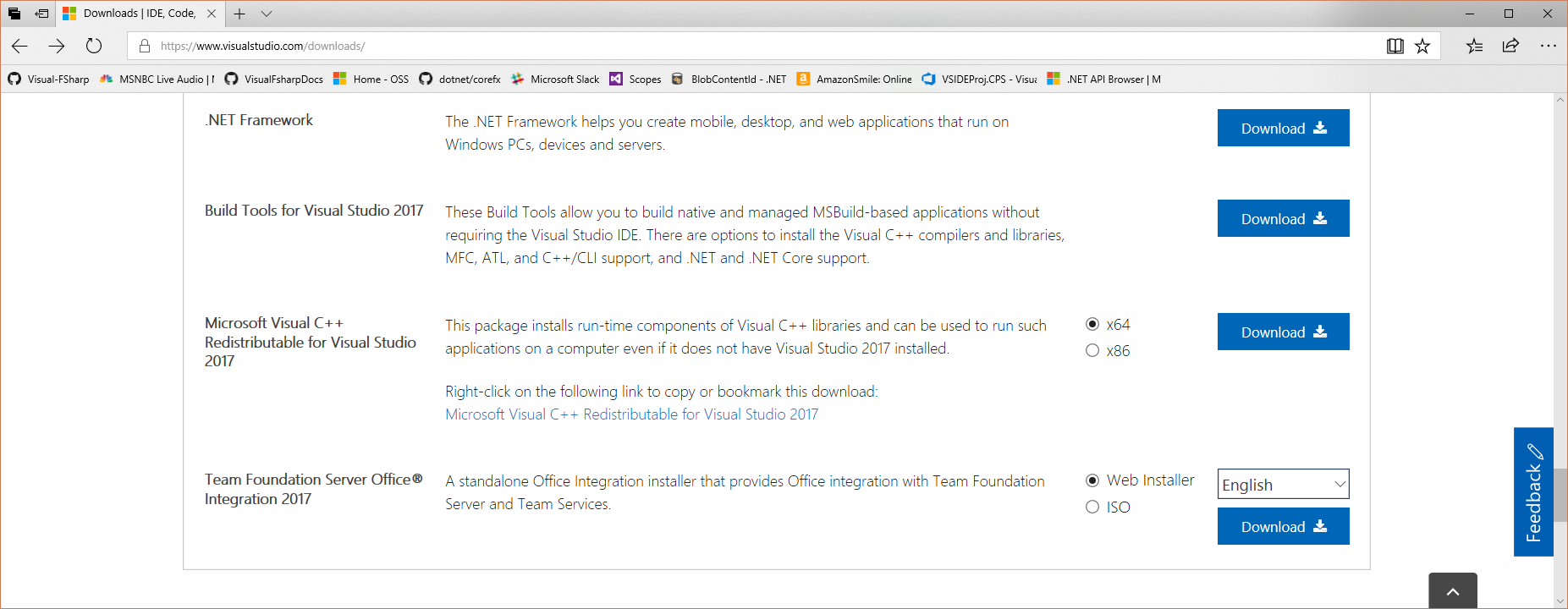
For build server installation of msbuild, F#, windows SDKs developers should use the Build Tools Sku from here: https://www.visualstudio.com/downloads/
Installer options: https://docs.microsoft.com/en-us/visualstudio/install/use-command-line-parameters-to-install-visual-studio
Workload and component IDs: https://docs.microsoft.com/en-us/visualstudio/install/workload-and-component-ids
Scroll down the page to "Other frameworks" and select download for Build Tools for Visual Studio 2017
KevinRansom
on 29 Mar 2018
@KevinRansom I used https://www.visualstudio.com/downloads/ and chose "F# compiler" once the installer launched. That worked great. Thanks! Discoverability could probably still be improved, such as replacing the "You can also install the support directly as a separate download." link on https://github.com/ScottHutchinson/fsfoundation/blob/gh-pages/use/windows/index.md with instructions on how to update the F# compiler as I just did using https://www.visualstudio.com/downloads/. Question: Will that work for someone who does not have VS 2017 installed (and doesn't want it installed)? EDIT: Actually, I just realized that the PC I just installed this on has only VS 2015, not VS 2017. So I guess it probably would work for someone who has no VS installed at all. If you agree with my suggested revision, I could update the fsfoundation page.
ScottHutchinson
on 29 Mar 2018
The Build tools Sku is not VisualStudio, it is the same installer tech, but it doesn't add any of the IDE stuff or other pieces that are not interesting in build servers.
So, for developers who don't want to use VS it should be suitable, however, if they don't want to install the Build Tools either then I guess they are out of luck. However, the buil;d tools will give them msbuild,the FSharp Compiler, and whatever windows SDKs they could imagine, so it seems like a decent solution for them. Regardless the installer MSI we have only supports a global install and so we can't really continue with it, when build tools has a better preview and upgrade behaviour.
Kevin
KevinRansom
on 29 Mar 2018
Related issues
 ploeh
·
3Comments
ploeh
·
3Comments
 Tarmil
·
4Comments
Tarmil
·
4Comments
 abelbraaksma
·
3Comments
abelbraaksma
·
3Comments
 Szer
·
3Comments
Szer
·
3Comments
 mrakgr
·
3Comments
mrakgr
·
3Comments
Most helpful comment
Some 3 months after F# 4.1 shipped and as far as i can see there is still no standalone msi to put the compiler tools onto CI machines...
Whilst i understand the FSharp.Compiler.Tools nuget has got the SDK in there, it's a rather bold step to enforce this change. Also considering that an installation of VS2017 will successfully compile (if you include the F# stuff on installation) without the need for this nuget package.
This causes large areas of confusion as code will compile on a developer machine, but not on CI with the build tools MSI installed.