Fsharp: Add type annotations as code lens
This is a feature request.
The type annotations displayed above value definitions in VS Code is really useful:

It would be great if we could utilise the 'code lens' feature of Visual Studio, as shown below:

I'm not sure how difficult this would be to add, but I'm under the impression that the code lens code is available on Roslyn:
https://github.com/dotnet/roslyn/blob/614299ff83da9959fa07131c6d0ffbc58873b6ae/src/Features/CSharp/Portable/CodeLens/CSharpCodeLensDisplayInfoService.cs
 saul
saul
All 46 comments
I looked at it earlier, the problem is that the API is ISyntaxNode based, which we don't support.
 vasily-kirichenko
on 4 Feb 2017
vasily-kirichenko
on 4 Feb 2017
(BTW, I personally don't like the ionide feature - too much noise)
vasily-kirichenko
on 4 Feb 2017
The signature feature is amazing. I really love it.
 forki
on 4 Feb 2017
forki
on 4 Feb 2017
@forki go ahead :)
vasily-kirichenko
on 4 Feb 2017
No I don't love it that much ;-)
forki
on 4 Feb 2017
Obviously if it was to be implemented we'd need to give the option to disable it in the settings.
saul
on 4 Feb 2017
I'm not sure how best to approach this - from what I understand, the CodeLens APIs themselves are closed source, so I believe that there is first a dependency on making them open. I can try to reach out to the people who own that area to see how feasible it would be to open them up so that the F# community can start implementing things like this feature request.
In terms of specifically making CodeLens show type signatures, I agree that it's a cool thing and also agree that it ought to be toggled. I'm not too sure about making it on by default, though. It's a somewhat divisive feature, and a lot of care would have to go in to making sure that it isn't too "jumpy". I know @Krzysztof-Cieslak had to do some work here and may be able to offer some advice on that.
 cartermp
on 4 Feb 2017
cartermp
on 4 Feb 2017
Type signatures in Ionide as "jumpy" as before. It makes the feature even less enjoyable.
vasily-kirichenko
on 4 Feb 2017
Right, and I would say that if it were implemented, it should be _off_ by default until a non-jumpy implementation could get implemented.
cartermp
on 4 Feb 2017
All of this would be preceded by proper support for configurability, though.
cartermp
on 4 Feb 2017
I've fixed some performance issue we had in FSAC with finding locations of CodeLenses but it doesn't remove "jumpy effect" completely (and it wouldn't be problem here since smarter people than me would implement it anyway :) )
I believe the core problem with "jumpy effect" right now is the fact that:
- FCS'
parseResults.GetNavigationItems().Declarationsseems to return empty list if the file is in not-parseable state (what makes sense) - I don't have control over how often VSCode ask for CodeLenses location [what may or may not be issue in VS, depending on how API looks like]
I'm pretty sure "jumpy effect" can be eliminated by providing stale results (either with empty CodeLens [it would at least keep position, so editor won't remove those additional lines] or with also stale signatures)
 Krzysztof-Cieslak
on 4 Feb 2017
Krzysztof-Cieslak
on 4 Feb 2017
I would like to give it a try. I talked with @cloudRoutine about some implementation details which need to be tested. If something works I'll report it here.
 realvictorprm
on 23 Apr 2017
realvictorprm
on 23 Apr 2017
@realvictorprm I tried to find a way to add an adornment that can be inserted between lines and failed. Maybe you will be more lucky.
vasily-kirichenko
on 23 Apr 2017
@vasily-kirichenko I managed to achieve this.

The lines are being made bigger and a suitable adornment is added 😃 !
realvictorprm
on 24 Apr 2017
cc @JoshVarty
 cloudRoutine
on 24 Apr 2017
cloudRoutine
on 24 Apr 2017
Btw, where should I start adding the stuff?`
Any suggestions?
realvictorprm
on 24 Apr 2017
@realvictorprm I think QuickInfo folder in FSharp.Editor project is OK for now. However, maybe it's better to add a new CodeLense folder. Yeah, it may be better. As you wish.
vasily-kirichenko
on 24 Apr 2017
And yes, it's absolutely awesome :) Make a PR as soon as possible so we all could review and help with it.
vasily-kirichenko
on 24 Apr 2017
A new CodeLens folder would probably be best. If you have the latest nightly, it should be easy to add folders. This looks really cool!
cartermp
on 24 Apr 2017
BTW, I think we will be able to make the signatures colored (unlike Code ;)
vasily-kirichenko
on 24 Apr 2017
Everything is possible. It's a simple TextBox 😄 @vasily-kirichenko
But please thank @cloudRoutine alot too. He showed me the way! And was very patient 😃
realvictorprm
on 24 Apr 2017
I, for one, would love rainbow colors in the signatures.
cartermp
on 24 Apr 2017
@vasily-kirichenko we definitely can, this is what I was telling you we could do the other day. Instead of using a textbox we could use a stack panel and have generalized mechanism for additional contextual information that can expand above or below any particular line. It could be for errors, inline evaluation, VCS metadata, etc.
cloudRoutine
on 24 Apr 2017
You can assign me to the issue (whoever is allowed to)
realvictorprm
on 24 Apr 2017
@realvictorprm Interestingly enough, I cannot assign you here (though I can assign @saul, so the limitation does not appear to be organization-specific).
cartermp
on 24 Apr 2017
What a bummer 😕 @cartermp
Any Idea why? Maybe the PR then?
realvictorprm
on 24 Apr 2017
Yup, looks like you can be assigned to the PR, just not the issue. I think it's a quirk with GitHub:

cartermp
on 25 Apr 2017
Look here fellows:
https://github.com/realvictorprm/VisualFSharpCodeLens/
I made a small repo for the current working state. I wasn't able yet to integrate it tough.
realvictorprm
on 25 Apr 2017
wow, wow, wow. Don't use checkFileResults.PartialAssemblySignature.Entities, use checkFileResults.GetAllUsesOfAllSymbolsInFile instead.
vasily-kirichenko
on 25 Apr 2017
Haha thanks finally someone who tells me what could be improved.
@vasily-kirichenko I wasn't fine with that too :wink: but with what you suggest I couldn't come up yet with a solution. I'll try it now again 😄 But actually it works this way very nice too
realvictorprm
on 25 Apr 2017
:) GetProjectOptionsFromScript is a heavy operation, cache FSharpOptions for now (VFT does cache already, so it won't be a problem as we merge it into the main repo)
vasily-kirichenko
on 25 Apr 2017
hmm, no I don't see a way using GetAllUsesOfAllSymbolsInFile @vasily-kirichenko
I tried it today for a couple of hours too but I didn't got the correct type name results.
okay I'll cache that now. maybe performance will go up with this 😄
How to cache that @vasily-kirichenko?
realvictorprm
on 25 Apr 2017
I'll try to fix the FCS part tomorrow and make a PR here.
vasily-kirichenko
on 25 Apr 2017
how you mean? Don't worry I can take care of the stuff :wink:
realvictorprm
on 25 Apr 2017
ok :)
vasily-kirichenko
on 25 Apr 2017
How Ionide does it: it asks for a tooltip for each symbol, then takes the first line from it and shows. We want to get structured text instead (as it does Quick Info) and format it.
vasily-kirichenko
on 25 Apr 2017
Yeah I already thought about such approach too because the Quickinfo show the signature too.
realvictorprm
on 25 Apr 2017
@realvictorprm I think we can (and should) port the logic used to format and colorize types used in fsi, see over here https://github.com/Microsoft/visualfsharp/blob/5b3688a91d13f5050cd89be594d939b816005426/src/fsharp/fsi/fsi.fs#L152
vasily-kirichenko
on 26 Apr 2017
Just for showing other people the progress here too:
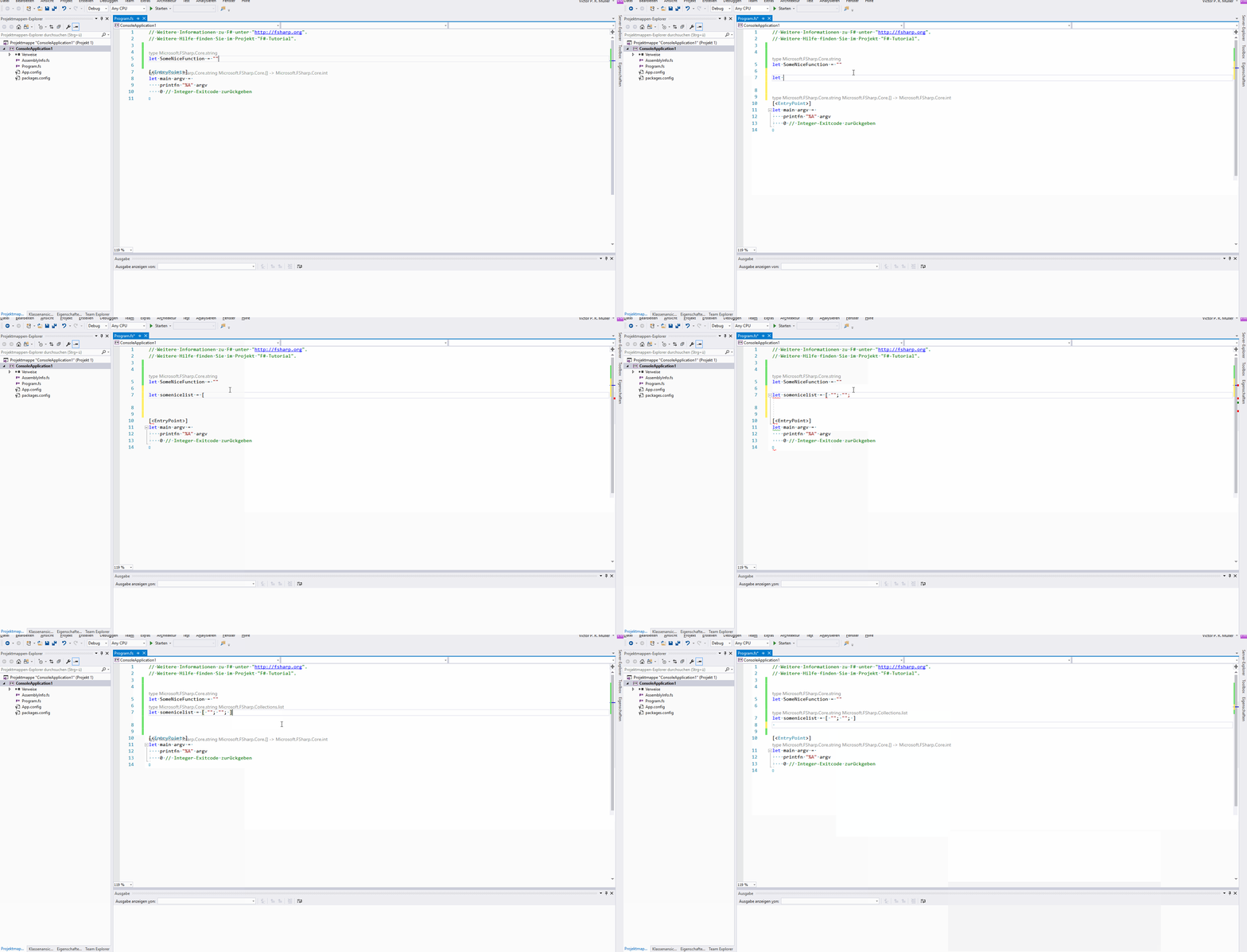
Okay, I'll look into it @vasily-kirichenko There's still some small bugs left in the code lens, e.g. members of types where the signature should be int but is unit -> int (which logically is correctly but we don't apply unit. I guess it's done internal)
realvictorprm
on 26 Apr 2017
@realvictorprm Pull my PR please.
vasily-kirichenko
on 26 Apr 2017
I consider to change my current PR to add only "sideways" Code-Lens similar to those recently added to Ionide. I think those could work without big problems.
realvictorprm
on 19 Sep 2017
This is now implemented, though experimental. Closing for posterity.
cartermp
on 29 Jun 2018
Is there a way I can test this, even its experimental phase?
 erlis
on 9 Aug 2018
erlis
on 9 Aug 2018
@erlis If you use VS 15.8 Preview, you can turn it on via Settings > Text Editor > F#.
cartermp
on 9 Aug 2018
Is there a way to disable the F# Language Service logging for this feature? I normally have the output window open (and the option "Show Output window when build starts" set) and it distracts quite a bit when working in the text editor and the logging kicks in.
Apart from that I like this feature! First it was a bit awkward to have the code lens on the right of the definition and changed it to be on top, but the editor window was jumping around while editing the source code and I changed it back to be on the right.
 toburger
on 23 Aug 2018
toburger
on 23 Aug 2018
@toburger This is done in #5145 and tracked by #5188
cartermp
on 23 Aug 2018
Related issues
 GennadyGS
·
3Comments
GennadyGS
·
3Comments
 ploeh
·
3Comments
ploeh
·
3Comments
 mrakgr
·
3Comments
mrakgr
·
3Comments
 Tarmil
·
4Comments
Tarmil
·
4Comments
 jackfoxy
·
4Comments
jackfoxy
·
4Comments