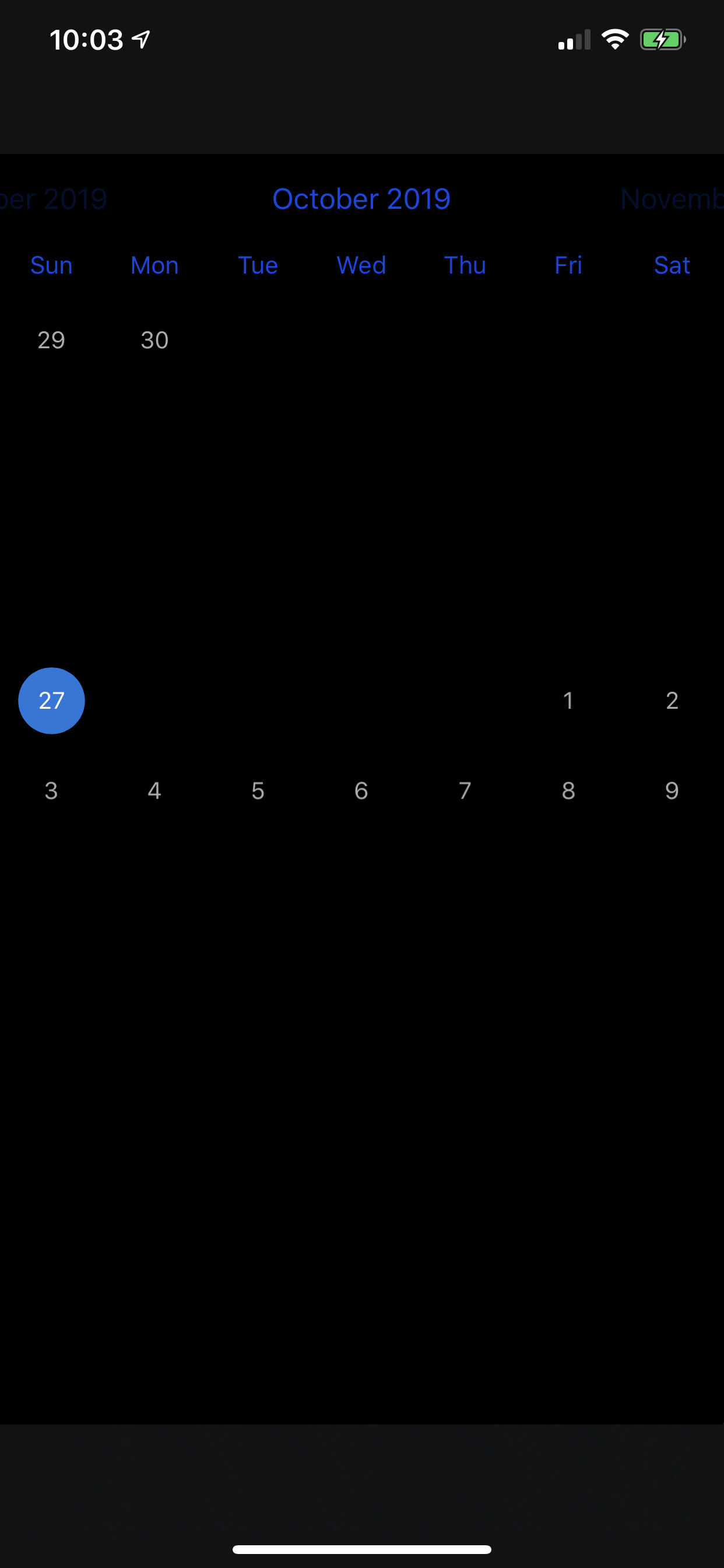
FSCalendar date text is black on Dark Mode
Bug description
Dark Mode is available starting from iOS 13. When I try using FSCalendar in one of my projects with Dark Mode enabled, some of the date texts are black, and cannot be seen.
Integration method: cocoapods
Steps to reproduce
- Create sample app with single view
- Drag UIView into ViewController
- Set DataSource and Delegate to ViewController
- Launch app and observe date texts
Device model: iPhone XS Max
iOS version: 13.1.3
Xcode version: Xcode 11.1 (11A1027)
FSCalendar version: 2.8.0
 ericswpark
All 2 comments
Did anyone have a recommended fix for this ? @WenchaoD
 JulesMoorhouse
on 25 Dec 2019
JulesMoorhouse
on 25 Dec 2019
👍1
Ahhh setting appearance.titleDefaultColor and detecting dark mode etc...
JulesMoorhouse
on 25 Dec 2019
👍2
Was this page helpful?
0 / 5 - 0 ratings
Related issues
 iHamzaaK
·
5Comments
iHamzaaK
·
5Comments
 denikaev
·
5Comments
denikaev
·
5Comments
 thaoth58
·
3Comments
thaoth58
·
3Comments
 adavan2107
·
5Comments
adavan2107
·
5Comments
 StanleySathler
·
5Comments
StanleySathler
·
5Comments
Most helpful comment
Ahhh setting
appearance.titleDefaultColorand detecting dark mode etc...